



A Klaviyo popup form is the fastest way most stores grow their email list, and the easiest way to annoy visitors if it is set up badly. The settings that decide which it becomes are timing, who sees it, how many steps it has and what it offers. This guide covers each one, with real submit rates from popups in seven client stores.
Short answer: show the popup after a short delay or some scrolling, only to visitors Klaviyo doesn’t know yet, never on the cart or checkout, and ask a one-click question before the email field. Klaviyo suggests aiming for a submit rate of about 3% or higher. In Sendora Lab’s client data, two fashion stores that moved to that set-up went from 3.32% to 4.79% and from 2.75% to 4.40%.
What a good Klaviyo popup form submit rate looks like
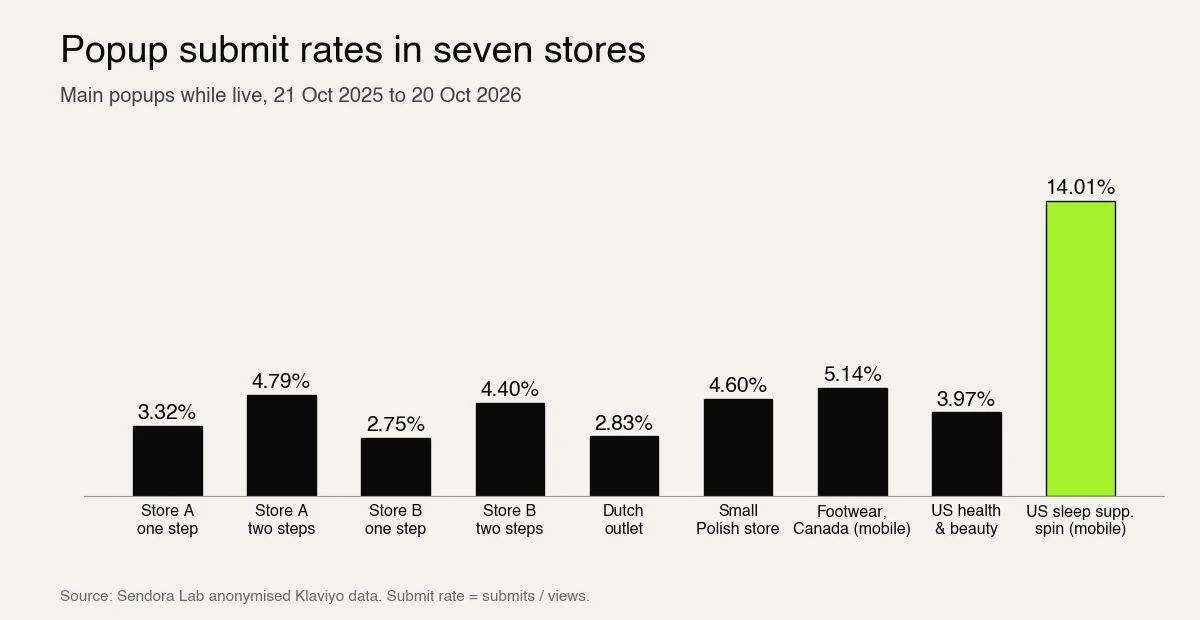
Most evergreen popups in our data converted between 2.75% and 5.14% of views, with one gamified popup well above that. Klaviyo’s own guide to sign-up form analytics suggests aiming for about 3% or higher for popups and flyouts.
A few terms first. A popup is a Klaviyo sign-up form that opens in the middle of the screen; a flyout slides in from the edge and lets people keep browsing. The submit rate is the number of form submissions divided by the number of form views. Klaviyo counts views, not people, so one visitor who sees the popup on three visits adds three views.
These are the main popups in seven client stores, from Sendora Lab’s anonymised Klaviyo data. Each figure covers the time the form was live between 21 October 2025 and 20 October 2026.
| Store | Popup | Views | Submits | Submit rate |
|---|---|---|---|---|
| Dutch-language fashion and lifestyle store (Store A) | One step, 35-second delay | 637,157 | 21,182 | 3.32% |
| Store A | Two steps, 15 seconds or 55% scroll | 81,986 | 3,923 | 4.79% |
| Dutch fashion store (Store B) | One step, 35-second delay | 148,896 | 4,096 | 2.75% |
| Store B | Two steps, 8 seconds or 55% scroll | 112,470 | 4,946 | 4.40% |
| Dutch outlet store | Mobile popup, 10% code | 107,269 | 3,035 | 2.83% |
| Small Polish online store | Popup | 8,961 | 412 | 4.60% |
| Footwear store selling in Canada | Mobile popup | 11,033 | 567 | 5.14% |
| US health and beauty brand | Popup | 12,656 | 502 | 3.97% |
| US sleep-supplement brand | Spin-to-win, mobile | 5,452 | 764 | 14.01% |
Store A and Store B are labels for this guide only. Don’t compare your rate with another store’s too closely: traffic quality, offer and how often the form shows all move it. Compare your own forms with each other.
Timing and display rules that worked
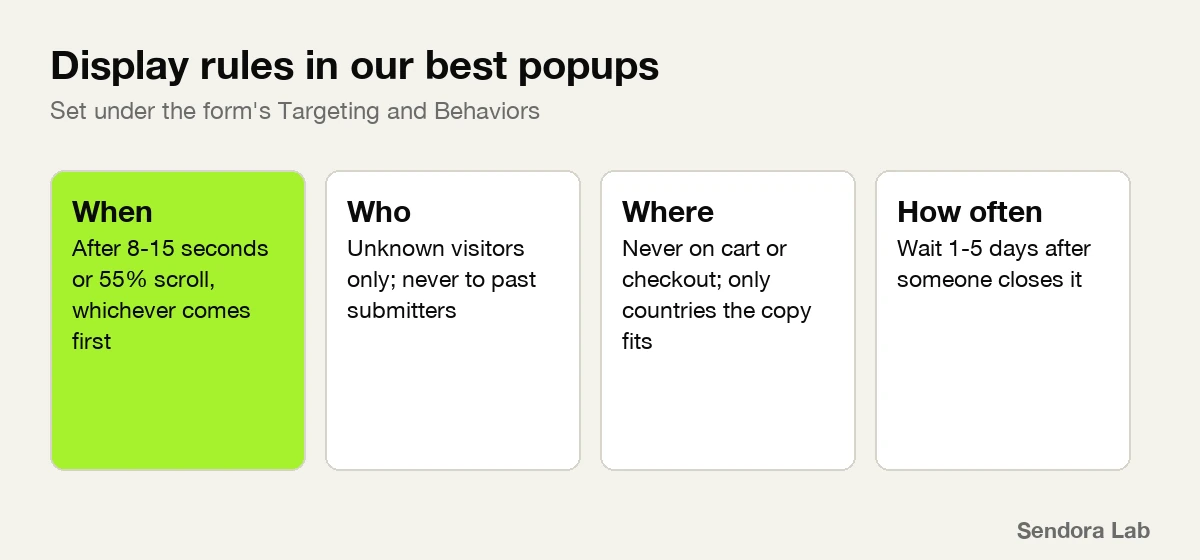
Show the popup after a short delay or once someone scrolls, hide it from known subscribers and keep it off the cart and checkout. These rules matter more than the design.
Klaviyo’s guide to getting started with sign-up forms describes the options: you can target by location, device, URL and more, choose “Don’t show to existing Klaviyo profiles”, and set how many days pass before a closed form appears again. These are the settings in the popups that performed best for us:
- Trigger: after 8 to 15 seconds, or after 55% scroll, whichever comes first.
- Audience: unknown visitors only, and not anyone who has submitted before.
- Pages: never on the cart or checkout, where a popup gets between a shopper and the payment.
- After closing: wait 1 to 5 days before showing it again.
- Location: only the countries the popup’s language and offer are written for.
Most people still say no, and that is normal. In Store A, 76.9% of the visitors who saw the old popup closed it. A popup that is easy to close does less damage to the visit than one people have to fight with, so keep the close button visible and the “no thanks” link plain.
Two steps, then the email
Asking a one-click yes or no question before the email field lifted the submit rate in both stores that tried it. The first click costs the visitor nothing, and people who say yes are more likely to finish.
Store A’s old popup asked for the email straight away, with a 35-second delay, and sent the 10% code by email. The new one opens with “Shop with 10% off?” and a yes button, shows the email field on step two, and puts the code on screen right away. Store B made the same change. Their submit rates moved from 3.32% to 4.79% and from 2.75% to 4.40%.
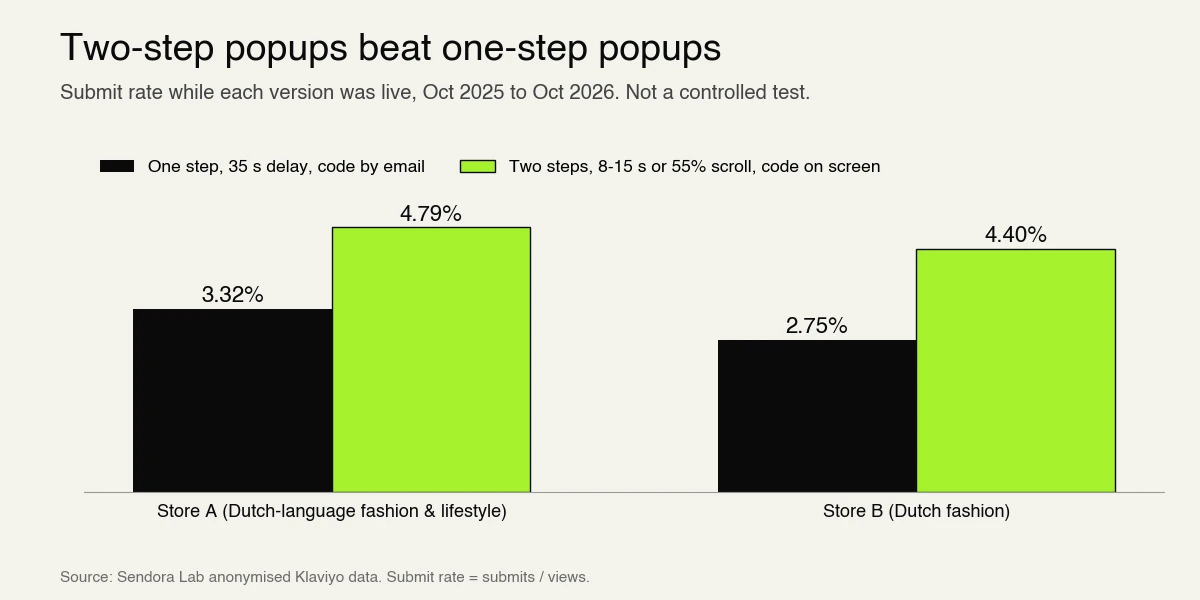
Two cautions. This was not a controlled test: the new versions also changed the delay, the location rules and the season, so we can’t say which change did most. The count itself should be comparable: as we read Klaviyo’s analytics guide, a multi-step form records the submit when the visitor sends the first email or phone field, so the yes click alone shouldn’t inflate the rate.
A third step can be useful too. The outlet store and the supplement brand ask one more question after the email, such as which category or need the visitor cares about. That answer can shape the Klaviyo welcome series from the first email.
The offer: discount, game or something else
A clear offer converts better than “join our newsletter”, but the cost of a discount lands later, in your margin. Pick the smallest offer that gets people to sign up, and make sure the first email delivers exactly what the popup promised.
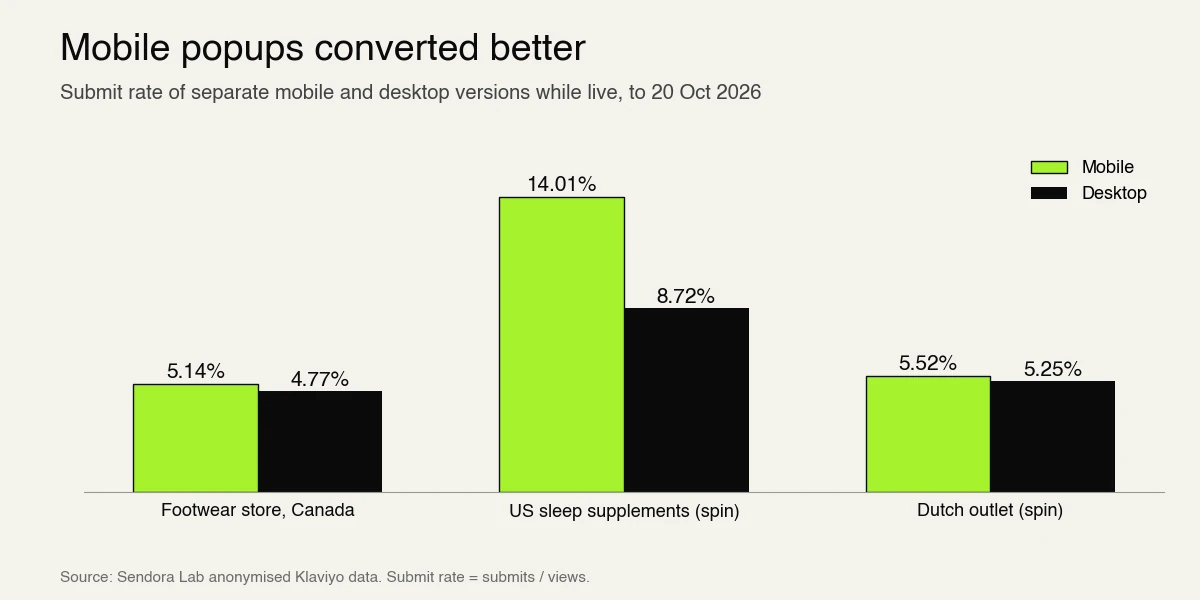
Spin-to-win popups, where the visitor spins a wheel for a discount, produced the highest rates in our data. The US sleep-supplement brand’s mobile wheel converted 14.01% of 5,452 views from September to October 2026, and its desktop version 8.72% of 2,042. The Dutch outlet store’s wheel converted 5.52% on mobile and 5.25% on desktop over the same weeks.
A game fits some brands and not others. If the brand sells on calm and quality, a plain 10% offer or a non-discount reason to join, such as early access or a useful guide, may suit it better. Whatever you choose, count how many welcome orders used the sign-up code; our welcome series guide explains why that number matters.
Submit rate is not list growth
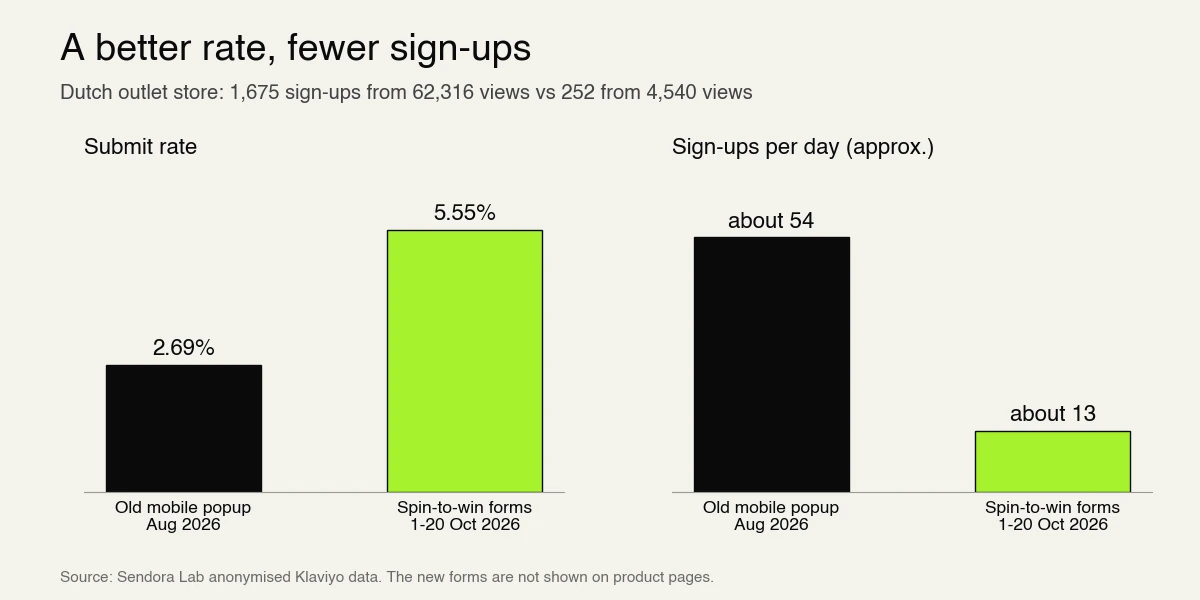
A higher submit rate can still mean fewer new subscribers if the popup is shown to fewer people. Watch the number of sign-ups per day next to the rate.
In Store A, the same popup was shown four times as often in December 2025 as in November. Its submit rate fell from 6.49% to 2.73%, yet monthly sign-ups rose from 731 to 1,262. The Dutch outlet store saw the opposite. Its old mobile popup collected 1,675 sign-ups from 62,316 views in August 2026, about 54 a day. From 1 to 20 October 2026, its two spin-to-win forms collected 252 from 4,540 views, about 13 a day, at a much better rate of 5.55%. The new forms are excluded from product pages, which is likely where most of the views went.
Every sign-up from a popup also makes the visitor known to Klaviyo on that browser, which is what lets browse abandonment and other onsite flows reach them later. Our guide to Viewed Product tracking explains why identified visitors matter. So when you cut views to raise the rate, check what it does to total sign-ups before you keep the change.
Mobile, desktop and language
Build separate mobile and desktop versions, and a separate popup for each language you sell in. In all three stores with separate versions, mobile converted better than desktop.
The footwear store’s mobile popup converted 5.14% against 4.77% on desktop, the supplement brand’s 14.01% against 8.72%, and the outlet store’s 5.52% against 5.25% (21 October 2025 to 20 October 2026, each while live). On a phone, keep the form short, the text large and the close button easy to tap.
Both Dutch fashion stores have also built a popup per language, shown by visitor location. Check every step of each version: in two stores we found a success message in a different language from the rest of the form. Our guide to multilingual email marketing covers how to store the language you collect.
Consent comes first in every version. Say clearly what people are signing up for, and don’t add anyone who didn’t ask; our guide to Shopify email deliverability explains why bought or unclear sign-ups end up as spam complaints.
Conclusion
A Klaviyo popup form grows your list without hurting the brand when it waits a few seconds, shows only to new visitors, stays off the checkout, asks one easy question first and promises an offer the first email keeps. Measure it on sign-ups per day as well as submit rate, and test one change at a time. To see popups and emails we have designed, look at our work; for help with your own, see our Klaviyo email marketing service or book a free audit. Giving a code on the success step? See how to set up unique coupon codes in Klaviyo.
FAQ
What is a good submit rate for a Klaviyo popup?
Klaviyo suggests aiming for about 3% or higher for popups and flyouts. Most evergreen popups in our client data converted between 2.75% and 5.14% of views.
When should a popup appear?
In the popups that worked best for us, after 8 to 15 seconds or 55% scroll, whichever came first, only for unknown visitors and never on the cart or checkout.
Do two-step popups convert better?
In two of our client stores, moving to a yes or no first step lifted the submit rate from 3.32% to 4.79% and from 2.75% to 4.40%. Other settings changed at the same time, so treat it as a strong lead to test, not proof.
Should the popup be different on mobile?
Yes. Build a separate mobile version with less text and an easy close button. In all three stores with separate versions, mobile converted better than desktop.
Want this set up in your Klaviyo account?
A free 30-minute audit, your account open on screen.
Book a free audit