



Klaviyo can create unique coupon codes directly in your Shopify store, so every recipient gets their own single-use code instead of one shared code that ends up on coupon sites. You set the coupon up once under Content > Coupons, then drop it into flows, campaigns, SMS or sign-up forms. The setup takes ten minutes; the mistakes happen in expiry, code supply and the places where a static code still slips through.
Short answer: In Klaviyo, go to Content > Coupons, choose Create Shopify Coupon, set the discount, prefix, eligibility and expiry, and insert it with the Coupons personalisation option (or the coupon_code tag in SMS). Flows and forms top up codes automatically; campaigns need you to add a batch first. At Sendora Lab we also check every message for leftover static codes, because that is where most discount leakage comes from.
Static vs unique codes: what’s the difference?
A static code is one code everyone shares; a unique code belongs to one person and can be redeemed once. Klaviyo’s own coupon guide uses the same split.
A coupon in Klaviyo is the saved discount setting; a code is what the customer types or clicks. A flow is an automated series triggered by behaviour (a sign-up, a started checkout), and a campaign is a one-off send to a list or segment. Unique codes matter most in flows, because those emails keep sending for months and any shared code in them keeps circulating.
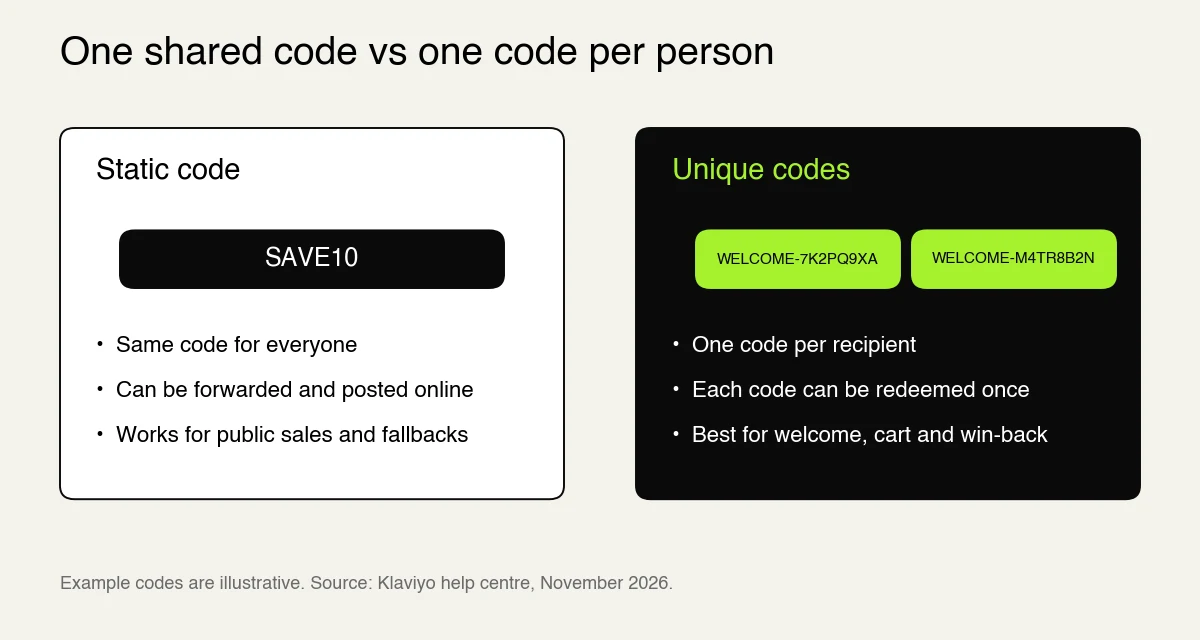
Static codes still have a place: a public sale code you want shared, or a fallback in a sign-up form. For anything tied to a person (welcome offer, cart recovery, win-back), use unique codes.
How to create Klaviyo unique coupon codes for Shopify
You build the coupon in Klaviyo and Klaviyo creates the matching discount in Shopify. These steps follow Klaviyo’s unique coupon codes for Shopify article, last updated 30 March 2026.
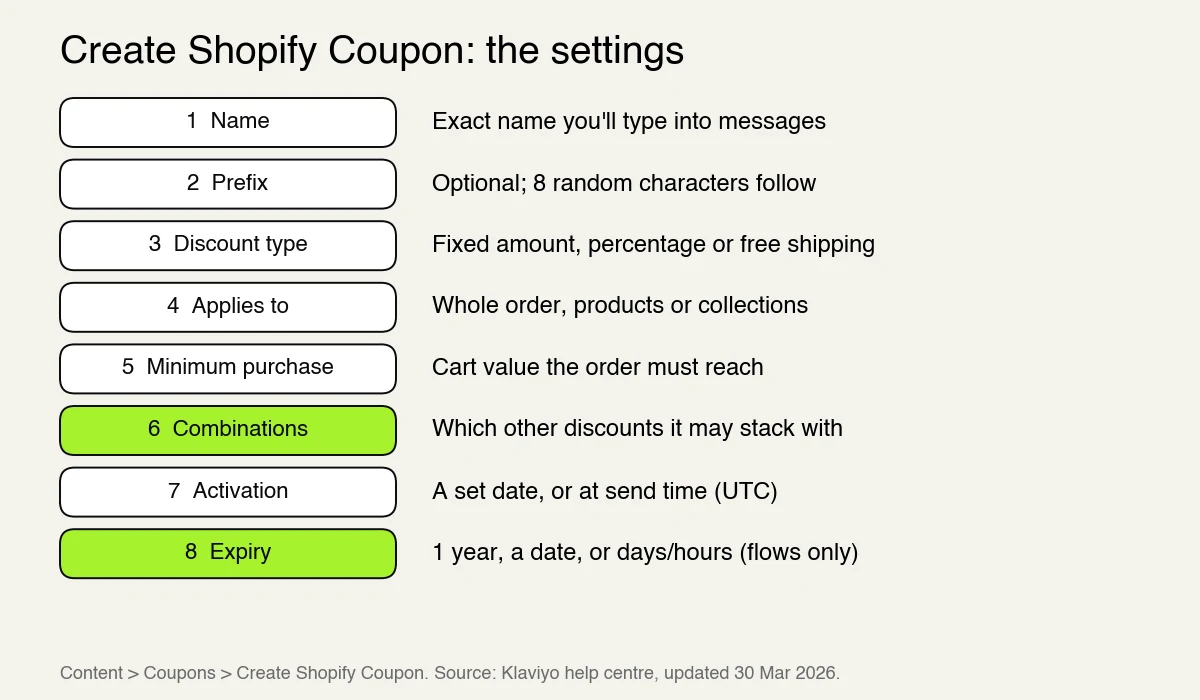
- Go to Content > Coupons and click Create Shopify Coupon.
- Give it a clear name. You will type this exact name into messages, so use something like
WELCOME10-FLOW, not “test 2”. - Add an optional prefix. Klaviyo adds 8 random letters and numbers after it for flow codes.
- Pick the discount type: fixed amount, percentage or free shipping, and what it applies to (whole order, products or collections).
- Set a minimum purchase and the combinations rule: which other discounts it may stack with.
- Choose the activation date (a date, or at send time) and the expiry.
- Click Create coupon.
Where to insert the code
In an email, add a text block, click the personalisation icon, choose Coupons and pick your coupon. In SMS, use the tag {% coupon_code 'CouponName' %}; only one code per text is allowed. In a sign-up form, add a coupon block to the success step, choose Unique and Shopify Coupon, and set a static fallback.
Klaviyo uses Shopify’s bulk discount feature, so you can find the discount in your Shopify Discounts admin by searching for the coupon name. To see which code one person received, open their Klaviyo profile, then Details, then the Coupons section.
Expiry, code supply and other settings that trip people up
Most problems come from three things: campaigns running out of codes, expiry rules behaving differently than expected, and previews using up real codes.
- Campaigns need a batch. Click Add Codes before scheduling. You need at least as many codes as recipients or the campaign won’t send, and large batches can take several hours.
- Flows and forms refill themselves. Flows generate codes as needed. Forms aim for 600 codes per live form and top up when fewer than 400 remain.
- Relative expiry is flow-only. Campaign codes expire after a year or on a set date. Flow codes can also expire a set number of days or hours after sending.
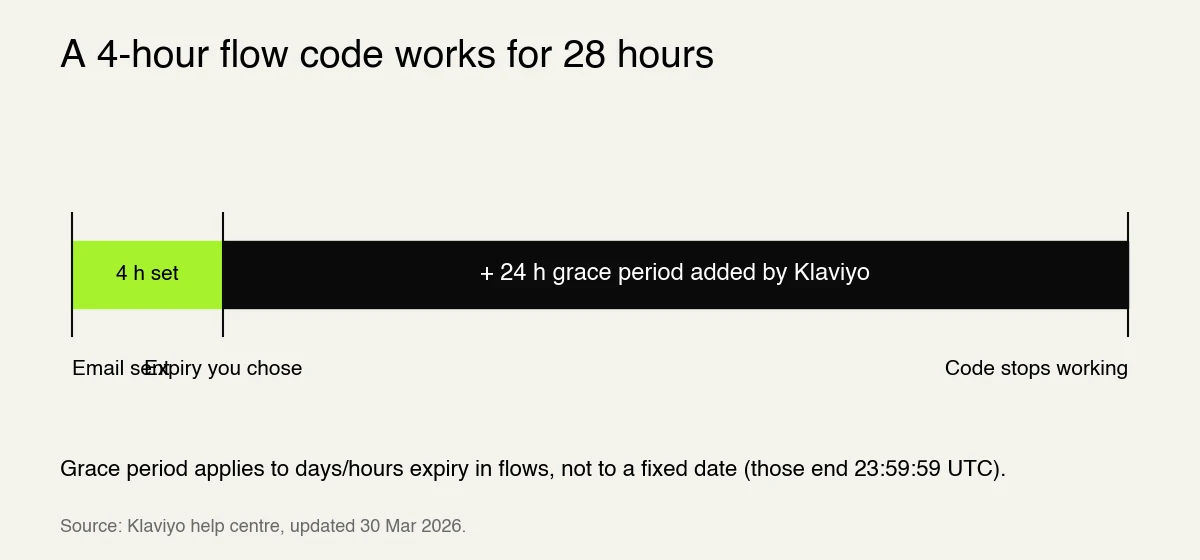
- There is a 24-hour grace period. A flow code set to expire after 4 hours actually works for 28 hours, to allow for delivery delays. Write your “ends tonight” copy with that in mind.
- Time zones differ. Klaviyo sets dates in UTC; Shopify shows expiry in the store’s time zone, so the two screens may not match.
- Previews cost codes. An inbox preview reserves a real code, and everyone on that preview gets the same one. In-app preview shows
CouponName-PREVIEW. - There is a ceiling. Shopify allows 20 million unique codes per store. If you ever reach it, Klaviyo can’t generate new codes until you delete unique codes in Shopify.
A recipient keeps the same flow code while it is unexpired, even across several messages in the flow. That is useful: a reminder email shows the same code as the first one, so nobody ends up with two.
What real Klaviyo accounts show
Real setups rarely fail at creation; they fail quietly later. Here is what we found in Sendora Lab’s anonymised Klaviyo data from a US supplement brand on Shopify, read on 10 November 2026.
The account has a Klaviyo metric called Coupon Assigned, logged when a profile is given a code. It recorded 389 assignments in November 2025, then 266, 309, 225 and 335 in the following months, and 131 in April 2026: 1,655 in total. From May to October 2026 it recorded none.
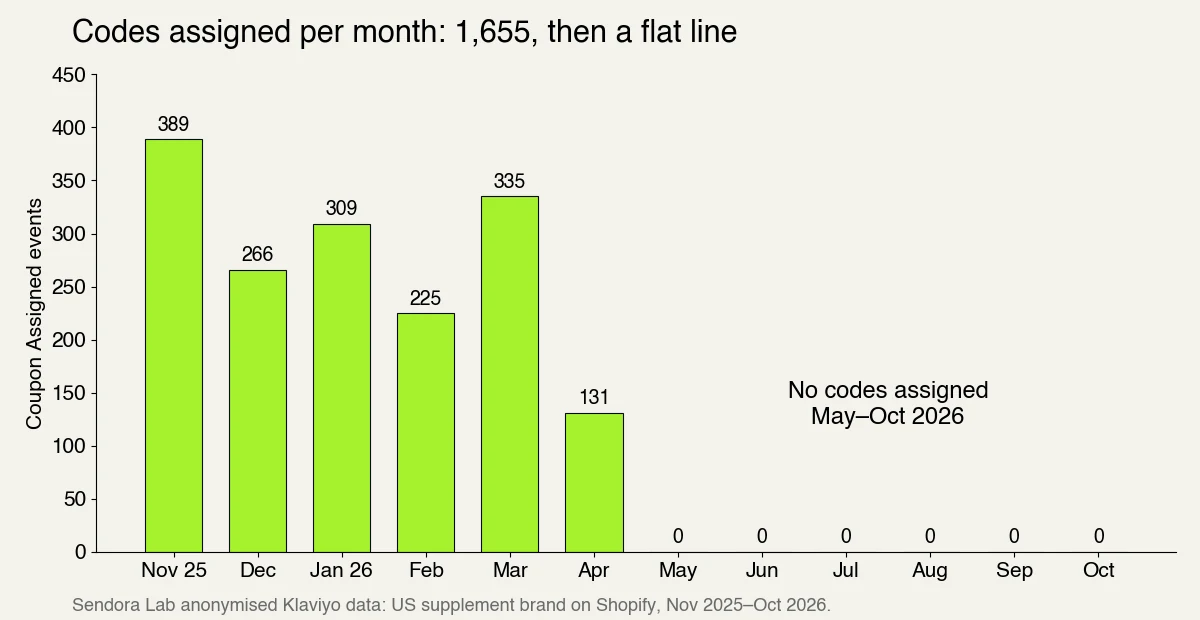
A drop to zero can mean a coupon was removed from a form or flow on purpose, a form was paused, or codes stopped generating. The data alone can’t tell you which. That is the point: put Coupon Assigned on a dashboard next to sign-ups, so a sudden flat line gets a question within a week, not six months later.
The same account’s live SMS welcome flow is built the right way. It sends a unique code for 10% off, waits 3 days, then checks whether the person has placed an order since entering the flow. Only non-buyers get the “your code is expiring soon” reminder, and because the code is unique, the reminder repeats the same code.
Where discount codes still leak
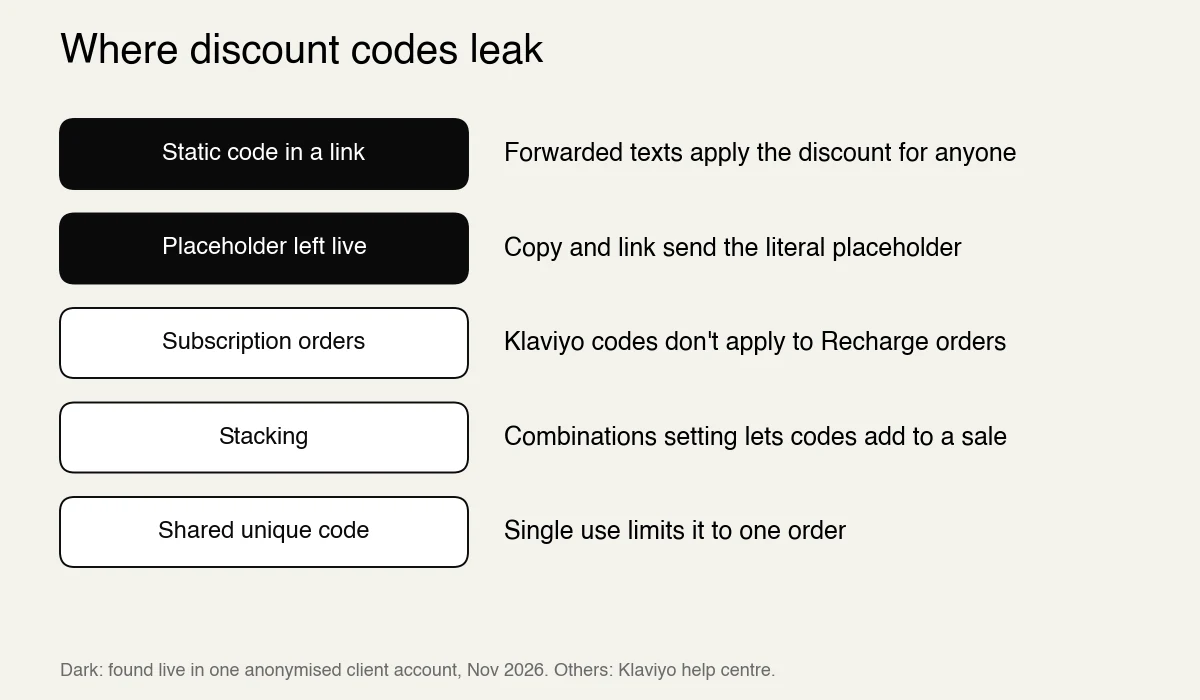
Leakage usually comes from the messages around your unique codes, not the coupon itself. The same account showed two examples in its live abandoned checkout flow.
- A static code in a link. The flow’s text messages offer 20% off with one shared code added to the checkout link. Anyone can forward that text, and the code works for them too. Shopify’s shareable discount links apply a code automatically and keep it on the cart, which is convenient, and just as convenient for a stranger.
- A placeholder left live. One live text message still contained a literal placeholder where the code should be, in both the copy and the link. The flow sent almost no texts in the past year, so nobody saw it, but it would go out as written the day SMS sign-ups pick up.
- Subscription orders. Klaviyo’s coupon codes only work on one-off orders, not subscription orders such as those from Recharge. This store runs Recharge, so a “10% off your subscription” message with a Klaviyo code would fail at checkout.
- Stacking. If the combinations setting allows it, a welcome code can stack with a sitewide sale. Decide on purpose.
- Sharing a unique code. A unique code can be redeemed once, but the recipient can still pass it on. Single use limits the damage to one order.
Our quick check before any flow goes live: search every message for the coupon name, a percent sign and the word “code”, then send yourself a real test and complete a checkout with it.
When not to add a coupon
Unique codes stop leaks; they don’t decide whether you should discount. In cart recovery we usually hold the discount back for a later step, as covered in our abandoned cart flow guide, and in a welcome series a strong first email can earn the order without one.
If you do offer a sign-up discount, make the form do the work: our pop-up form guide shows how to grow the list without training people to wait for codes.
Conclusion
Klaviyo unique coupon codes for Shopify take minutes to set up and remove the biggest source of discount leakage: one code that everyone shares. Watch the parts around them: code batches for campaigns, the expiry grace period, static codes in SMS links, placeholders, and subscription orders. If you want someone to check your flows for leaks, see how Sendora Lab runs Klaviyo email and SMS. Before you add a code to a flow, decide who should get one with our email discount strategy guide.
FAQ
Does Klaviyo create the discount in Shopify automatically?
Yes. A Shopify coupon created in Klaviyo uses Shopify’s bulk discount feature, and you can find it in Shopify’s Discounts admin by searching for the coupon name.
Why won’t my campaign with a unique coupon send?
Campaigns need codes generated in advance with Add Codes, and you need at least as many codes as recipients. Large batches can take several hours, so add them well before the send.
Can a Klaviyo coupon expire a few hours after the email?
In flows, yes: you can set expiry in days or hours after sending. Klaviyo adds a 24-hour grace period, so a 4-hour code works for 28 hours. Campaigns only allow 1 year or a set date.
Do Klaviyo coupon codes work with Recharge subscriptions?
No. Klaviyo’s coupon codes only work for one-off orders, not subscription orders such as those enabled by Recharge.
How do I see which code a customer got?
Open the customer’s profile in Klaviyo, go to Details and scroll to the Coupons section.
Want this set up in your Klaviyo account?
A free 30-minute audit, your account open on screen.
Book a free audit