



The Smile.io Klaviyo integration copies each loyalty member’s points balance, VIP tier and referral link into Klaviyo, and sends loyalty activity such as points earned or rewards expiring as events. You install it from Smile, connect it with one sign-in, run a one-time sync, and then send your loyalty emails from Klaviyo flows instead of Smile’s built-in emails.
Short answer: Install the Klaviyo integration in Smile Admin, connect it through OAuth, then click Sync customer data. Smile then adds five profile properties and up to eight loyalty events to Klaviyo. At Sendora Lab we move one Smile email at a time into a Klaviyo flow and switch the Smile version off the same day, so nobody gets the same message twice.
What the Smile.io Klaviyo integration sends
It sends two kinds of data: profile properties that describe where a member stands, and events that record what just happened. Properties drive segments; events trigger flows.
A profile property is a field stored on a person’s Klaviyo profile. An event (Klaviyo calls the event type a metric) is a timestamped action, like a placed order. A flow is an automated series of messages that starts when an event happens or someone joins a list or segment. A segment is a group of profiles that updates itself based on rules you set.
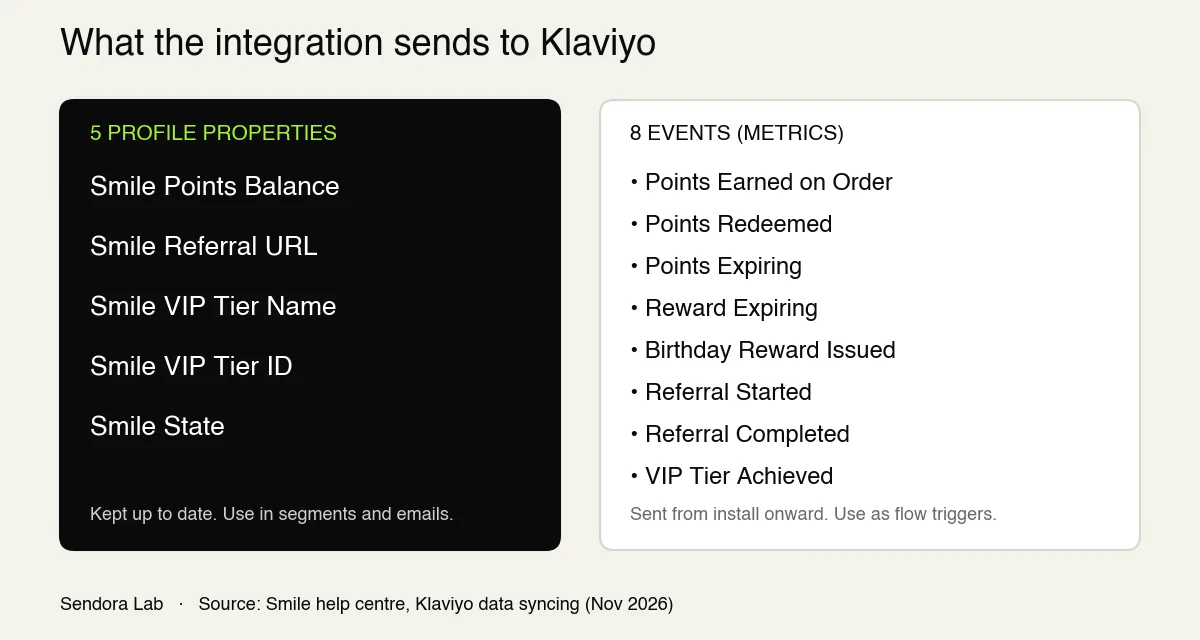
The five profile properties
According to Smile’s data syncing guide (checked November 2026), these properties stay up to date as members earn and spend:
| Property | Type | Use it for |
|---|---|---|
| Smile Points Balance | Number | “You have enough points for a reward” segments and email copy |
| Smile Referral URL | Text | A personal referral link in post-purchase emails |
| Smile VIP Tier Name | Text | Tier-specific content and early-access campaigns |
| Smile VIP Tier ID | Number | Filters that will not break if you rename a tier |
| Smile State | Text | Splitting members from guests (member, candidate or disabled) |
Smile matches people by email address. If the address already exists in Klaviyo, the profile is updated; if not, Smile creates a new one.
The eight loyalty events
Smile sends Birthday Reward Issued, Points Earned on Order, Points Redeemed, Points Expiring, Referral Started, Referral Completed, Reward Expiring and VIP Tier Achieved. It only sends events for the parts of the program you use, so a store without referrals will never see referral events.
How to set up the Smile.io Klaviyo integration
Setup takes three clicks on the Smile side and no code. The waiting is in the first sync, which Smile says can take from a few minutes to a couple of hours depending on how many customers you have.
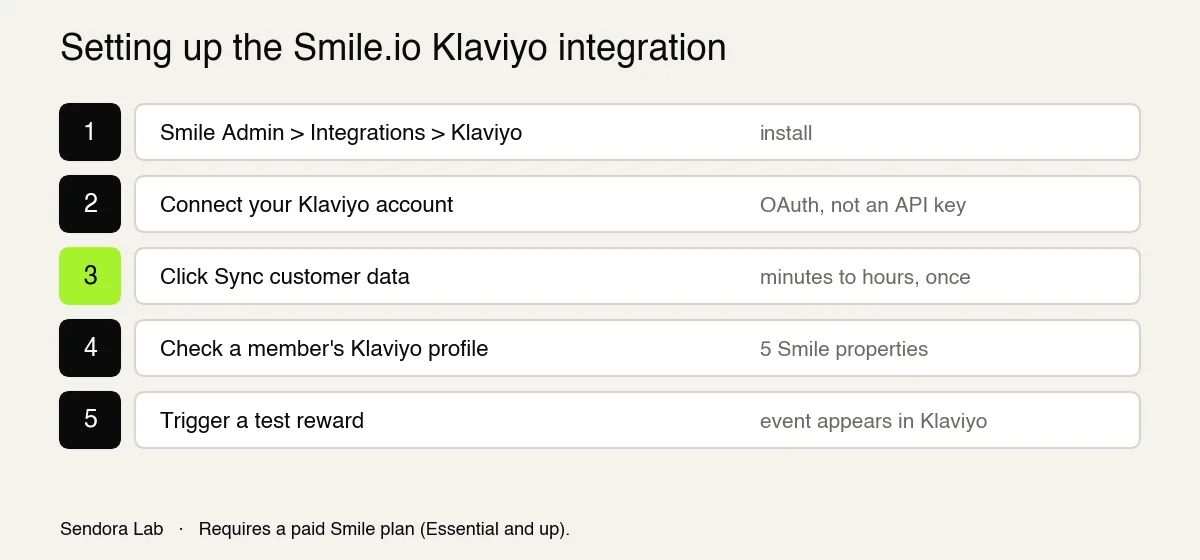
- In Smile Admin, open Integrations and install Klaviyo.
- Follow the prompts to connect your Klaviyo account.
- On the integration’s settings page, click Sync customer data. This only needs to happen once.
- Open a known member’s profile in Klaviyo and check that all five Smile properties are there.
- Give a test customer some points or a reward and check that the event shows up on their profile.
Per Smile’s setup guide, the integration needs a paid Smile plan (Essential, Standard, Growth, Plus or Enterprise, as of November 2026). Smile builds and supports it, so connection problems go to Smile support, not Klaviyo.
If your store connected years ago by pasting an API key, you are on the legacy version. Open the integration in Smile and click Reconnect in the banner. That upgrades you to OAuth and keeps your data, and it is required for the pre-built flow templates.
Loyalty emails to build in Klaviyo
Smile ships ready-made Klaviyo flows for almost every loyalty email it sends itself. Move them over one by one, and turn off the matching Smile email as each flow goes live.
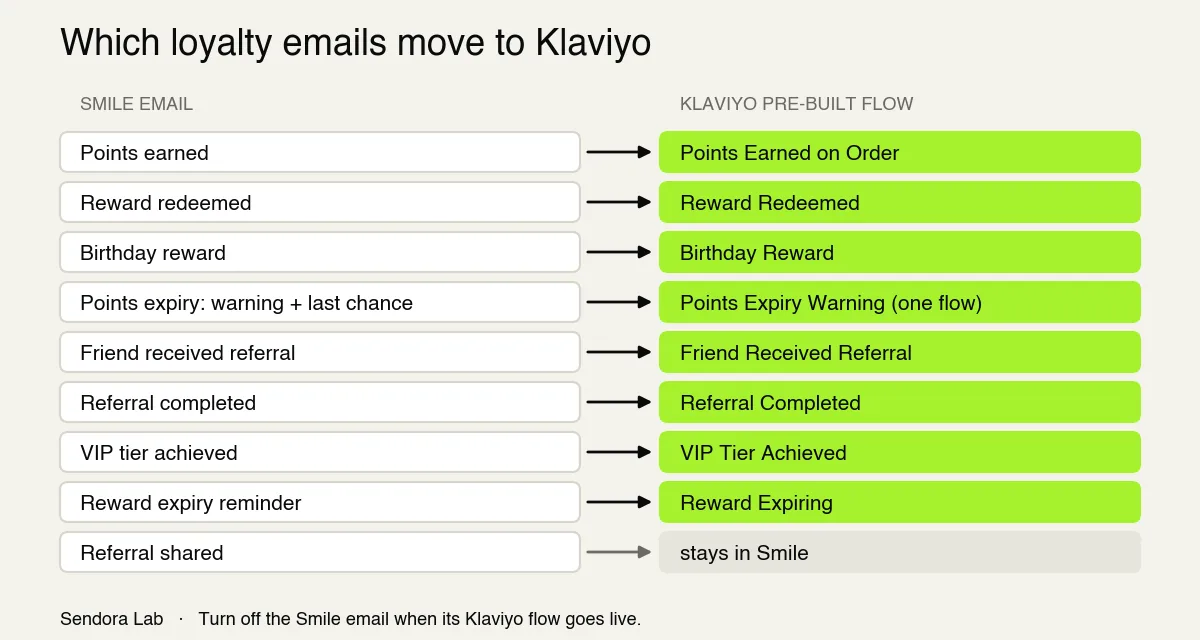
In Klaviyo, go to Flows, Create Flow, filter by the Smile: Loyalty & Rewards integration and pick a template. The templates take your logo, colours and fonts from your Klaviyo brand settings. Smile’s flow guide lists two exceptions worth knowing: the “Referral shared” email can only be sent from Smile, and the points-expiry warning and last-chance emails share one flow.
Put the real numbers in the email
The point of moving loyalty emails to Klaviyo is personalisation. Each event carries properties you can insert, for example:
{{ event.points_change }}in a points-earned email, for the points from that order.{{ event.reward_fulfillment.code }}in a reward-redeemed email, for the discount code.{{ event.receiver_reward_fulfillment.code }}in the friend’s referral email.{{ person|lookup:'Smile Points Balance' }}in any email, for the current balance.
Event variables are case-sensitive and must match exactly, as Klaviyo’s event data guide explains. Check them in Preview & test using a real customer’s event. Smile warns that previews from its test profile show blank values, which can make a working email look broken.
Points expiring: one flow, two moments
Points Expiring fires at the warning and last-chance thresholds you set in Smile (30 and 3 days before expiry by default). Both arrive as the same event, so write copy that works for both, and show the date with {{ event.extra.points_balance_expires_at }} rather than writing “in 30 days”.
Loyalty segments worth building
The profile properties turn your loyalty program into targeting. Four segments cover most of what we use them for.
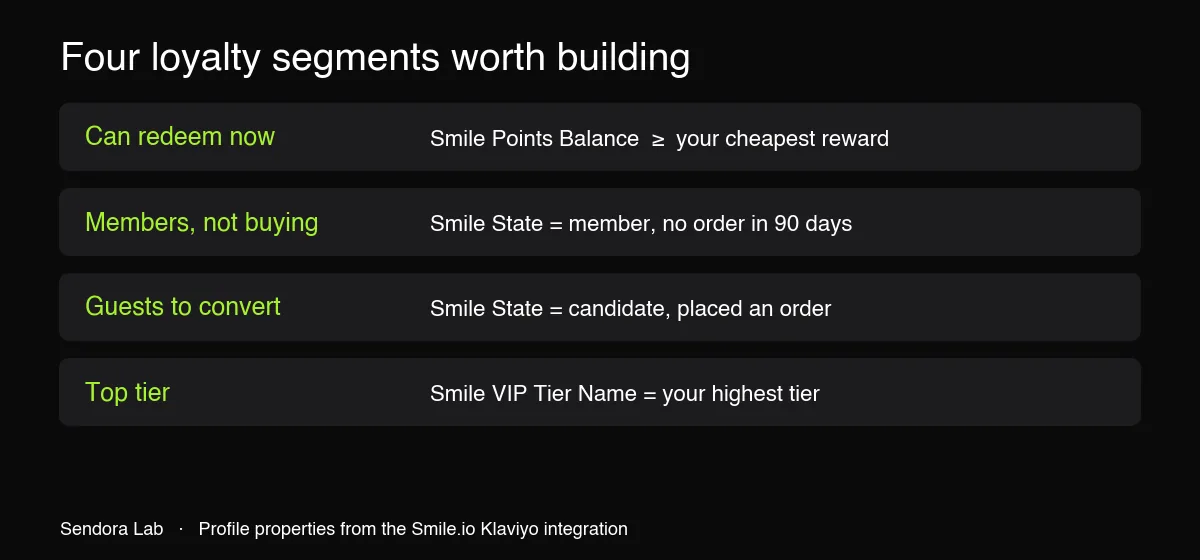
- Can redeem now: Smile Points Balance is at least the cost of your cheapest reward.
- Members, not buying: Smile State is
memberand no order in the last 90 days. Lead with their balance before any discount. - Guests to convert: Smile State is
candidateand they have ordered. Smile’s own suggestion is to tell them the points they could have earned if they had created an account. - Top tier: Smile VIP Tier Name equals your highest tier. Use it for early access, not extra discounts. Our VIP segment guide covers how to keep that group small and useful.
One detail that is easy to miss: the Referral Started event creates a new Klaviyo profile for the email a friend types into the referral form. Check how those profiles are treated for marketing consent before any of them land in a campaign segment.
How many loyalty emails to expect
Points Earned on Order can fire at most once per order, so your order count is the ceiling for that flow. Check it before you switch the flow on, because it adds an email to every purchase that already gets an order confirmation and possibly a post-purchase flow.
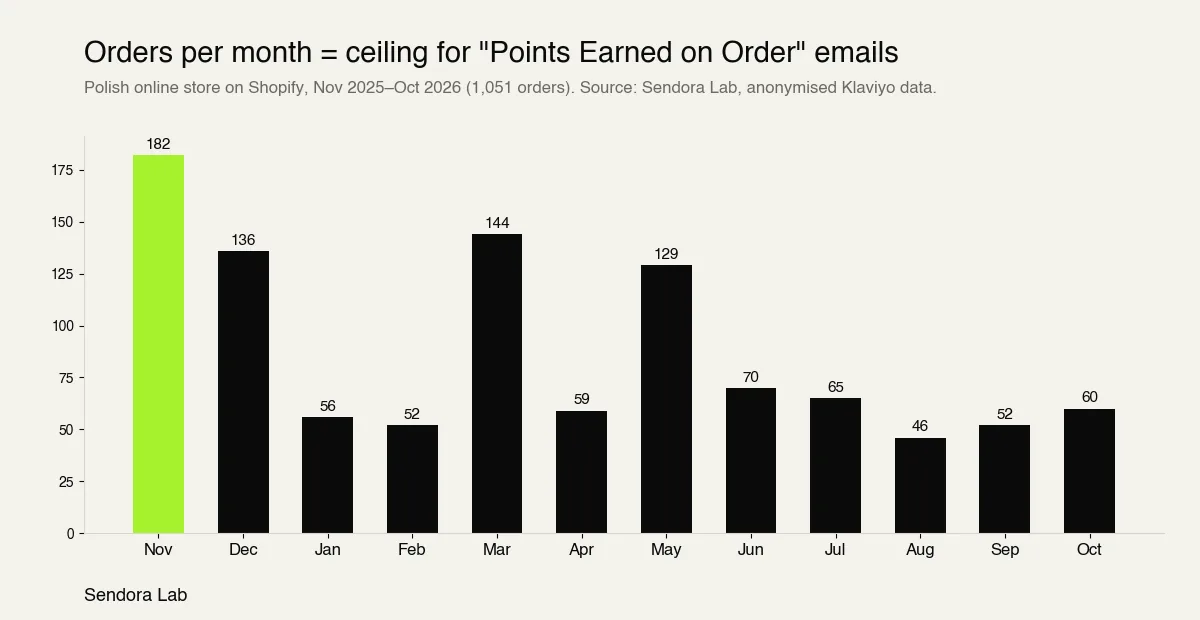
In Sendora Lab’s anonymised Klaviyo data from a Polish online store on Shopify (November 2025 to October 2026), Placed Order counts ranged from 46 in July to 182 in November, 1,051 orders in total. For that store, a points-earned flow would send no more than 182 emails in its busiest month, and fewer in practice, since only members earn points and a points delay pushes the event back until the points are awarded.
At a volume like that, consider folding the points message into the existing post-purchase email, and give it its own flow only when the program is a real reason people buy again.
For context: none of the 21 client Klaviyo accounts Sendora Lab checked on 21 November 2026 had Smile.io events, so this is a planning estimate, not a measured Smile result.
Checks after connecting
Most problems we would expect come from timing and matching, not from the connection itself. Run these six checks in the first week.
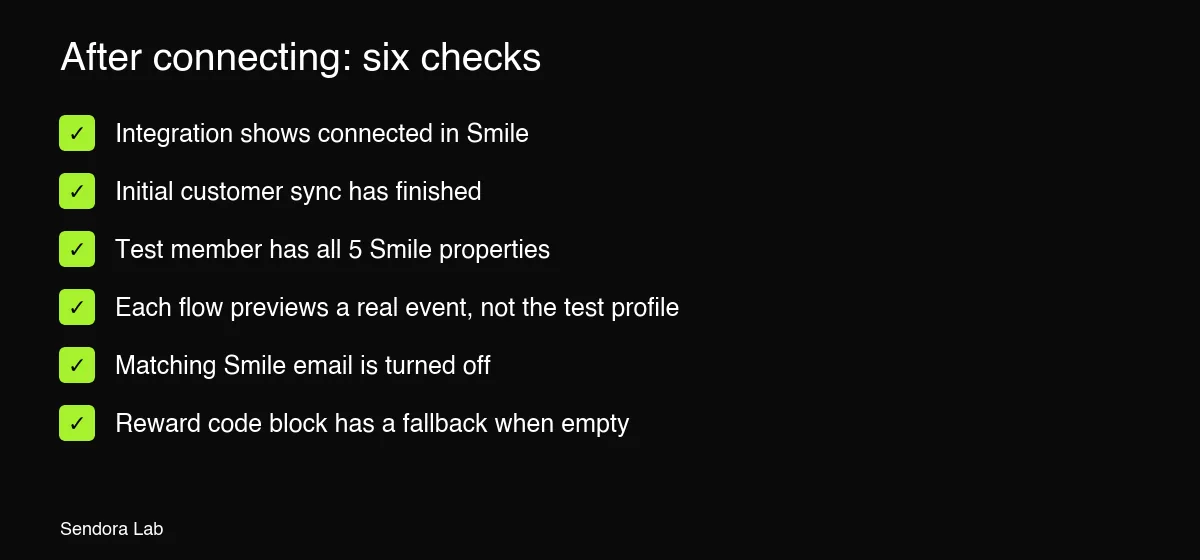
- No history: Smile does not send events for activity before the install or while the integration was disconnected. A new Points Expiring flow starts empty and fills over the following weeks.
- No email, no sync: customers without an email address in Smile are skipped. Smile’s troubleshooting page says this most often affects POS guest checkouts.
- Duplicate emails: if a Smile email and a Klaviyo flow cover the same event, customers get both. Turn one off.
- Empty codes: the
codeproperty is empty for rewards without a code, such as points or store credit. Give that block a fallback line. - Klaviyo Reviews added later: if you installed Klaviyo Reviews after the Smile integration, reviews will not earn points until you remove and reinstall the integration. Removing it deletes the review earning rule, so recreate it afterwards.
- Lost connection: if Smile loses access to Klaviyo, syncing pauses for everyone. Smile emails you when that happens.
The same habit applies to every app you connect, which we cover in our guide to Klaviyo integrations for Shopify.
Conclusion
The Smile.io Klaviyo integration is quick to connect; the work is in what you do with the data. Sync once, move each loyalty email into a Klaviyo flow with real balances and codes in it, switch off the Smile version, and use the five properties to build segments that give members a reason to come back. If you want a second pair of eyes on your loyalty flows, our Klaviyo email marketing service builds and tests them for Shopify brands.
FAQ
Does the Smile.io Klaviyo integration send past loyalty activity?
No. The one-time sync copies current profile properties such as points balance, but events are only sent from the moment the integration is connected.
Do I need a paid Smile plan?
Yes. As of November 2026, Smile lists the integration on its Essential, Standard, Growth, Plus and Enterprise plans.
Why can’t I see Smile’s flow templates in Klaviyo?
The templates need the OAuth version of the integration. If you connected with an API key, click Reconnect on the integration page in Smile to upgrade.
Can I send every Smile email from Klaviyo?
Almost. Smile’s “Referral shared” email can only be sent from Smile; the others have matching Klaviyo flows.
Want this set up in your Klaviyo account?
A free 30-minute audit, your account open on screen.
Book a free audit