



Shopify Email vs Klaviyo comes down to one trade: Shopify Email is cheap, simple and built into your admin, while Klaviyo gives you deeper data, more flexible automations and better reporting for a higher monthly bill. Most small stores can start on Shopify Email. Move to Klaviyo when your flows, segments or reporting need more than its templates allow, not just when your list gets bigger.
Short answer: stay on Shopify Email while you send a few campaigns a month and run its ready-made automations. Switch to Klaviyo when you need flows that branch on behaviour, segments built on browsing or order history, or a clear report of which email earned which order. At Sendora Lab we build on Klaviyo every day, and the move pays off when automation, not campaigns, starts carrying your revenue.
One naming note first: Shopify now calls the app Shopify Messaging, because it covers email, SMS and WhatsApp. Most people still search for “Shopify Email”, so this guide uses both names.
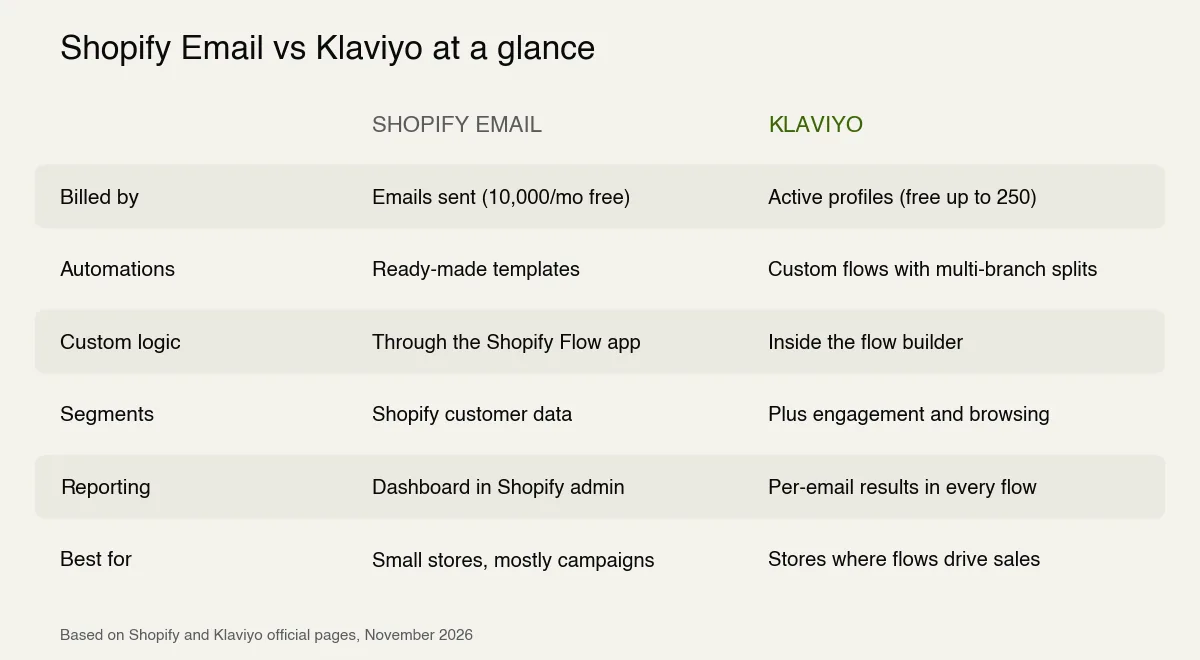
Shopify Email vs Klaviyo at a glance
Shopify Email is a sending tool inside Shopify; Klaviyo is a separate marketing platform that pulls in your Shopify data and lets you do far more with it. The table below sums up the differences that matter for a small store.
A flow is an automated series of messages that starts when someone does something, such as abandoning a checkout. A segment is a group of profiles that updates itself based on rules, such as “bought twice in the last 90 days”.
What Shopify Email does well
Templates pull your logo, products and prices straight from your store, so a campaign takes minutes. Shopify’s automation templates cover the basics: browse, cart and checkout recovery, a welcome discount email or series, a thank-you and upsell after purchase, win-back, birthday and VIP emails (Shopify Help Center, as of November 2026). For custom automations, or ones that use a third-party app, Shopify points you to its separate Shopify Flow app.
What Klaviyo adds
Klaviyo’s flow builder lets you split a flow on almost anything: what someone did or didn’t do, profile properties, location, list or segment membership, consent, predicted lifetime value or churn risk, or a random sample for A/B tests, combined with AND and OR logic (Klaviyo Help Center). It also tracks onsite events such as Viewed Product and Active on Site once the Klaviyo app embed is on, which feeds browse flows and segments (Klaviyo: Getting started with Shopify).
What each one costs at real sending volumes
Shopify Email bills by emails sent; Klaviyo bills by active profiles. That makes Shopify Email very cheap for small lists, and it means cost alone is rarely the reason to switch.
Shopify includes 10,000 emails a month on every plan, then charges $1 USD per 1,000 extra emails, with lower rates after 300,000 a month (Shopify Messaging pricing, as of November 2026). Abandoned checkout emails don’t count towards that total. Klaviyo’s free plan covers up to 250 active profiles and 500 emails a month; paid plans are quoted by profile count on its pricing page.
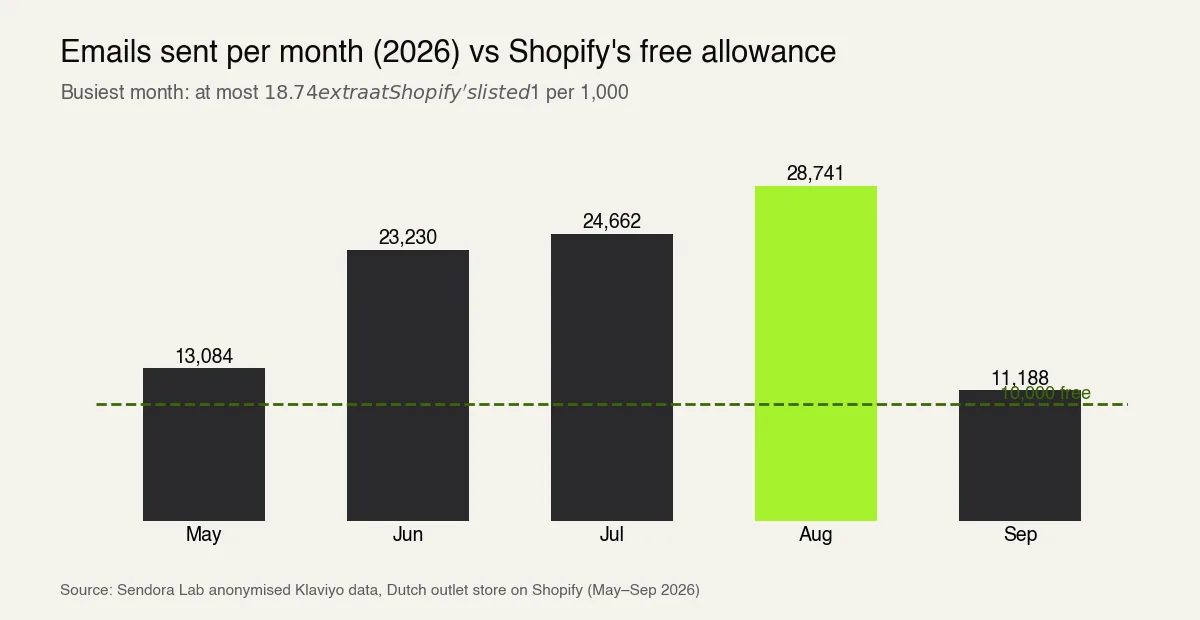
To make this concrete: in Sendora Lab’s anonymised Klaviyo data from a Dutch outlet store on Shopify, the account sent between 11,188 and 28,741 emails a month from May to September 2026 (Received Email events). At Shopify’s listed price, even the busiest month, August, would have cost at most $18.74 above the free allowance. That is an upper bound, because the store’s checkout recovery emails would have been free on Shopify.
So for a store this size, Shopify Email is the cheaper tool. The question is what you get for the extra money on Klaviyo.
Shopify Email limitations you notice first
The limits show up in three places: how far you can shape a flow, how finely you can target people, and how clearly you can see what each email earned.
Follow-up emails earn real orders
Recovery flows rarely win everything with the first email. The same Dutch outlet store ran a four-email abandoned checkout series in Klaviyo. Across 1 October 2025 to 30 September 2026, that series reached 24,771 recipients and was credited with 79 orders. Emails 2, 3 and 4 brought in 30 of those orders, or 37.97%, and 36.03% of the series’ attributed revenue.
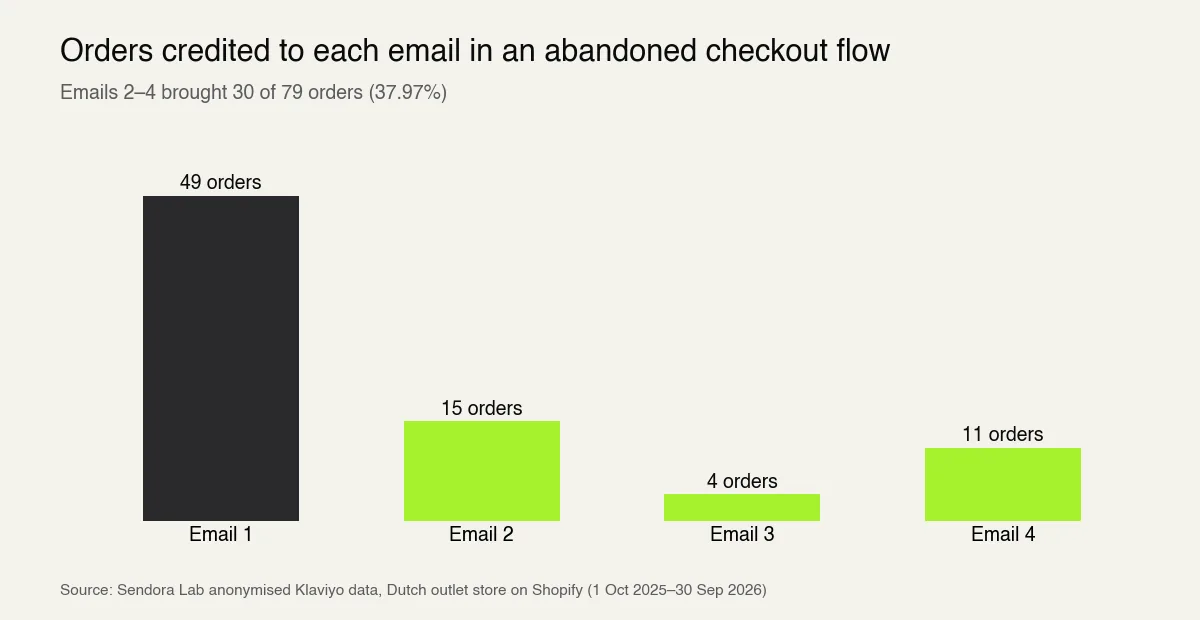
Attributed revenue is the order value Klaviyo credits to an email because the buyer opened or clicked it within the attribution window. It is a useful guide, not proof that the email caused the sale. Note too that email 4 earned more orders than email 3 here; that is the kind of detail you only see with per-email reporting, and it tells you which step to rewrite.
Targeting stays basic
Shopify Email sends to your Shopify customer segments, which work well for order and customer data. Klaviyo segments can also use email engagement and onsite browsing, so you can build an engaged segment, exclude people who just bought, or target people who viewed a category three times this month. If you want those rules, see our guide to Klaviyo segments vs lists.
Custom logic needs another app
Anything beyond Shopify’s templates means building it in Shopify Flow. That works, but you then manage two tools for one automation. In Klaviyo the trigger, filters, delays, splits and messages live in one flow.
When to move to Klaviyo: five signs
Move when the tool is stopping work you already want to do. A bigger list on its own is not a reason.
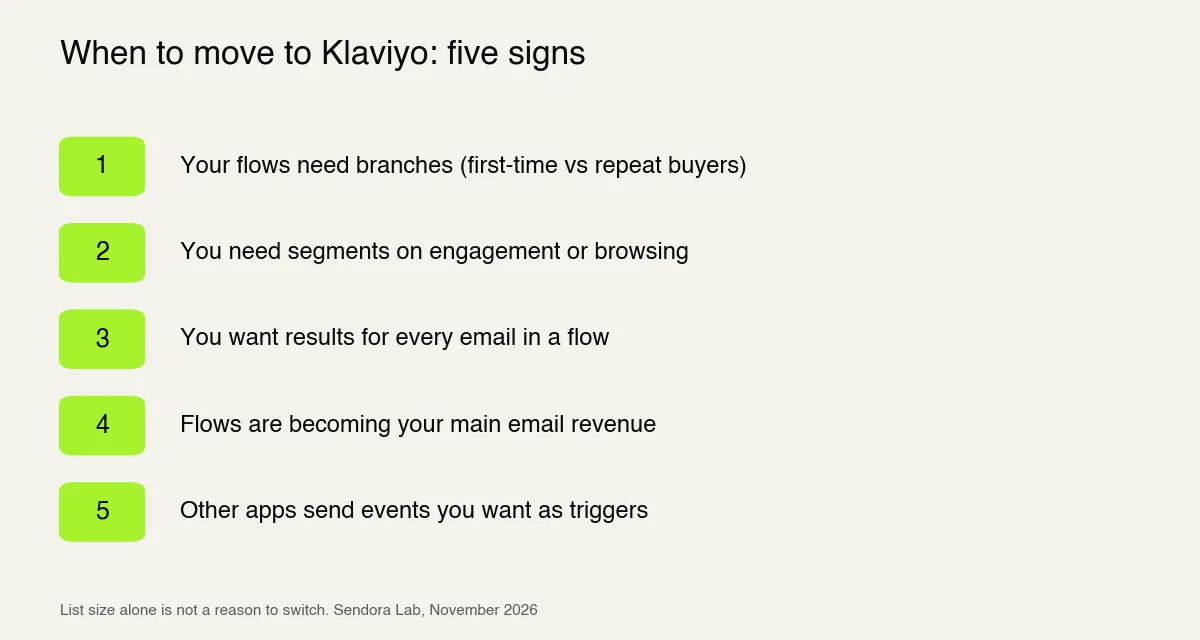
- Your flows need branches. You want different emails for first-time and repeat buyers, or a path that stops when someone orders.
- You need behaviour-based segments. Engagement, browsing or product-level rules, not just “customers who ordered”.
- You want per-email reporting. You need to know which step of a flow earns orders, as in the example above.
- Flows are becoming your main revenue. Once automation carries a large share of email sales, small gains in each step add up.
- You use other apps. Reviews, subscriptions or loyalty tools that send events you want to use as triggers. Check our guide to Klaviyo integrations for Shopify.
If none of these apply yet, stay on Shopify Email and spend the time on better campaigns. If you are still weighing other platforms, compare email marketing tools for Shopify first.
How to switch from Shopify Email to Klaviyo without losing data
Install Klaviyo, let it sync your Shopify history, rebuild your flows, then turn Shopify’s automations off. Run the two in that order so no one gets the same reminder twice.
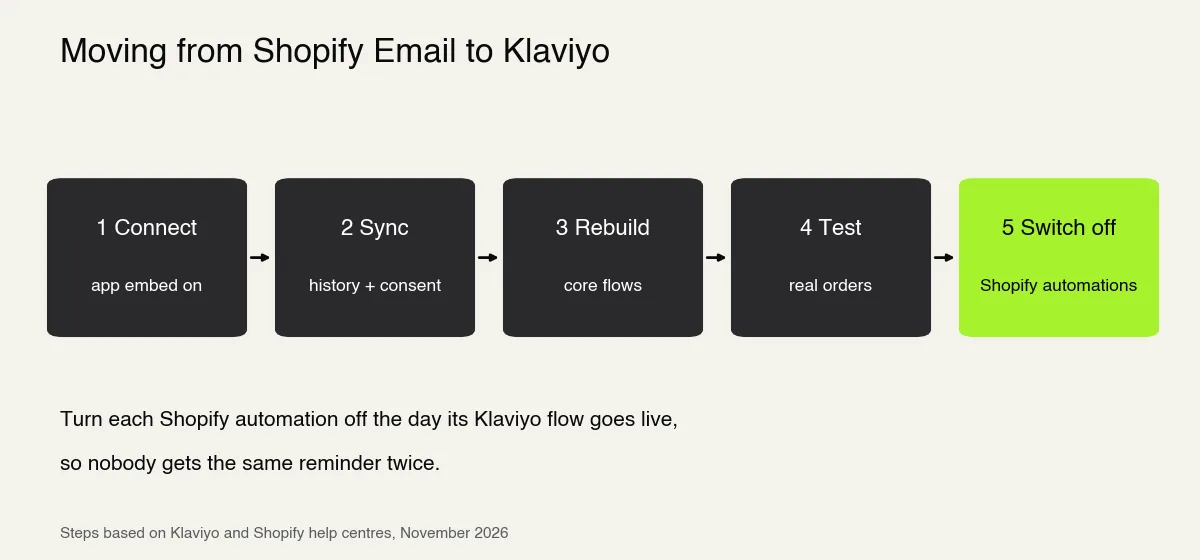
- Connect Shopify and turn on the app embed. Klaviyo then syncs customers and orders and starts tracking onsite events. Watch the “Historical data” section until the first sync finishes.
- Sync consent. Turn on subscriber sync so people who accept marketing at checkout or in Shopify forms land on your Klaviyo list. Historical SMS subscribers need a separate step, per Klaviyo’s help centre.
- Rebuild the core flows. Start with abandoned checkout, welcome and post-purchase. Our guide to abandoned checkout vs abandoned cart helps you pick the right trigger.
- Test with real orders. Place a test order and abandon a checkout to check triggers, filters and links.
- Switch off Shopify’s automations on the same day. Turning one off cancels anyone waiting in it, so do it as the Klaviyo flow goes live.
Keep campaigns on one platform at a time. Sending from both for weeks splits your reporting and makes it easy to email the same people twice.
Conclusion: Shopify Email or Klaviyo?
In the Shopify Email vs Klaviyo choice, start with Shopify Email if you are small and mostly send campaigns; it is cheap and quick. Move to Klaviyo when you need branching flows, behaviour-based segments and per-email reporting, because that is where the extra cost earns its keep. If you want help planning the move or rebuilding your flows, see our email and retention services or book a free audit.
FAQ
Is Shopify Email free?
Shopify includes 10,000 emails a month on every plan, then charges $1 USD per 1,000 extra emails, as of November 2026. Abandoned checkout emails don’t count towards the total. SMS is billed separately.
Is Shopify Email the same as Shopify Messaging?
Yes. Shopify now calls the app Shopify Messaging because it covers email, SMS and WhatsApp in one place.
When should a Shopify store move to Klaviyo?
When you need flows that branch on behaviour, segments built on browsing or engagement, or reporting per email. List size alone is not a reason to switch.
Do follow-up emails in a flow matter?
In one Dutch outlet store’s four-email abandoned checkout flow, emails 2 to 4 brought in 30 of 79 credited orders (1 Oct 2025 to 30 Sep 2026). So yes, the later steps are worth building and testing.
Can I run Shopify Email and Klaviyo at the same time?
You can for a short handover, but turn off each Shopify automation when its Klaviyo flow goes live, so customers don’t get the same reminder twice.
Want this set up in your Klaviyo account?
A free 30-minute audit, your account open on screen.
Book a free audit