



The best email marketing tools for Shopify are the ones that read your store’s data and send automated emails from it: Shopify Messaging, Klaviyo, Omnisend and Mailchimp all do this, at different depths and on different billing rules. A new store can start on Shopify’s own tool for free. A store that wants detailed segments and many automated emails usually ends up on Klaviyo or Omnisend.
Short answer: Pick the tool by three things, in this order: how well it uses Shopify data to trigger automated emails, how it counts your list for billing, and how much setup help you need. Editors and template counts matter far less. In Sendora Lab’s client data, automated emails earned most of the email revenue, so the automation side is where the choice really shows.
This guide compares the four tools from their own pricing and help pages (checked in October 2026), shows real Klaviyo data from one Shopify store, and ends with a 30-day setup plan that works whichever tool you choose.
What an email marketing tool for Shopify has to do
An email tool for Shopify has to know who bought what, who is browsing, and who left a checkout, then send the right email without you pressing send. Everything else is secondary.
That breaks down into five jobs:
- Store data sync. Customers, orders, products and consent status come across from Shopify, ideally within minutes.
- Behaviour tracking. Product views, add-to-cart and checkout events are recorded on the storefront. On most tools this needs an app embed or tracking script switched on in your theme.
- Flows. A flow is a series of emails sent automatically when someone does something, such as joining your list or leaving a checkout. Campaigns are the opposite: one-off emails you send to a list or segment on a chosen day.
- Segments. A segment is a group of contacts that updates itself from rules, for example “ordered twice, nothing in 120 days”.
- Signup forms and deliverability tools. Pop-ups that collect consent, plus domain authentication so your emails reach the inbox.
All four tools in this guide connect to Shopify. The difference is how much of that data you can use, how fast, and what it costs as your list grows. If you already run Klaviyo, our guide to Klaviyo integrations for Shopify shows how to check that every event is arriving.
Why flows matter more than the email editor
Flows usually earn more per email than campaigns, because they reach people at the moment they showed interest. So the most important test of a Shopify email tool is how well it builds and runs flows from store data.
In Sendora Lab’s anonymised Klaviyo data from a US supplement store on Shopify (1 October 2025 to 30 September 2026), flows sent 45.19% of all marketing emails and earned 85.23% of the email-attributed revenue. Flow emails reached 31,307 recipients and were credited with 184 orders. Campaign emails reached 37,972 recipients and were credited with 45 orders.
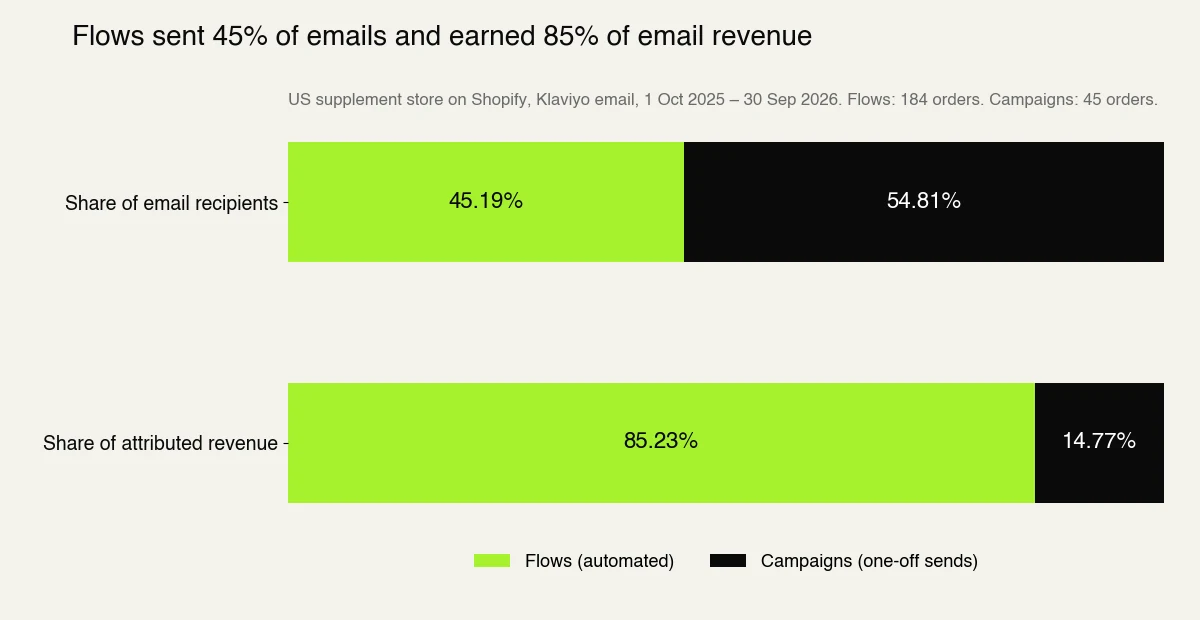
Attributed revenue is the order value Klaviyo credits to an email when someone opens or clicks it and then orders within the attribution window. It is a useful comparison between email types, not a precise count of extra sales.
One store is not a benchmark, and this store ran more flows than most new shops. The point holds anyway: when you compare tools, open the flow builder and the flow reports before you look at email templates.
Email marketing tools for Shopify, compared
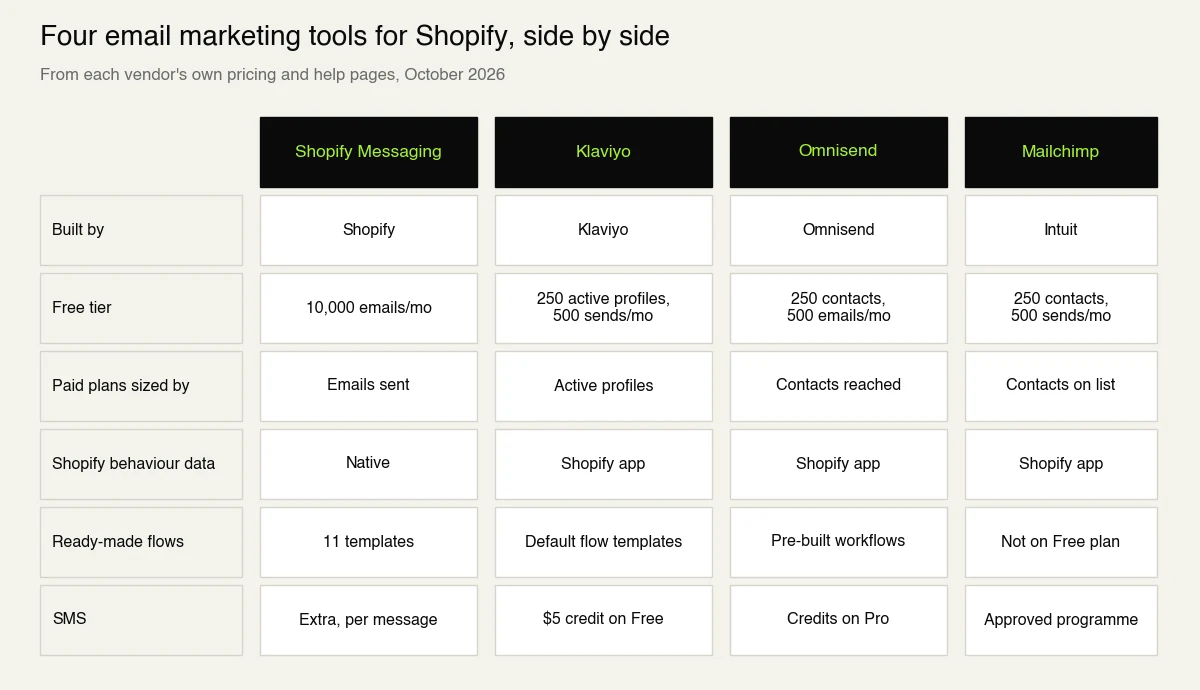
Shopify Messaging is the cheapest start, Klaviyo gives the most control, Omnisend bundles email and SMS simply, and Mailchimp suits stores that already use it. All prices and limits below come from each vendor’s own pages as of October 2026; they change often, so check them on the day you sign up.
Shopify Messaging (formerly Shopify Email)
Shopify’s built-in tool lets you send up to 10,000 emails a month free, then charges $1 USD per 1,000 additional emails, according to Shopify’s email marketing page. Shopify’s help centre lists 11 ready-made automation templates, including abandoned product browse, abandoned cart, abandoned checkout, welcome, thank-you, first-purchase upsell, win-back, birthday and VIP welcome, and notes that abandoned checkout emails don’t count towards your sent emails (Shopify Help Center). SMS is charged separately per message.
Suits: new stores with small lists that want the basics live this week, with nothing extra to install.
Klaviyo
Klaviyo’s free plan covers up to 250 active profiles, 500 email sends a month and $5 of mobile messages a month, with email support for the first 60 days (Klaviyo pricing page). Its Shopify app brings in customer and order data, and tracks Viewed Product and Active on Site once the app embed is on in your theme. In Sendora Lab’s experience it has the deepest segment builder and flow logic of the four, which is why most of our client accounts run on it.
Suits: stores that want many flows, detailed segments and clear revenue reporting, and are willing to spend time on setup.
Omnisend
Omnisend’s free plan covers 250 contacts and 500 emails a month. Standard starts at $11.20 a month (500 contacts, 6,000 emails) and Pro at $41.30 a month (2,500 contacts, unlimited emails, SMS from $0.007 per message), per Omnisend pricing. Pre-built workflows for cart abandonment, welcome and post-purchase are on every plan. Its Shopify connection syncs contacts, products, orders and cart activity, with orders arriving instantly or within 3 minutes.
Suits: growing stores that want email and SMS in one place without building much from scratch. Our Klaviyo vs Omnisend comparison goes deeper.
Mailchimp
Mailchimp’s free plan allows 250 contacts and 500 sends a month (250 a day) but has no automation flows; paid Standard plans allow up to 200 flows (Mailchimp pricing page). Its Shopify app syncs customers, orders and storefront events such as product views, add-to-cart and checkout started, mostly in near real time, according to Mailchimp’s help centre.
Suits: businesses already using Mailchimp for other brands or newsletters. See Klaviyo vs Mailchimp for the trade-offs.
How each tool counts your list for billing
The tools charge for different people, so the same Shopify store can cost very different amounts on each. Check who counts before you import anyone.
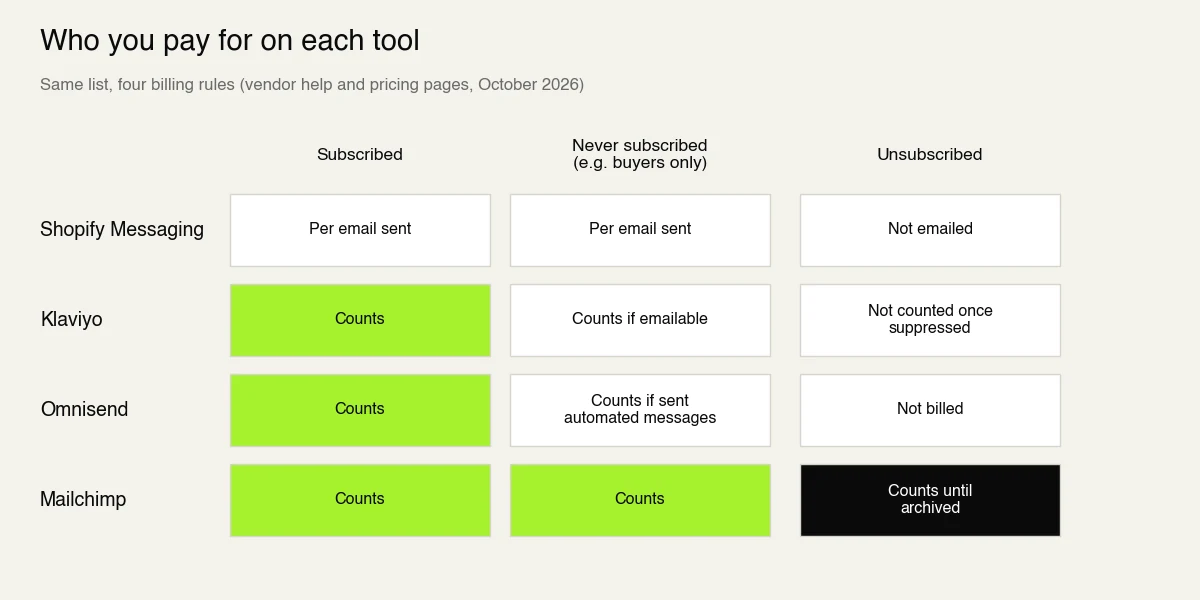
- Shopify Messaging charges by emails sent, not by list size.
- Klaviyo sizes its email plan by active profiles: profiles with an email address that are not suppressed. Unsubscribed and bounced profiles stop counting once suppression is processed (Klaviyo help).
- Omnisend bills for subscribers and for non-subscribers who received automated messages. Unsubscribed contacts aren’t billed.
- Mailchimp counts subscribed, unsubscribed and non-subscribed contacts. Archived, cleaned and deleted contacts don’t count (Mailchimp help).
This matters most for Shopify stores, because every buyer syncs across whether or not they agreed to marketing. A store with many past buyers and few subscribers pays for those buyers on some tools and not on others. On a contact-based plan, archiving people who will never be emailed is the simplest saving.
Which tool fits which Shopify store
Match the tool to the stage of the store and the time you have, not to a ranking. Any of the four can run the core flows well.
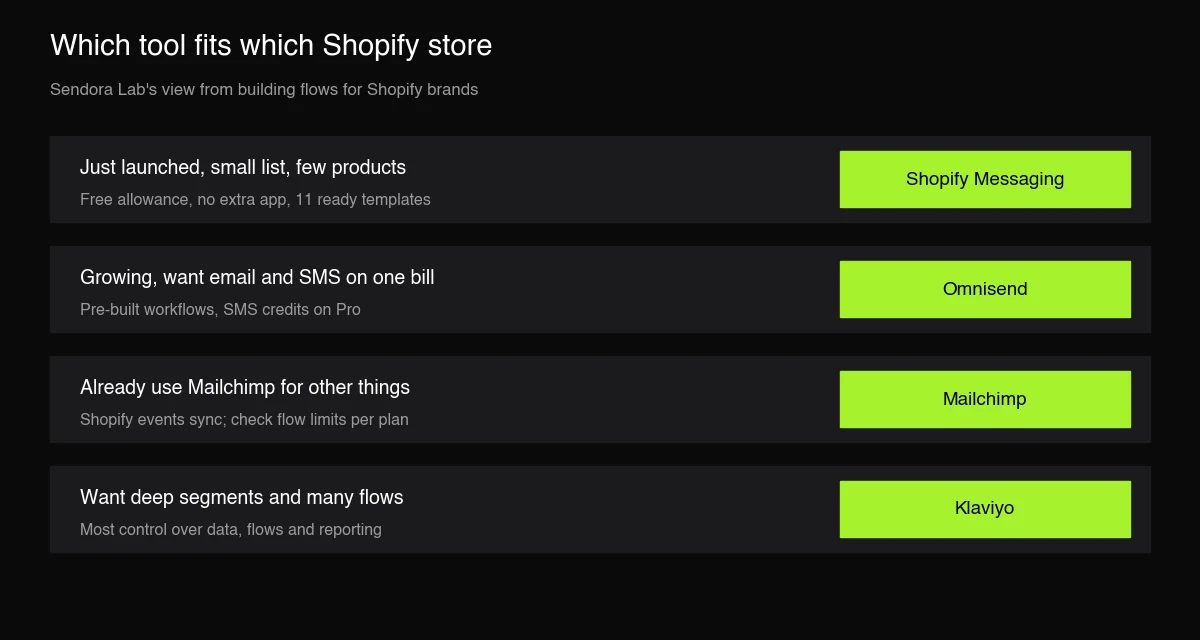
- Just launched, small list: Shopify Messaging. The free allowance covers most new stores, and the templates cover browse, cart and checkout recovery.
- Growing, want SMS too, little build time: Omnisend. Workflows come pre-built and SMS sits on the same bill.
- Already on Mailchimp: stay there if the flows you need fit your plan, and check the flow limits before you upgrade.
- Want detailed segments, many flows and clear reporting: Klaviyo. It takes more setup, and pays it back once you run more than the basic flows.
From Sendora Lab’s own work: stores rarely outgrow a tool because of templates. They move because they want a segment or a flow split the current tool can’t build, or because the bill grows with contacts they never email.
What to set up in the first 30 days
Whichever email marketing tool for Shopify you choose, the first month looks the same: connect data, protect deliverability, then build the flows that catch buyers closest to an order.
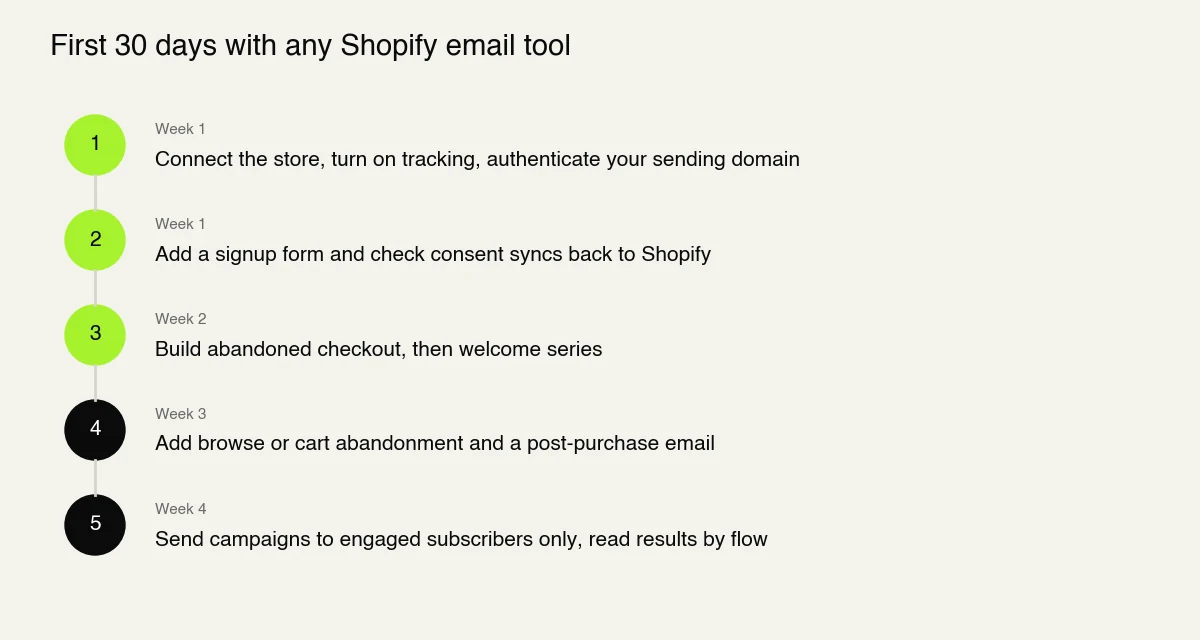
- Week 1: connect and check tracking. Install the Shopify app, switch on the theme app embed or tracking script, and place a test order to confirm the events arrive.
- Week 1: authenticate your domain. Set up SPF, DKIM and DMARC so mailbox providers trust your sends. Our Shopify deliverability basics covers the steps.
- Week 2: abandoned checkout, then welcome. These two reach people who are already close to buying. Our guide to abandoned checkout vs abandoned cart covers timings.
- Week 3: browse or cart abandonment, and a post-purchase email.
- Week 4: campaigns to engaged subscribers only, and read results flow by flow rather than as one total.
Moving to another tool later
Switching is possible but not free: lists and consent move, flows and templates usually have to be rebuilt. Choosing well at the start saves that rebuild.
When a store moves, contacts, consent status and suppressions can be exported and imported, and Shopify order history re-syncs through the new app. Flows, email designs and past reports don’t carry over. Run the old and new tool side by side for a few weeks, send the first campaigns from the new tool to engaged subscribers only, and turn off each old flow only when its replacement is live, so nobody gets two abandoned checkout emails.
Conclusion
The right email marketing tools for Shopify are the ones that turn store data into flows you can trust, at a price that fits how they count your list. Start on Shopify Messaging if you are new and small, choose Omnisend for simple email plus SMS, stay on Mailchimp if it already runs your business, and choose Klaviyo when you want full control of segments and flows. If you want a second opinion on your setup, see how Sendora Lab runs Klaviyo email marketing for Shopify brands. For a head-to-head on the two most common choices, read Shopify Email vs Klaviyo.
FAQ
Is Shopify Email free?
Shopify Messaging (formerly Shopify Email) lets you send up to 10,000 emails a month free, then charges $1 USD per 1,000 additional emails, as of October 2026. Abandoned checkout emails don’t count towards the emails you send.
What is the best email marketing app for Shopify?
It depends on the store. Shopify Messaging suits new stores, Omnisend suits stores that want email and SMS with little setup, and Klaviyo suits stores that want detailed segments and many flows.
Do unsubscribed contacts count towards my bill?
On Mailchimp, yes, until you archive them. On Klaviyo, they stop counting once suppression is processed, and on Omnisend unsubscribed contacts aren’t billed. Shopify Messaging bills by emails sent.
Do I need automated flows or just campaigns?
Both, but flows first. In Sendora Lab’s data from a US supplement store on Shopify, flows sent 45.19% of emails and earned 85.23% of email-attributed revenue over 12 months.
Can I switch email tools later?
Yes. Contacts, consent and order history move, but flows, templates and reports have to be rebuilt in the new tool.
Want this set up in your Klaviyo account?
A free 30-minute audit, your account open on screen.
Book a free audit