



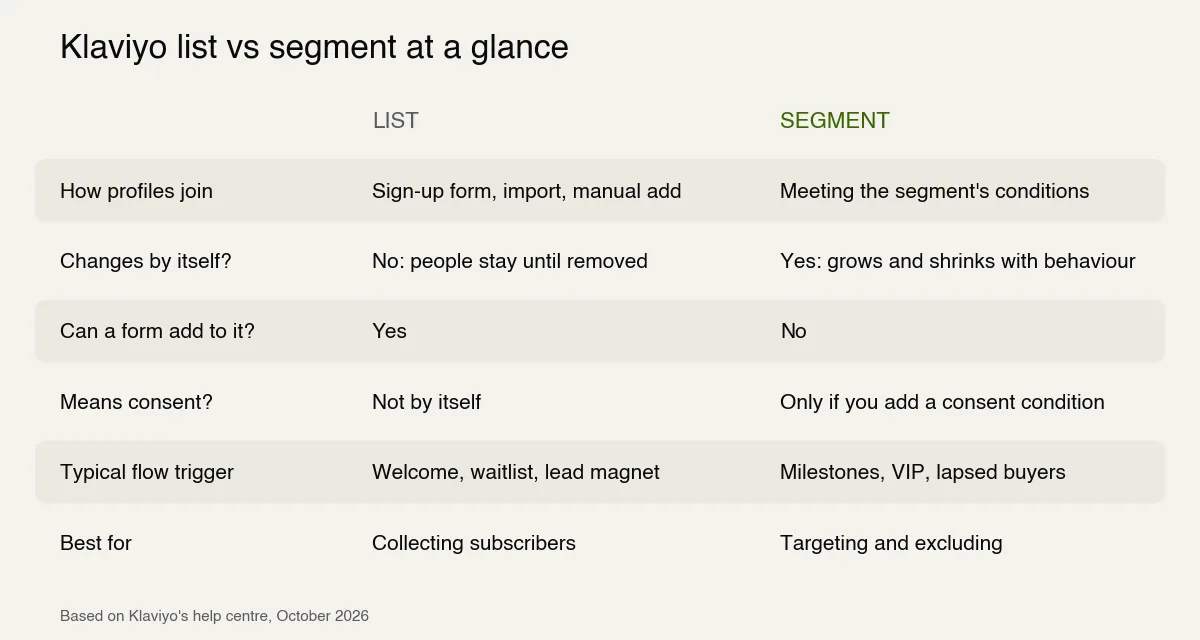
In Klaviyo, a list is a static group of profiles that you add people to, usually through a sign-up form or an import. A segment is a dynamic group that Klaviyo fills and empties for you, based on conditions such as “opened an email in the last 90 days” or “placed two orders”. Lists collect subscribers; segments decide who gets which message.
Short answer: Use a list to capture people (sign-up forms, imports, waitlists) and to trigger a welcome flow. Use segments for almost everything you send to: campaigns, exclusions, VIP and win-back audiences. At Sendora Lab we keep one main list per channel and do the targeting with segments, because segments update themselves and lists don’t.
Klaviyo segments vs lists: the core difference
The difference is how people get in and whether membership changes on its own. A list only changes when someone joins or is removed; a segment re-checks its conditions and changes as people behave.
A few terms first. A profile is one person in Klaviyo, with their email or phone, properties and activity. A flow is an automated series of messages that starts when something happens, such as a profile joining a list. A campaign is a one-off send to chosen lists or segments.
Klaviyo’s help article on segments and lists (checked October 2026) sets out the rules:
- Profiles join a list through sign-up forms, manual adds or imports. Lists are static.
- You cannot add anyone to a segment by hand, by import or through a form. Profiles join only when they meet its conditions.
- Being on a list does not, on its own, mean a profile has consented to marketing.
- Segments draw from all profiles, including people who never opted in, unless you add a consent condition.
- Segment updates are not always instant.
When to use a list
Use a list when you need to record that someone signed up for something. That is its job: a dated record of who joined, from where.
Good uses for a list
- Your main subscriber list. Klaviyo recommends one main list per channel (one for email, one for SMS) holding people who have agreed to marketing.
- A form-specific list when one sign-up form needs its own welcome flow, for example a quiz or a spin-to-win pop-up.
- A waitlist or early-access list for a launch or a sale, so you can email exactly the people who raised their hand.
- Imports from an old platform or an event, kept apart until you have checked consent.
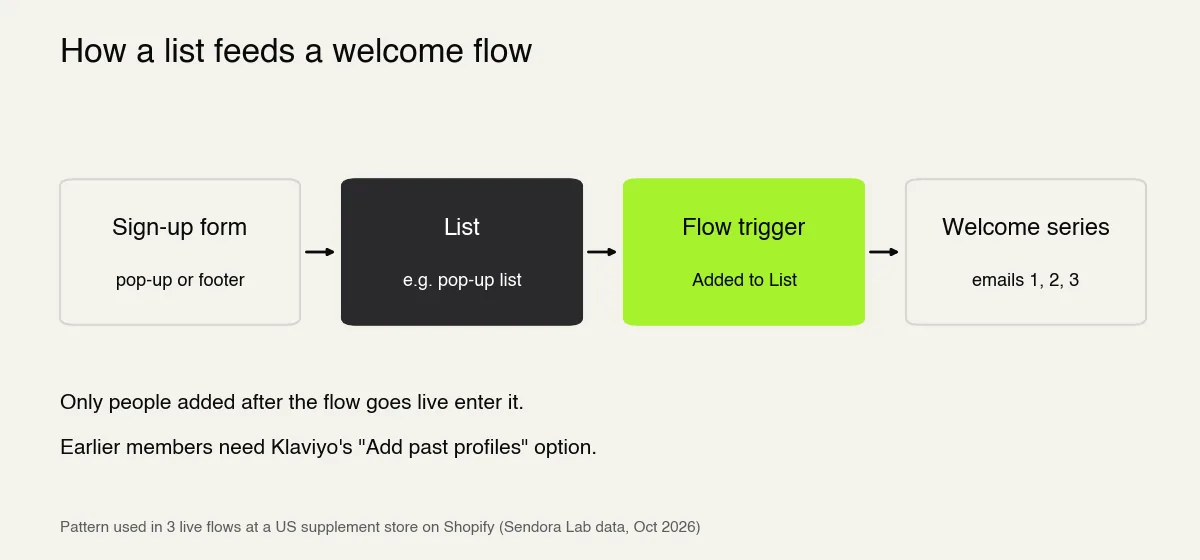
Lists are the natural trigger for a Klaviyo welcome series: the flow starts when a profile is added to the list. One catch: only people added after the flow goes live enter it. To reach earlier members you use “Add past profiles”, which, per Klaviyo’s guide to adding past profiles, looks back up to two years and will not re-send messages someone already received.
When to use a segment
Use a segment whenever the audience should change with behaviour: engaged subscribers, recent buyers, lapsed customers, high spenders. You set the rules once and Klaviyo keeps the membership current.
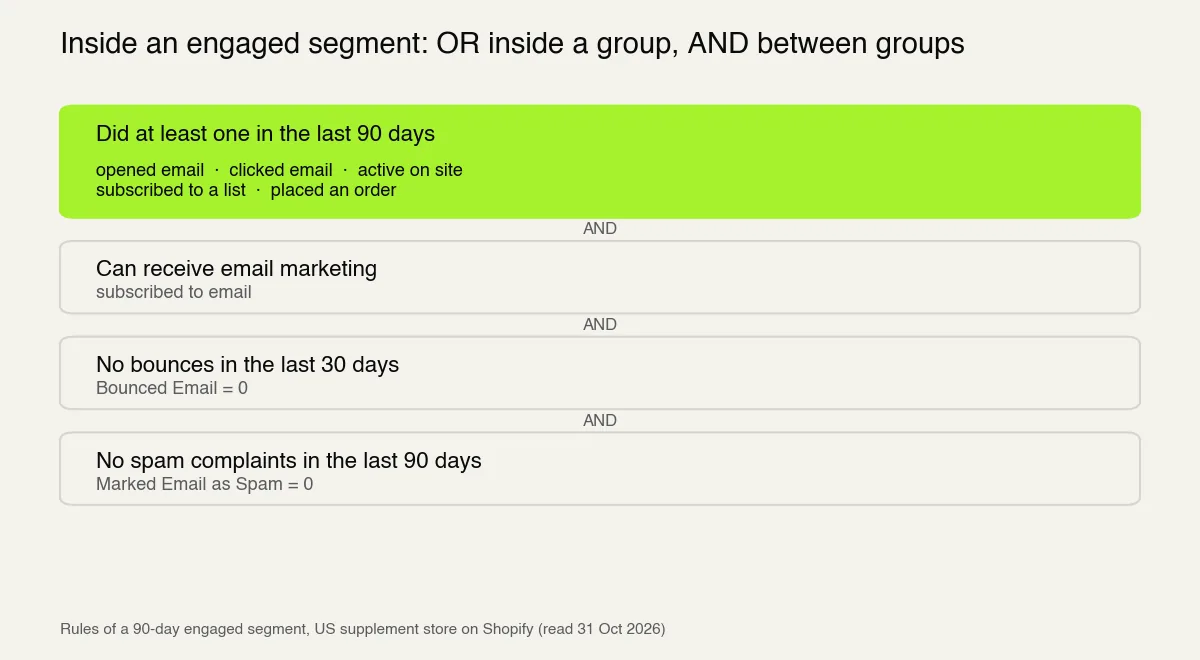
Segment conditions combine in two ways. Conditions inside one group are joined by OR (any one is enough); separate groups are joined by AND (all must be true). Get this wrong and the segment is either far too big or almost empty.
Good uses for a segment
- Campaign audiences, such as an engaged segment of people who opened, clicked or ordered recently.
- Exclusions: people who never engage, recent purchasers for a discount send, or spam complainers.
- Flow triggers for milestones, such as reaching VIP status. New segment-triggered flows let a profile enter once, unless you change the re-entry setting.
- Analysis: tracking how many buyers sit in each stage, as in RFM segmentation.
Always add the “can receive email marketing” condition to a segment you plan to send to. Without it, the segment can include people who bought once but never subscribed.
What a real account looks like
In practice, lists stay few and segments do the work. This is how one account we manage is set up.
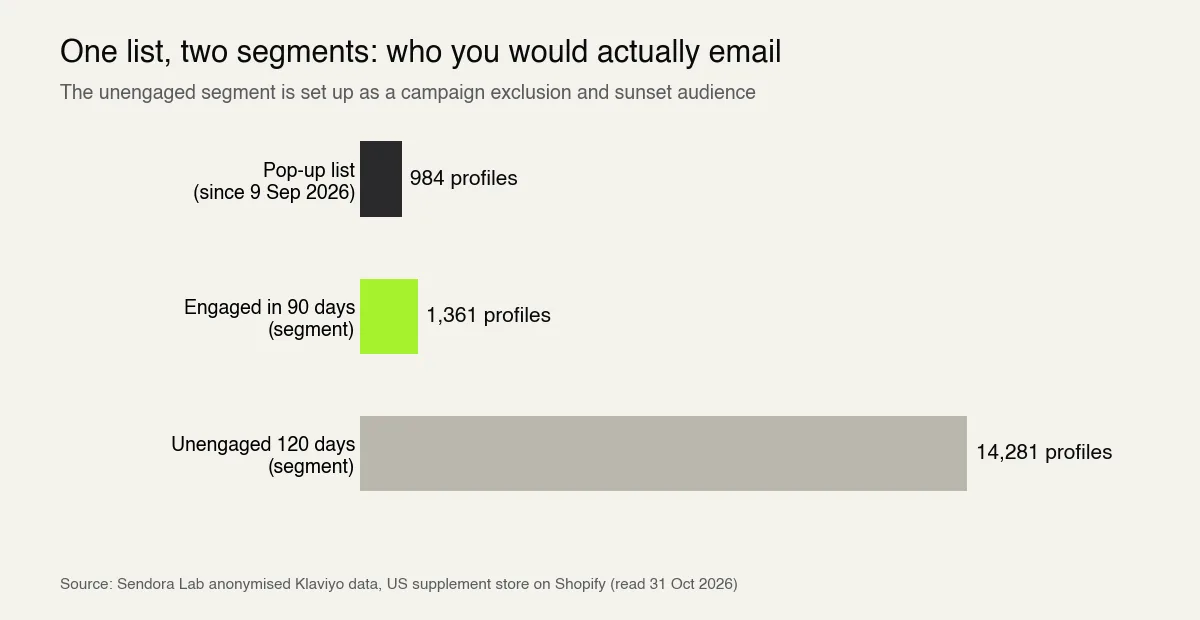
In Sendora Lab’s anonymised Klaviyo data from a US supplement store on Shopify (read on 31 October 2026), the account has 9 lists. Four of them trigger a flow on “Added to List”: three live welcome or waitlist flows and one draft. The pop-up list, created on 9 September 2026, held 984 profiles and feeds its own welcome series.
Segments carry the targeting. In the same account on the same day:
- The 90-day engaged segment held 1,361 profiles. Its rules: opened or clicked an email, was active on site, subscribed to a list or placed an order in the last 90 days, AND is subscribed to email, AND no bounce in 30 days, AND no spam complaint in 90 days.
- The 120-day unengaged segment held 14,281 profiles: people who received at least three emails in 120 days with no real opens (machine opens filtered out), no clicks and no orders, and who did not join a list in the last 30 days. It is set up as an exclusion for campaigns and as the audience for a sunset flow.
The unengaged segment is more than ten times the size of the engaged one. A campaign sent to “the whole list” would land mostly on people who have shown no interest for four months, which is how inbox placement starts to slide. The segments stop that without anyone cleaning a list by hand.
Common mistakes with lists and segments
Most problems come from using a list where a segment belongs, or the reverse.
- A new list for every campaign. Lists pile up, nobody knows which is current, and people miss sends. Use one main list and segment it.
- Sending campaigns to the main list. It includes people who stopped reading long ago. Send to an engaged segment and exclude the unengaged one.
- Treating list membership as consent. It isn’t. Check consent status, especially on imported lists.
- Expecting a segment flow to catch existing members. Like list flows, segment flows only take people who join after the flow is live, unless you add past profiles.
- Mixing up OR and AND. Put alternatives in one group and requirements in separate groups, then check the profile count before you send.
For flows, the same “who gets in” logic also shows up as trigger and flow filters; see trigger filter vs flow filter.
Conclusion
The Klaviyo segments vs lists choice is simpler than it looks. Lists record who signed up and start welcome flows. Segments decide who receives each campaign and who is left out, and they keep themselves up to date. Keep one main list per channel, build a handful of well-tested segments, and check consent on both.
If your account has grown into dozens of lists and you are not sure who your campaigns reach, Sendora Lab can sort it out. See our email marketing services or book a free audit. Building segments from a sentence? Our Klaviyo AI segment builder guide shows what to check.
FAQ
Is a Klaviyo list or segment better for campaigns?
A segment, in most cases. It updates itself, so you can send to people who engaged recently and exclude those who haven’t, without cleaning a list by hand.
Can I add people to a Klaviyo segment manually?
No. Profiles join a segment only by meeting its conditions. To add people by hand, by import or through a form, use a list.
Does being on a Klaviyo list mean someone has consented?
No. Klaviyo states that list membership alone does not mean consent. Check each profile’s consent status, and add a “can receive email marketing” condition to segments you send to.
Will a new list-triggered flow email people already on the list?
No. Only profiles added after the flow goes live enter it. Use “Add past profiles” to include earlier members; it looks back up to two years.
How many lists should a Klaviyo account have?
Klaviyo recommends one main list per channel. Add extra lists only where a form or waitlist needs its own flow, as the store in this post does with four flow-triggering lists.
Want this set up in your Klaviyo account?
A free 30-minute audit, your account open on screen.
Book a free audit