



An email design system is the set of brand styles, saved blocks and layouts that every email is built from. Instead of designing each campaign from a blank page, you assemble it from parts that are already on brand and already tested. This guide explains what goes into one, how to build it in Klaviyo, and what we found when we checked 17 real Klaviyo accounts.
Short answer: an email design system is a small library of reusable parts (colours, fonts, buttons, header, footer, product row, proof blocks) plus a few layouts built only from those parts. In Klaviyo you build it with brand settings and universal content, so one edit updates every email that uses a block. In Sendora Lab’s check of 17 client Klaviyo accounts on 20 October 2026, 11 had saved blocks, but at least five had two or more saved footers, which is exactly the drift a system is meant to stop.
What an email design system is
An email design system is a shared kit for building emails: rules for how things look, and ready-made pieces that follow those rules. It is smaller and more practical than a website design system, because email has fewer components and stricter technical limits.
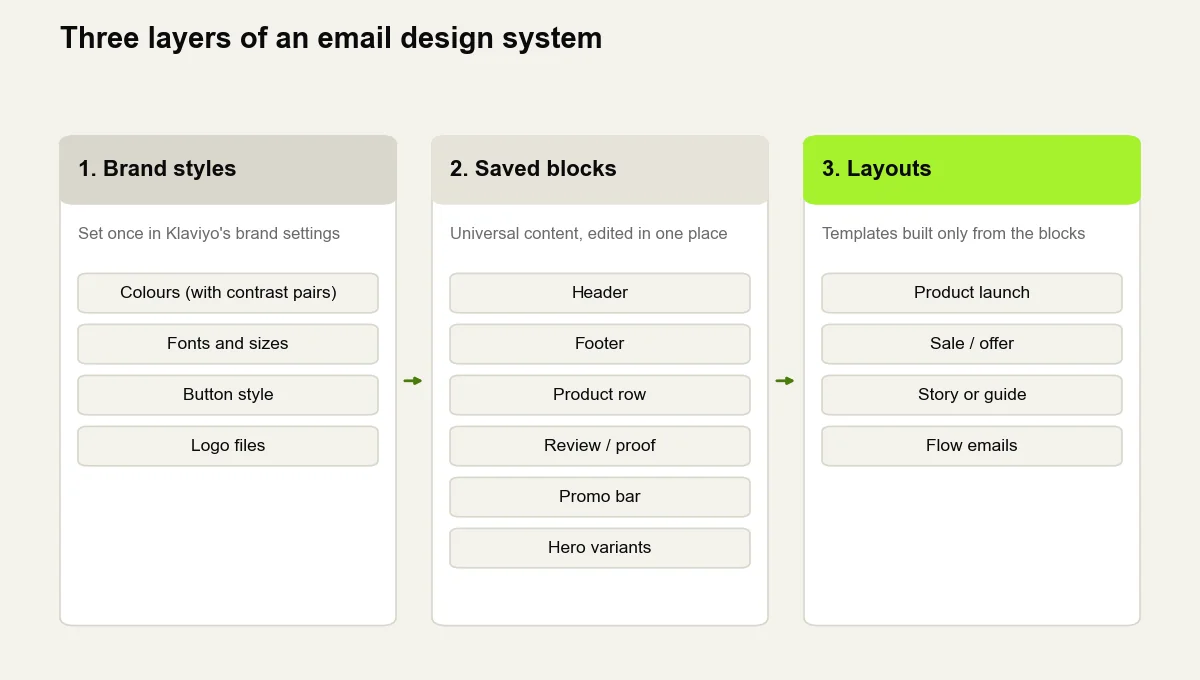
It has three layers:
- Brand styles: colours (including which text colours are allowed on which backgrounds), fonts and sizes, button style and logo files.
- Saved blocks: the parts you repeat in almost every email, such as header, footer, product row, review or proof block, promo bar and two or three hero variants.
- Layouts: three to five templates assembled only from those blocks, for example a product launch, a sale, a story or guide, and the base for flow emails.
Parcel’s guide to starting an email design system describes the same idea from the code side: list the patterns you repeat, group each component’s variants, and decide how much freedom the people building emails should have. In Klaviyo, most of that freedom question comes down to which blocks are locked as universal content and which are edited per email.
Why every brand that sends weekly needs one
A design system pays off when you send often: it cuts build time, keeps every email on brand and means a fix is made once, not in every template. The more campaigns and flow emails you run, the more those three gains add up.
The volume is usually higher than people think. A Dutch online fashion store we work with sent 52 email campaigns between 6 April and 30 September 2026, about two a week, on top of its automated flows (Sendora Lab’s anonymised Klaviyo campaign reports). Designing each of those from scratch is not realistic, so in practice the team copies an older email. That works until the older email has a mistake in it.
We found one in that store’s campaigns: the header logo linked to a different web address from the store’s own product and collection pages, and it received 490 clicks between April and September 2026. A header saved as a universal block is the place to fix a link like that once, instead of hunting through every campaign. Our guide to ecommerce email design covers that check and the rest of a pre-send review.
What it does for the team
- Speed: a campaign becomes assembly and copy, not layout work.
- Consistency: spacing, button style and footer are the same in every email, including flows built months apart.
- Handover: a new designer or freelancer can build an on-brand email on day one, because the parts already exist.
What we found in 17 Klaviyo accounts
Most accounts we checked had started a system, but few had finished one: footers were saved everywhere, brand settings almost nowhere, and duplicate blocks were common.
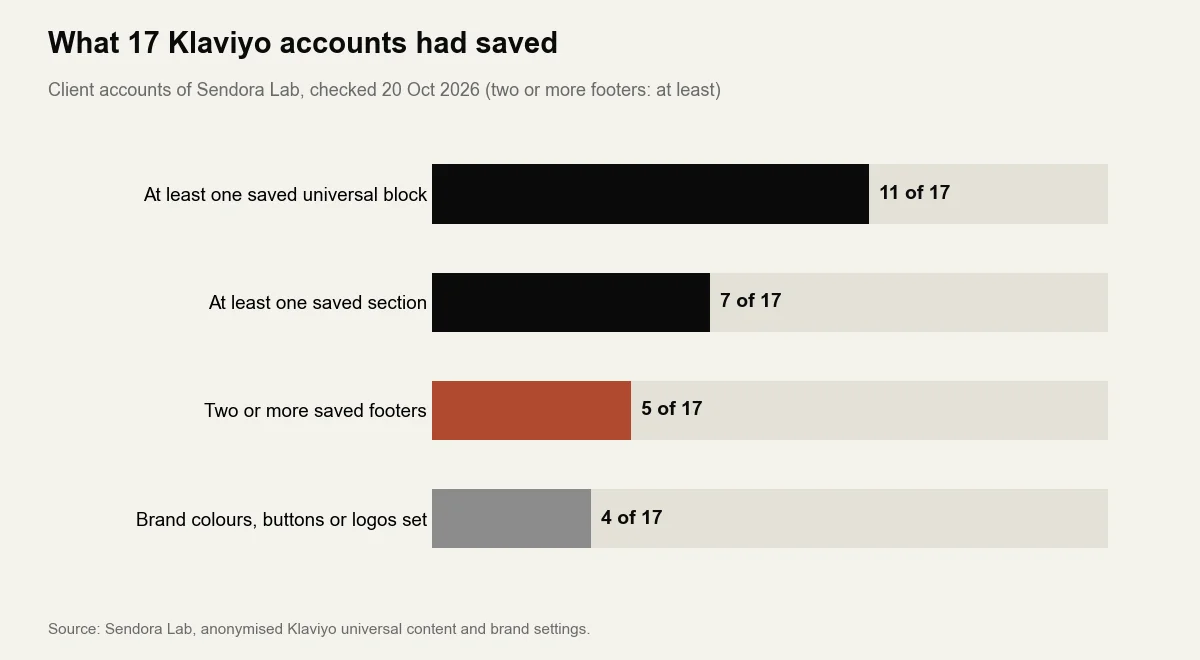
On 20 October 2026 we listed the saved universal content and brand settings in the 17 client Klaviyo accounts Sendora Lab has access to (anonymised; some were set up by us, so this is partly a check on our own housekeeping). Universal content is Klaviyo’s name for a saved block or section that you insert into many templates; Klaviyo’s universal content documentation says changes saved to a universal block propagate to all templates using it.
- 11 of 17 accounts had at least one saved universal content item, 62 items in total. Across all 17, the median was 2.
- 7 of 17 had at least one saved section (a full row, not just a single block).
- Only 4 of 17 had any brand colours, buttons or logos set in Klaviyo’s brand settings.
- At least 5 of the 11 had two or more saved footers, and two of them had four.
Which blocks get saved first
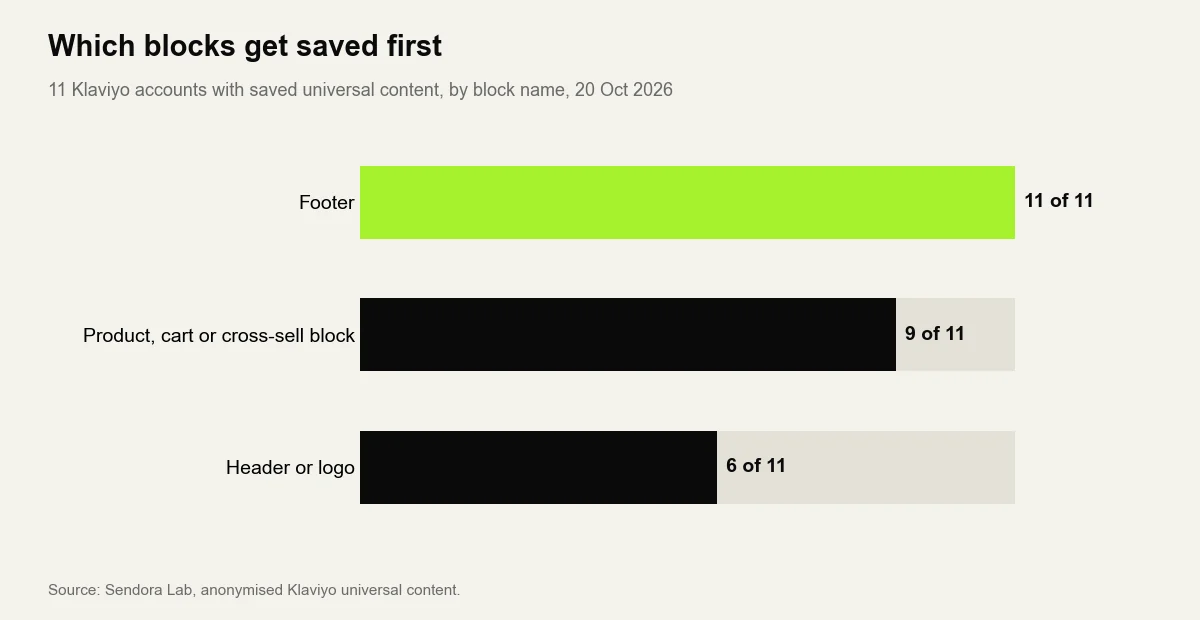
Among the 11 accounts with saved content, all 11 had a footer, 9 had a product, cart or cross-sell block, and 6 had a header or logo block. That order makes sense: the footer carries the unsubscribe link and legal text, so it changes least and hurts most when it is wrong.
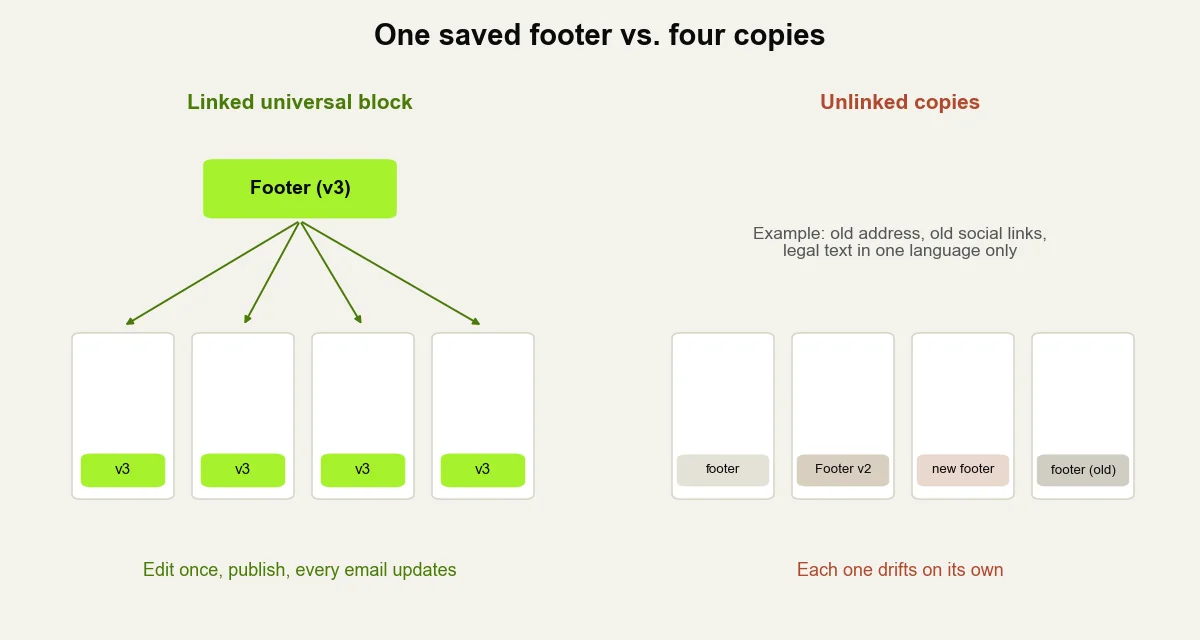
The duplicate footers are the warning sign. Names like “footer”, “new footer” and “footer updated” usually mean someone edited a copy instead of the linked block. Each copy then drifts on its own: an old address here, a missing language there.
How to build an email design system in Klaviyo
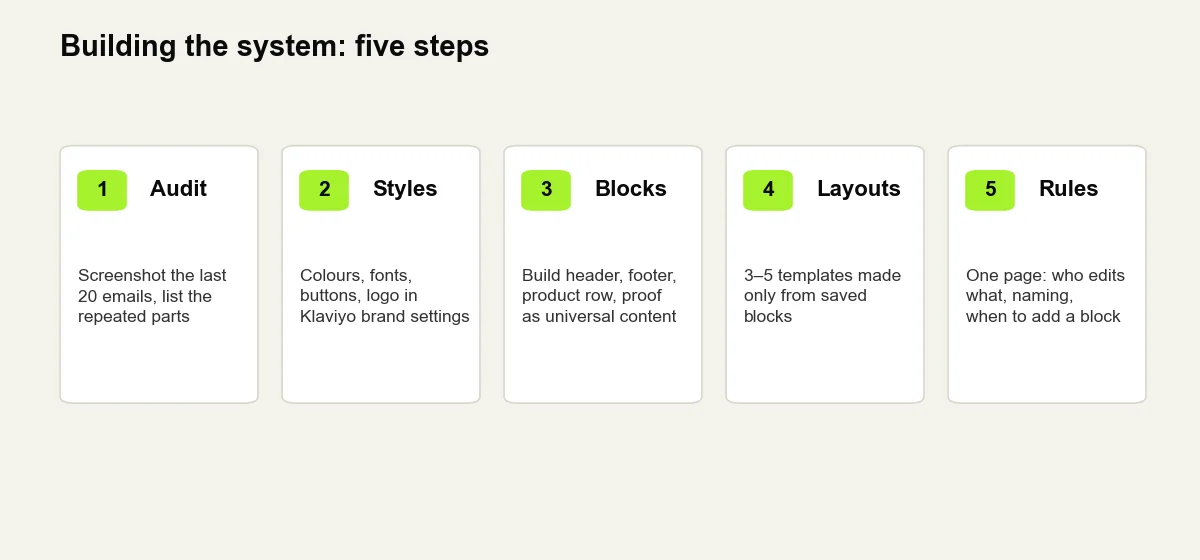
Build it in five steps: audit what you send, set brand styles, save the repeated parts as universal content, assemble a few layouts, and write down the rules. A first version is a short project, not a redesign.
1. Audit what you already send
Screenshot your last 20 campaigns and your main flow emails side by side. Circle every part that repeats: header, footer, product rows, buttons, review blocks, shipping or returns bars. Note every variation, such as three button styles or two footers. That list is your first component inventory.
2. Set brand styles
In Klaviyo, go to Content > Images & brand and open the Brand tab to add logos, colours and fonts, then use the Defaults tab to decide how they apply to new templates and blocks. Klaviyo’s article on updating your brand styles is clear that changing these settings will not update existing blocks, templates or flows, so do this before you rebuild anything.
3. Save the repeated parts as universal content
Build the header, footer, product row and proof block once, then save each as universal content. When you edit one and publish the change, every email that uses it updates. Keep the names clear and dated, for example “UC | Footer | EN”, and delete or archive copies as soon as the linked version is live.
Not every block should be universal. Hero images, headlines and product picks change with each send, so those belong in the layout, not in a locked block. Dynamic blocks that read flow data, such as an abandoned cart item list, need the right event behind them; our abandoned cart flow guide shows how that block works.
4. Assemble three to five layouts
Make a saved template for each email type you send most often, built only from saved blocks and placeholders. Most stores need a product launch, a sale or offer, a story or guide, and a base for flow emails. Test each layout on a phone and with images off before anyone uses it; our guide to phone-first email design lists what to check.
5. Write the rules on one page
Write down who may edit universal blocks, how blocks are named, which colour pairs pass contrast, and when a new block is allowed. One page is enough. Without it, the system turns back into copies within a few months.
Keeping the system alive
A design system is maintained, not finished. Review it every quarter and whenever the brand, the legal text or the store’s main links change.
- Quarterly: search universal content for duplicates and old versions, and merge them into one linked block.
- On a rebrand: update universal content first. Klaviyo’s brand styles article recommends exactly this, because it saves editing flows and draft campaigns one by one.
- On a new language: save one footer per language rather than editing a shared one by hand each time; see our guide to running email in more than one language.
- In the campaign plan: pick the layout when you plan the send, as in our email campaign calendar, so building is assembly, not design.
When you build each campaign, start from a saved layout, as described in how to create a Klaviyo campaign.
Conclusion
An email design system is not a big design project. It is a short list of brand styles, a handful of linked blocks and three to five layouts, kept tidy. In the 17 Klaviyo accounts we checked, most brands had started one with a saved footer, but duplicates and missing brand settings were common. Fix those first, and every campaign after that gets faster and more consistent.
Sendora Lab designs email systems and templates for Shopify brands in Klaviyo. See examples in our email design portfolio, read about our email marketing service, or book a free audit and we will review your saved blocks with you.
FAQ
What is an email design system?
A set of brand styles, reusable blocks (header, footer, product row, proof) and a few layouts built only from those blocks. Every email is assembled from the same parts, so it stays on brand and is quicker to build.
How do I build an email design system in Klaviyo?
Set your logos, colours and fonts under Content > Images & brand, save repeated parts as universal content, and build three to five saved templates from those blocks. Then write one page of rules on naming and editing.
Does changing Klaviyo brand styles update my existing emails?
No. Klaviyo says changing brand styles does not update existing blocks, templates or flows. Universal content blocks do update everywhere they are used when you edit and publish them.
How common are saved blocks in Klaviyo accounts?
In 17 client accounts Sendora Lab checked on 20 October 2026, 11 had saved universal content and all 11 had a saved footer. Only 4 had brand colours, buttons or logos set, and at least 5 had two or more saved footers.
Want this set up in your Klaviyo account?
A free 30-minute audit, your account open on screen.
Book a free audit