



An email campaign calendar is a simple plan of which campaigns go out on which days, who gets each one and what each one is for. Without one, sends pile up around sales and then disappear for weeks. This guide shows how to build a monthly calendar in five steps, using a year of real campaign data and the calendar built into Klaviyo.
Short answer: put the dates and product news you already know on the calendar first, then fill every week with one or two campaigns that each have one job and one audience, and keep that rhythm in quiet months too. In Sendora Lab’s anonymised Klaviyo data from a small Polish online store on Shopify, the 9 campaigns tied to a date or product news earned 103 of the year’s 147 attributed campaign orders, while two months had no campaigns at all. A calendar fixes both problems before they happen.
What an email campaign calendar covers, and what it doesn’t
A calendar plans campaigns, not flows. A campaign is a one-off email you send to a list or segment on a day you choose. A flow is an automated series that sends when a shopper does something, such as joining your list or leaving a cart. Flows run every day underneath your calendar and need no slot; our guide to how email campaigns work explains the difference in more depth.
Every entry on the calendar should answer five questions. If one is still blank a week before the send date, the campaign is at risk.
| Field | Example | Why it matters |
|---|---|---|
| Date and time | Thursday, 10:00 | Fixes the deadline for copy and design |
| Job | Announce a restock | One job per email keeps the message clear |
| Audience | Engaged in the last 60 days | Decides who sees it, and your deliverability |
| Offer | None, or 10% for 48 hours | Stops discounts creeping into every send |
| Owner | One named person for copy, one for design | Someone has to say “ready” |
The audience is usually a segment: a group of profiles that matches conditions you set, such as “opened or clicked in the last 60 days”, and that Klaviyo updates automatically.
Step 1: Mark the anchors first
Anchors are campaigns with a reason to exist on a specific day: a seasonal sale, a holiday your customers celebrate, a launch or a restock. Put them on the calendar before anything else, because everything else fits around them.
The data shows why. Between 1 October 2025 and 30 September 2026, the store sent 25 email campaigns to 70,028 recipients, and Klaviyo attributed 147 orders worth PLN 31,874.75 to them (added up from the per-campaign reports). An attributed order is one Klaviyo credits to an email because the shopper opened or clicked it shortly before buying. We grouped the campaigns by name. Nine were tied to a date or to product news: Black Week, Black Friday and its resend, Cyber Monday, a back-in-stock email, Mother’s Day, a new-arrival email and two Children’s Day emails. They went to 35,131 recipients and earned 103 orders, or PLN 0.614 per recipient. The other 16 went to 34,897 recipients and earned 44 orders, or PLN 0.295 per recipient.
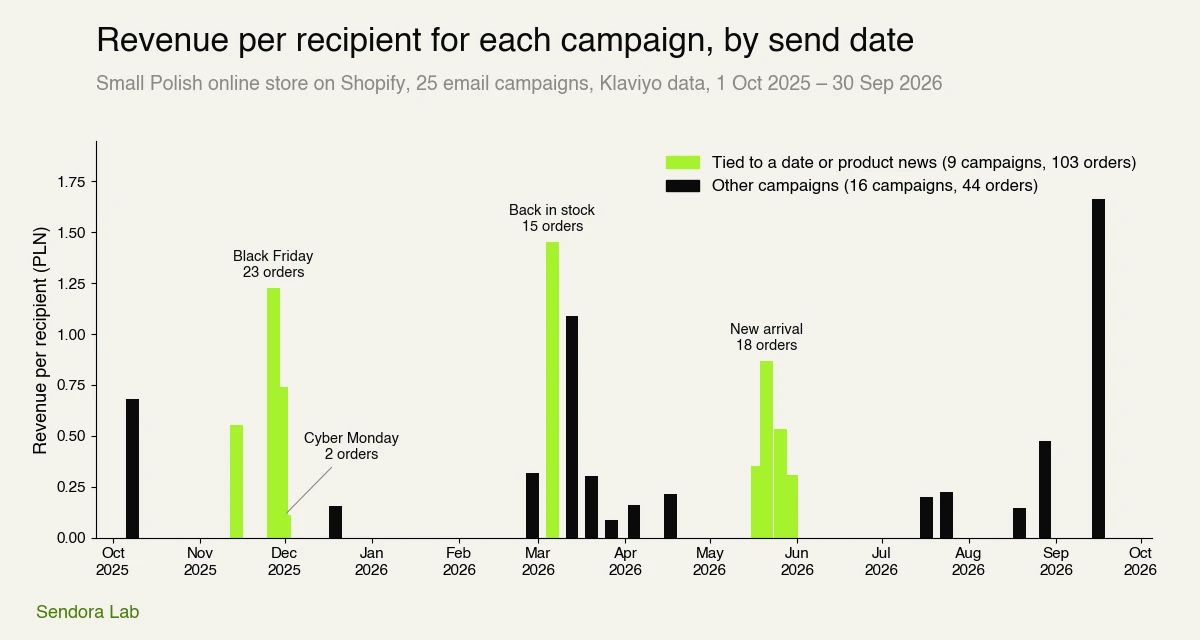
Revenue per recipient is attributed revenue divided by the number of people who received the email, and it is the fairest way to compare one campaign with another (see our guide to revenue per recipient). The strongest sends were the back-in-stock email in March (PLN 1.453 per recipient, 15 orders) and the Black Friday email (PLN 1.227, 23 orders). Audiences differed from send to send, so read the split as a pattern, not a controlled test: news gives people a reason to open today.
November needs the most lead time. Start it in September and use our Black Friday email plan for the full sequence.
Step 2: Set a rhythm you can keep every month
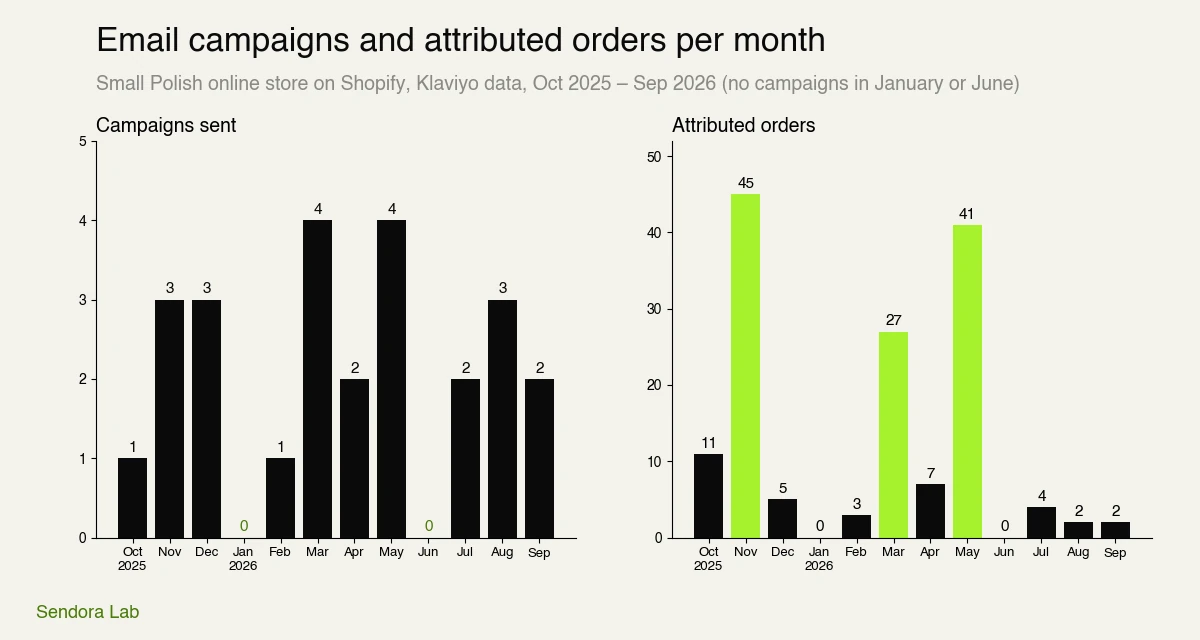
Pick a base number of campaigns per week and hold it, including in months with no sale. The store’s monthly campaign count from October to September was 1, 3, 3, 0, 1, 4, 2, 4, 0, 2, 3 and 2. January and June had none, so they also had no campaign orders.
An even rhythm also protects your inbox placement. Gmail’s email sender guidelines ask bulk senders to send at a consistent rate and warn that sudden jumps in volume can lead to rate limiting or reputation drops. A calendar with empty months followed by a burst of sale emails is exactly that pattern.
Leave space after big moments, too. The store sent three sale emails in five days around Black Friday. Orders fell from 23 on the first to 12 on the resend and 2 on Cyber Monday, which also had the highest unsubscribe rate of the four sale emails (0.73%). December as a whole earned 5 campaign orders.
How many campaigns your list will take is a separate question. Our guide to email marketing frequency shows how to find that number. In Sendora Lab’s own planning, a small store starts at one campaign a week plus its anchors, because that is a calendar a small team can keep.
Step 3: Give every week a job and every send an audience
Fill the weeks between anchors with a repeating pattern, so you never start from a blank page. When an anchor lands in a week, it replaces that week’s slot instead of adding to it.
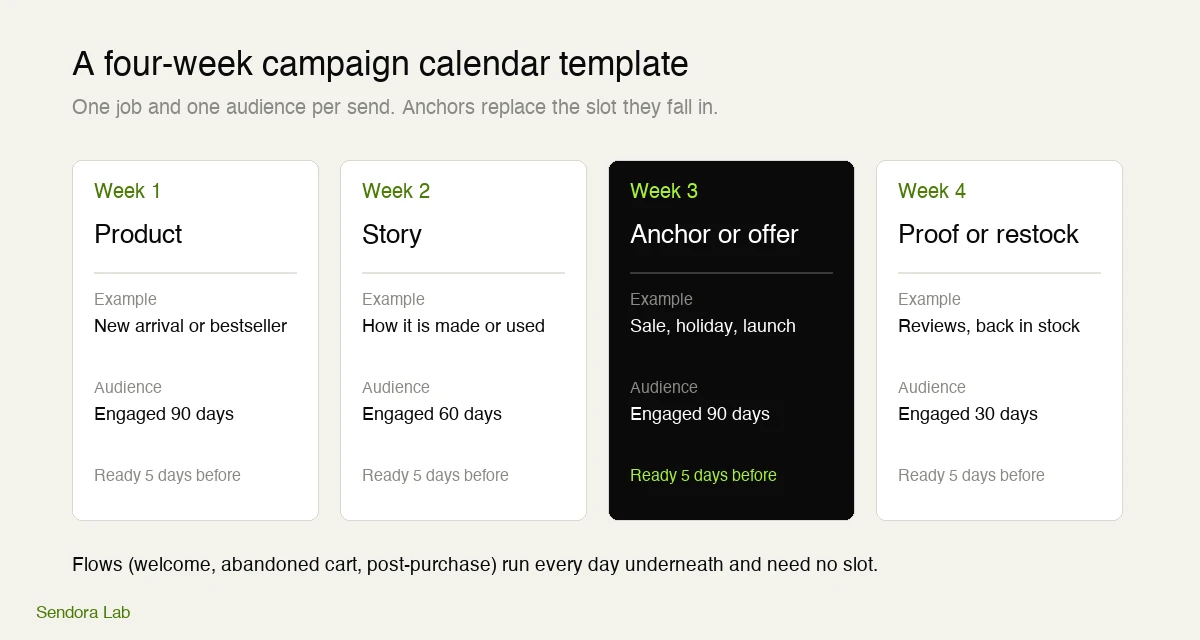
- Week 1, product: a new arrival or a bestseller, with one clear link.
- Week 2, story: how something is made or how to use it. No offer.
- Week 3, anchor or offer: the sale, holiday or launch for that month.
- Week 4, proof or restock: reviews, or products back in stock.
Send each campaign to people who are still reading. Our guide to building an engaged segment in Klaviyo covers the 30, 60 and 90-day versions. Have copy, design and segment ready five days before the send, so the last days are for testing links and checking the preview, not writing.
A resend can earn its slot when the offer is strong. The store’s Black Friday resend three days after the first email earned PLN 0.738 per recipient and had the lowest unsubscribe rate of its four sale emails (0.11%).
Step 4: Build the calendar in Klaviyo
Klaviyo has a campaign calendar built in, so the plan and the real campaigns can live in one place. Open the Campaigns tab and click the calendar icon in the top right, as described in Klaviyo’s guide to using the campaign calendar.
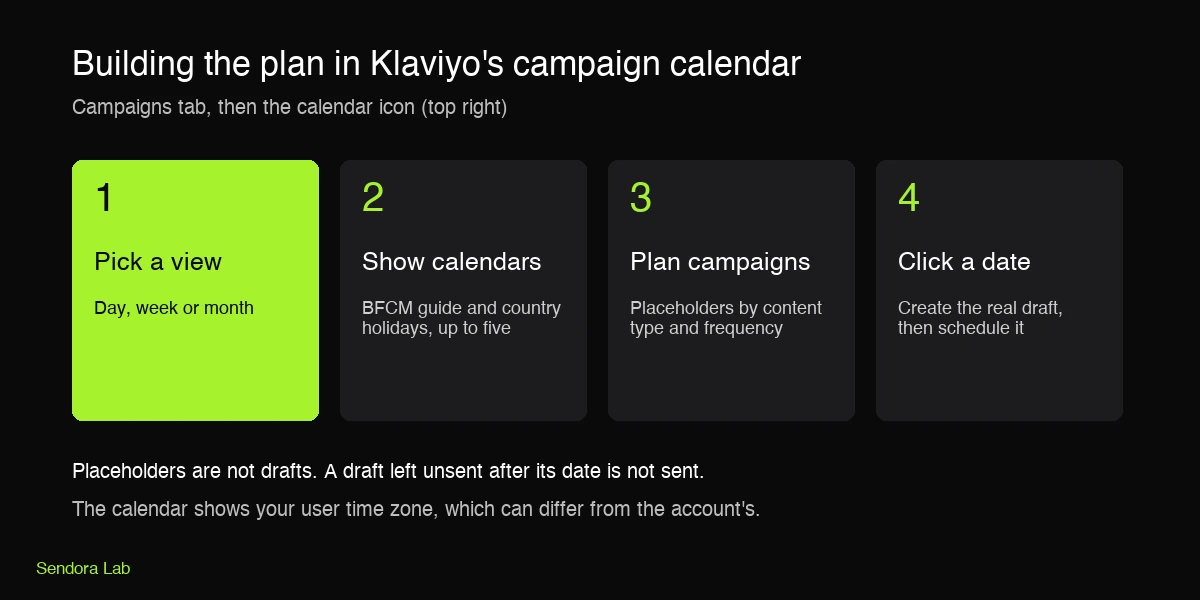
- Pick a view. Day, week or month. The month view shows up to three campaigns per day, with a “+ others” link for the rest.
- Show holiday calendars. From the action menu, choose “Show calendars” to overlay Klaviyo’s BFCM guide and country holiday calendars, up to five at a time, according to Klaviyo’s article on campaign calendar options.
- Plan campaigns. The campaign planner asks a few questions about your business, then fills the calendar with slots for content types such as education, product features and promotions, each with its own frequency. These placeholders are not drafts, as Klaviyo’s guide to creating a campaign plan makes clear.
- Click a date to create the real campaign. Then build it step by step; our guide on how to create a Klaviyo campaign covers audience, content, testing and scheduling.
Two details catch teams out. The calendar shows times in your own user time zone, which can differ from the account’s time zone. And a draft that is still unsent when its date passes will not be sent, so check the week view every Monday.
Step 5: Review the month before you plan the next
At the end of each month, put every campaign in one table with its recipients, click rate, orders, revenue per recipient and unsubscribe rate. Then ask three questions:
- Which jobs earned? Give more slots to the type of campaign that sold, as this store’s restock and new-arrival emails did.
- Which weeks were empty or crowded? Fix the rhythm before adding new ideas.
- Did any send lose more readers than usual? A jump in unsubscribes is a sign to space sends out or narrow the audience.
Plan the next month in detail and the next quarter’s anchors in outline. That way November never arrives as a surprise.
Conclusion
A good email campaign calendar is short: anchors first, a weekly rhythm you can keep, one job and one engaged audience per send, and a monthly review. The store in this guide earned most of its campaign orders from a handful of well-timed emails, and nothing at all in the two months it went quiet.
Sendora Lab plans and runs campaign calendars for Shopify brands as part of our email marketing service. If you want a second pair of eyes on your plan, book a free audit.
FAQ
How far ahead should I plan email campaigns?
Plan the coming month in detail and the next quarter’s anchor dates in outline. Start Black Friday and Cyber Monday planning in September.
Does Klaviyo have a campaign calendar?
Yes. Open the Campaigns tab and click the calendar icon. You can switch between day, week and month views, overlay holiday calendars and use the campaign planner to add placeholders, which are not drafts.
Should flows go on the campaign calendar?
No. Flows such as welcome and abandoned cart emails send automatically when a shopper qualifies. The calendar is for campaigns you choose to send on a given day.
What should I do when a holiday falls in a planned week?
Let the holiday campaign replace that week’s slot instead of adding an extra email. In the store’s data, three sale emails in five days ended with a Cyber Monday email that earned 2 orders.
Want this set up in your Klaviyo account?
A free 30-minute audit, your account open on screen.
Book a free audit