



Klaviyo BIMI is not a Klaviyo setting. It is a DNS record you publish yourself so that Gmail, Yahoo and Apple Mail can show your logo next to emails you send through Klaviyo. It only works once your DMARC policy is enforced, your Klaviyo sending domain is branded, and (for Gmail) you hold a VMC or CMC certificate for the logo.
Short answer: To get BIMI working for Klaviyo emails, set DMARC to p=quarantine or p=reject at pct=100, send from a Klaviyo branded sending domain on the same root domain, make a square SVG Tiny PS logo, buy a VMC or CMC, and publish a TXT record at default._bimi.yourdomain. At Sendora Lab, the DMARC step is where most brands stall, not the logo.
What BIMI is, and what Klaviyo does and doesn’t do
BIMI (Brand Indicators for Message Identification) is an email standard that lets inboxes show a sender’s logo when the email passes DMARC. Klaviyo’s part is the authenticated sending domain; the logo, certificate and DNS record are yours to set up.
Klaviyo says this plainly in its About BIMI article: it provides the branded sending domain, does not issue certificates, and has no control over whether an inbox shows the logo. A branded sending domain is the subdomain (often send.yourdomain.com) that Klaviyo signs your emails with, so they authenticate under your name instead of Klaviyo’s. If you haven’t set one up, start with our guide to the Klaviyo branded sending domain.
In our work we treat BIMI as a reward for authentication you should have anyway, not as a deliverability fix. What it changes is recognition: your logo instead of a grey initial.
What you need before BIMI works
You need six things in place, and they build on each other. Skip one and nothing shows.
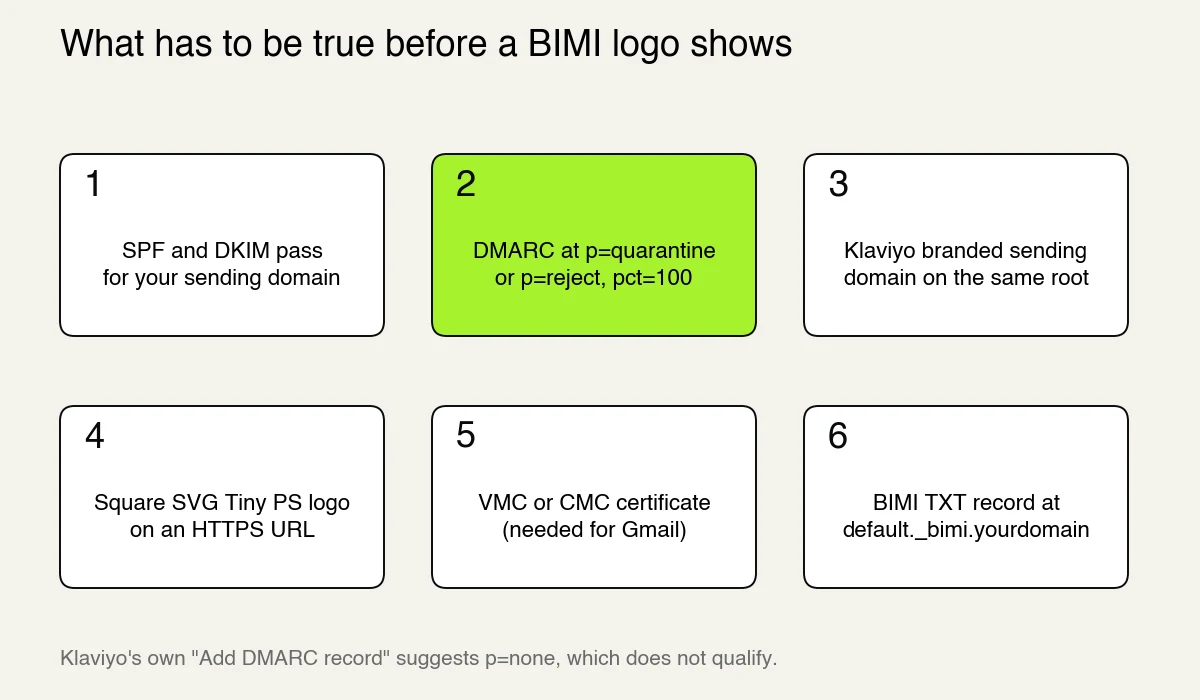
- SPF and DKIM passing for your sending domain. SPF lists the servers allowed to send for you; DKIM is a signature that proves the email wasn’t changed. Our plain-English guide to SPF, DKIM and DMARC covers both.
- DMARC at enforcement. DMARC is the DNS policy that tells inboxes what to do with mail that fails SPF and DKIM. Google’s BIMI setup page requires p=quarantine or p=reject with pct=100; p=none does not qualify. The BIMI Group implementation guide adds that subdomains must be at enforcement too.
- A Klaviyo branded sending domain on the same root domain as your From address.
- A logo file: square SVG in the SVG Tiny PS profile, centred, no extra text, on an HTTPS URL. Klaviyo and Google both recommend 32 KB or less, and Google asks for at least 96 by 96 pixels.
- A VMC or CMC if you want the logo in Gmail.
- The BIMI TXT record itself.
One trap: Klaviyo’s own “Add DMARC record” option suggests p=none. That is a sensible first record, but Klaviyo’s BIMI article confirms it does not meet BIMI requirements. You have to move it on.
Where your logo will actually show
BIMI only shows in inboxes that support it, and Microsoft is not one of them. So before you pay for a certificate, look at where your list really reads email.
The BIMI Group’s support list (last updated May 2025) names Google, Yahoo Inc., Apple, Fastmail, La Poste, Onet Poczta and Zoho among supporters, and lists Microsoft as not supporting BIMI. Klaviyo can break delivered emails down by inbox provider, which tells you how much of your list could see the logo.
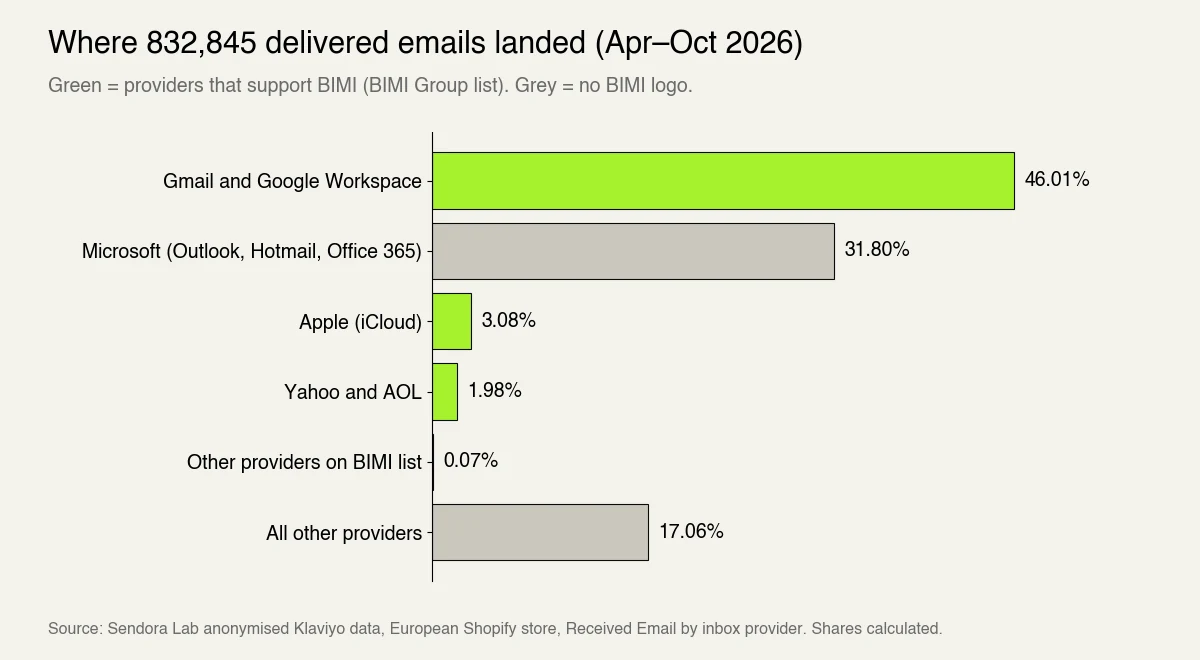
In Sendora Lab’s anonymised Klaviyo data from a European online store on Shopify (Received Email grouped by inbox provider, April to October 2026), 832,845 emails were delivered. Gmail and Google Workspace took 46.01%, Microsoft’s Outlook, Hotmail and Office 365 took 31.80%, Apple iCloud 3.08% and Klaviyo’s “Verizon Media Group” plus “Yahoo” groups (Yahoo and AOL mail) 1.98%. Adding the smaller BIMI providers, 51.15% of delivered emails went to inboxes that support BIMI. Nearly a third went to Microsoft, where the logo won’t appear.
Run the same check before you start. In Klaviyo, open the Received Email metric and group it by Inbox Provider. A list that is mostly Gmail gets far more from BIMI than one that is mostly Outlook.
How many brands are ready for BIMI today
Most brands are closer than they think on DMARC, and almost nobody has finished the job. That gap is the real opportunity.
On 11 November 2026, Sendora Lab looked up the public DNS records for the root domains behind 21 client Klaviyo accounts with a branded sending domain. Six had DMARC at p=none, ten at p=quarantine and five at p=reject. So 15 of 21 already meet BIMI’s policy rule, and none of the 21 sets pct below 100. None of the 21 publishes a BIMI record.
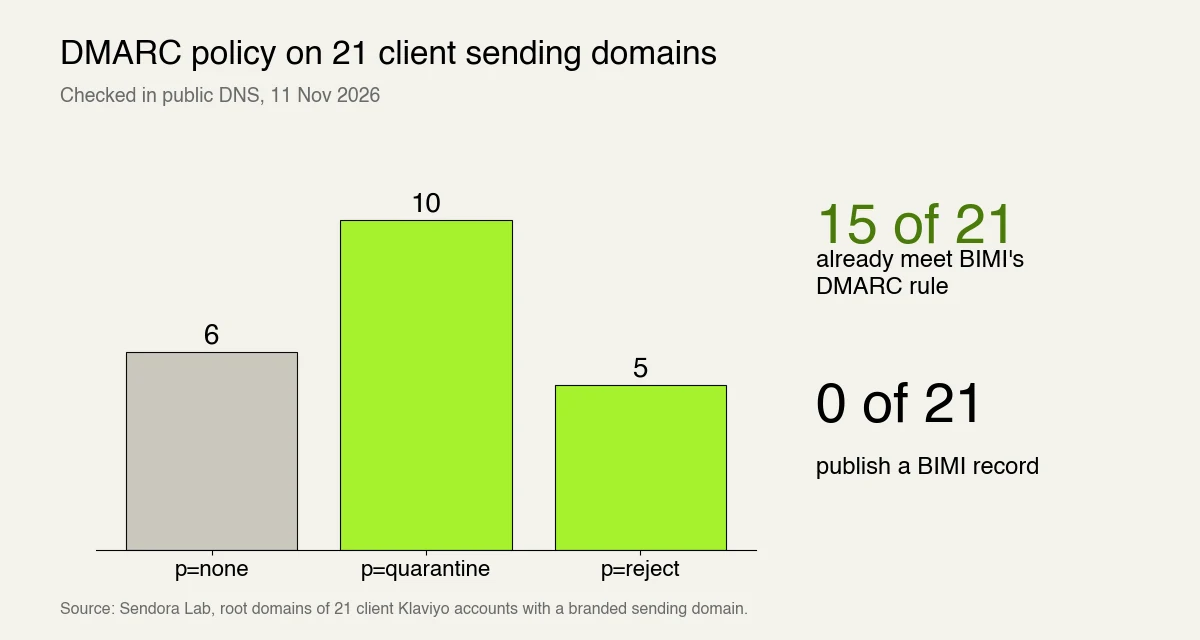
For the 15, BIMI is mostly a logo file, a certificate and one DNS record. For the six on p=none, the work is DMARC first: read the DMARC reports, make sure every tool that sends as your domain (Shopify, your helpdesk, Google Workspace, invoicing software) passes, then tighten the policy. Moving to quarantine before that check can send your own order confirmations to spam.
How to set up BIMI for Klaviyo, step by step
Do it in this order, because each step depends on the one before. Expect the certificate to take the longest.
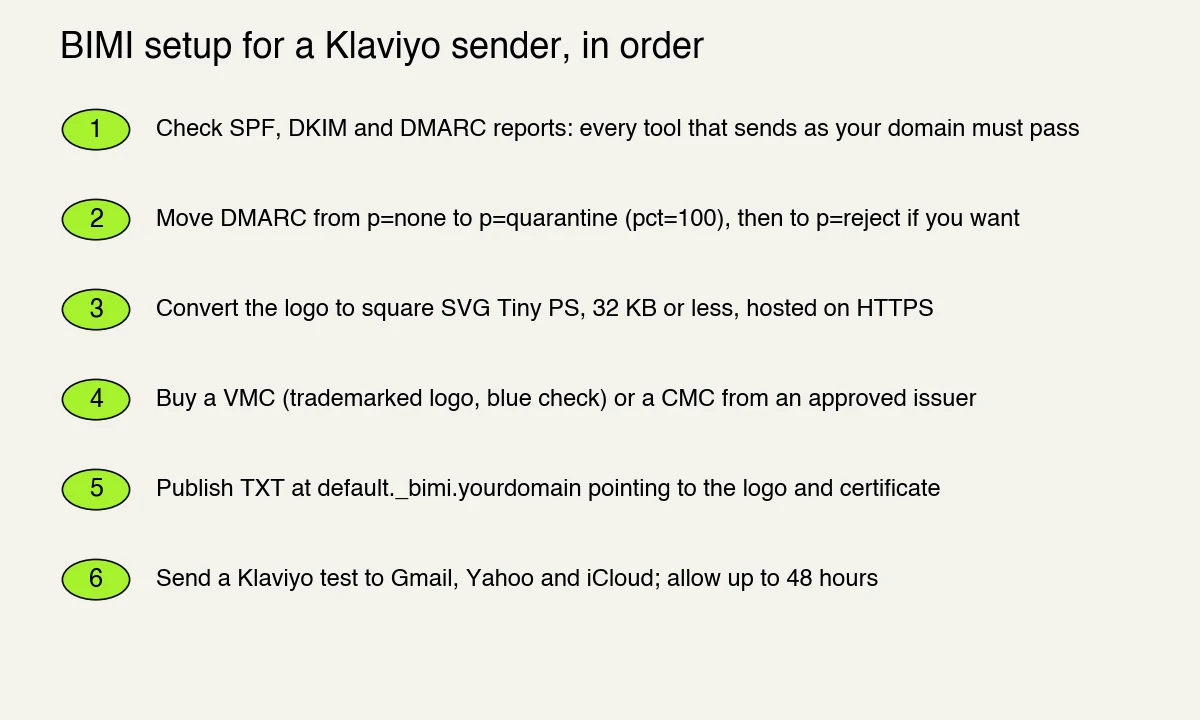
- Confirm your Klaviyo sending domain is verified and active. It should sit on the same root domain as your From address.
- Audit who sends as your domain. Use your DMARC aggregate reports (the rua address) to find every service. Fix SPF or DKIM for any that fail.
- Tighten DMARC. Change p=none to p=quarantine with pct=100. Many teams then move to p=reject once reports stay clean.
- Prepare the logo. Export a square SVG and convert it to SVG Tiny PS. Host it on HTTPS.
- Get a certificate. A VMC or CMC comes from an approved issuer, not from Klaviyo.
- Publish the BIMI record. Add a TXT record at default._bimi.yourdomain.com in the format
v=BIMI1; l=[SVG URL]; a=[PEM URL], per the BIMI Group guide. Google’s example leaves l= empty and points a= to a PEM file that bundles the logo and certificate. - Test. Send a Klaviyo preview or a small campaign to Gmail, Yahoo and iCloud addresses. Google says the logo can take up to 48 hours to appear.
VMC or CMC: which certificate do you need?
Choose a VMC if your logo is a registered trademark and you want Gmail’s blue checkmark; choose a CMC if it isn’t trademarked. Both get your logo into Gmail.
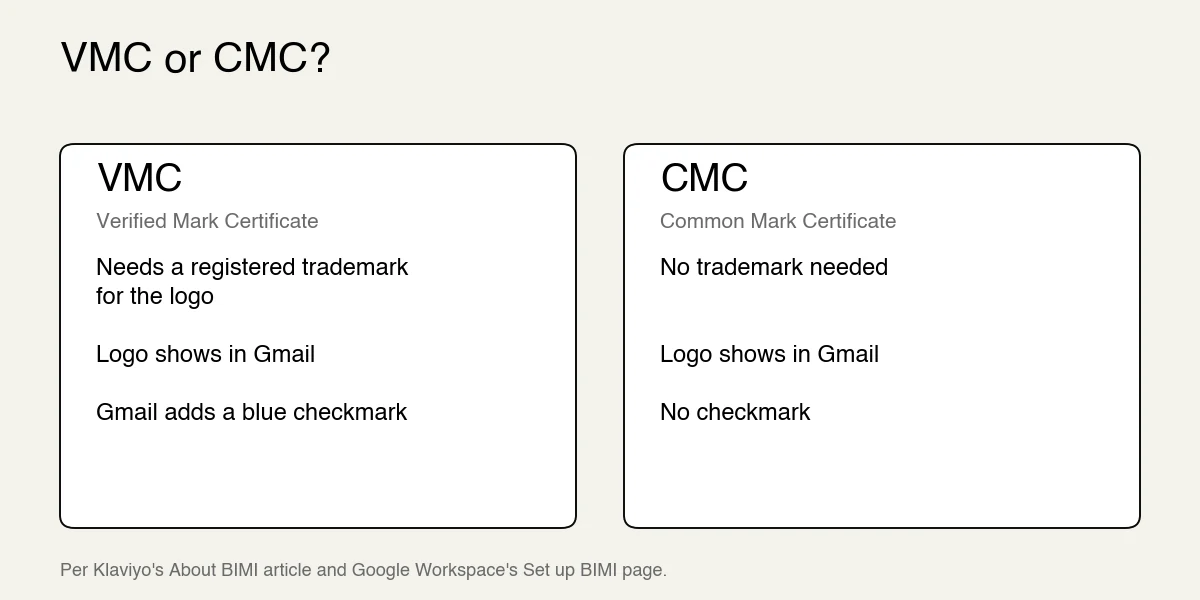
| VMC (Verified Mark Certificate) | CMC (Common Mark Certificate) | |
|---|---|---|
| Trademark needed | Yes | No |
| Logo in Gmail | Yes | Yes |
| Gmail checkmark | Yes | No |
Both certificates are paid, and prices vary by issuer, so check current pricing with the issuer directly. If your trademark application is still pending, a CMC gets the logo showing now.
Conclusion
Klaviyo BIMI comes down to good authentication plus one DNS record. Klaviyo handles the sending domain; you handle DMARC enforcement, the logo file, the certificate and the TXT record. Check your inbox mix first: if half your list reads in Gmail, the logo is worth it, and if most of your list is on Outlook, fix DMARC for the deliverability benefit and treat the logo as a bonus.
Want us to check your DMARC, sending domain and BIMI readiness? Sendora Lab does this as part of our email and retention service, or you can book a free audit.
FAQ
Can I set up BIMI inside Klaviyo?
No. Klaviyo provides the branded sending domain, but the BIMI record, logo and certificate are set up in your DNS and with a certificate issuer. Klaviyo does not issue VMCs or CMCs.
Does BIMI work with DMARC p=none?
No. Google requires p=quarantine or p=reject with pct=100. Klaviyo’s “Add DMARC record” option suggests p=none, which does not qualify.
Do I need a VMC for BIMI?
For Gmail you need either a VMC or a CMC. A VMC needs a trademarked logo and adds Gmail’s checkmark; a CMC does not need a trademark and shows no checkmark.
Will my logo show in Outlook?
No. The BIMI Group lists Microsoft as not supporting BIMI. In one store’s Klaviyo data, 31.80% of delivered emails went to Microsoft inboxes.
How long does it take for the BIMI logo to appear?
Google says up to 48 hours after you add the TXT record. The certificate usually takes longer to get than the DNS work.
Want this set up in your Klaviyo account?
A free 30-minute audit, your account open on screen.
Book a free audit