



Klaviyo Smart Sending stops a person from getting a second marketing email (or SMS, or push) if they already received one on the same channel within a set window: 16 hours for email by default. It protects your list from overload, but it also silently skips flow emails, and Klaviyo does not resend them later. If your flow reports show skipped recipients, Smart Sending is the first thing to check.
Short answer: keep Smart Sending on for campaigns and low-intent flow emails, and turn it off for the few high-intent emails that react to something a shopper just did, such as the first abandoned checkout email. At Sendora Lab we set this per message, check the Skipped tab on every flow email, and use flow filters to stop flows from overlapping.
What Klaviyo Smart Sending does
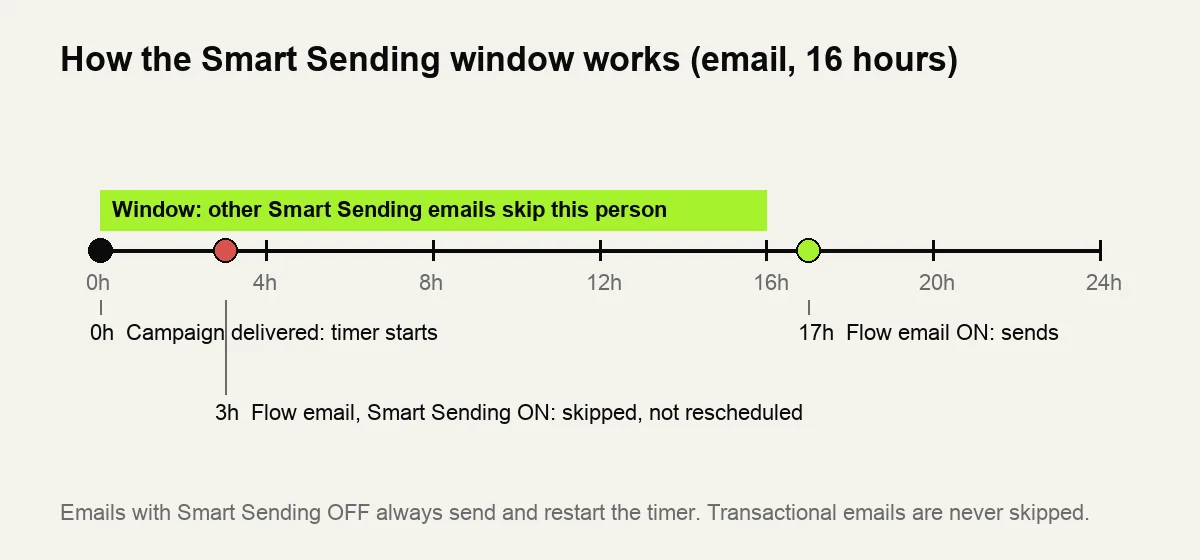
Smart Sending is a per-person frequency cap. When it is on for a message, Klaviyo skips anyone who already received a message on that channel inside the Smart Sending window.
A few terms first. A flow is an automated series of messages triggered by an event, such as a started checkout. A campaign is a one-off send to a list or segment. The Smart Sending window (Klaviyo calls it the Smart Sending period) is the number of hours a profile is protected after a message.
The rules that matter, from Klaviyo’s Smart Sending guide:
- Default windows are 16 hours for email, 24 hours for SMS and 24 hours for push, and each channel has its own timer. An email never blocks an SMS.
- The timer starts for everyone Klaviyo tried to deliver to, even if the email later bounced. People who were skipped do not start a new timer.
- Skipped people are not rescheduled. If a flow email skips someone, they never get that email.
- A message sent with Smart Sending off still reaches people inside the window, and it restarts their timer.
- Transactional messages are never skipped and never block marketing messages.
- For SMS, the check is on the phone number, not the profile.
Smart Sending is on by default for campaigns and can be switched on or off for each email in a flow. For campaigns, you set it on the recipients step when you create a Klaviyo campaign.
Why your flow emails are being skipped
Open the flow email, click View details, then Recipient activity and the Skipped tab. The Type dropdown shows why each person was skipped.
Klaviyo’s article on why a flow message skipped a profile lists the reasons. “Smart Sending” means the person received an email or SMS too recently. The other common ones are “Fails Flow Filters” (the person no longer matches the flow’s filters at send time), “Fails Additional Filters” (a filter on that one message) and “Person Suppressed”.
The pattern we see most in audits: a store sends a campaign in the morning, a shopper clicks it, browses, starts a checkout and leaves. Ten minutes later the abandoned checkout flow fires, and Smart Sending skips the shopper because the campaign arrived a few hours earlier. Your campaigns create exactly the shoppers your abandonment flows are built for, and the default setting hides the flow from them.
If the skipped count is high and the reason is “Fails Flow Filters”, that is a filter problem, not Smart Sending. Our 20-minute Klaviyo audit covers how to check flow filters.
Should you change the Smart Sending window?
Usually not. The 16-hour email window is a sensible floor for most stores, and the better lever is choosing which messages use it.
You change it under your organisation name, then Settings, Email, Sending preferences, Smart Sending Period. SMS and push have their own settings, and SMS can use separate windows for campaigns and flows. Changes are not instant or retroactive: someone who received a campaign before you shortened the window stays protected for the original length.
A longer window means fewer emails per person but more skipped flow messages. A shorter one does the opposite. If you send campaigns several times a week, think about total weekly volume first; our guide to how often to send email covers that decision.
Which flow emails should skip Smart Sending
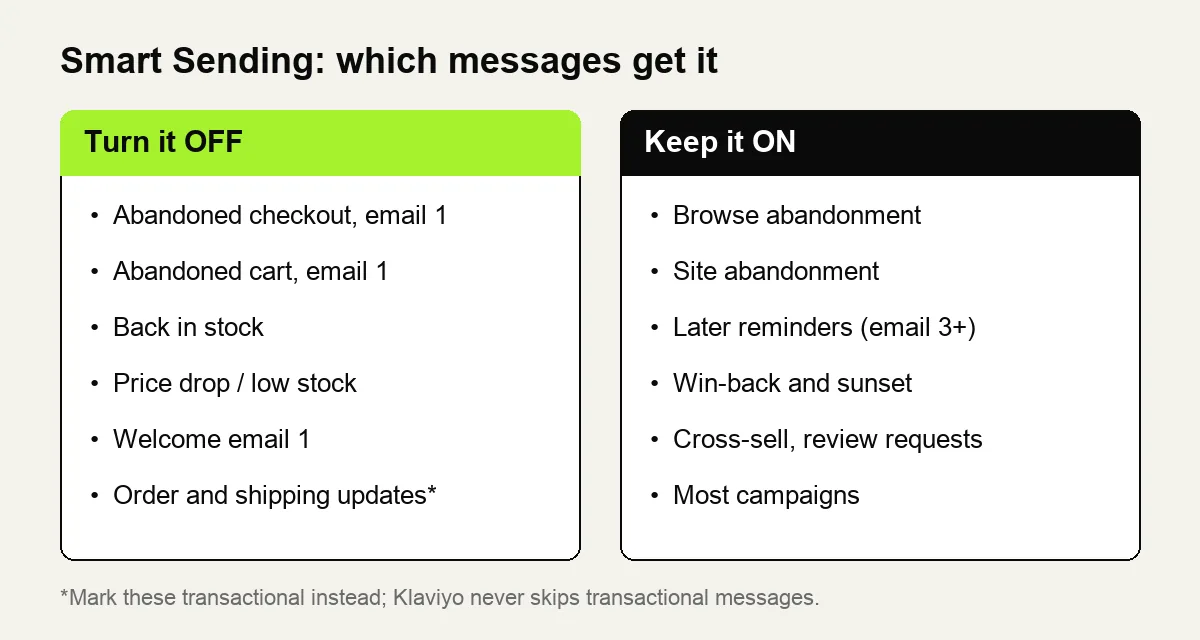
Turn Smart Sending off where the email answers an action the shopper took minutes ago. Leave it on where the email is a gentle nudge that can wait or be missed.
Turn it off
- Abandoned checkout email 1 and abandoned cart email 1.
- Back in stock, price drop and low stock alerts the shopper asked for.
- Welcome email 1, which should arrive while the sign-up is fresh.
Keep it on
- Browse and site abandonment, where intent is lower.
- Third and later reminders in any abandonment series.
- Win-back, sunset, cross-sell, review request and replenishment emails.
Order confirmations and shipping updates should be set up as transactional messages rather than as marketing emails with Smart Sending off. Klaviyo never skips transactional messages.
What a real account does: Smart Sending off, filters on
One store we work with, a Dutch-language fashion and lifestyle store, has Smart Sending switched off almost everywhere and controls overlap with flow filters instead. In Sendora Lab’s read-only review of its Klaviyo account (October 2026), all 57 email campaigns sent between 3 April and 19 October 2026 had Smart Sending off, as did all 22 emails in its abandoned checkout, abandoned cart and browse abandonment flows.
Overlap is handled by the flows themselves. The abandoned checkout flow drops anyone who has placed an order since entering it. The added-to-cart and browse flows drop anyone who has started a checkout since entering, so a shopper moves to the stronger flow instead of getting both.
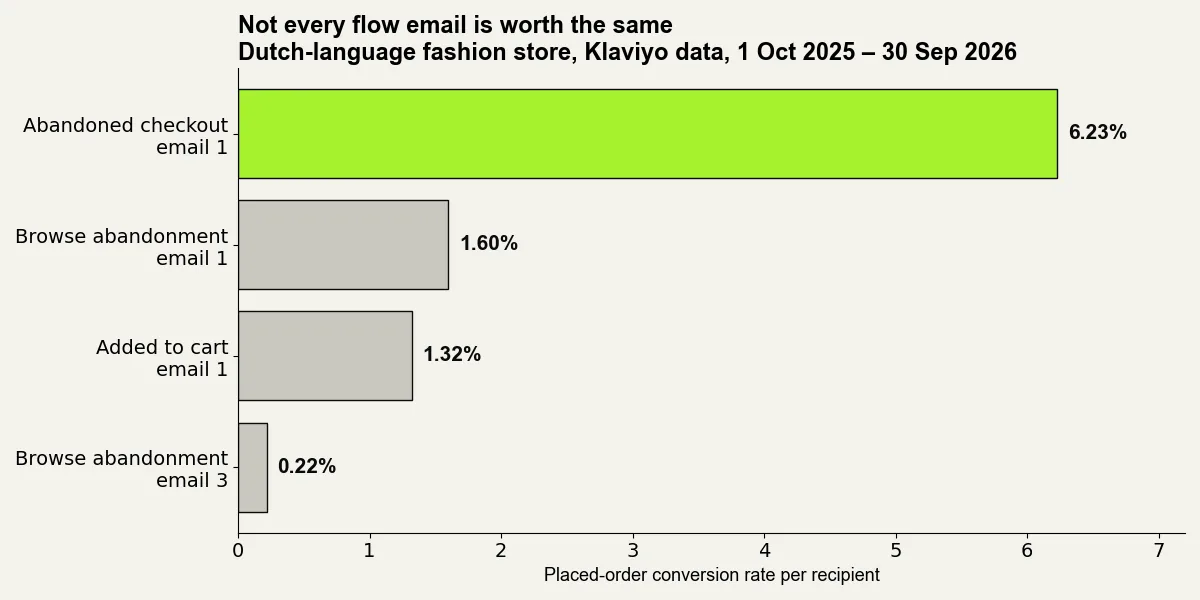
The data shows why the first checkout email deserves to always send. In the store’s Klaviyo flow report for 1 October 2025 to 30 September 2026, the designed version of abandoned checkout email 1 (sent 20 minutes after the checkout) reached 3,099 recipients with a 6.23% placed-order conversion rate. Browse abandonment email 1 converted at 1.60% across 17,727 recipients, added-to-cart email 1 at 1.32% across 3,811, and browse abandonment email 3 at 0.22% across 13,567. Conversion rate here is the share of recipients who placed an order that Klaviyo attributed to the email.
There is a cost. The same checkout email had a 3.62% unsubscribe rate, against 1.31% for browse email 3. Sending without a cap reaches more buyers but also more people who feel crowded, which is why we keep the cap on low-intent emails. For the timing and filters around that first email, see our Klaviyo abandoned cart flow guide.
A Smart Sending policy you can copy
Write the decision down once so every new flow and campaign follows it.
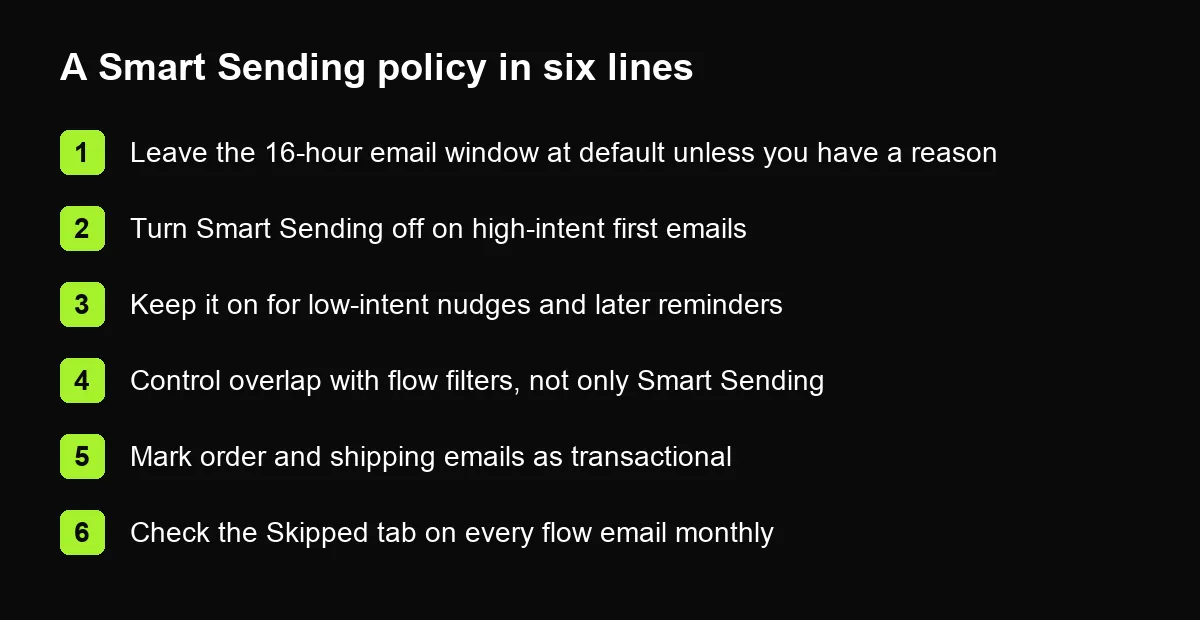
- Leave the 16-hour email window at the default unless you have a clear reason.
- Turn Smart Sending off on high-intent first emails: checkout, cart, back in stock, welcome.
- Keep it on for low-intent nudges and every later reminder.
- Stop flows overlapping with flow filters, such as “has not started checkout since starting this flow”.
- Set order and shipping emails up as transactional.
- Once a month, open the Skipped tab on each live flow email and check the reasons.
If unsubscribes or spam complaints climb after switching Smart Sending off, tighten list hygiene before you turn the cap back on. Our sunset policy guide explains how.
Conclusion
Klaviyo Smart Sending is a good default with one blind spot: it treats a campaign and your highest-intent flow email as equals. Keep it on for most messages, switch it off for the emails that follow a fresh action, and let flow filters handle overlap. If you want us to check your Smart Sending setup and skipped flow emails, look at our Klaviyo email marketing services or book a free audit. One flow where Smart Sending should always be off is the Klaviyo back in stock flow. For the filters that stop flows colliding in the first place, read our Klaviyo flow overlap guide.
FAQ
What is the default Klaviyo Smart Sending window?
16 hours for email, 24 hours for SMS and 24 hours for push. Each channel has its own timer, and you can change the windows in your account’s sending preferences.
Does Klaviyo resend a flow email that Smart Sending skipped?
No. Klaviyo does not reschedule skipped recipients, so a skipped flow email is never delivered to that person.
Does Smart Sending affect transactional emails?
No. Transactional messages are never skipped, and receiving one does not cause a person to be skipped for marketing messages.
How do I see why a flow email skipped someone?
Open the flow email, click View details, go to Recipient activity, open the Skipped tab and filter by reason with the Type dropdown.
Should I turn Smart Sending off for every flow?
No. Turn it off for high-intent first emails such as abandoned checkout and back in stock, and keep it on for browse abandonment, later reminders and win-back emails.
Want this set up in your Klaviyo account?
A free 30-minute audit, your account open on screen.
Book a free audit