



SPF, DKIM and DMARC are three DNS records that let inboxes check an email really comes from the brand in the From line. Gmail and Yahoo now require all three from anyone who sends in bulk, so a store without them risks bounces and the spam folder. This guide explains each one in plain English, what the rules ask for, how to set them up for Klaviyo, and what happened when one store got the alignment wrong.
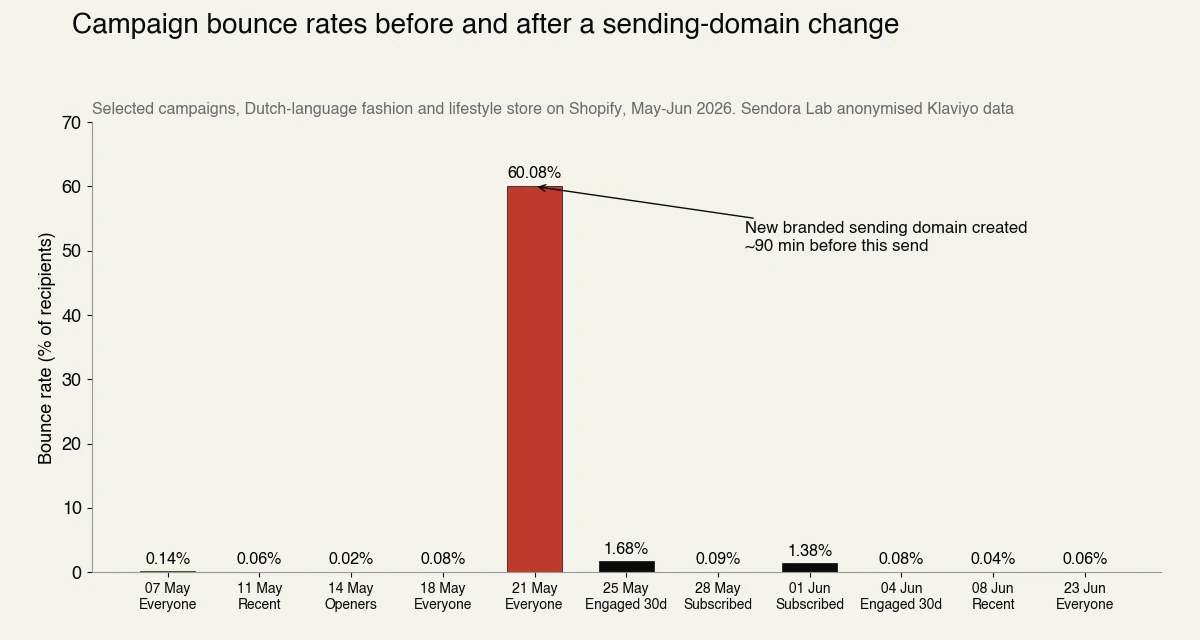
Short answer: SPF says which servers may send for a domain, DKIM signs each email so it can’t be forged or changed, and DMARC checks that at least one of them passes on the same domain as your visible From address, then tells inboxes what to do if it doesn’t. In Klaviyo you get all three by setting up a branded sending domain and adding a DMARC record (p=none is enough to start). The part that breaks most often is alignment: in Sendora Lab’s anonymised data, a campaign that Microsoft rejected with “Spf= Pass, Dkim= Pass, DMARC= Fail” had 60.08% of its emails bounce.
What SPF, DKIM and DMARC each do
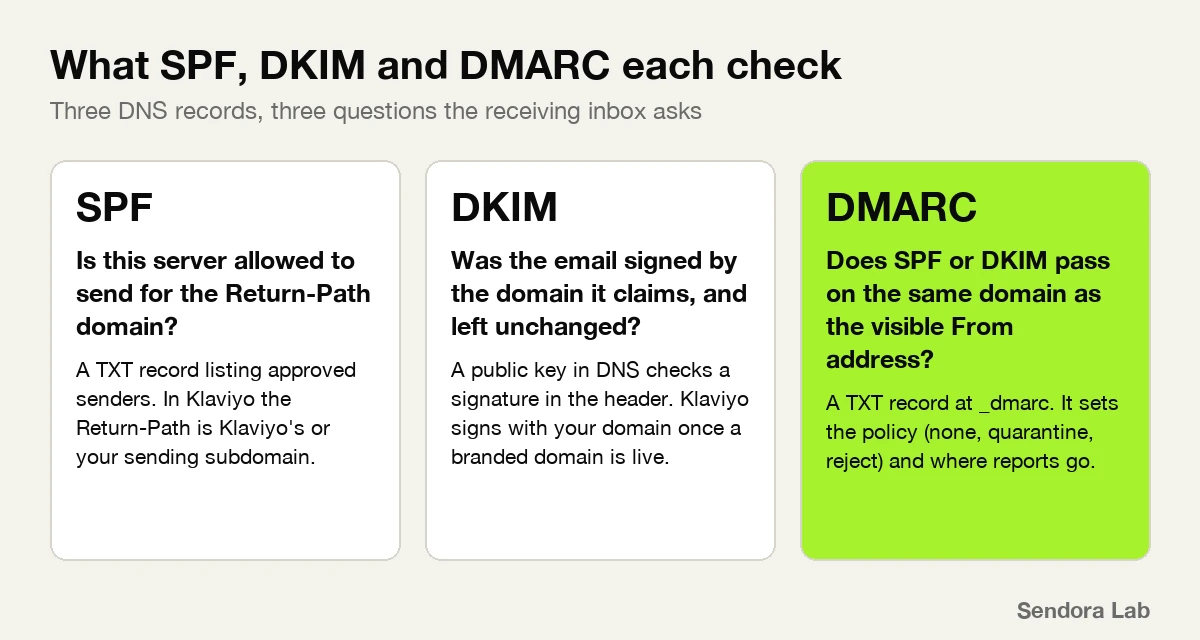
Each record answers one question a receiving server asks about your email. None of them is visible to your subscribers; they live in your domain’s DNS, the public settings that say where your website and email go.
- SPF (Sender Policy Framework) is a TXT record that lists the servers allowed to send for a domain. It is checked against the Return-Path, the hidden bounce address, not the From address people see.
- DKIM (DomainKeys Identified Mail) adds a cryptographic signature to every email. The receiving server uses a public key in your DNS to confirm the signature and that the content wasn’t changed on the way.
- DMARC (Domain-based Message Authentication, Reporting and Conformance) is a TXT record at
_dmarc.yourdomain.com. It asks for SPF or DKIM to pass on a domain that matches your From address, sets a policy for mail that fails, and names where reports should go.
That matching is called alignment, and it is the idea most explanations skip. A message can pass SPF and DKIM on someone else’s domain, for example your email platform’s, and still fail DMARC because neither check passed for your own domain. According to dmarc.org’s overview, DMARC builds on SPF and DKIM and lets a domain owner ask receivers to do nothing, quarantine or reject mail that doesn’t align.
What Gmail and Yahoo require from senders
Since February 2024, Gmail and Yahoo treat authentication as an entry ticket. Small senders need SPF or DKIM; bulk senders need SPF, DKIM and a DMARC record, with the From domain aligned.
| Requirement | All senders | Bulk senders |
|---|---|---|
| Authentication | SPF or DKIM | SPF and DKIM |
| DMARC record | Not required | Required; policy can be p=none |
| Alignment | Not required | From domain aligned with SPF or DKIM |
| Unsubscribe | Not in Google’s all-sender list | One-click unsubscribe plus a visible link |
| Spam complaint rate | Below 0.3% | Below 0.3% (Google suggests staying under 0.10%) |
Google’s email sender guidelines set the stricter rules for senders of more than 5,000 messages a day to Gmail accounts, and Klaviyo notes that all your traffic counts towards that, transactional email included. Yahoo’s sender best practices set the same p=none minimum, accept relaxed alignment, and ask senders to honour unsubscribes within 2 days. A store with a list of a few thousand can cross 5,000 on a single campaign day, so it is safer to set everything up from the start.
Why SPF and DKIM can pass while DMARC fails: real data
DMARC fails when SPF and DKIM pass, but not for the domain in your From address. That is exactly what happened to a Dutch-language fashion and lifestyle store on Shopify in Sendora Lab’s anonymised Klaviyo data.
On 18 May 2026 the store sent a campaign to its full list of 26,432 recipients; 20 bounced (0.08%). On the morning of 21 May a new branded sending domain was created in the account, and about 90 minutes later a campaign went to the same list. This time 15,520 of 25,831 recipients bounced: a bounce rate of 60.08%, with only 10,311 emails delivered. That campaign used a From address on a second domain the brand owns; the next campaign, on 25 May, sent from the store’s main domain.
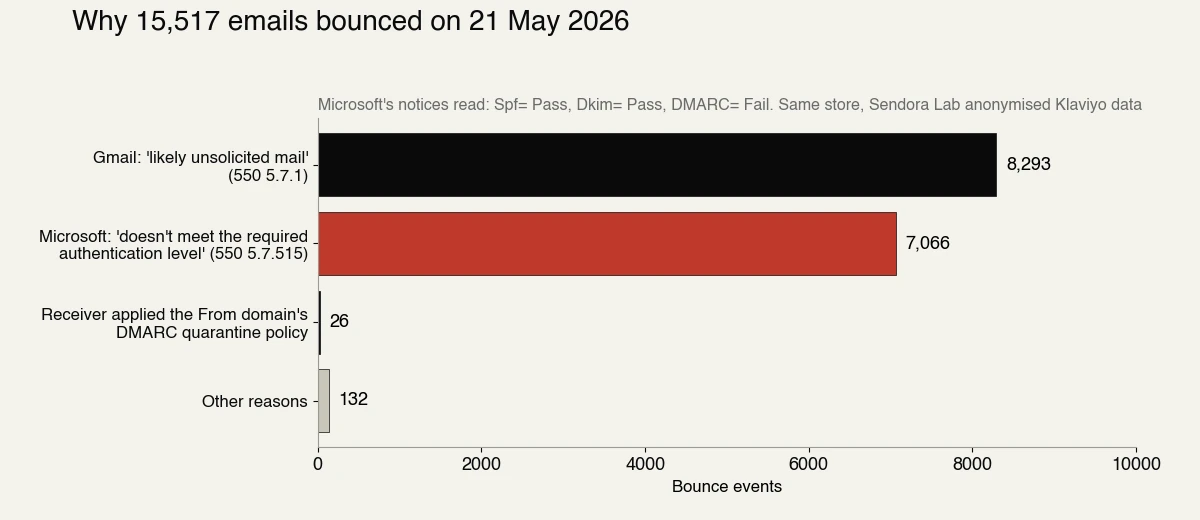
The bounce messages explain why. Of the 15,517 bounce events Klaviyo logged that day, 7,066 came from Microsoft with code 550 5.7.515, which reads that the sending domain “doesn’t meet the required authentication level”, followed by “Spf= Pass, Dkim= Pass, DMARC= Fail”. Another 8,293 came from Gmail, which blocked the email as “likely unsolicited mail”. A further 26 receivers said the sender’s own policy told them to quarantine it, which suggests the From domain already had a strict DMARC policy.
Bounces were back to 1.68% and 1.38% on two of the next five campaigns and under 0.1% on the rest. Two lessons follow. First, a pass on SPF and DKIM means nothing for DMARC unless the domain matches your From address. Second, Klaviyo’s own setup guide says to pause all sending before you activate your first marketing sending domain. Before any domain change, check the From address of every scheduled campaign and live flow. Our Shopify email deliverability guide covers how to read bounce rates like these.
How to set up SPF, DKIM and DMARC for Klaviyo
In Klaviyo you don’t write SPF or DKIM records by hand. You set up a branded sending domain, add the DNS records Klaviyo gives you, and switch on the DMARC record if your domain has none.
By default, Klaviyo sends from a shared domain, which shows as “via klaviyomail.com” next to your sender name. Klaviyo’s article on the domains that affect deliverability explains that SPF on the Return-Path always passes with Klaviyo and that you can only DKIM-sign with a domain you own. So the shared domain gives you SPF and DKIM passes, but not on your domain, which means no DMARC alignment. A branded sending domain adds a DKIM signature on your own domain, and that signature is what aligns.
- Pause sending if this is your first marketing sending domain. Klaviyo asks for this in its branded sending domain setup guide.
- Go to your company name (bottom left) → Settings → Domains → Add domain, and choose the send type (marketing first).
- Confirm the root domain and pick an unused subdomain such as
send.yourstore.com. - Choose the routing. Dynamic delegates the subdomain to Klaviyo with 4 NS records; static uses CNAME records, including two DKIM records.
- Turn on Add DMARC record if your domain has none. It adds
v=DMARC1; p=none;, a monitoring-only policy. - Add the records at your DNS host, or let Klaviyo’s automatic setup do it. Then Verify and Activate. DNS changes can take up to 48 hours.
- Use your root domain in every From address (for example
hello@yourstore.com), not the sending subdomain, and check flows as well as campaigns.
Only Owner, Admin, Manager and Campaign Coordinator roles can do this. Klaviyo also recommends warming new accounts and newly registered domains over 2 to 4 weeks, which we leave for a separate guide.
Where stores stall
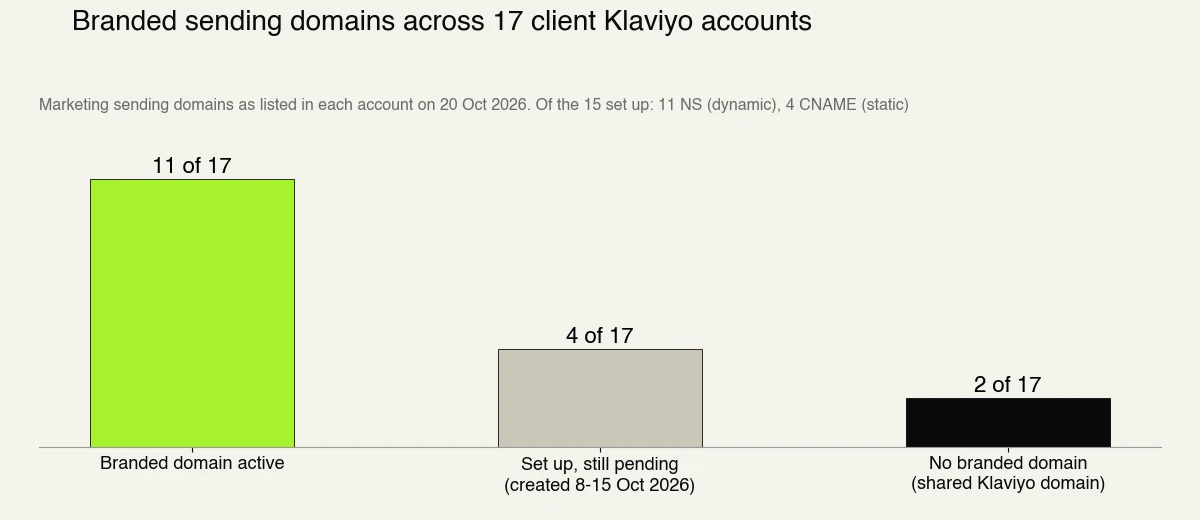
Starting the setup is easy; finishing it is where accounts stall. Across 17 client Klaviyo accounts we checked on 20 Oct 2026, 11 had an active branded sending domain, 4 had one set up between 8 and 15 Oct 2026 that was still pending verification, and 2 had none and still sent from the shared domain. A pending domain usually means the DNS records haven’t been added or picked up yet, and until it is active the account keeps sending without alignment.
Moving your DMARC policy from p=none to reject
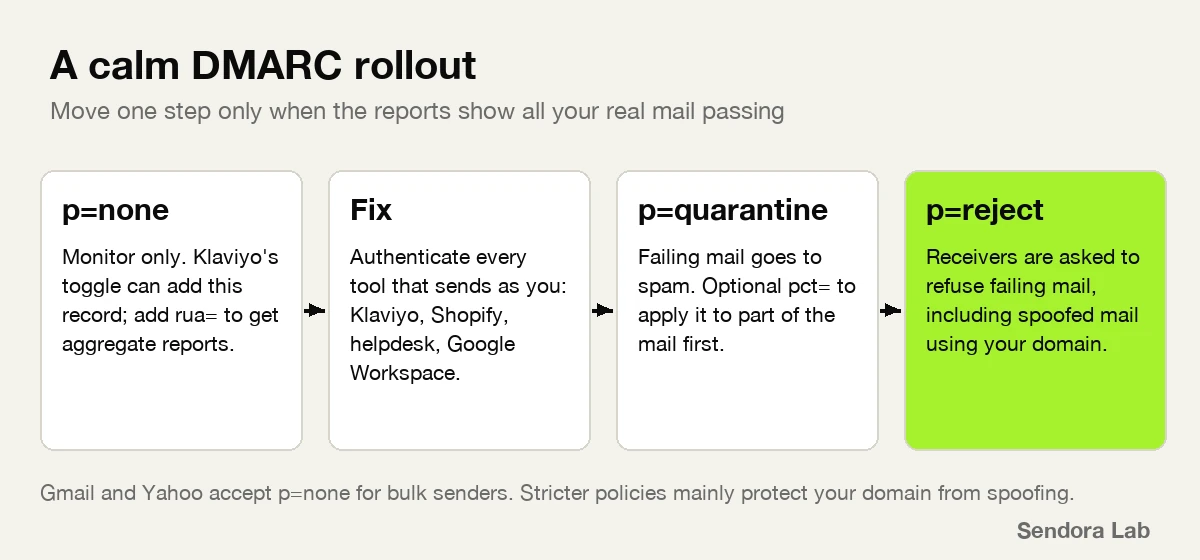
Start at p=none and stay there until reports show all your real email passing. Then move to quarantine and, if you want full protection against spoofing, to reject.
The p= tag sets the policy. none only monitors, quarantine asks receivers to treat failing mail as suspicious (usually the spam folder) and reject asks them to refuse it. Add rua=mailto: with an address you check, or a DMARC reporting tool, to receive aggregate reports. The optional pct= tag applies a stricter policy to part of the mail first. Klaviyo’s DMARC toggle adds p=none without a reporting address, so tightening the policy sits with you or your IT contact.
Before tightening, list every tool that sends as your domain: Klaviyo, Shopify notifications, your helpdesk, review apps and your own mailbox provider. Each needs to pass SPF or DKIM on your domain. The store above shows the cost of a strict policy with one sender out of line: receivers quarantined or refused mail that its own customers had asked for.
How to check your setup in five minutes
Send yourself a campaign preview to a Gmail address and read the headers. In Gmail, open the email, choose Show original, and look for SPF, DKIM and DMARC each marked PASS, with your own domain next to DKIM.
- If DKIM shows a Klaviyo domain and DMARC fails or is missing, your branded sending domain isn’t active.
- If DMARC fails while SPF and DKIM pass, compare the From domain with the DKIM domain. They must match (a subdomain of the same root counts under relaxed alignment).
- In Klaviyo, open a campaign’s bounce details after each send. Messages mentioning authentication, DMARC or 5.7.515 point to alignment, not to bad addresses.
Authentication is the entry ticket, not the whole game. Sending to people who want your email, through an engaged segment and a sunset policy, keeps complaint rates under Google’s limits. Our Klaviyo audit checklist puts all of these checks in one place.
Conclusion
SPF, DKIM and DMARC take an hour to set up in Klaviyo and protect every email you send after that. Set up a branded sending domain with sending paused, add a DMARC record at p=none, put your root domain in every From address, and check the headers before you send. In our data, one send that failed alignment bounced six in ten emails. If you’d like us to check your setup, see our Klaviyo email marketing service or book a free audit. Once DMARC is at quarantine or reject, you can add BIMI to show your logo in the inbox.
FAQ
Do I need SPF, DKIM and DMARC to send with Klaviyo?
Klaviyo doesn’t require DMARC to send marketing email, but Gmail and Yahoo require SPF, DKIM and a DMARC record from bulk senders. A branded sending domain plus a DMARC record at p=none meets those rules.
What DMARC policy should a Shopify store start with?
Start with p=none and a reporting address. Move to quarantine and then reject only when reports show every tool that sends as your domain is passing.
Why does DMARC fail when SPF and DKIM pass?
Because DMARC needs SPF or DKIM to pass on the same domain as your visible From address. Passing on your email platform’s domain doesn’t count.
What does bounce code 5.7.515 mean?
It is Microsoft’s rejection for a sending domain that “doesn’t meet the required authentication level”. In our data it came with SPF and DKIM passing and DMARC failing.
Want this set up in your Klaviyo account?
A free 30-minute audit, your account open on screen.
Book a free audit