



Klaviyo vs Mailchimp comes down to what your store sells through email. Mailchimp is a broad email tool that suits many kinds of business. Klaviyo is built around ecommerce data, so for a Shopify store that wants revenue from automated flows it is usually the stronger fit. Below is how they differ on store data, pricing and switching, with numbers from one real store.
Short answer: pick Klaviyo if you sell on Shopify and want most email revenue to come from flows triggered by what shoppers do on your site. Pick Mailchimp if email is mostly newsletters, you are not an online store, or you want one simple tool for a small list. At Sendora Lab we build on Klaviyo because the store data and flow triggers are where the money is: in one footwear store, 61% of flow revenue came from flows triggered by on-site behaviour.
Klaviyo vs Mailchimp: the main differences
Both tools send campaigns, run automations and connect to Shopify. The difference is depth: Klaviyo is designed around store events and customer profiles, while Mailchimp covers more types of business with a simpler setup.
A campaign is a one-off email sent to a list or segment. A flow (Mailchimp calls these marketing automation flows) is a series of messages that sends on its own when something happens, such as a shopper adding an item to the cart.
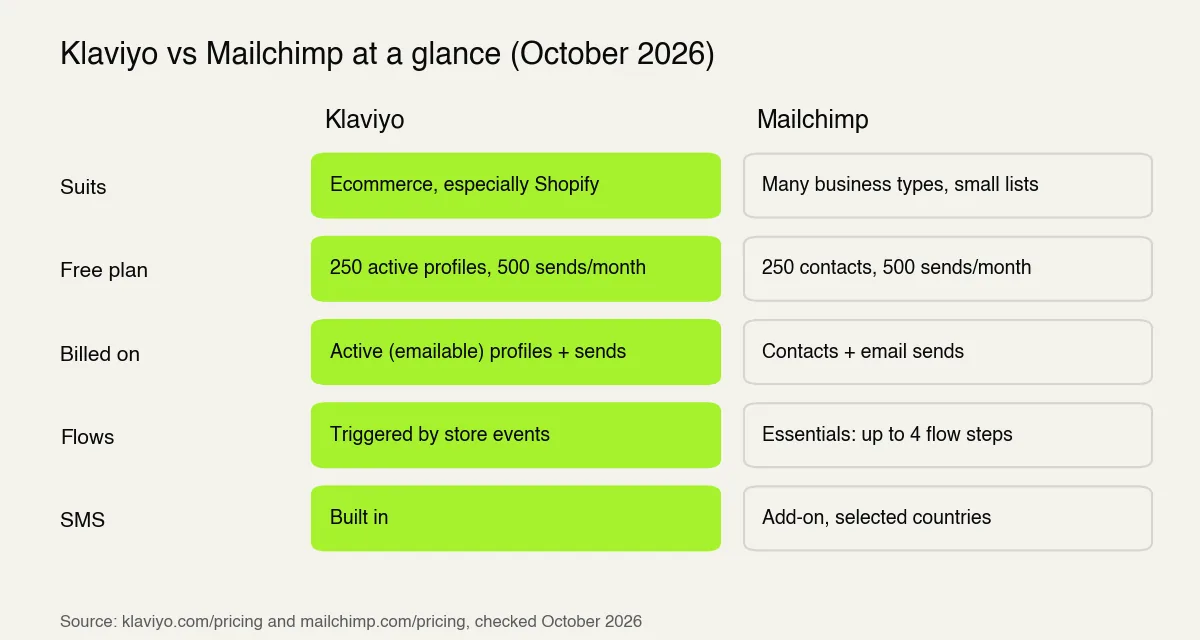
| Klaviyo | Mailchimp | |
|---|---|---|
| Best suited to | Ecommerce brands, especially on Shopify | Many business types, newsletters, small lists |
| Free plan (as of October 2026) | Up to 250 active profiles, 500 email sends a month | 250 contacts, up to 500 sends a month (250 a day) |
| What you pay for | Active profiles (people you can email) and sends | Contacts and email sends, in plan tiers |
| Automations | Flows on store events and profile data | Flows; Essentials allows up to 4 flow steps, Standard and Premium up to 200 flows |
| SMS | Built in, alongside email | Add-on from Essentials, in selected countries, after an application |
Plan details come from the official Klaviyo pricing page and Mailchimp pricing page, checked in October 2026. Paid prices depend on list size, region and promotions, so check both pages for your own numbers rather than trusting a starting price in any article, this one included.
Store data and flows: where the gap shows for Shopify brands
For a Shopify store, the deciding question is how much revenue comes from flows that fire on shopper behaviour, and how much detail each tool has when they fire. That is where Klaviyo is strongest.
Klaviyo records what shoppers do on a Shopify store, such as Viewed Product, Added to Cart and Checkout Started, on each customer profile, and any of these events can start a flow. Our guide to Klaviyo integrations for Shopify covers how to check those events are arriving. Mailchimp’s own Shopify integration page also lists abandoned cart reminders, product-specific emails and segments built from Shopify customer events, so this is a question of depth and control, not of one tool having automations and the other not.
Here is why it matters. In Sendora Lab’s anonymised Klaviyo data from a footwear store on Shopify (1 June–22 October 2026, email flows, orders attributed by Klaviyo), flows were split by what started them:
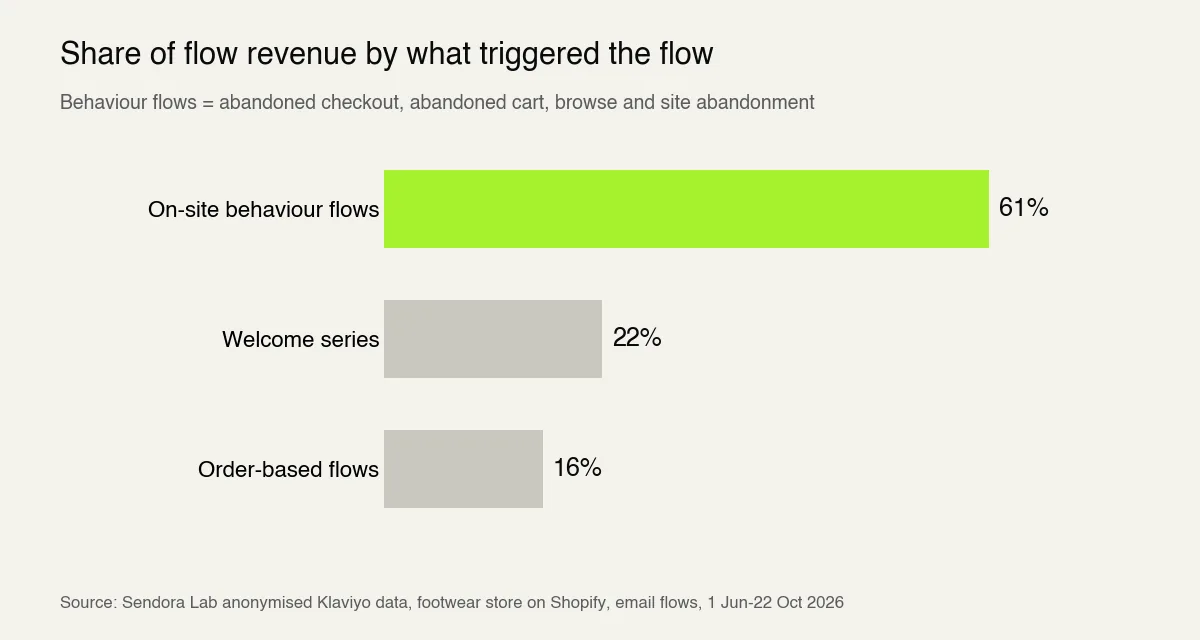
- On-site behaviour flows (abandoned checkout, abandoned cart, browse abandonment, site abandonment): 61% of flow revenue and 82 of the 143 attributed orders.
- Welcome series (triggered by joining a list): 22% of flow revenue.
- Order-based flows (order confirmation, review and cross-sell): 16% of flow revenue.
The behaviour flows did this even though the browse and site abandonment flows only went live in late September. Attributed revenue means orders Klaviyo credits to an email under the account’s attribution settings, so treat it as a guide, not exact profit. If you want to see how the strongest of these flows are built, read abandoned checkout vs abandoned cart.
Whichever tool you test, run the same check: can it trigger on product viewed, added to cart and checkout started, show the product in the email, and stop the flow when the order comes in? If the answer is yes for your store, the gap narrows.
Pricing: how each tool counts your list
Both charge more as your list grows, but they count it differently, and that changes the bill more than the starting price does.
Klaviyo bills on active profiles. Its help article on how Klaviyo bills customers defines an active profile as any profile that can be emailed, whatever its consent status, which includes shoppers who gave an email at checkout without subscribing. Email-suppressed profiles drop out of the count once suppression is processed. Mailchimp’s pricing page says paid plans are billed on contacts and email sends, with overage charges if you go past your plan’s limits.
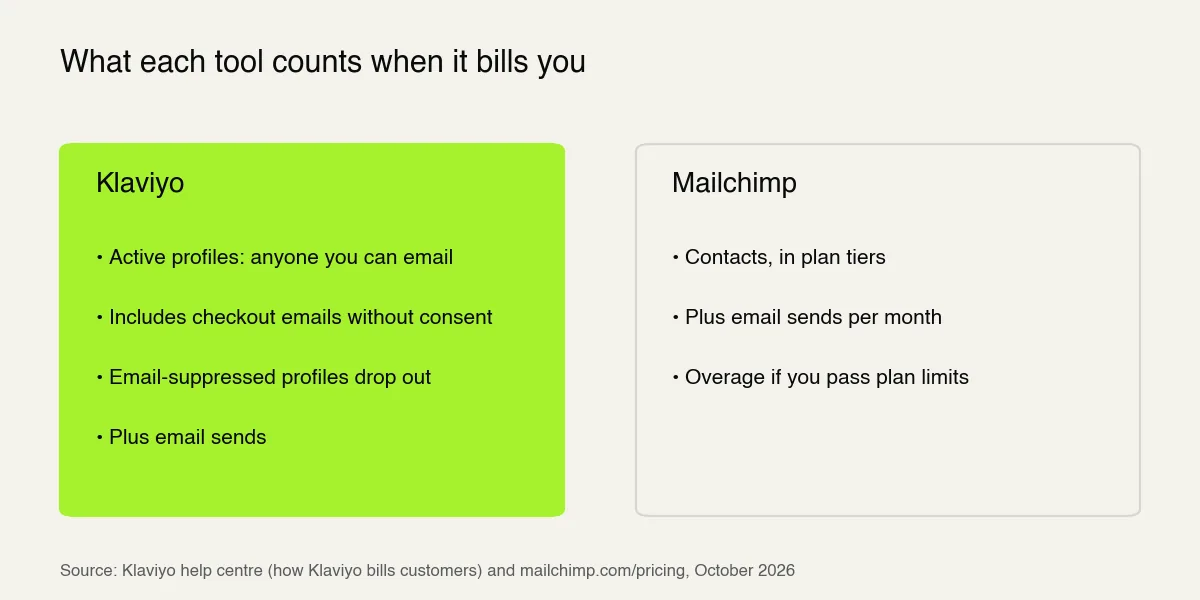
In practice, the cheapest list is a clean one. On Klaviyo, suppressing people who never open keeps the active profile count down, which is the job of a sunset policy. On either tool, compare the price at the list size you expect in a year, not today.
How to switch from Mailchimp to Klaviyo
Switching takes four steps, and the order matters. Klaviyo’s guide on how to migrate from Mailchimp sets them out:
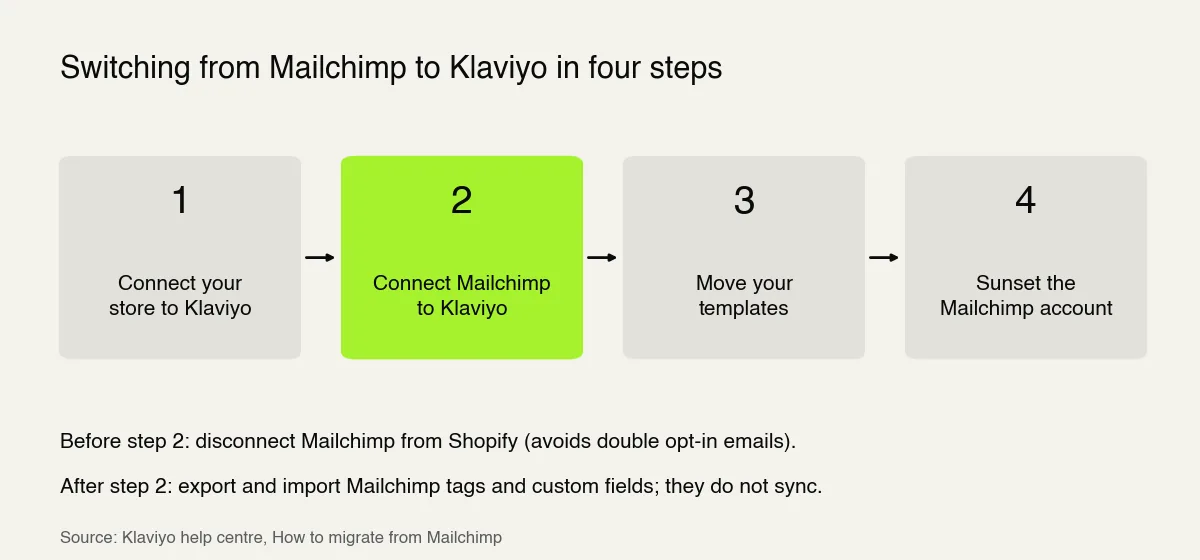
- Connect your store to Klaviyo. Do this first so order and browsing history land on profiles before anything else.
- Connect Mailchimp to Klaviyo. The integration brings over subscribers (including unsubscribes and cleaned contacts), audiences as Klaviyo lists, email receives, clicks and opens, and Mailchimp ratings.
- Move your templates. Rebuild your best emails in Klaviyo rather than copying every old design.
- Sunset the Mailchimp account once flows and forms are running in Klaviyo.
Two traps catch most stores. First, disconnect Mailchimp from Shopify before you connect it to Klaviyo; Klaviyo warns that leaving the old connection in place can send double opt-in emails to your existing list. Second, Mailchimp tags and custom audience fields do not sync, so export and import them yourself or your segments will come over empty.
We also rebuild sign-up forms in Klaviyo and turn on flows one at a time, starting with abandoned checkout, so each one can be checked before the next goes live.
Klaviyo or Mailchimp: which should you choose?
For a Shopify brand that wants email to earn through automated flows, Klaviyo is usually the better choice in the Klaviyo vs Mailchimp decision, because it works from the store events that drove most flow revenue in the data above. Mailchimp is a sensible pick for newsletters, service businesses and small lists where simplicity matters more than store data. If you are moving across, follow the four steps in order and fix tags and the Shopify connection first.
If you would like a second pair of eyes before you switch, see how we run Klaviyo email marketing for Shopify brands. Still comparing tools? Read Klaviyo vs Omnisend. For Shopify Messaging and Omnisend too, read email marketing tools for Shopify compared. Starting from Shopify’s own app instead? See Shopify Email vs Klaviyo.
FAQ
Is Klaviyo better than Mailchimp for Shopify?
For most Shopify stores that rely on automated flows, yes. Klaviyo records shopper events such as Viewed Product, Added to Cart and Checkout Started on each profile and can start flows from them; in one footwear store, flows triggered by on-site behaviour earned 61% of flow revenue.
Do Klaviyo and Mailchimp both have free plans?
Yes, as of October 2026. Klaviyo’s free plan covers up to 250 active profiles and 500 email sends a month; Mailchimp’s covers 250 contacts and up to 500 sends a month, with a cap of 250 a day.
Can I move my Mailchimp subscribers to Klaviyo?
Yes. Klaviyo’s Mailchimp integration imports subscribers, unsubscribes and cleaned contacts, audiences as lists, and email engagement. Mailchimp tags and custom audience fields do not sync and need a manual export and import.
Does Mailchimp have SMS?
Yes, as an add-on for the Essentials plan or higher, in selected countries, and only after Mailchimp approves an application. In Klaviyo, SMS sits in the same platform as email.
Why should I disconnect Mailchimp from Shopify before migrating?
Klaviyo warns that leaving the old Mailchimp–Shopify connection in place while integrating Mailchimp with Klaviyo can send double opt-in emails to your existing subscribers.
Want this set up in your Klaviyo account?
A free 30-minute audit, your account open on screen.
Book a free audit