



A Klaviyo abandoned site flow emails known visitors who came to your store but left without opening a product, adding to cart or starting checkout. It is triggered by the Active on Site metric and usually sends one or two short emails. It can bring back a few extra orders, but it also annoys people faster than any other abandonment flow, so it needs tight filters.
Short answer: Build it on the Active on Site trigger, filter out anyone who viewed a product, added to cart, started checkout or ordered since the flow began, wait 15–30 minutes, and send one helpful email. In Sendora Lab’s data from a footwear store on Shopify, the flow converted well in its first month but lost subscribers more than four times as fast as the browse abandonment flow, so treat it as a flow to switch on with care, not by default.
What a Klaviyo abandoned site flow is and who it reaches
An abandoned site flow is the shallowest of the abandonment flows: it catches people who visited but did nothing you can act on. A flow in Klaviyo is an automated series of messages that starts when someone does something, such as visiting the site.
The trigger is the Active on Site metric. Klaviyo records it when an identified browser starts a session on your store; per Klaviyo’s web tracking guide, a session ends after 60 minutes without activity. “Identified” matters: the browser must have clicked through a Klaviyo email or SMS before, or submitted a Klaviyo form. Anonymous first-time visitors never enter this flow.
That makes the audience mostly subscribers and past customers who came back on their own or from a campaign. They already know you. That’s why the email should help them find something, not introduce the brand.
How it fits with the other abandonment flows
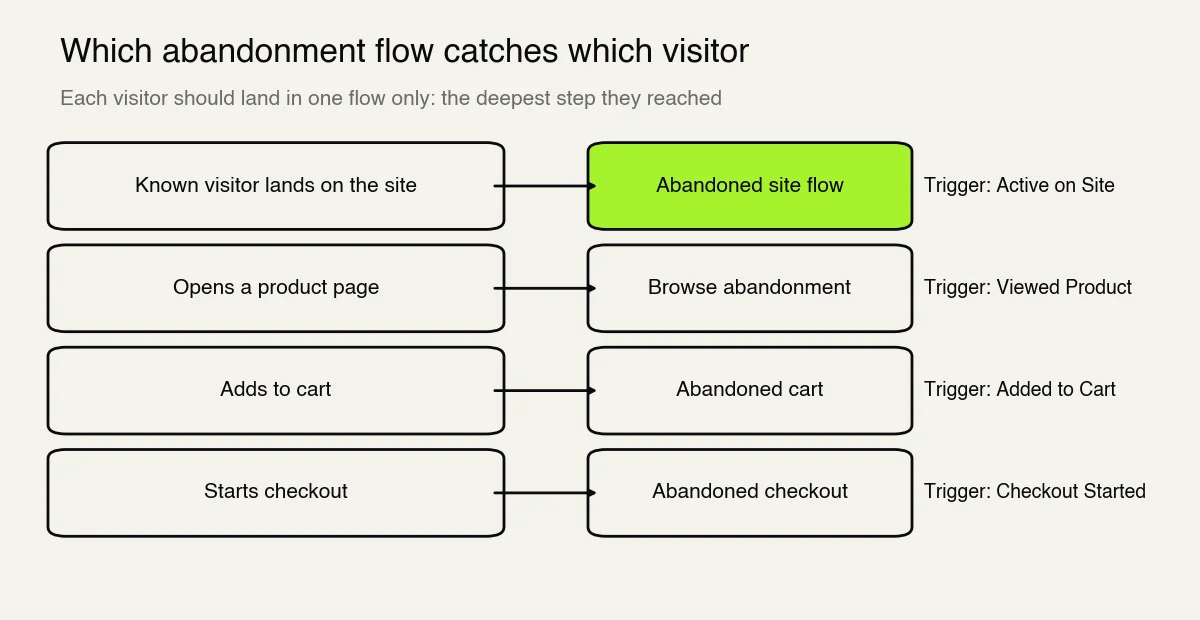
Each visitor should land in one flow only, the one for the deepest step they reached. Someone who opens a product page belongs in your browse abandonment flow. Someone who adds to cart or starts checkout belongs in the flows covered in abandoned checkout vs abandoned cart. The site flow is only for what is left.
How to set up the abandoned site flow in Klaviyo
Create a new flow from scratch, choose Active on Site as the trigger, add the exclusion filters below, then a short delay and one email. Klaviyo’s own setup guide uses the same trigger and a 15-minute first delay.
Flow filters
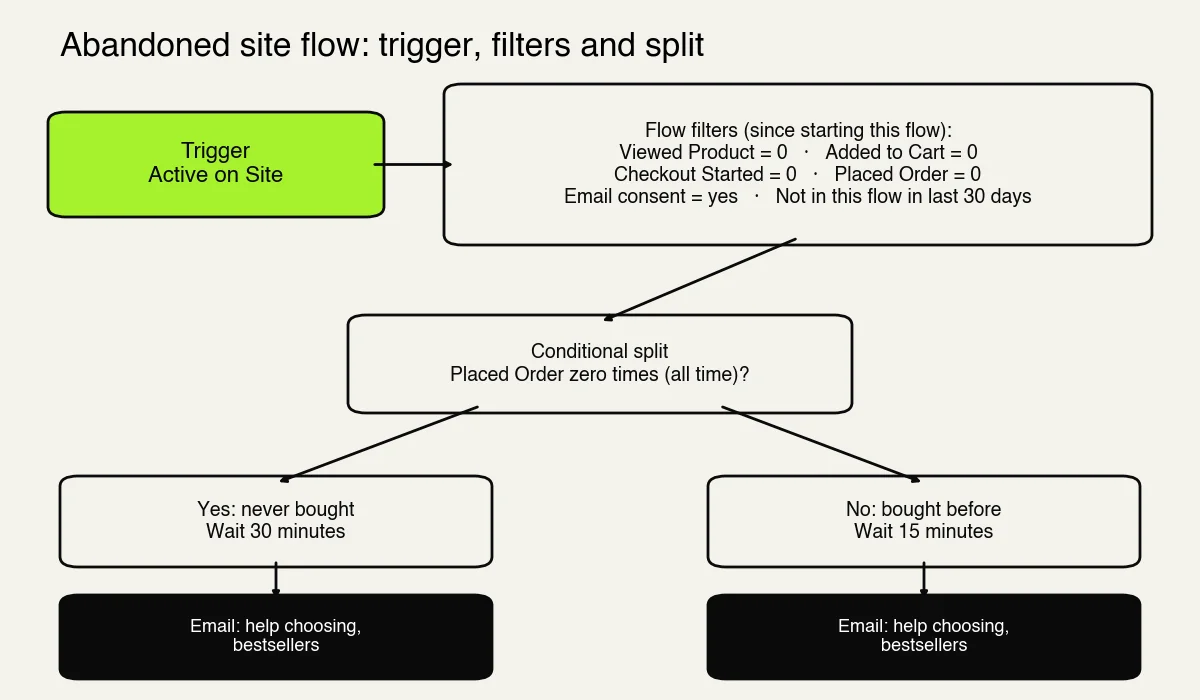
A flow filter is checked when the person enters the flow and again before every step, so anyone who takes a shopping action drops out. Use “since starting this flow” for each of these:
- Viewed Product zero times
- Added to Cart zero times (Shopify stores with Added to Cart tracking)
- Checkout Started zero times
- Placed Order zero times
- Has not been in this flow in the last 30 days
Klaviyo’s guide also adds “Active on Site zero times since starting this flow”, so a second visit during the delay ends the flow. If you are unsure which filter type to use, see trigger filter vs flow filter.
Timing and the past-buyer split
The footwear store in our data splits the flow straight after the trigger. A conditional split sends people down different paths based on a rule; here the rule is “Placed Order zero times, all time”. People who have never bought wait 30 minutes, past buyers wait 15, and each path gets one email that offers help choosing and shows bestsellers. The store also requires email consent in the flow filters and has Smart Sending off on these emails. If you keep Smart Sending on, Klaviyo skips this email for anyone who got another email from you recently, which is often what you want here.
What to put in the email
Keep it to one short email with a clear way back into the store: bestsellers, top categories, a size or fit guide, or a reply-to-us line. You don’t know what they were looking for, so don’t pretend you do. Leave discounts for the cart and checkout flows, where intent is higher.
Real results: what one store’s site flow did in its first month
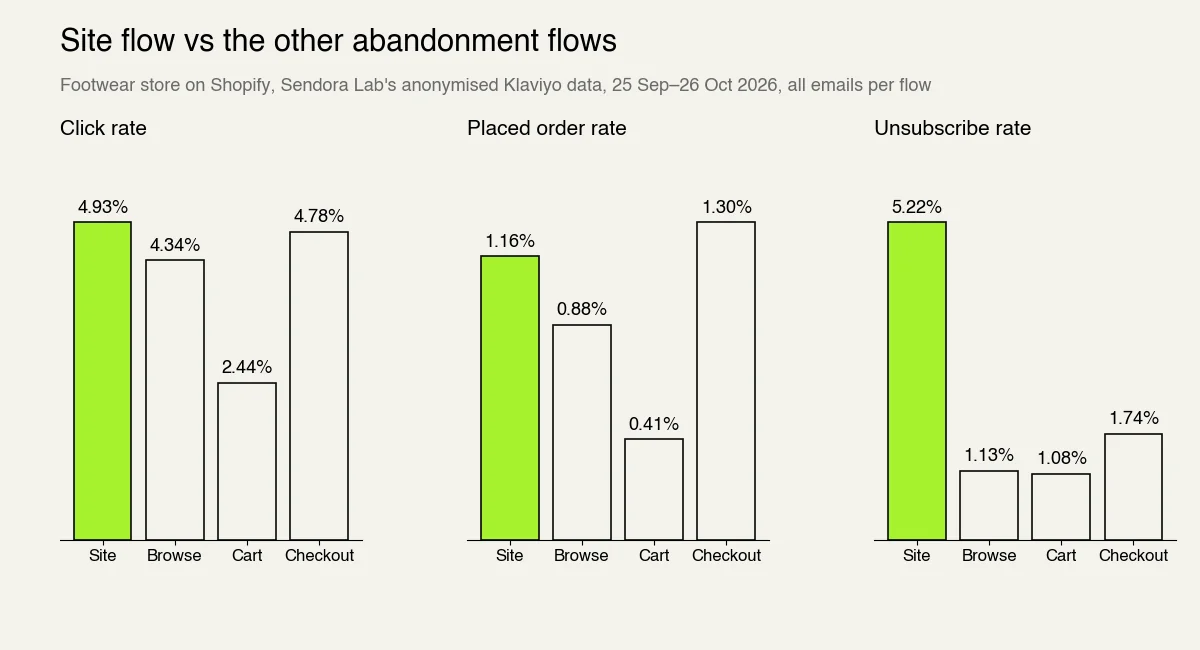
In Sendora Lab’s anonymised Klaviyo data from a footwear store on Shopify (25 Sep–26 Oct 2026), the abandoned site flow sent 690 emails, with a 4.93% click rate and a 1.16% placed order rate. That placed order rate was higher than browse abandonment (0.88%) and cart (0.41%) over the same weeks, and close to checkout (1.30%).
The cost showed up in unsubscribes. The site flow’s unsubscribe rate was 5.22%, against 1.13% for browse, 1.08% for cart and 1.74% for checkout. The site flow emails also drew 2 spam complaints; the other three flows drew none in that period.
Two cautions. The flow had been live for about a month, so the order count is small: 8 orders in total. And placed order rate here is Klaviyo’s attributed conversion rate, the share of recipients who ordered within the attribution window after the email, not proof that the email caused the order.
Past buyers vs people who never bought
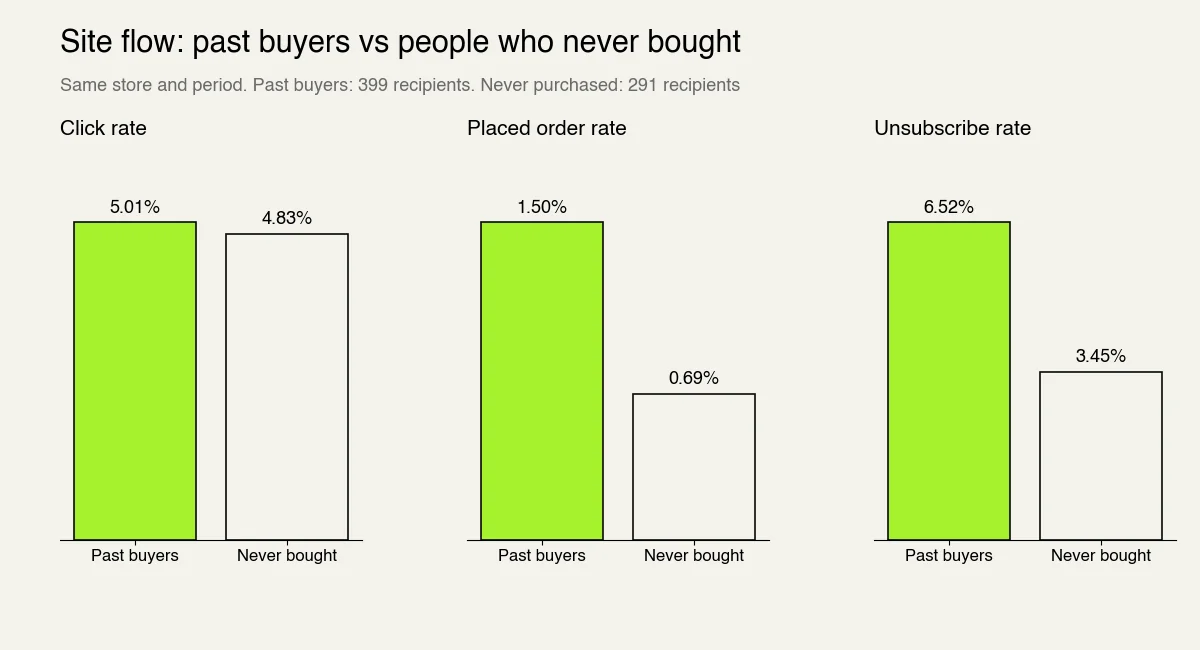
Past buyers ordered more from the site flow, and they also unsubscribed more. That is the angle most setup guides miss: the people most likely to buy are also the ones most likely to find the email intrusive.
In the same store and period, the past-buyer path reached 399 people, with a 5.01% click rate, a 1.50% placed order rate and a 6.52% unsubscribe rate. The never-purchased path reached 291 people, with 4.83% clicks, a 0.69% placed order rate and a 3.45% unsubscribe rate. Both spam complaints came from the past-buyer path.
What to do with that
- Run it for sales, not all year. The store labels this flow “turn on during sales”. A visit during a sale is a clearer buying signal, and the email has a real reason to exist.
- Give past buyers a longer gap. A 30-day re-entry limit is the minimum. For repeat customers, 60 or 90 days, or excluding anyone who ordered in the last 30 days, is a safer test.
- Watch unsubscribes weekly. If the flow’s unsubscribe rate stays several times higher than your browse flow, pause it. Every lost subscriber is lost to every future campaign, not just this flow.
- Exclude unengaged profiles. If you run a sunset policy, keep the same people out of this flow.
Is a Klaviyo abandoned site flow worth building?
Build it after welcome, checkout, cart and browse flows are live and tested, not before. It reaches the fewest high-intent visitors and carries the highest unsubscribe risk of the four abandonment flows in our data.
It suits stores with plenty of returning visitors who leave without viewing a product, often because the home page or navigation doesn’t lead them in. If many of those visitors bounce, the flow can recover some of them. It can also tell you something useful: a large site flow audience can point to a navigation or product tracking problem worth fixing first.
Conclusion
A Klaviyo abandoned site flow is easy to set up: Active on Site trigger, four “zero times since starting this flow” filters, a 30-day re-entry limit, a 15–30 minute delay and one helpful email. The hard part is restraint. In one store’s first month it kept pace with the deeper flows on placed order rate but lost subscribers several times faster, especially past buyers, so run it for sales periods and check the unsubscribe rate every week.
Want a second pair of eyes on your abandonment flows? Sendora Lab builds and audits Klaviyo flows for Shopify stores. See our email marketing services.
FAQ
What triggers a Klaviyo abandoned site flow?
The Active on Site metric, which Klaviyo records when an identified browser starts a session on your store. Visitors who have never clicked a Klaviyo email or SMS or submitted a Klaviyo form are not identified, so they don’t enter the flow.
What is the difference between a site abandonment and a browse abandonment flow?
The site flow is for known visitors who left without opening a product page. Browse abandonment starts on Viewed Product, so it can show the exact product someone looked at. Filter the site flow so anyone who viewed a product goes to browse abandonment instead.
How long should the delay be?
Klaviyo’s guide uses 15 minutes. The footwear store in our data waits 15 minutes for past buyers and 30 minutes for people who never bought, then sends one email.
Why is the unsubscribe rate so high on site abandonment emails?
The visitor did very little, so an email minutes later can feel like being watched. In our data the site flow’s unsubscribe rate was 5.22%, against 1.13% for browse abandonment in the same weeks.
Should a site abandonment email include a discount?
Usually not. Intent is low, and a regular discount teaches people to visit and wait. Keep discounts, if any, for cart and checkout flows.
Want this set up in your Klaviyo account?
A free 30-minute audit, your account open on screen.
Book a free audit