



A Klaviyo branded sending domain is a subdomain you own, such as send.yourbrand.com, that Klaviyo uses to send your emails instead of its shared domain. You set it up in Settings > Domains, add the DNS records Klaviyo generates, verify them and then activate the domain. Klaviyo says DNS changes can take up to 48 hours to show, so plan for that wait.
Short answer: Add a Marketing domain in Klaviyo, pick an unused subdomain like “send”, choose Dynamic (NS records) or Static (CNAME records), publish the records at your DNS host, verify, then activate. Keep your From address on your root domain. At Sendora Lab we check this first on any Klaviyo account, because a branded domain is what lets your emails pass DMARC under your own name.
What a Klaviyo branded sending domain is
A branded sending domain is the domain your emails are technically sent and signed from. Without one, Klaviyo sends from a shared domain and many inboxes show “via klaviyomail.com” next to your sender name.
Two terms help here. SPF and DKIM are DNS records that prove a server is allowed to send for your domain. DMARC is a DNS policy that tells inboxes what to do when a message fails those checks, and it only passes when the signing domain matches the domain in your From address. On a shared domain the signature belongs to Klaviyo, not you. With a branded domain the signature carries your domain, so the message lines up with your From address. Our plain-English guide to SPF, DKIM and DMARC covers the records themselves.
This matters because Google’s rules for bulk senders (5,000 or more messages a day to Gmail) require SPF, DKIM and a published DMARC record, and say the From domain must be aligned with the SPF or DKIM domain, according to Google’s email sender guidelines.
Klaviyo has three send types, each with its own domain: Marketing (campaigns and flows, the default), Transactional (only flow messages marked as transactional) and Service (Helpdesk replies). You can have one active domain per type, and all of them must share the same root domain, per Klaviyo’s branded sending domain guide (updated September 2026).
How to set up a branded sending domain in Klaviyo
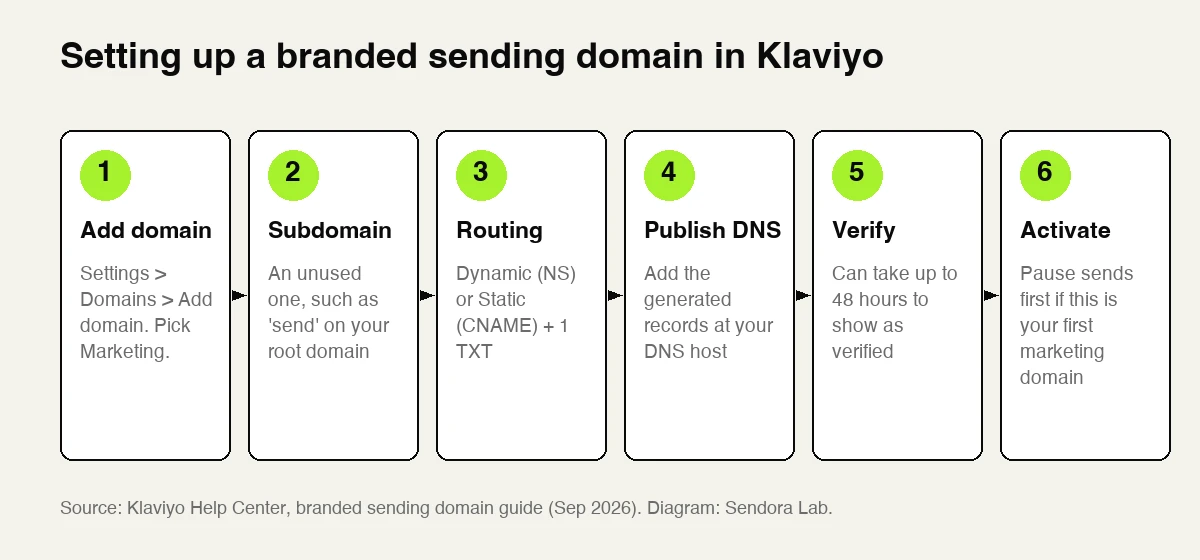
The setup has six steps and most of the time goes into waiting for DNS. Here is the order we follow on client accounts.
- Add the domain. In Klaviyo go to Settings > Domains and select Add domain. Choose Marketing unless you are adding a second type.
- Pick a subdomain. Use one that has no other records on it. “send” is the usual choice: send.yourbrand.com.
- Choose routing. Dynamic or Static (explained below). Klaviyo can also add a DMARC record for you.
- Publish the records. Klaviyo can publish them for you through Entri, or you add them by hand. Copy the exact values from your account; never reuse records from a blog post.
- Verify. Klaviyo says DNS changes can take up to 48 hours to show. The status moves from Verifying to Verified, or to Action required if something is wrong.
- Activate. If this is your first marketing domain, Klaviyo recommends pausing flows and campaigns before you activate.
Dynamic vs Static routing
Dynamic routing hands the subdomain to Klaviyo with up to four NS records plus one TXT record. Static routing keeps the subdomain at your DNS host with up to three CNAME records (the sending host and two DKIM keys) plus one TXT record.
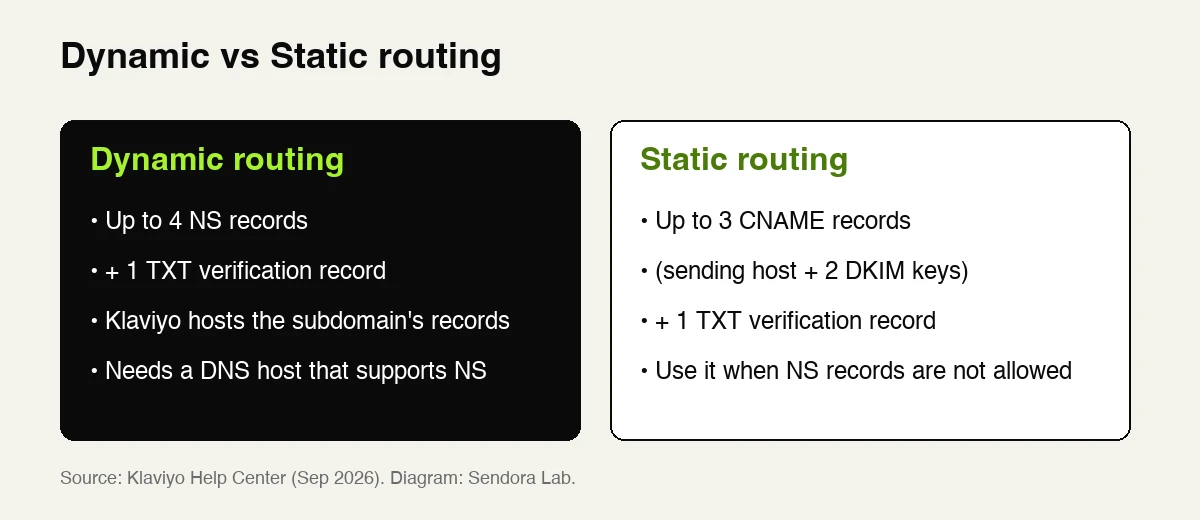
Pick Dynamic if your DNS host supports NS records, because Klaviyo then manages the subdomain’s records for you. Pick Static if your host blocks NS delegation for subdomains, or if your IT team wants every record visible in one place.
From address, DMARC and warming after you activate
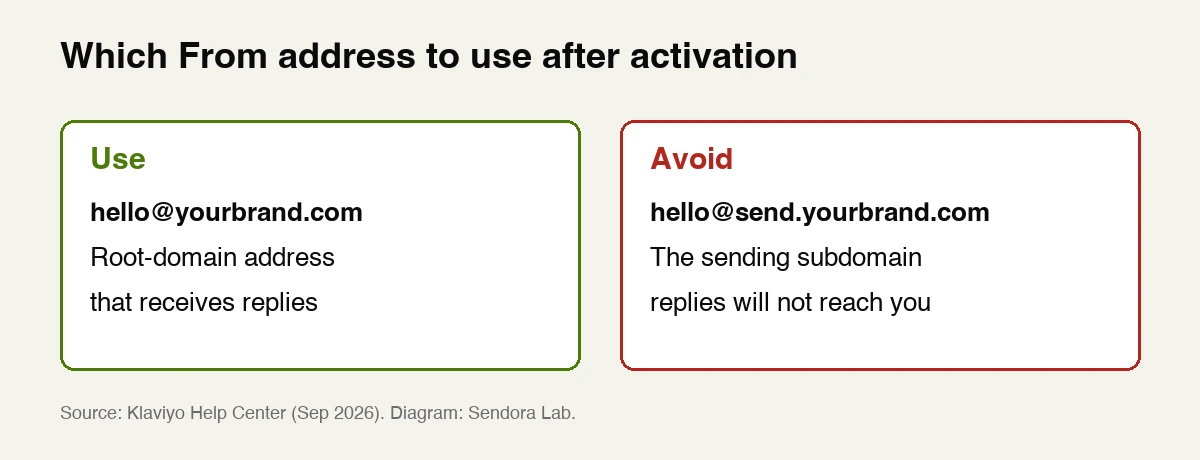
After activation, keep sending from an address on your root domain, such as hello@yourbrand.com. Klaviyo warns not to use the sending subdomain itself in the From address, or replies will not reach you.
DMARC
If you do not have a DMARC record yet, let Klaviyo add one. It publishes a policy of p=none, which meets the bulk-sender requirement without asking inboxes to quarantine or reject mail. If you already have DMARC on your root domain, leave it in place and check that your reports show Klaviyo mail passing.
Do you need to warm the domain?
Warming means raising volume slowly so inboxes learn to trust a new sender. Klaviyo says new marketing domains (new accounts, or domains registered in the last 30 days) should be warmed over roughly the first two to four weeks. An existing sender activating its first marketing domain does not need to re-warm if the root domain is at least 30 days old and has already sent email. Transactional and service domains usually need no warming.
If you do warm, start with people who opened or clicked recently and add colder segments week by week. A sunset policy keeps the unengaged out of that first month.
What we see across 22 Klaviyo accounts
Most established stores already have a branded domain, but setups still stall. We checked the sending domain settings of 22 client Klaviyo accounts on 6 November 2026 (Sendora Lab’s anonymised data, read-only).
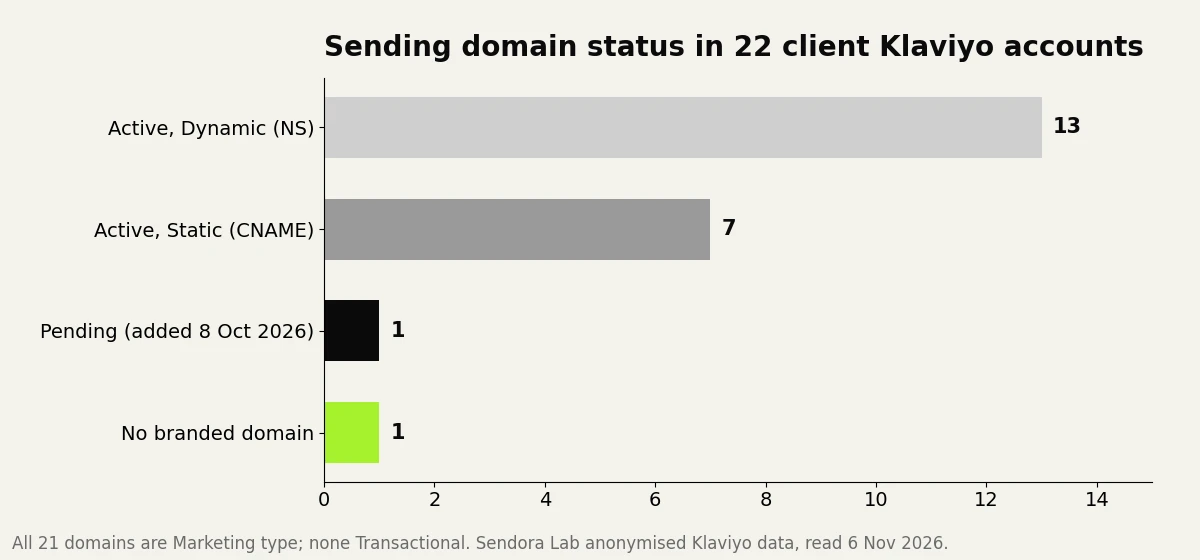
- 20 accounts had an active domain: 13 on Dynamic routing and 7 on Static.
- One domain was still pending, nearly a month after it was added on 8 October 2026. The records were never finished, so that store is still on shared sending.
- One account had no branded domain at all.
- All 21 domains were Marketing type. None of the 22 accounts had a Transactional domain.
- Every Dynamic domain used “send” as the subdomain.
Two lessons come out of this. First, “added” is not “done”: check that the status says active, not pending. Second, if you send order or shipping emails from Klaviyo flows, a separate Transactional domain is an option almost nobody uses yet. It keeps those messages on their own domain, apart from promotional mail.
What changed after one store activated its domain
A branded domain is not a cleaning tool, and the data shows why. A Polish online store in our anonymised Klaviyo data added its branded domain on 10 January 2026. We calculated its monthly bounce rate as bounced emails divided by delivered plus bounced, from Klaviyo’s Received Email and Bounced Email counts (October 2025 to August 2026).
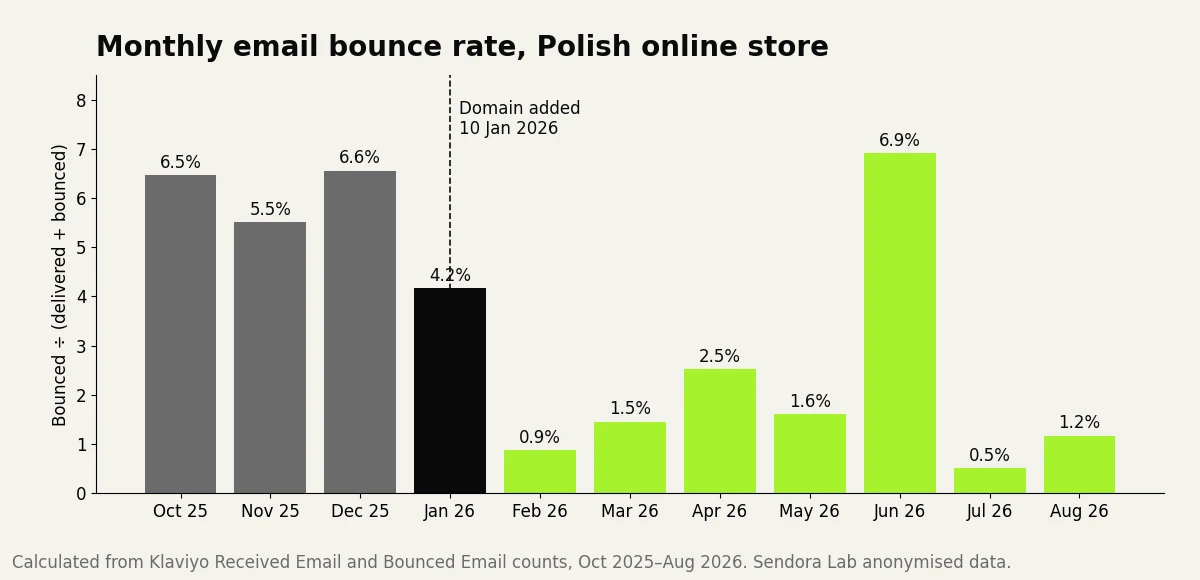
Before the change, bounces ran at 6.5% in October, 5.5% in November and 6.6% in December 2025 (246 of 3,803, 629 of 11,422 and 627 of 9,562 sends). From February to August 2026 the rate was between 0.5% and 2.5% in every month except June, when 22 of 318 sends bounced (6.9%).
We do not credit the domain alone for that drop, and this data cannot prove what caused it. In October, November and December 2025 Klaviyo added 16, 60 and 82 addresses to the account’s bounce suppression list, so some bad addresses were no longer mailed in 2026. The audience also changed from month to month. June shows how fast the rate can climb again on a small send. The domain fixes authentication; list hygiene fixes bounces. You need both, which is why both sit near the top of our Klaviyo audit checklist.
Why verification fails, and how to fix it
A failed verification is usually a DNS entry problem, not a Klaviyo problem. Klaviyo’s troubleshooting guide lists the usual causes.
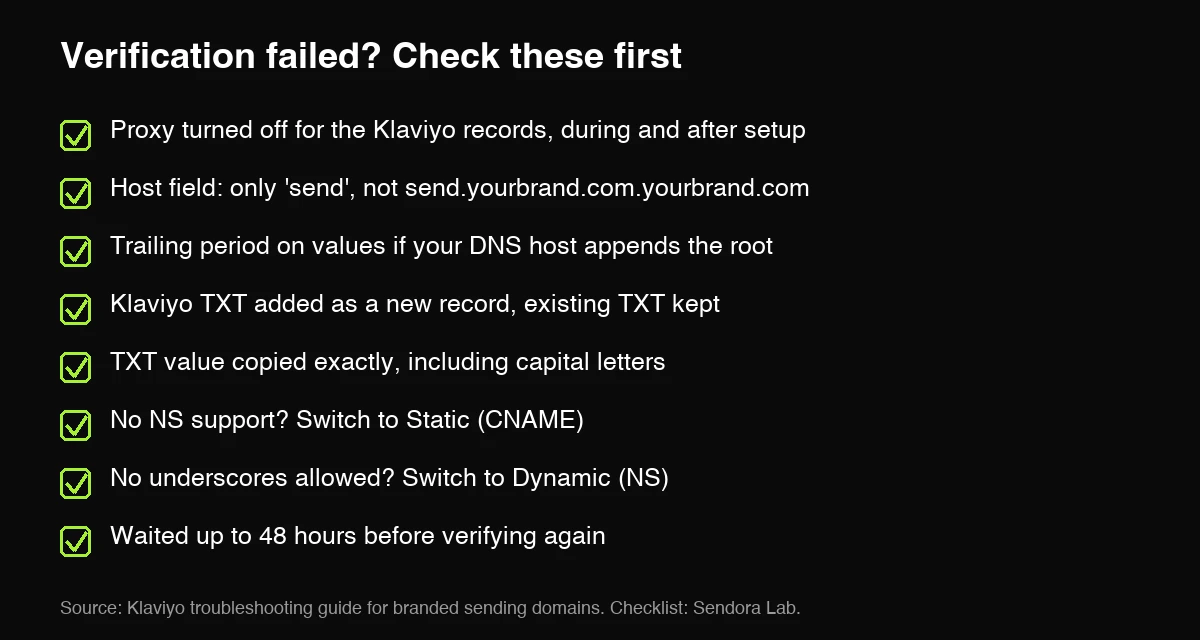
- Proxying is on. Some DNS hosts can proxy records, which hides the target Klaviyo needs. Turn it off for the Klaviyo records and keep it off.
- The root domain is doubled. If your host adds the root itself, typing send.yourbrand.com creates send.yourbrand.com.yourbrand.com. Enter only “send”.
- Values get the root appended. Some hosts need a trailing period at the end of the value.
- An old TXT record was overwritten. Add Klaviyo’s TXT value as a new record and keep the existing ones.
- The TXT value does not match. Copy it again exactly, including capital letters.
- Your host cannot do NS records or underscores. Use Static if NS is not supported, and Dynamic if underscores are not allowed.
Then give DNS time to update before you select Verify again. For the wider picture, our Shopify email deliverability basics covers what else decides inbox placement.
Conclusion
A Klaviyo branded sending domain takes a short DNS task and puts your own name on every email you send. Set it up on an unused subdomain, keep your From address on the root domain, add DMARC if you have none, and warm the domain only if it is new. Then check it says active, not pending, and keep cleaning your list, because the domain will not do that for you.
Not sure your setup is right? Sendora Lab’s Klaviyo email service includes a full deliverability check, or you can book a free audit. Moving to a new domain? Our Klaviyo domain warming guide has the schedule and a real ramp. With the domain live and DMARC enforced, the next step is Klaviyo BIMI, which puts your logo next to your emails.
FAQ
What subdomain should I use for a Klaviyo branded sending domain?
Use an unused subdomain with no other records on it. “send” is the common choice; every Dynamic domain in our 22-account check used it.
How long does Klaviyo domain verification take?
Klaviyo says DNS changes can take up to 48 hours to show. If verification still fails after that, check the records for proxying, doubled root domains and TXT mismatches.
Should my From address use the send subdomain?
No. Klaviyo warns that replies will not reach you if you send from the sending subdomain. Use a root-domain address that can receive replies, such as hello@yourbrand.com.
Do I need to warm a new Klaviyo sending domain?
Only if the domain or account is new. Klaviyo says an existing sender whose root domain is at least 30 days old and has already sent email does not need to re-warm its first marketing domain.
Will a branded sending domain lower my bounce rate?
Not by itself. Bounces depend on whether addresses exist. In our data, a store’s bounce rate fell after its domain went live, but other changes happened at the same time, and one later month bounced at 6.9% again.
Want this set up in your Klaviyo account?
A free 30-minute audit, your account open on screen.
Book a free audit