



The Recharge Klaviyo integration sends subscription events (started, cancelled, upcoming order, paused) and subscriber properties from Recharge into Klaviyo, so you can run subscription emails as Klaviyo flows. You install it from Recharge’s app marketplace after Klaviyo is connected to Shopify. The connection takes minutes; the work is choosing which flows to build on it and checking that events really arrive.
Short answer: Connect Klaviyo to Shopify, then install Klaviyo from Recharge’s App marketplace and accept the permissions. Build a welcome flow on “Subscription started on ReCharge”, an upcoming order reminder, and a cancellation flow that uses the cancellation reason. At Sendora Lab we check that each event has fired at least once and has a live flow behind it before calling a subscription setup done.
What the Recharge Klaviyo integration does
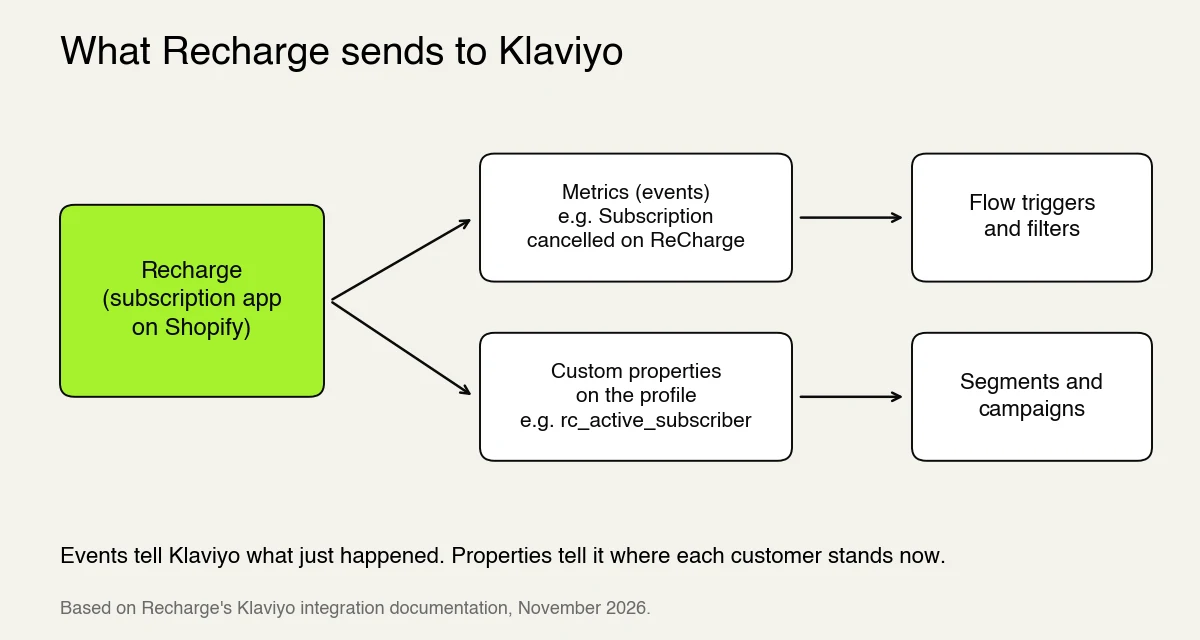
It sends two kinds of data: events that say what a subscriber just did, and profile properties that say where they stand now. Flows run on the first; segments run on the second.
A metric in Klaviyo is a type of event recorded on a profile, such as a placed order. A flow is an automated series of emails or texts that starts when a metric fires or someone joins a list or segment. Recharge creates its own metrics, such as “Subscription cancelled on ReCharge”, and adds custom properties starting with rc_ to each profile, such as rc_active_subscriber and rc_next_charge_date.
Recharge now builds and owns this integration. If your store still runs the older version built by Klaviyo, Recharge’s setup guide says you must upgrade to the new one. For the wider picture of what else to plug into Klaviyo, see our guide to Klaviyo integrations for Shopify.
How to connect Recharge to Klaviyo
Connect Klaviyo to your store platform first, then install Klaviyo from inside Recharge. The steps below are for stores on Recharge’s Shopify Checkout Integration, as of November 2026.
- Make sure Klaviyo is already connected to Shopify.
- In the Recharge merchant portal, open Tools & apps and choose App marketplace.
- Find Klaviyo, click Get, then Connect now.
- Log in to Klaviyo and accept the permissions (scopes) it asks for. You are sent back to Recharge.
- Recharge then backfills its
rc_properties onto your existing Klaviyo profiles.
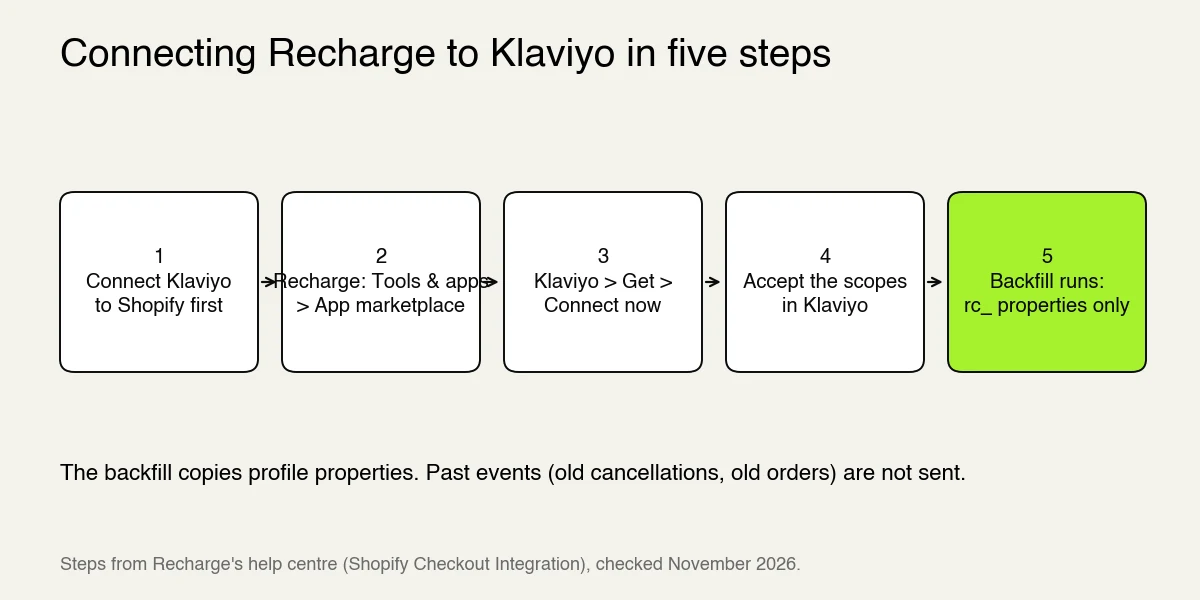
The backfill does not copy past events
This is the step most guides skip. According to Recharge’s custom properties guide, the historical backfill copies profile properties but not event metrics, and can take up to 72 hours on a large store. So a subscriber who cancelled last spring will not have a “Subscription cancelled on ReCharge” event in Klaviyo. A win-back flow triggered by that event only catches cancellations from now on. To reach older churned subscribers, build a segment on rc_cancelled_subscription_count instead (more on that below).
Recharge metrics to build subscription flows on
Start with three flows: a subscriber welcome, an upcoming order reminder and a cancellation flow. Recharge’s metric list covers the rest when you need it.
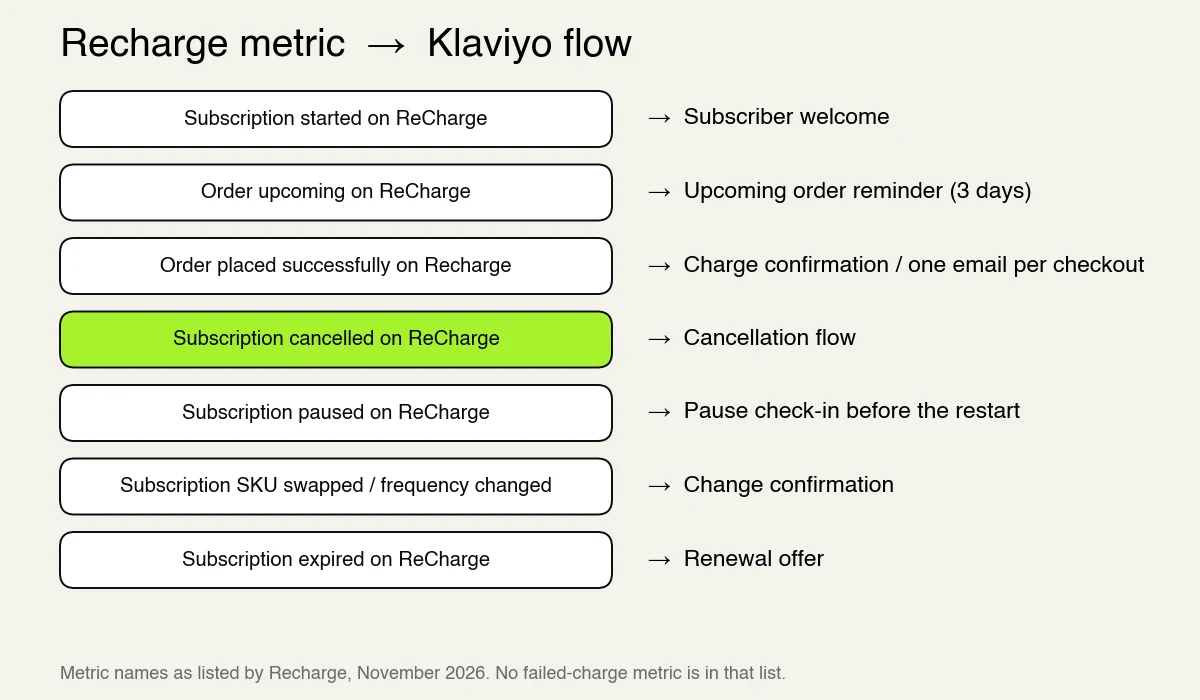
- Subscription started on ReCharge fires once for every new subscription. A customer who buys two subscriptions in one checkout fires it twice. If you want one welcome email per checkout, Recharge suggests triggering on “Order placed successfully on Recharge” with the type filter set to CHECKOUT.
- Order upcoming on ReCharge fires three days before a charge by default. You can change the number of days in Recharge’s upcoming order email settings.
- Subscription paused, SKU swapped and frequency changed are good for short confirmation emails, so the customer knows the change worked.
Event data goes into emails with the event. prefix, for example {{ event.scheduled_at }} for the charge date. Without the prefix, the variable prints nothing.
Replacing Recharge’s own notifications
If Klaviyo takes over emails like the upcoming charge reminder, two things matter. Turn off the matching notification in Recharge, or customers get both. And apply for transactional status on each of those Klaviyo emails, so they reach people who have unsubscribed from marketing. In Klaviyo you tick “Apply for transactional status” on the email and submit it; Klaviyo’s guide says review can take up to 24 hours, and editing the email later removes the status until you resubmit.
One gap to know about: Recharge’s metric list (checked November 2026) has no failed-charge or declined-payment metric. Keep Recharge’s own failed payment notifications switched on rather than assuming Klaviyo can handle them.
Build a subscription cancellation flow
A subscription cancellation flow confirms the cancellation, then uses the reason the customer gave to decide what to send next. It is the flow with the clearest payback for most subscription brands, because the person already knows and likes the product.
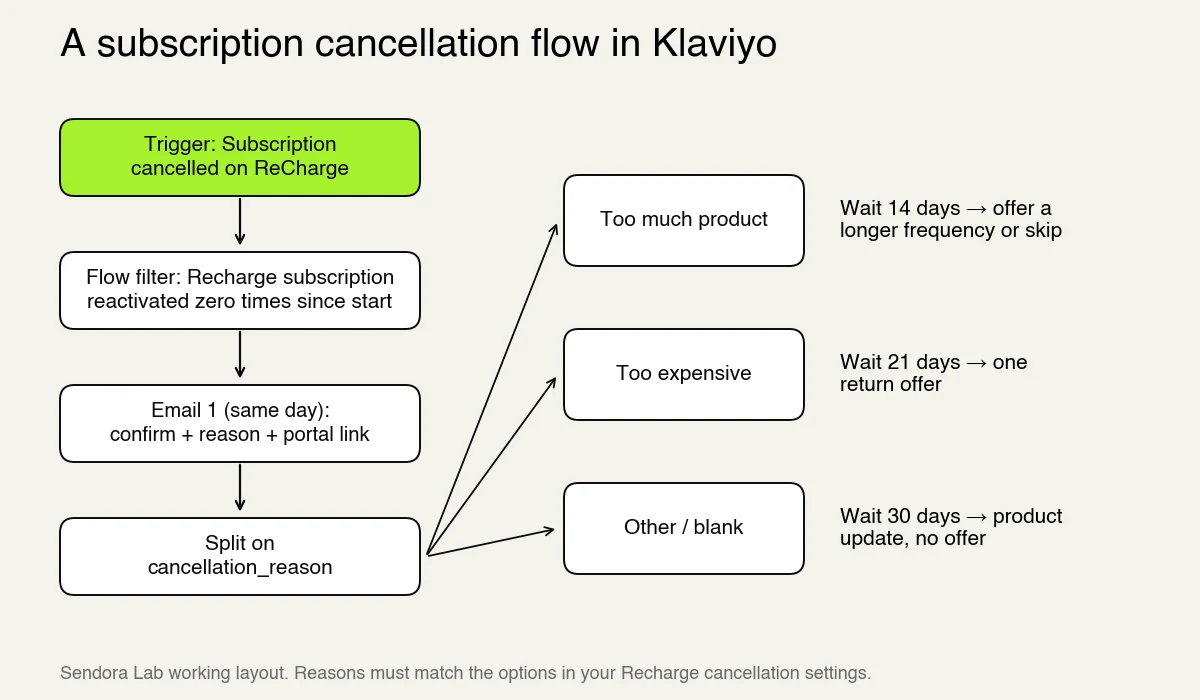
Here is the layout we use as a starting point:
- Trigger: Subscription cancelled on ReCharge.
- Flow filter: “Recharge subscription reactivated” zero times since starting this flow, so people who come back on their own drop out. A flow filter is checked before every step; a trigger filter only at entry (see trigger filter vs flow filter).
- Email 1, same day: confirm the cancellation, repeat the reason with
{{ event.cancellation_reason }}, and link to the customer portal in case it was a mistake. - Conditional split on the cancellation reason. “Too much product” gets an offer to change frequency or skip after about two weeks. “Too expensive” gets one return offer. Everything else gets a product update with no discount.
The reason labels must match the options in your Recharge cancellation settings exactly, or the split sends everyone down the last branch. Test it with a real cancellation on a staff account before going live. After the flow ends, lapsed subscribers move into your normal win-back segment.
Segments from Recharge custom properties
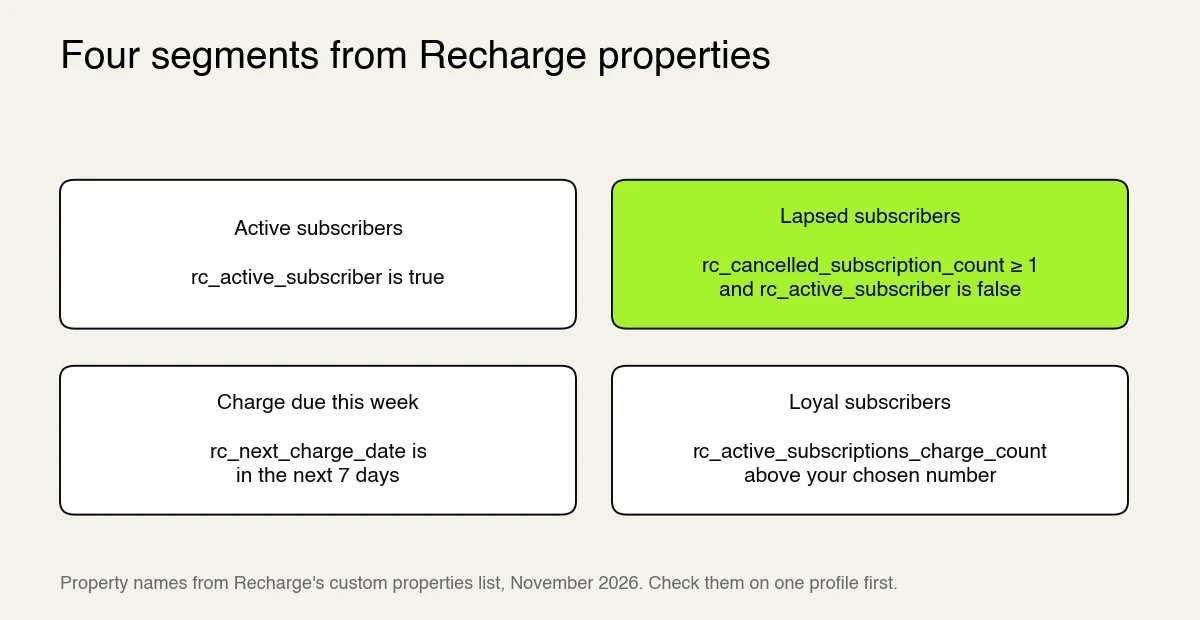
The rc_ properties let you split campaigns by subscription status without any extra events. These four segments cover most needs.
- Active subscribers:
rc_active_subscriberis true. Keep them out of “subscribe and save” campaigns they don’t need. - Lapsed subscribers:
rc_cancelled_subscription_countis at least 1 andrc_active_subscriberis false. This reaches people who cancelled before the integration was connected. - Charge due this week:
rc_next_charge_datein the next 7 days. Useful for add-on offers before an order ships. - Loyal subscribers:
rc_active_subscriptions_charge_countabove a number you choose, for thank-you gifts or early access.
Open one known subscriber’s profile in Klaviyo and check how each property is stored before you build. If properties look wrong, Recharge has a backfill option to resync them. For non-subscribers who reorder by hand, a replenishment flow does a similar job.
What to check after you connect
Check three things a week after connecting: that each Recharge metric has fired, that it fires more than once, and that a live flow uses it. Events arriving is not the same as emails going out.
None of the six client Klaviyo accounts Sendora Lab checked on 13 November 2026 runs Recharge. One, a UK-facing store on Shopify, connected a different subscription app whose events first appeared on 30 October 2026. In Sendora Lab’s anonymised Klaviyo data from that store, each of the six subscription events we checked (created, cancelled, cancellation requested, paused, rebill, payment failed) fired exactly once in the week of 26 October, then zero times in the two weeks to 12 November. No flow was triggered by the cancellation or payment-failed events.
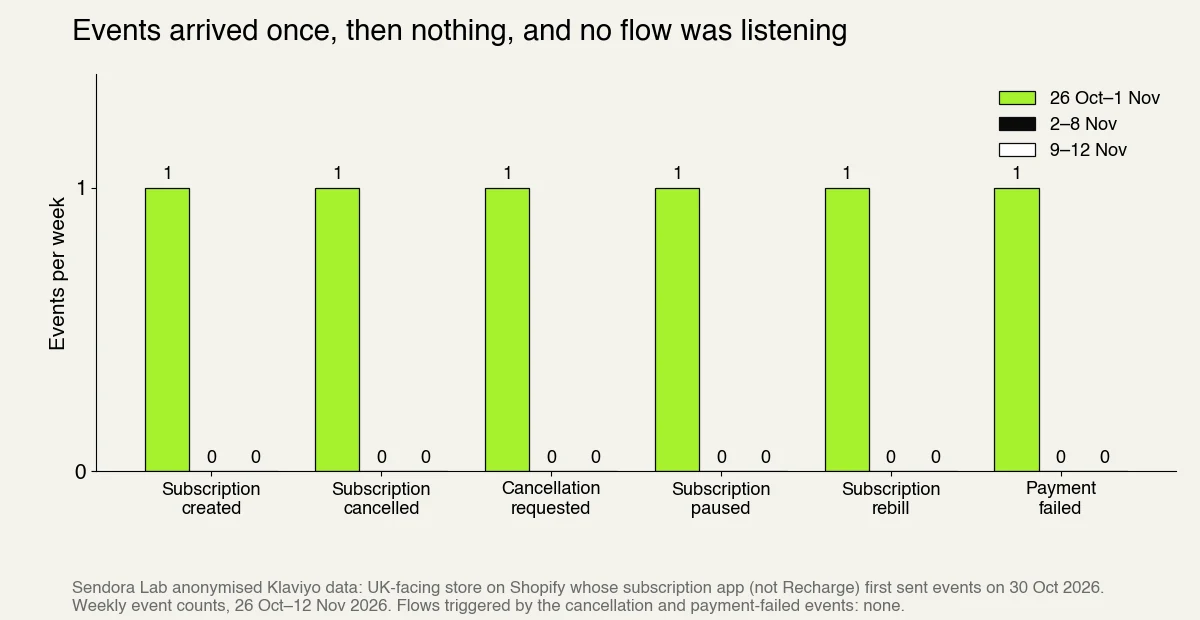
A single event of each type on the day of connection usually means a setup or test event, not live subscriber activity. The lesson carries over to Recharge: look at the metric’s activity over a couple of weeks, not just whether it exists. To build flows before real activity comes in, Recharge’s guide to manually triggering its metrics suggests test profiles, a test checkout, and moving a charge date to fire the upcoming order metric.
Use this short checklist:
- Each Recharge metric you rely on appears in Klaviyo’s metrics list.
- Its activity graph shows events on more than one day.
- Each metric you rely on has a flow set to Live, not Draft or Manual.
- Duplicate notifications in Recharge are switched off for every email Klaviyo now sends.
- A test profile shows the expected
rc_properties.
Conclusion
The Recharge Klaviyo integration is quick to switch on: connect Klaviyo to Shopify, install it from Recharge’s App marketplace and let the property backfill finish. The value comes from three flows (welcome, upcoming order, cancellation), a few rc_ segments, and checking that each event really fires and has a live flow behind it. If you’d like help building subscription flows in Klaviyo, see our email marketing services.
FAQ
Do I need Klaviyo connected to Shopify before connecting Recharge?
Yes. Recharge’s guide says to install the Klaviyo integration after Klaviyo is integrated with your ecommerce platform.
Does the Recharge backfill send past cancellations to Klaviyo?
No. The backfill copies rc_ profile properties only, not event metrics. Use rc_cancelled_subscription_count in a segment to reach people who cancelled earlier.
Which Recharge metric triggers a cancellation flow?
“Subscription cancelled on ReCharge”. It fires when a subscription is cancelled in the customer portal, the merchant portal, via API, or with the bulk cancellation tool, and carries a cancellation_reason property.
Why does my subscription welcome email send twice?
“Subscription started on ReCharge” fires once per subscription, so two subscriptions in one checkout fire it twice. Trigger on “Order placed successfully on Recharge” filtered to CHECKOUT for one email.
Can Klaviyo send Recharge’s failed payment emails?
Recharge’s metric list, checked in November 2026, has no failed-charge metric. Keep Recharge’s own failed payment notifications switched on.
Want this set up in your Klaviyo account?
A free 30-minute audit, your account open on screen.
Book a free audit