



A Klaviyo trigger filter looks at the event that started a flow and decides once, at entry, who gets in. A flow filter (Klaviyo now calls it a profile filter) looks at the person’s profile and history, and Klaviyo checks it again before every email, SMS or split. That second check is the real difference in the Klaviyo trigger filter vs flow filter choice: only a flow filter can stop a flow after someone buys.
Short answer: use a trigger filter for rules about the event itself, such as order value, product or category. Use a flow filter (profile filter) for anything that must stay true for the whole flow, such as “has not placed an order since starting this flow”. At Sendora Lab we put purchase exits, consent and location rules in profile filters, and keep trigger filters for event details.
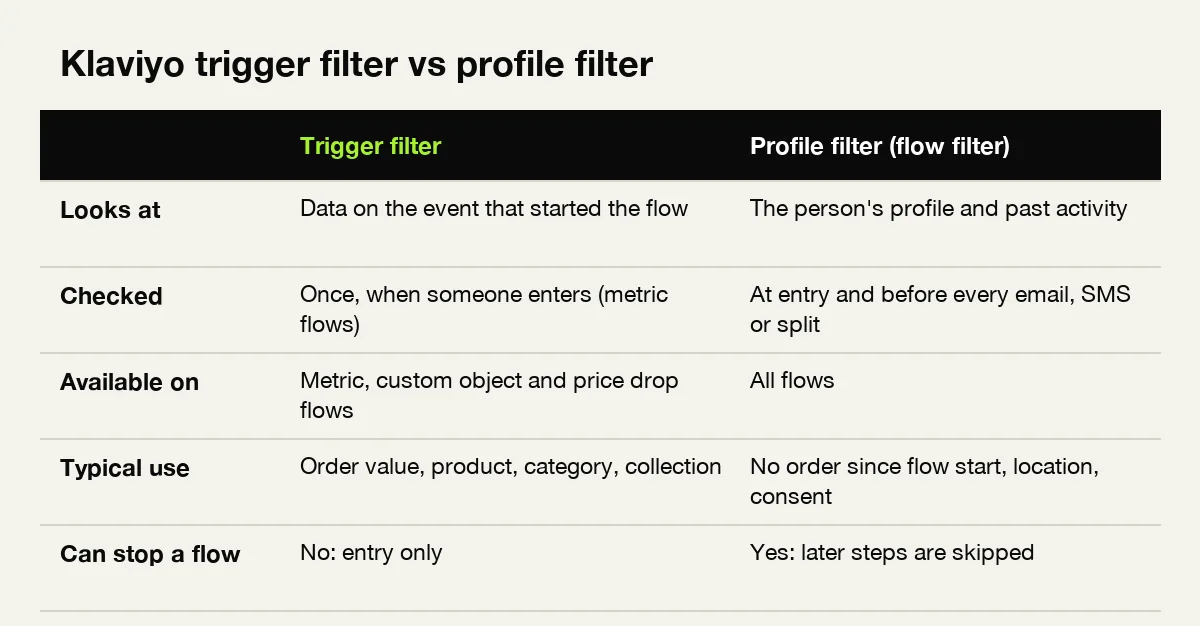
Klaviyo trigger filter vs flow filter at a glance
The difference comes down to two questions: what data the filter reads, and when Klaviyo reads it. Get those two right and most filter problems disappear.
A few terms first. A flow is an automated series of messages that starts when something happens, such as a started checkout. The trigger is that starting point: a metric (an event like Placed Order), a list, a segment, a date property or a price drop. A metric-triggered flow is one that starts from an event.
- Trigger filter: reads properties sent with the triggering event, for example the order’s value or the items in it. Only metric, custom object and price drop flows have trigger filters.
- Flow filter / profile filter: reads the profile, meaning properties such as country and past behaviour such as orders, opens or unsubscribes. Every flow can have one.
Older Klaviyo screens and most forum threads say “flow filter”. The current editor and Klaviyo’s guide to flow triggers and filters say “profile filter”. They are the same setting.
What a trigger filter does
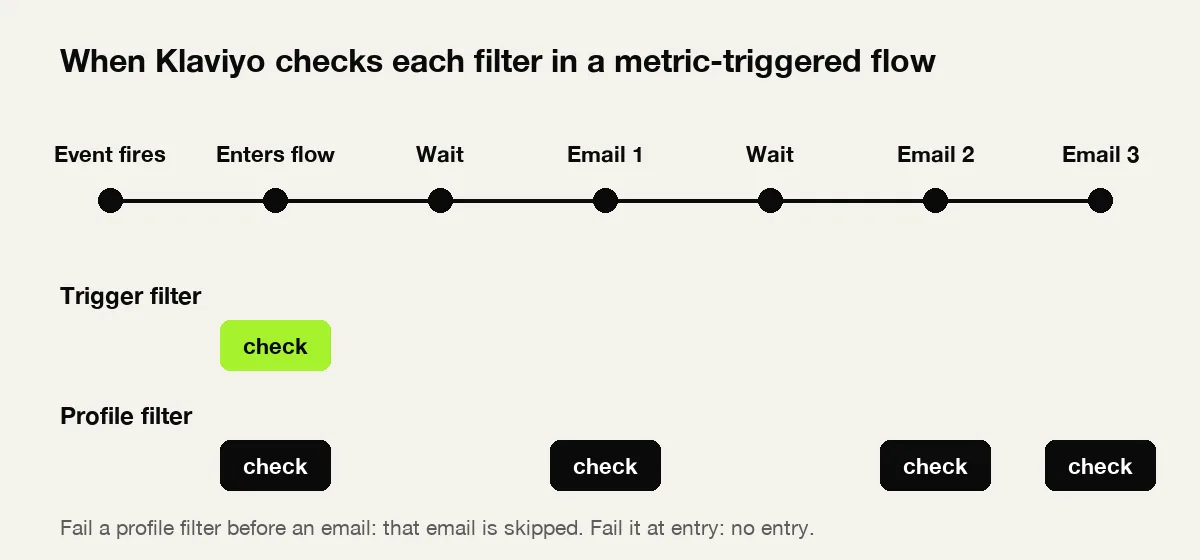
A trigger filter narrows who enters a flow, based only on the event that fired. For metric-triggered flows Klaviyo checks it once, when someone first enters, and never again.
Good uses for a trigger filter:
- A post-purchase cross-sell that only starts for orders containing one category.
- A thank-you or how-to email for one product that needs instructions.
- A browse abandonment flow that only starts when the viewed item is above a set price.
- An abandoned checkout flow for high-value carts, with its own copy or offer.
Because the check happens once, a trigger filter cannot react to anything that happens later. If you put “Placed Order” logic in a trigger filter, it only describes the order that started the flow, not the orders that follow.
Custom object flows are the exception: Klaviyo checks their trigger filters at every step. If you don’t use custom objects, you can ignore this.
What a flow filter (profile filter) does
A profile filter checks who the person is and what they have done. Klaviyo checks it when someone enters the flow and again before each action, such as sending an email or SMS.
The detail most guides skip is what happens on a fail. If someone fails the profile filter at entry, they never enter. If they fail it later, Klaviyo skips that action but does not remove them from the flow. They move on to the next step, where the filter is checked again.
For conditions like “has placed an order since starting this flow”, that makes no practical difference. Once it is true it stays true, so every later email is skipped. Rolling windows behave differently. A condition such as “Added to Cart zero times in the last 24 hours” can fail before one email and pass before the next, because the 24-hour window moves.
In Sendora Lab’s anonymised Klaviyo data from a Dutch-language fashion and lifestyle store on Shopify (flow settings read on 21 Oct 2026), the abandoned checkout flow uses four profile filter rows joined by AND:
- Placed Order zero times since starting this flow.
- Bounced Email zero times over all time.
- Checkout Started, as recorded by a second tracking tool, zero times since starting this flow.
- Added to Cart zero times in the last 24 hours.
None of the three metric-triggered flows we checked in that account (abandoned checkout, browse abandonment and win-back) uses a trigger filter. Every rule sits in the profile filter. That is the right default when the rules need to hold for the whole flow.
How to stop a Klaviyo flow after purchase
Add a profile filter: “What someone has done: Placed Order zero times since starting this flow.” A trigger filter cannot do this, because it is never checked after entry.
Klaviyo’s own abandoned cart example uses this exact filter. It applies to any flow that should end once the shopper buys, including browse abandonment, abandoned cart, abandoned checkout and win-back flows. Use the “since starting this flow” timeframe, not “over all time”, or past customers will never enter at all.
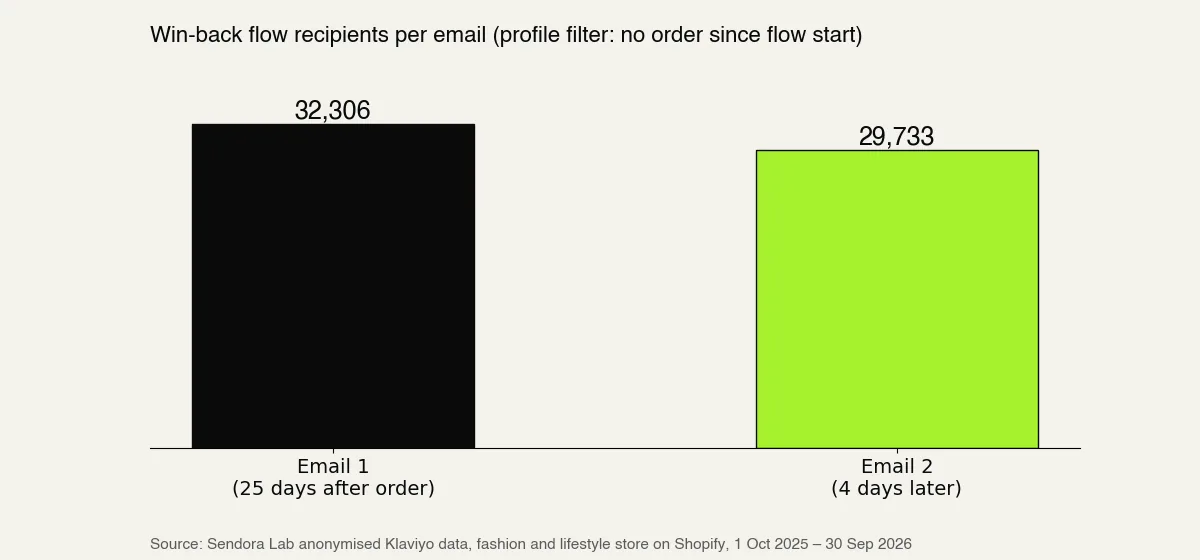
The same store’s win-back flow shows the filter at work. It starts on Placed Order, waits 25 days, sends email 1, waits 4 days and sends email 2, with the profile filter above. Between 1 Oct 2025 and 30 Sep 2026, email 1 went to 32,306 recipients and email 2 to 29,733, a gap of 2,573.
The filter is not the whole gap. 1,244 people unsubscribed from email 1, and some profiles fall at the edges of the date range. The rest includes people the filter skipped because they ordered again in those 4 days, which is exactly what you want: no “we miss you” email the week after a new order.
If you also use Klaviyo Smart Sending, remember it skips sends for a different reason. Check the Skipped tab before you blame the filter.
AND vs OR: the filter mistake we find most in audits
Exclusion rules need AND. Joining “zero times” conditions with OR lets almost everyone through.
Klaviyo joins filter conditions with AND or OR, and the choice changes who gets through. Klaviyo’s AND vs OR reference says AND makes a flow filter more exclusive and OR makes it more inclusive.
The same store’s browse abandonment flow shows the risk. To keep shoppers who started checkout out of the browse emails, it checks Checkout Started from three tracking sources, “zero times since starting this flow”, but all three sit in one OR group. A shopper passes if any one source missed the checkout. Moving each condition to its own AND row fixes it.
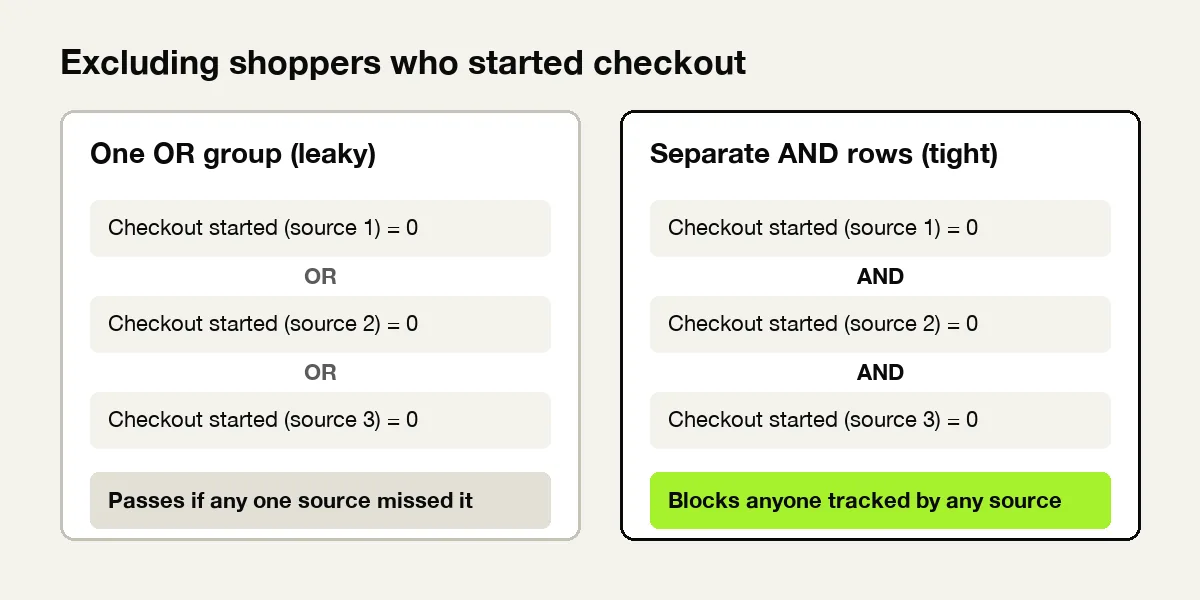
To check your own flows, open each profile filter and read it as a sentence. If it says “has not done A, or has not done B”, ask whether you really meant “and”. Our Klaviyo audit checklist includes this check.
Which filter to use: a quick decision guide
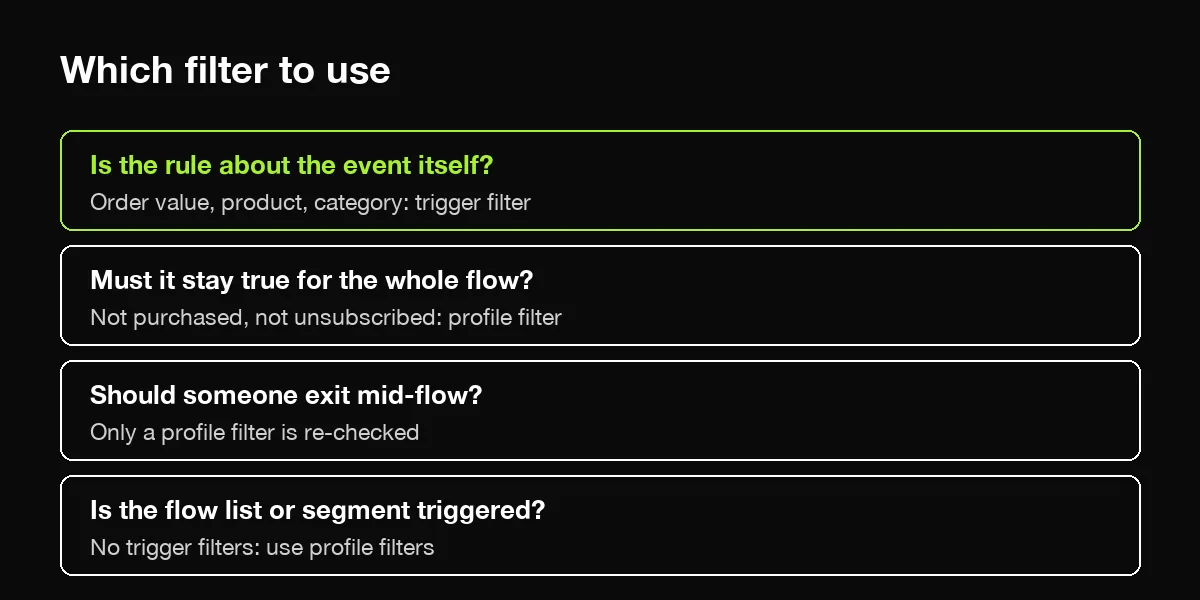
Ask what the rule is about. If it is about the event, use a trigger filter. If it is about the person and must hold until the last email, use a profile filter.
- Order value, product, category or collection of the trigger event: trigger filter.
- Has not purchased since the flow started: profile filter.
- Country, language or consent: profile filter.
- Not in another flow already, such as checkout vs cart: profile filter on the other flow’s trigger event, “zero times since starting this flow”.
- List or segment-triggered flows: profile filters only, since these flows have no trigger filters.
- How often someone can re-enter: the re-entry setting in the trigger, not a filter. The store above lets people re-enter its checkout and browse flows after 10 days.
One more rule: you cannot change a flow’s trigger once it is set, but you can edit both kinds of filter at any time. Our guides to the abandoned cart flow and browse abandonment flow show these filters in full builds.
Conclusion
The Klaviyo trigger filter vs flow filter choice is about timing. Trigger filters judge the event once, at the door. Profile filters judge the person at the door and again before every message, which is why purchase exits, consent and overlap rules belong there. Then read every filter as a sentence and check each OR. If you want us to check the filters in your flows, see our Klaviyo email marketing services or book a free audit. Running several flows at once? See our guide to Klaviyo flow overlap for the filters that stop them colliding. To send people down different paths instead of removing them, use a Klaviyo conditional split. Custom events work the same way; see our guide to the Klaviyo custom events API.
FAQ
Is a flow filter the same as a profile filter in Klaviyo?
Yes. “Flow filter” is the older name. Klaviyo’s current editor and help centre call it a profile filter.
When does Klaviyo check a trigger filter?
For metric-triggered flows, once, when someone first enters the flow. Custom object flows are the exception: their trigger filters are checked at every step.
Does failing a profile filter remove someone from the flow?
No. Klaviyo skips the action they failed and moves them to the next step, where the filter is checked again. A condition that stays true, such as an order since the flow started, makes them skip every later step.
How do I stop a Klaviyo flow after someone buys?
Add the profile filter “Placed Order zero times since starting this flow”. A trigger filter cannot do this, because it is not checked after entry.
Can list- or segment-triggered flows use trigger filters?
No. Only metric, custom object and price drop flows have trigger filters. List- and segment-triggered flows use profile filters.
Want this set up in your Klaviyo account?
A free 30-minute audit, your account open on screen.
Book a free audit