



Klaviyo flow overlap happens when one person qualifies for two or more flows at the same time and gets emails from each of them in the same few days. You fix it by deciding which flow owns each stage of the customer journey, then adding profile filters so the other flows pause or exit while that flow runs. Some overlap is planned and fine; marketing flows stacking on top of each other is the part to stop.
Short answer: To stop Klaviyo flows overlapping, rank your flows by buying intent, make each flow exit when the shopper does something that belongs to a higher flow, and add a “received email from flow X in the last few days” filter to welcome and win-back flows. Smart Sending helps as a safety net, but in Sendora Lab’s client work it never replaces proper flow filters.
What Klaviyo flow overlap is, and when it is fine
Flow overlap is when a single profile is active in more than one flow at once, so their inbox fills with automated emails that were each designed to be the only message they get. A flow is an automated series of emails or texts that Klaviyo sends when a trigger happens, such as someone joining a list or adding a product to their cart.
Not every overlap is a problem. A buyer will normally get an order thank-you, shipping updates and later a review request, and those are meant to run side by side. The overlap that hurts is between marketing flows: a new subscriber who browses on day one can land in the welcome series, the site abandonment flow and the browse abandonment flow, all inside a day or two.
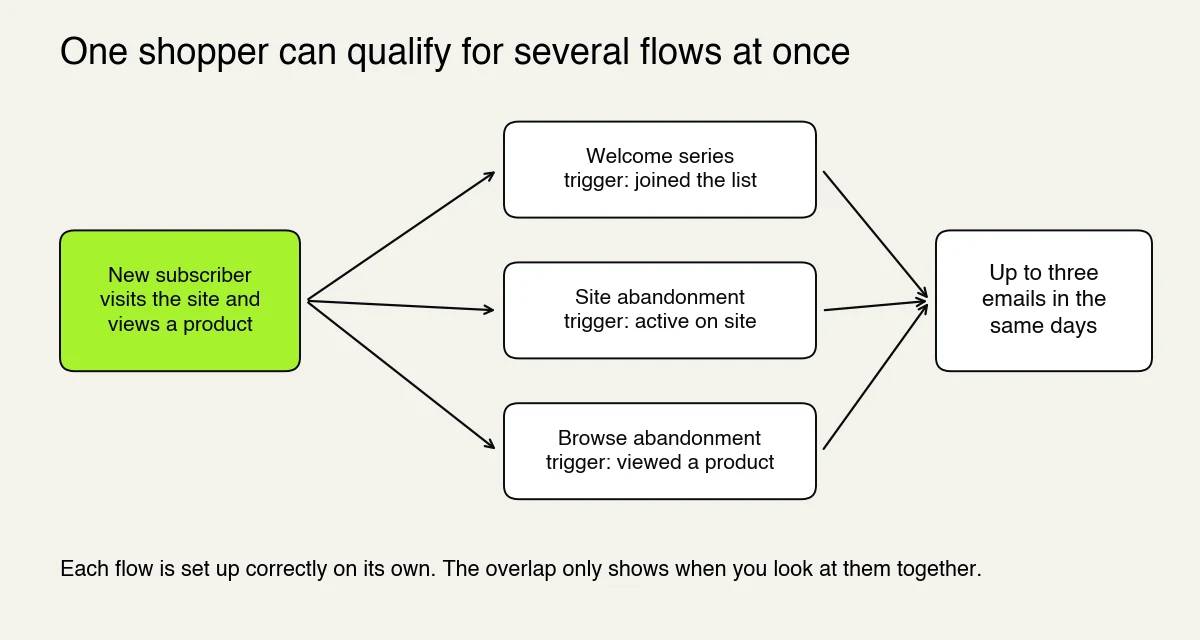
Each of those flows can be set up correctly on its own. The overlap only shows when you look at all of them together, which is why it is so common in accounts that grew one flow at a time.
How much flow overlap a real account has
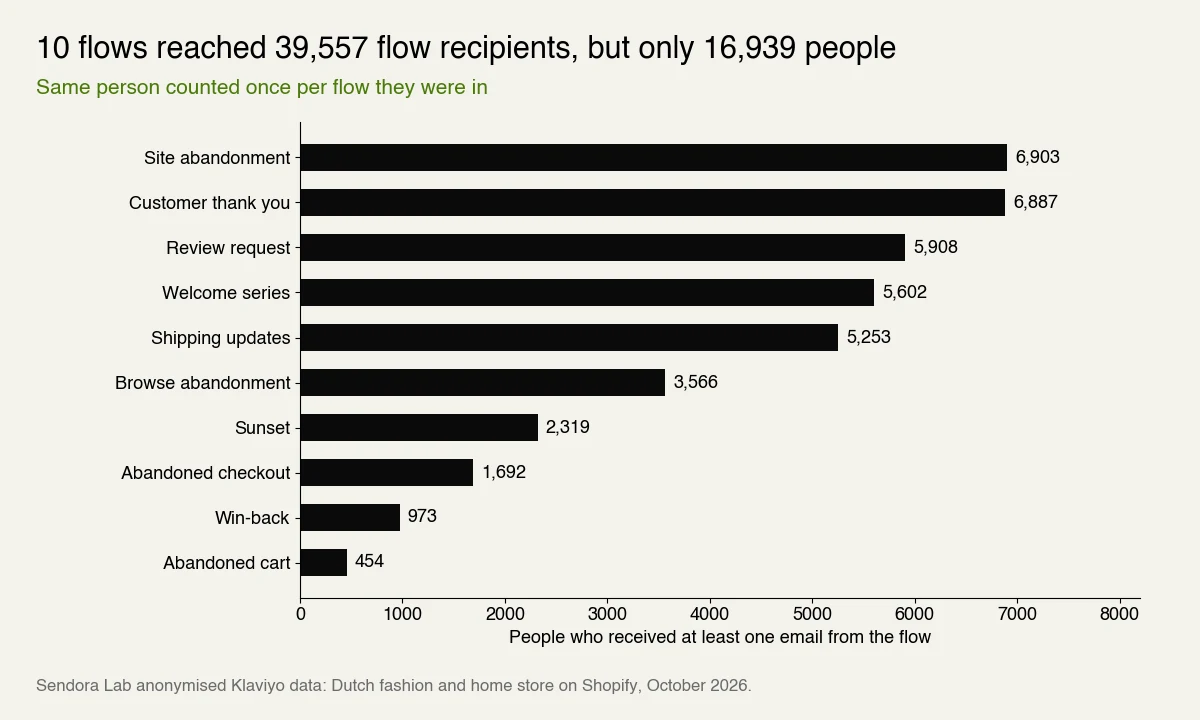
More than most brands expect. In Sendora Lab’s anonymised Klaviyo data from a Dutch fashion and home store on Shopify (October 2026), 10 live flows sent 93,564 emails to 16,939 different people.
When you count recipients flow by flow, the same month adds up to 39,557 flow recipients. The gap exists because one person is counted once in every flow they were in, so the average recipient sat in more than two flows that month. Part of that is the planned post-purchase stack; part is welcome, site and browse flows reaching the same new visitors.
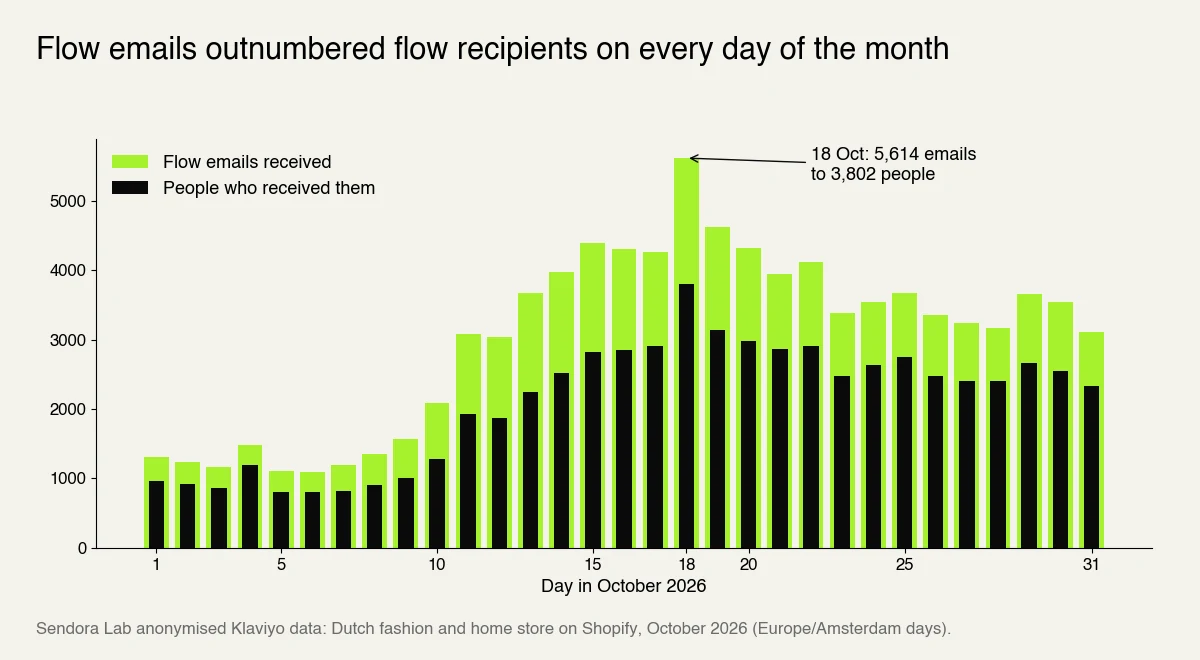
The daily numbers tell the same story. In the same store’s October 2026 data, flow emails outnumbered the people receiving them on every single day. The busiest day, 18 October, saw 5,614 flow emails go to 3,802 people. Those daily totals mix two things: flows that send more than one email in a day (shipping updates do) and different flows hitting the same person.
What the filters in that account showed
The abandonment flows were already built as a ladder. The browse and cart flows exit when the shopper adds to cart, starts checkout or places an order after entering, and the site flow does the same. But two gaps were left:
- The site abandonment flow does not exclude people who viewed a product, so a visitor who looks at one product can start both the site flow and the browse flow.
- The welcome series only filters out buyers. Nothing in the welcome flow or the abandonment flows checks whether the person is already in the other one.
These are the two most common collisions we see, and both are fixed with a few profile filters.
Where Klaviyo flows usually collide
Flows collide wherever two triggers can fire from the same visit or the same week. These are the pairs to check first:
| Flow pair | Why they collide | Usual fix |
|---|---|---|
| Welcome + browse, site or cart | New subscribers often browse straight after signing up | Welcome pauses while a recovery flow runs |
| Site + browse abandonment | Active on Site and Viewed Product fire in the same visit | Site flow exits on Viewed Product |
| Browse + cart + checkout | One shopper moves down the funnel in minutes | Each flow exits on the next step |
| Win-back + abandonment | A lapsed customer comes back and browses | Win-back pauses during recovery |
| Post-purchase flows | Thank-you, shipping and review all follow one order | Usually planned; space them with delays |
The cart and checkout pair deserves extra care because both often carry a discount. Our guide to abandoned checkout vs abandoned cart flows covers how to split those two cleanly.
How to exclude flow recipients in Klaviyo
You exclude flow recipients with profile filters, not with splits. A profile filter (often called a flow filter) is a rule on the whole flow that Klaviyo checks when someone enters and again before each email or text, according to Klaviyo’s guide to flow triggers and filters. If the person no longer fits, they leave the flow.
1. Rank your flows by intent
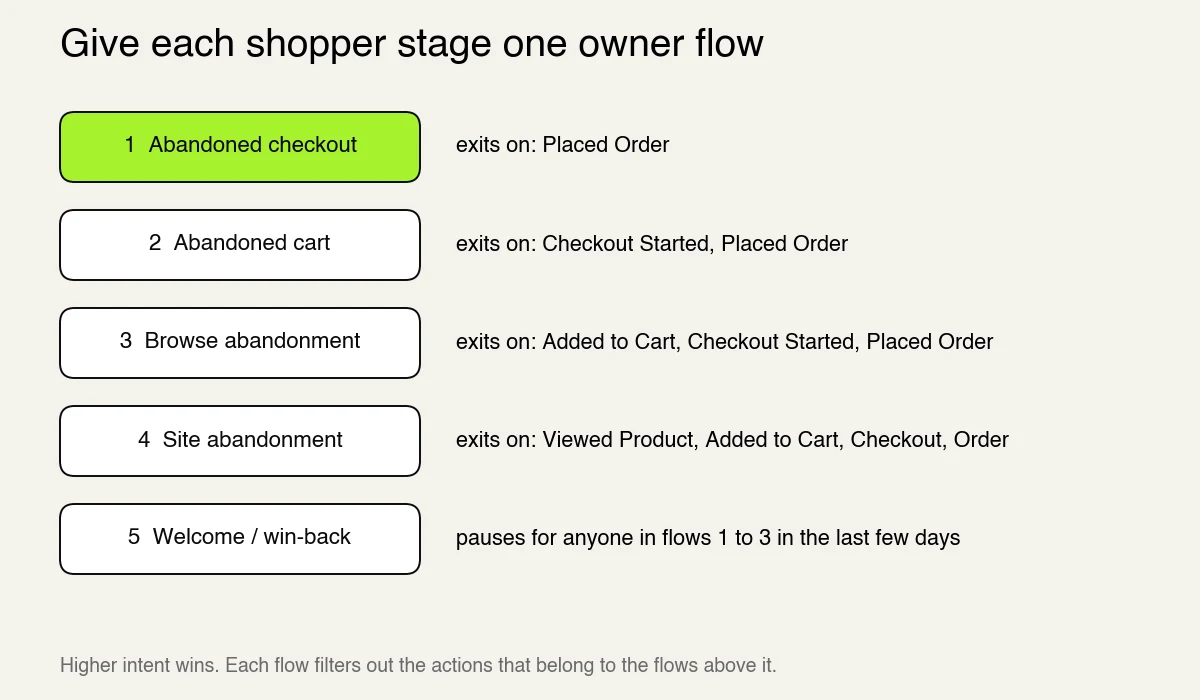
Decide which flow owns the shopper at each stage. Higher buying intent wins: checkout beats cart, cart beats browse, browse beats a plain site visit, and all of them beat the welcome series and win-back for the few days they run.
2. Make each flow exit on the next step
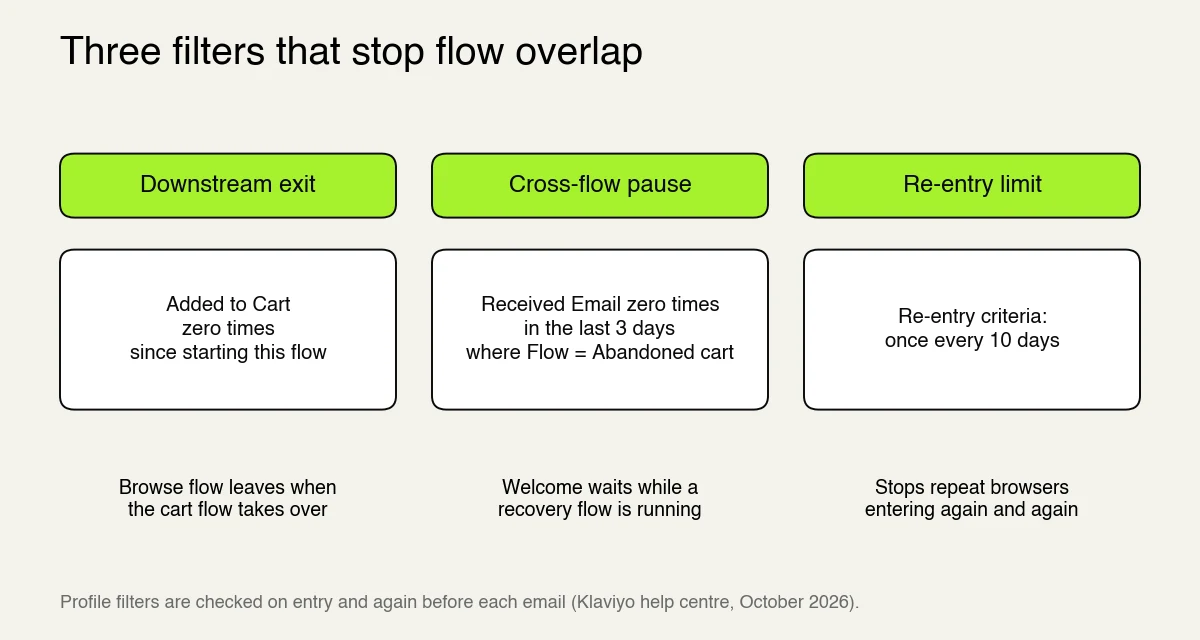
Add a filter for each action that belongs to a higher flow, measured “since starting this flow”. For browse abandonment that means Added to Cart zero times, Checkout Started zero times and Placed Order zero times since starting this flow. For site abandonment, add Viewed Product zero times since starting this flow as well. Our post on trigger filters vs flow filters explains why these must be profile filters: trigger filters only look at the event that started the flow.
3. Pause welcome and win-back during recovery flows
Add a filter such as “Received Email zero times in the last 3 days, where Flow equals Abandoned Cart”, with one condition per recovery flow joined by AND. Because profile filters are checked again before each email, the welcome series simply skips its next email while a cart or checkout flow is talking to that person. Pick the window to match the length of your recovery flows; 3 days is a starting point, not a rule.
4. Set re-entry criteria
Re-entry criteria control how often one person can start the same flow again. The account above lets people back into browse, cart and site flows once every 10 days, which stops a daily browser from restarting the same flow over and over. Klaviyo now uses this setting in place of the older “has not been in flow” filter.
5. Keep Smart Sending as the safety net
Smart Sending skips a marketing email if the person got another one too recently; the default email window is 16 hours, as set out in Klaviyo’s Smart Sending guide. It is useful, but it skips whichever email comes second, not the least important one. Read more in our guide to Klaviyo Smart Sending.
How to check your own account for flow overlap
You can measure overlap in about 20 minutes with segments and flow analytics. You don’t need to export anything.
- List live flows and their triggers. Mark which ones can fire in the same visit or week.
- Build a test segment with two conditions: Received Email at least once in the last 30 days where Flow equals A, AND the same for flow B. Its size is how many people got both.
- Check skip reasons. In each flow email’s analytics, look at skipped profiles. “Smart Sending” means a collision the filters missed; “Fails Flow Filters” means your exclusions are working. Klaviyo lists every reason in its guide to why a flow message skipped a profile.
- Compare unsubscribes by flow. A flow with a much higher unsubscribe rate than the others is often the one arriving on top of another.
Repeat the check after any new flow goes live. Most overlap we find comes from a flow added months after the others were built.
Conclusion
Klaviyo flow overlap is normal in any account with more than a handful of flows, and our client data shows it can reach most of the people your flows touch. Rank your flows by intent, make each one exit on the next step, pause welcome and win-back during recovery, and leave Smart Sending as the backstop. If you’d like a second pair of eyes on your flow filters, Sendora Lab builds and audits Klaviyo flows for Shopify brands, and our welcome series guide is a good next read. For branching inside one flow, see how to use a Klaviyo conditional split.
FAQ
Can a profile be in two Klaviyo flows at once?
Yes. Klaviyo does not stop one profile from being active in several flows. You have to add profile filters if you want one flow to pause or exit while another runs.
Does Smart Sending stop flow overlap?
Partly. It skips a marketing email if the person got another one inside the window, 16 hours for email by default. It does not decide which flow is more important, so use it alongside profile filters.
Should I use a split or a filter to exclude people from a flow?
Use a profile filter. A split sends people down different paths but keeps them in the flow, while a profile filter removes them when they no longer qualify.
Is it a problem if buyers get several post-purchase flows?
Usually not. Order thank-you, shipping updates and review requests are expected after a purchase. Space them with delays so they don’t land on the same day.
Want this set up in your Klaviyo account?
A free 30-minute audit, your account open on screen.
Book a free audit