



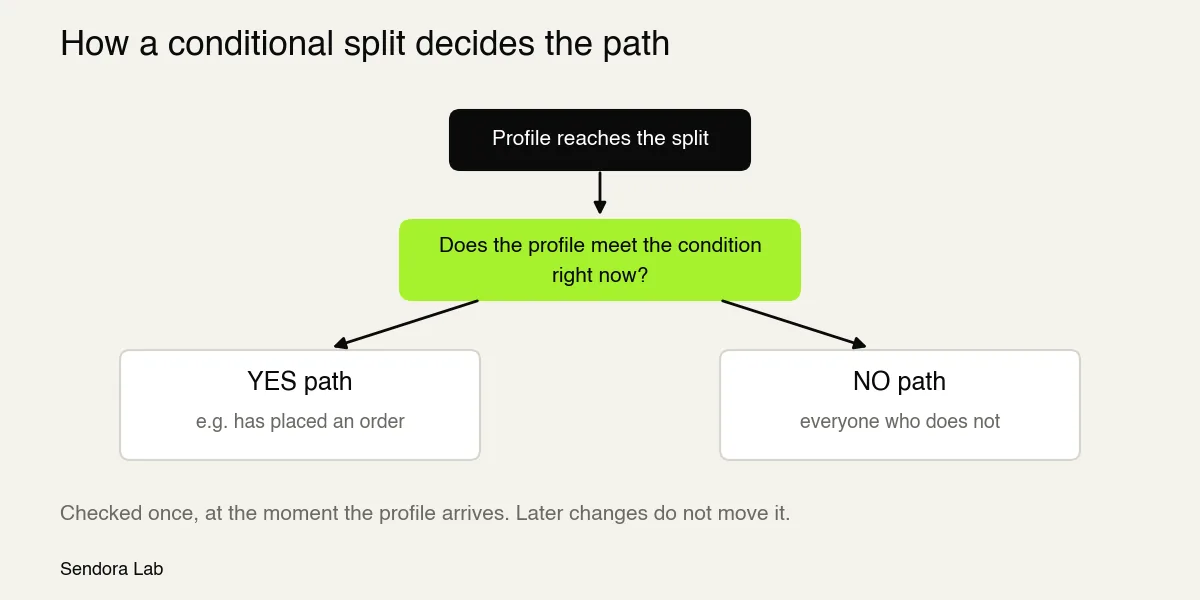
A Klaviyo conditional split sends each person in a flow down a different path based on who they are or what they have done, such as whether they have bought before. It checks the condition at the exact moment the profile reaches the split, then routes them once. Use it when the next email should depend on the person, not on the event that started the flow.
Short answer: add a conditional split from the flow builder, pick one condition (an event, a profile property, list or segment membership, location, consent, predictive data or a random sample), and build a separate path for each outcome. Put any time delay before a split that checks behaviour. At Sendora Lab we use conditional splits mostly for two jobs: separating buyers from non-buyers, and running 50/50 tests inside live flows.
What is a Klaviyo conditional split?
A conditional split is a flow step that asks one question about a profile and sends it down the YES or NO path. A flow is an automated series of emails or texts that starts when something happens, like a signup or an abandoned checkout.
The condition can be almost anything Klaviyo knows about a person: what they have or have not done, a profile property, where they live, which list or segment they belong to, whether they can receive email or SMS, predictive values such as expected lifetime value, or a random percentage. You can combine conditions with AND and OR.
The new multi-branch split
As of October 2026, Klaviyo is rolling out multi-branch splits, which merge the conditional split and the trigger split into one step with up to 20 paths. Klaviyo checks the paths in order and sends each profile down the first one it qualifies for, with an “Everyone else” path at the bottom (Klaviyo Help Center, Multi-Branch Splits). Existing YES/NO splits keep working unchanged. If you have the new version, path order matters: a profile that qualifies for paths 1 and 3 only ever sees path 1.
Conditional split vs trigger split
A conditional split reads the profile; a trigger split reads the event that started the flow. That one difference decides which to use.
Klaviyo’s own training puts it this way: trigger splits branch on criteria from the triggering event and are only available in metric and price drop flows, while conditional splits work in every flow type (Klaviyo Academy). A metric is any tracked event in Klaviyo, such as Placed Order or Checkout Started.
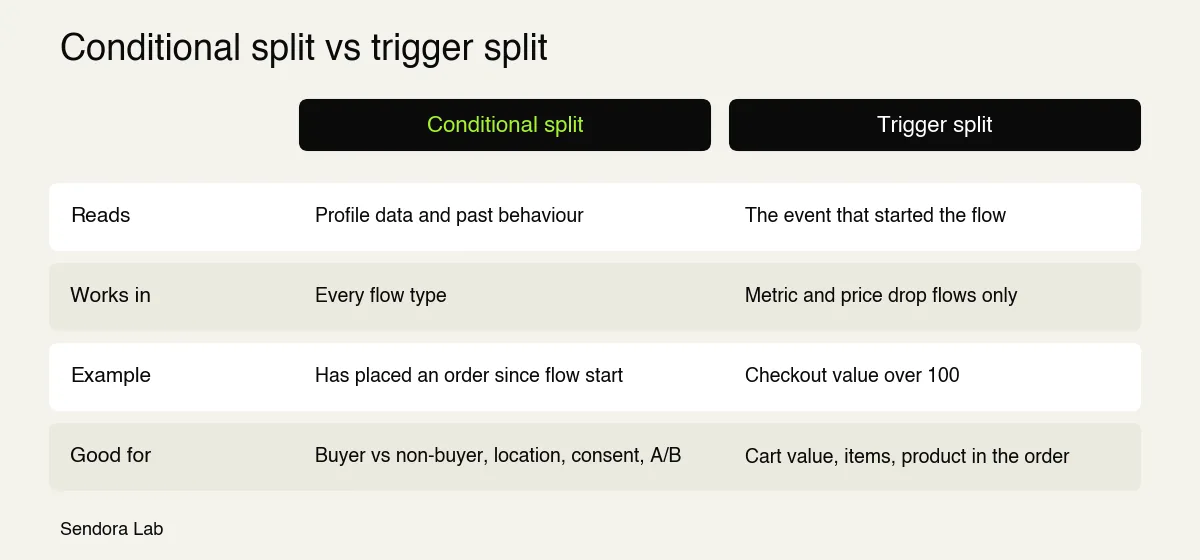
So “is this checkout worth more than 100?” is a trigger split, because the value lives on the Checkout Started event. “Has this person ever ordered?” is a conditional split, because it is about their history. Splits are also different from filters: a flow filter removes people from the flow, while a split keeps everyone and changes what they get. We cover that side in trigger filters vs flow filters.
How to add a conditional split to a Klaviyo flow
Drag the split into the flow, set one clear condition, then build both paths. The order of steps around it matters as much as the condition.
- Open the flow in the builder and drag Conditional split (or Split in the multi-branch version) to where the decision should happen.
- Choose the condition. For buyer checks, use “Placed Order at least once since starting this flow” rather than “over all time”, or past buyers will be treated as if they just bought.
- Build each path. If you insert the split in the middle of an existing flow, Klaviyo moves everything below it onto the first path, so check the other path is not empty.
- Preview a few test profiles from each side, then set the flow live.
Where the delay goes
A split only knows what is true at the second a profile arrives. If you want to stop buyers getting a reminder, the wait must come before the split, otherwise you check before anyone has had time to buy.
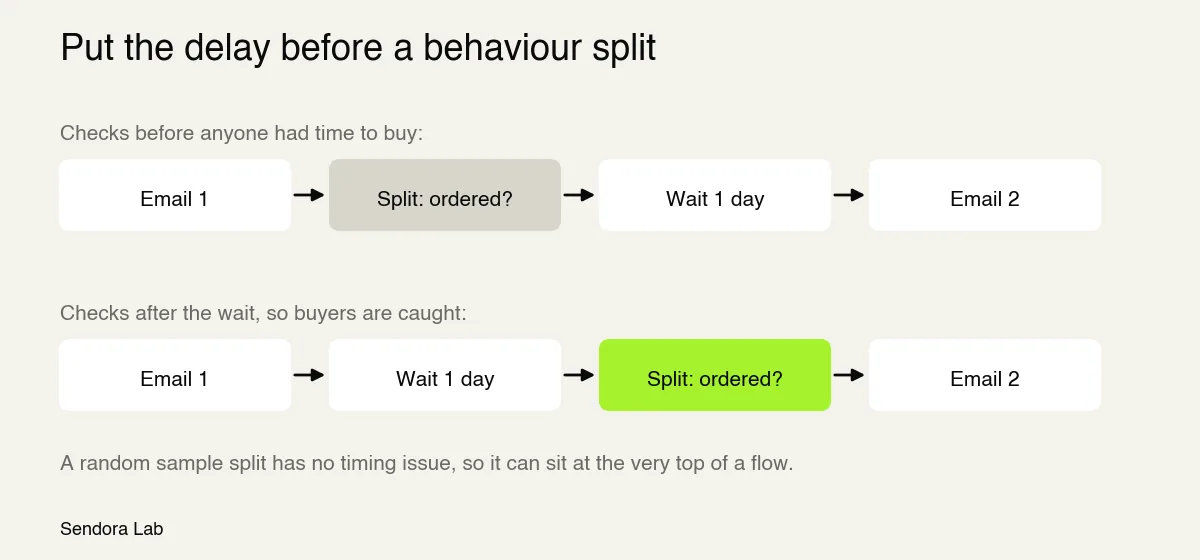
Random sample splits are the exception. They do not depend on behaviour, so they can sit at the very top of a flow.
Real example: 50/50 tests with a conditional split
A random sample split is the simplest way to test two versions of a flow without stopping it. Here is what that looked like in one store.
In Sendora Lab’s anonymised Klaviyo data from a Dutch fashion and home store on Shopify (flows read on 19 November 2026), 4 of its 10 live flows contain a conditional split, and all four are 50% random samples placed before the first email: welcome series, abandoned checkout, site abandonment and post-purchase. In the two we compare below, half the people get a plain-text version and half a designed version.
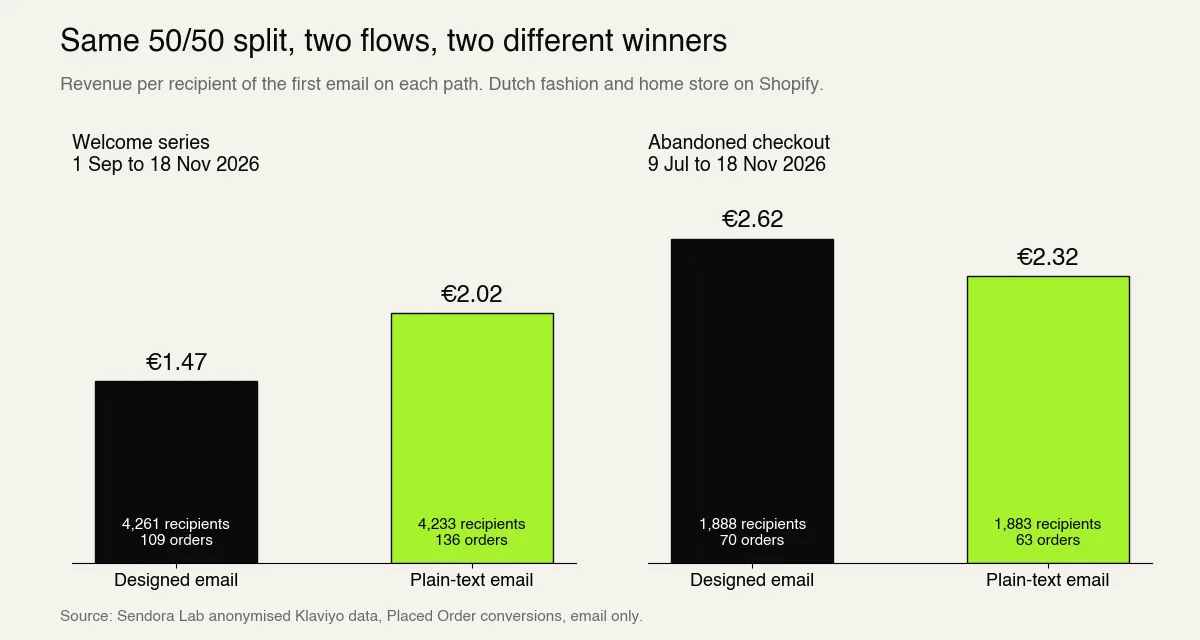
In the welcome series (1 September to 18 November 2026), the plain-text first email reached 4,233 people and earned €2.02 per recipient from 136 orders. The designed first email reached 4,261 people and earned €1.47 per recipient from 109 orders. The path sizes stayed almost equal, which is the first thing to check on any random split.
The abandoned checkout flow, live since 9 July 2026, went the other way. The designed first email earned €2.62 per recipient from 70 orders across 1,888 recipients; the plain-text one earned €2.32 from 63 orders across 1,883. Same store, same test, opposite result. The lesson is not “plain text wins”: test each flow on its own and read revenue per recipient, not clicks.
What this store is missing
None of the four splits checks behaviour. A buyer check after the first delay in the welcome series would let people who already ordered skip the “don’t forget your code” email. That is the next split we would add.
Common conditional split mistakes
Most broken splits fail for one of five reasons, and all five are quick to check in the flow builder.
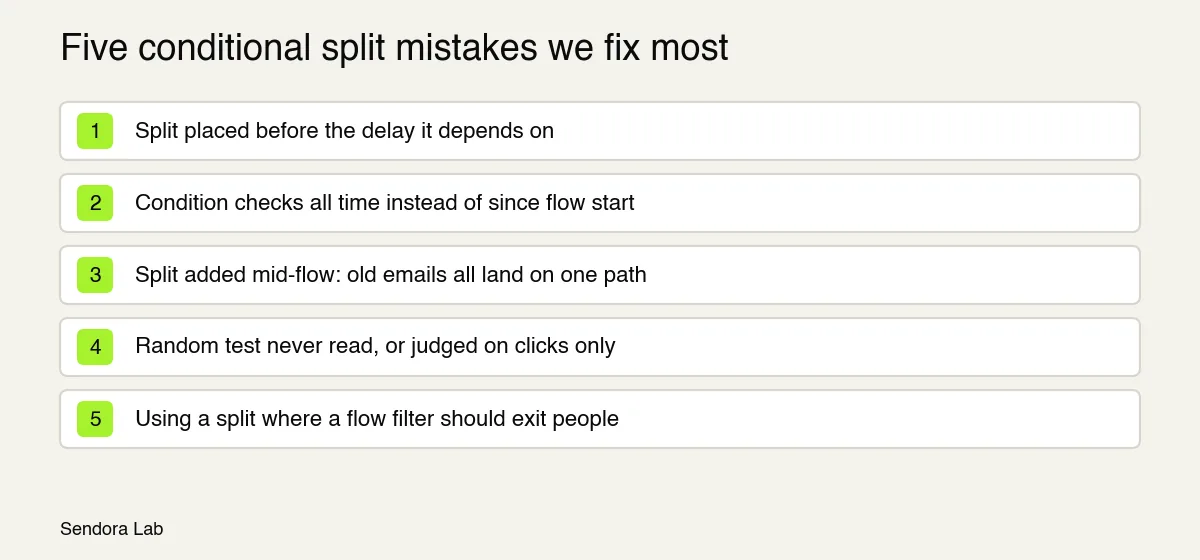
- Delay in the wrong place. The split runs before the wait it depends on.
- Wrong time window. “Over all time” instead of “since starting this flow” sends returning customers down the buyer path.
- Mid-flow insert. Existing emails all land on one path and the other path sends nothing.
- Tests nobody reads. A 50/50 split left running for months without a decision only halves your best version.
- Split instead of filter. If one group should get nothing at all, a flow filter is cleaner. If several flows hit the same people, see Klaviyo flow overlap.
Conclusion
A Klaviyo conditional split is the tool for “this person should get something different”. Use it for profile and behaviour questions, use a trigger split for questions about the event, and put delays before behaviour checks. Random sample splits are worth running in your main flows, as long as someone reads the results and picks a winner. If you want a second pair of eyes on your flow logic, our Klaviyo email marketing service starts with an audit of exactly this.
FAQ
What is the difference between a conditional split and a trigger split in Klaviyo?
A conditional split checks profile data and past behaviour and works in any flow. A trigger split checks the event that started the flow, such as order value, and only works in metric and price drop flows.
When does a conditional split check the condition?
At the moment the profile reaches the split. If someone buys after passing it, they stay on the path they were sent down.
Can a Klaviyo split have more than two paths?
Yes, with the multi-branch split Klaviyo began rolling out in October 2026. It allows up to 20 paths and sends each profile down the first one it qualifies for.
Can I A/B test a whole flow with a conditional split?
Yes. Use a random sample condition at 50% and build a different version on each path. In the store above, the same test picked a different winner in two flows, so test each flow separately.
Want this set up in your Klaviyo account?
A free 30-minute audit, your account open on screen.
Book a free audit