



A Klaviyo engaged segment is the group of subscribers who have recently shown they want your emails: they clicked, bought, visited the site or signed up in the last few weeks. Sending most campaigns to this group keeps complaint and bounce rates low, which keeps the rest of your email in the inbox. Below is how we build it, the condition most accounts miss, and what engaged audiences did in six months of real campaigns. Customers who used to buy but have gone quiet need their own win-back segment.
Short answer: build a segment of people who clicked an email, placed an order, were active on site or subscribed in the last 30 days, then add “is subscribed to email marketing” and exclude recent bounces and spam complaints. Treat opens with care, because Apple Mail Privacy Protection fakes many of them. In Sendora Lab’s anonymised data from a Dutch fashion store on Shopify (campaigns April to September 2026), sends to 30- or 60-day engaged segments clicked at 0.92% against 0.50% for the whole list.
What an engaged segment is in Klaviyo
It is your default campaign audience. In Klaviyo, a segment is a group of profiles that updates itself from conditions you set; a list, by contrast, only changes when someone joins or leaves it. An engaged segment uses recent behaviour as its conditions (a purchase behavior segment uses orders instead), so people move in when they interact and drop out when they go quiet.
Klaviyo’s lesson on engaged segments suggests three tiers: 30-day, 60-day and 90-day engaged. Most accounts we audit have these segments but send to “everyone” anyway. That is the habit to change: send to the engaged tier by default and widen only for a reason.
Inbox providers watch how recipients react. Google’s email sender guidelines ask senders to keep the spam rate in Postmaster Tools below 0.30%, recommend staying under 0.10%, and suggest unsubscribing people who don’t open or read your messages. An engaged segment is the simplest way to follow that advice without deleting anyone.
How to build a Klaviyo engaged segment, step by step
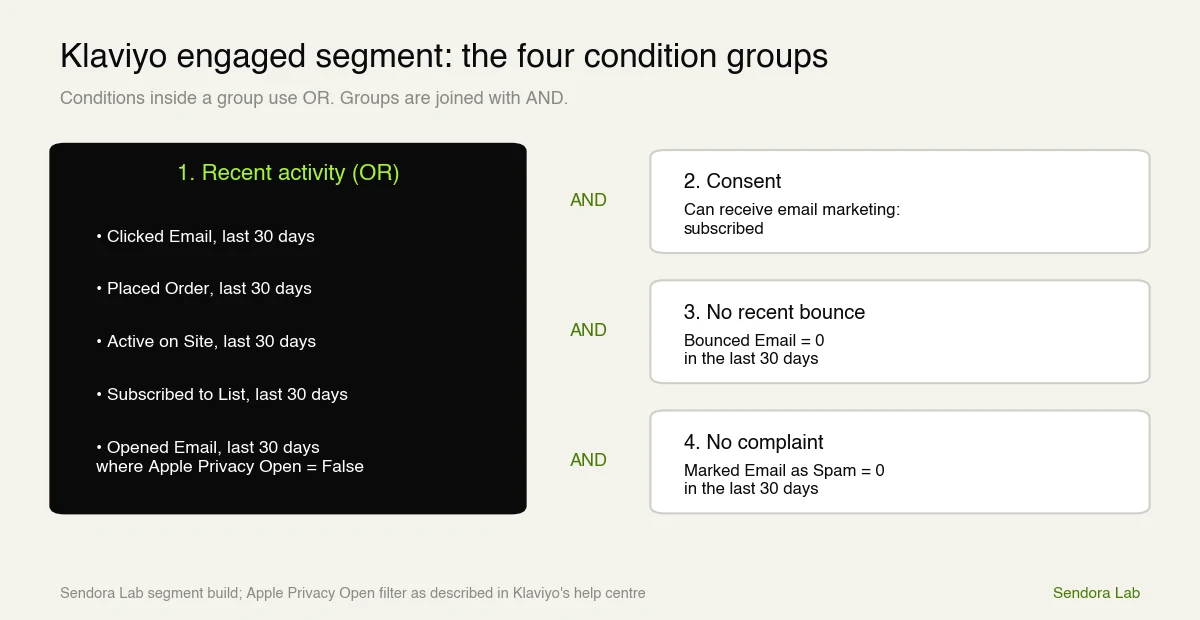
Create a new segment under Audience, then Lists & segments, and add four condition groups. Klaviyo joins conditions inside one group with OR and joins separate groups with AND, so the structure matters as much as the conditions.
The conditions we use
- Recent activity (one group, joined with OR): Clicked Email at least once in the last 30 days; Placed Order at least once in the last 30 days; Active on Site at least once in the last 30 days; Subscribed to List at least once in the last 30 days; and, if you keep opens, Opened Email at least once in the last 30 days where Apple Privacy Open equals False.
- Consent: “Can receive email marketing” with the status set to subscribed.
- No recent bounce: Bounced Email zero times in the last 30 days.
- No complaint: Marked Email as Spam zero times in the last 30 days.
Active on Site is the event Klaviyo records when an identified visitor browses your store. It is a useful signal for people who read but rarely click, but only if onsite tracking works; our guide to fixing Viewed Product tracking covers the usual problems.
Recent subscribers
New subscribers have no history yet, so the “subscribed in the last 30 days” condition keeps them in. If your welcome series runs longer than a week, consider excluding people still inside it so they don’t get campaigns and welcome emails on the same day.
The consent condition most accounts miss
Without a consent condition, an engaged segment counts people you cannot email. Klaviyo’s lesson says to include “Person is subscribed to email marketing” in every segment you plan to email, so the size you see is realistic.
The gap can be large. Engagement conditions also match profiles that have since unsubscribed, or that were suppressed after a bounce or a spam complaint. They stay in the count but cannot receive the campaign, so the segment looks bigger than the audience you will actually reach. The subscribed condition and the bounce and spam exclusions take them out.
Check the size after every change. If your engaged segment is more than half of everyone you can email, a condition is probably too loose.
Opens vs clicks after Apple Mail Privacy Protection
Opens are no longer a reliable sign of interest. Apple Mail Privacy Protection (MPP) loads images for Apple Mail users in the background, which can record an open the person never made. Klaviyo’s guide to identifying MPP opens explains the Apple Privacy Open property: it is True when the open came from a device with MPP on, and Klaviyo cannot tell an automatic open from a real one.
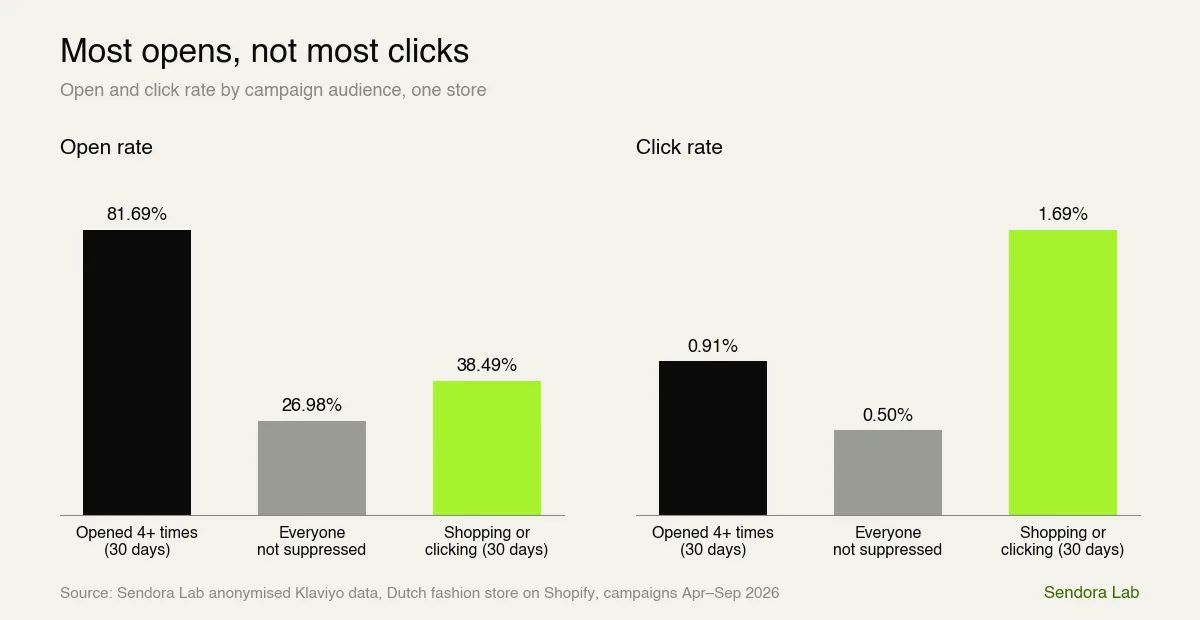
One store’s campaigns show what that does to an open-based audience. In Sendora Lab’s anonymised data from a Dutch fashion store on Shopify (campaigns 6 April to 30 September 2026), nine campaigns went to people who had opened four or more times in the last 30 days. They opened at 81.69% but clicked at 0.91%. Sixteen campaigns went to people who had been active on the site, started a cart or checkout, or clicked twice in the last 30 days: they opened at only 38.49% but clicked at 1.69%. The whole list opened at 26.98% and clicked at 0.50%.
So weight the segment towards clicks, orders and site visits. If you keep opens, add the filter “Apple Privacy Open equals False”. Our guide to open rates after Apple MPP covers what the number still tells you.
What the engaged segment did in real campaigns
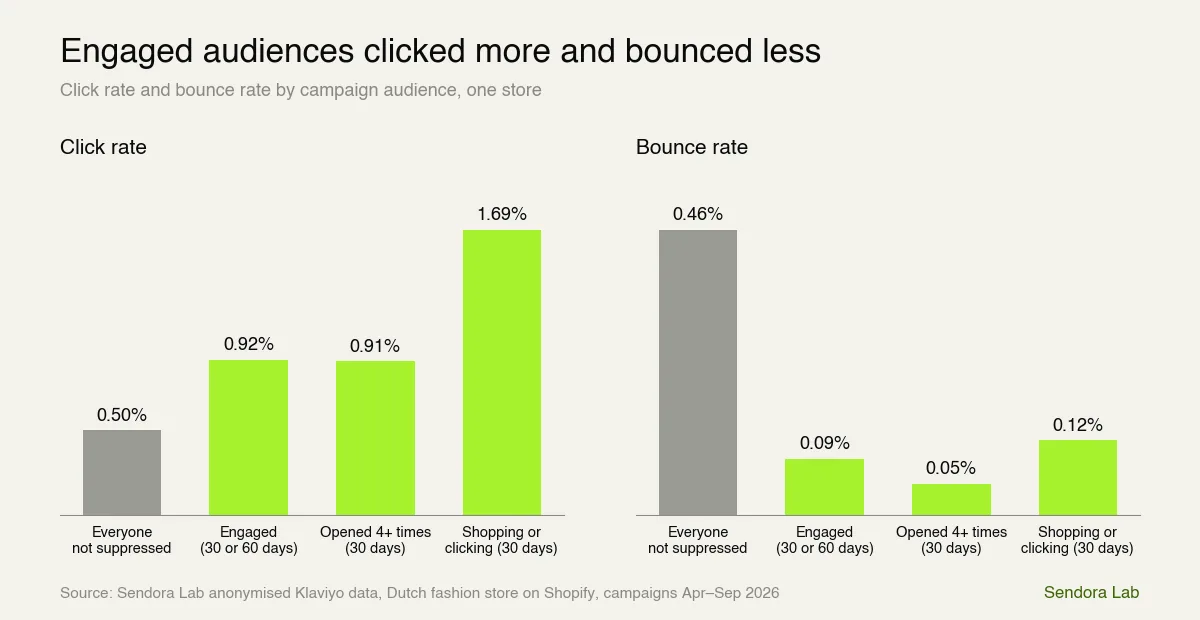
Across six months of campaigns, every engaged audience clicked more and bounced less than the whole list. The same Dutch store sent 52 campaigns between 6 April and 30 September 2026, and 48 of them went to one of the four audiences below. The table groups those campaigns by audience.
| Audience (Apr–Sep 2026) | Campaigns | Recipients | Click rate | Bounce rate | Unsubscribe rate |
|---|---|---|---|---|---|
| Everyone not suppressed | 14 | 314,912 | 0.50% | 0.46% | 1.05% |
| Engaged 30 or 60 days | 9 | 88,081 | 0.92% | 0.09% | 1.50% |
| Opened 4+ times in 30 days | 9 | 48,595 | 0.91% | 0.05% | 1.52% |
| Shopping or clicking in 30 days | 16 | 23,216 | 1.69% | 0.12% | 1.79% |
Each engaged audience clicked at close to double the whole list’s rate or more, and bounced far less. Unsubscribe rates went the other way: 1.50% to 1.79% in the engaged groups against 1.05% for the whole list, so a tighter audience is not a reason to send more often. These are different campaigns grouped by audience, not a same-day test, and orders were few (11 to 30 per group), so we judge the audiences on clicks and bounces rather than revenue.
The shopping and clicking audience is the one to copy. It was the smallest group but clicked at 1.69%, close to double the other engaged groups. Bounces were low everywhere in this store, but the whole-list sends still bounced the most, at 0.46%. That is why we add a recent-bounce exclusion to every audience, not just the engaged one.
Choosing the window: 30, 60, 90 or 120 days
Pick the window by list health and send frequency, not list size. A short window protects deliverability; a longer one reaches more people when you need volume.
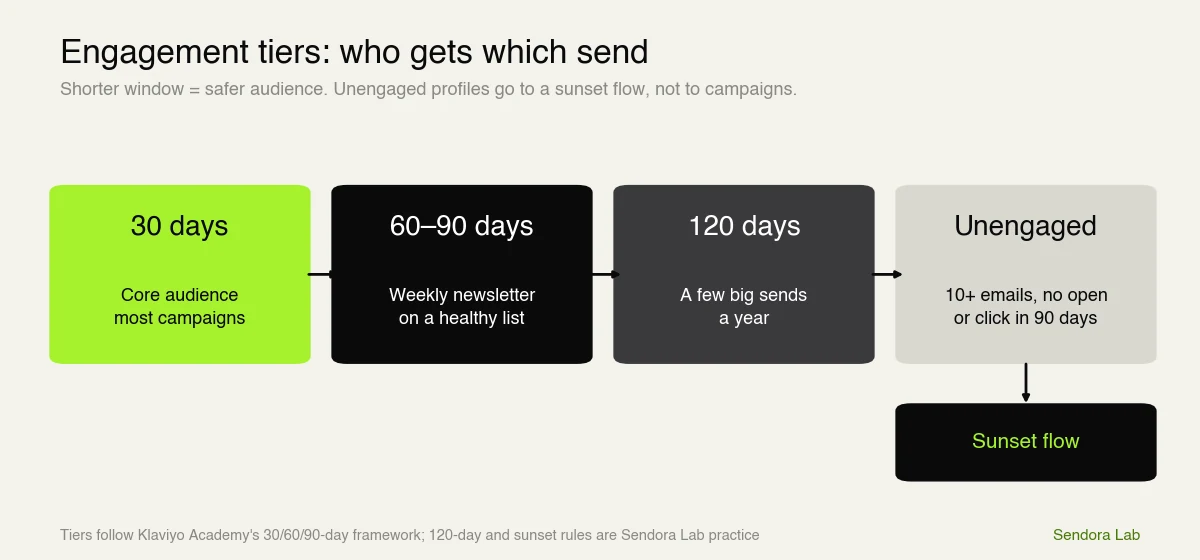
- 30 days: the core audience for most campaigns, and the only audience while warming a new sending domain.
- 60–90 days: for weekly newsletters on a healthy list, or a second send to non-clickers of a strong campaign.
- 120 days: for a few big moments a year, such as a seasonal sale, and only when recent bounce and complaint rates are low.
- Unengaged: people who have received at least ten emails and have not opened or clicked in 90 days. Move them to a sunset flow rather than mailing them every week.
Tighten the window if spam complaints or bounces rise, and widen it only after a few sends to the shorter tier look healthy. Our guide to email deliverability basics covers the other half of inbox placement: authentication and list hygiene.
The engaged segment answers “who should get this campaign”. The next question is “who deserves something different”, which is where a Klaviyo VIP segment for your best customers comes in.
Conclusion
A good Klaviyo engaged segment is built on clicks, orders, site visits and recent sign-ups, limited to subscribed profiles and cleaned of recent bounces and complaints. In our data, frequent openers opened at 81.69% but clicked at 0.91%, shoppers and clickers clicked at 1.69%, and every engaged audience clicked more and bounced less than the whole list. Make it your default campaign audience; our guide on how to create a Klaviyo campaign shows where to set it. Sendora Lab sets up segments and campaign programmes as part of our Klaviyo email marketing services; if you want a second opinion on yours, book a free audit. Still deciding between lists and segments? Read Klaviyo segments vs lists. If you draft it with AI, run the checks in our Klaviyo AI segment builder guide first.
FAQ
Does Klaviyo come with engaged segments already built?
Many accounts have Engaged (30 Days), (60 Days) and (90 Days) segments from Klaviyo’s setup. Open each one and check it has a subscribed condition and an Apple Privacy Open filter before you rely on it.
Should I use opens in an engaged segment?
Only with the filter “Apple Privacy Open equals False”. In our data, an audience of frequent openers opened at 81.69% but clicked at 0.91%, while an audience built on site activity and clicks opened at 38.49% and clicked at 1.69%.
What window should my engaged segment use?
Start with 30 days for regular campaigns. Use 60 to 90 days for a healthy weekly newsletter, and 120 days only for a few big sends a year with low bounce and complaint rates.
Why is my engaged segment bigger than expected?
Usually the consent condition is missing or opens are unfiltered. Without them the segment also counts unsubscribed and suppressed profiles, and people whose only signal is an automatic Apple open.
Want this set up in your Klaviyo account?
A free 30-minute audit, your account open on screen.
Book a free audit