



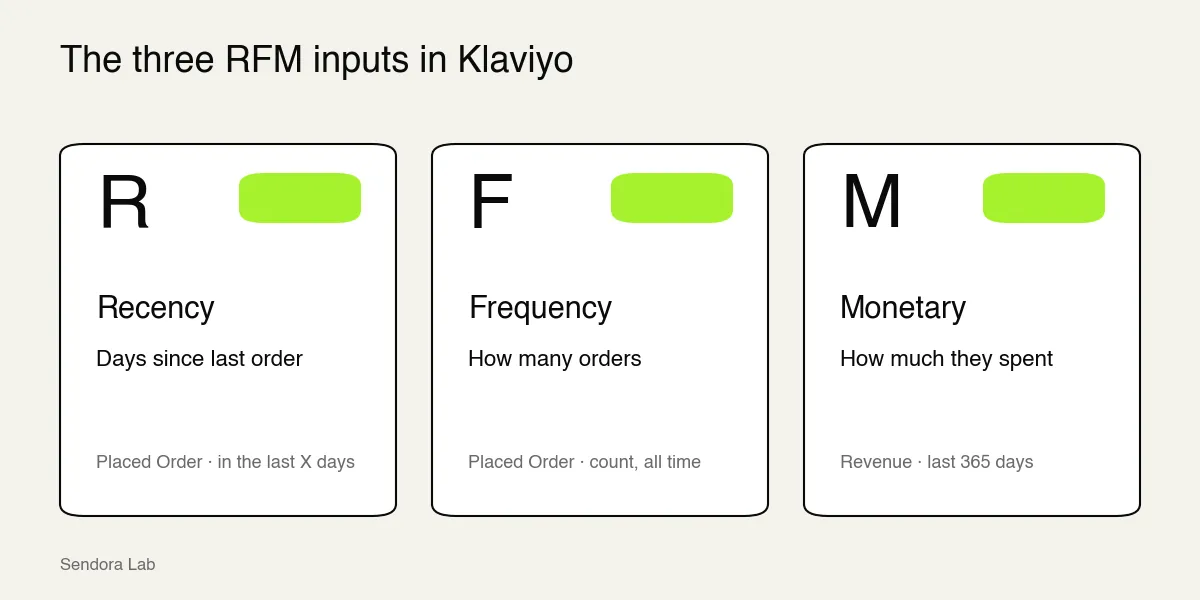
Klaviyo RFM segmentation groups your customers by three things: how recently they last ordered (recency), how often they order (frequency) and how much they spend (monetary value). You can get it two ways: Klaviyo’s built-in RFM report, which scores every buyer for you but needs a paid add-on and enough order history, or a set of segments you build yourself from Placed Order data, which works on any account.
Short answer: If your account has the RFM analysis report and meets its data rules, use its groups (Champions, Loyal, Recent, Needs attention, At risk, Inactive) directly in segments and flows. If it doesn’t, build three to five segments by hand: one condition for days since last order, one for order count and one for revenue. At Sendora Lab we start with the hand-built version on most Shopify accounts, because it is free, easy to read and easy to change.
What RFM segmentation means in Klaviyo
RFM is a way to rank buyers so you can treat your best, newest and slipping customers differently. Each customer gets a score for recency, frequency and monetary value, and the mix of scores decides which group they sit in.
A few Klaviyo terms first. A segment is a list that updates itself: profiles join and leave as they meet or stop meeting its conditions. A flow is an automated series of messages that starts when something happens, such as a profile joining a segment. Placed Order is the event your store (Shopify here) sends to Klaviyo for every order; RFM is built almost entirely on it.
The point of RFM is not the labels. It is that a customer who bought three times last month and a customer who bought once two years ago should not get the same email, offer or send frequency.
Klaviyo’s built-in RFM report: what you need
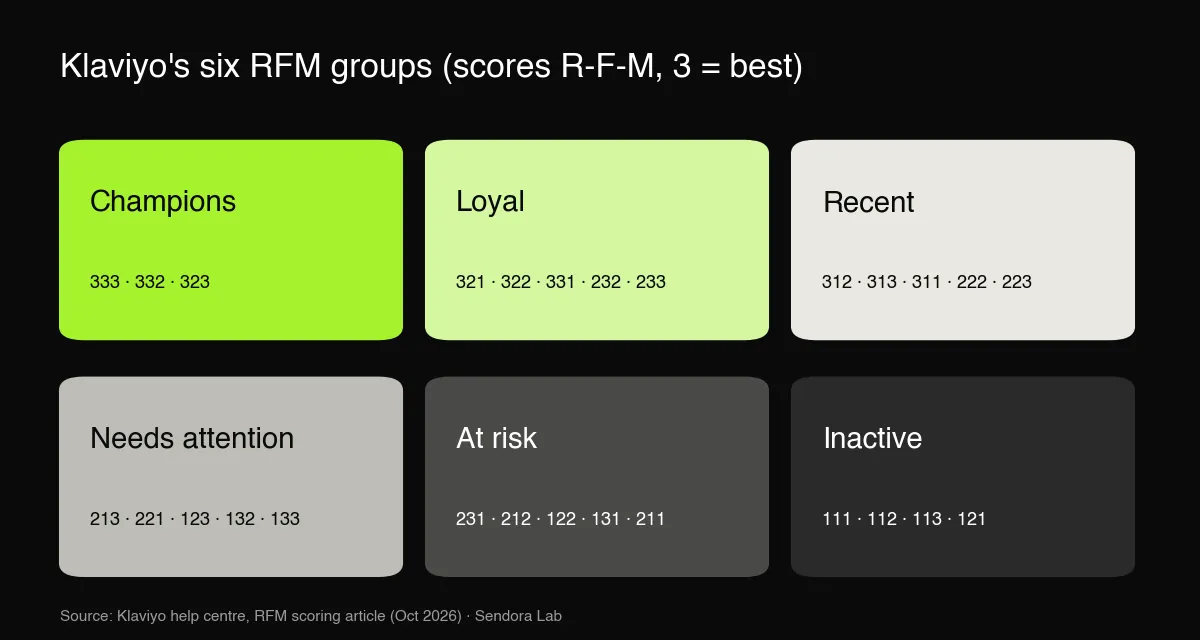
The built-in report scores each buyer from 1 to 3 on each of the three factors and places them in one of six groups. It is part of Klaviyo’s paid analytics add-on, not the standard plan.
According to Klaviyo’s RFM report guide (checked October 2026), the account needs at least 500 customers who have placed an order, at least 180 days of order history with orders in the last 30 days, and some customers with three or more orders. It also needs the Advanced KDP and Personalization subscription.
How the scores work
Recency uses days since the last order: a 3 means the last order was within 180 days, a 2 means 180 to 365 days, and a 1 means more than 365 days. Frequency and monetary scores split your own customers at the 33rd and 66th percentiles, so the cut-offs fit your store rather than a benchmark, as Klaviyo’s scoring article explains.
| Group | Score combinations (R-F-M) | What we usually do |
|---|---|---|
| Champions | 333, 332, 323 | Early access, no discounts |
| Loyal | 321, 322, 331, 232, 233 | Cross-sell, reviews, referral asks |
| Recent | 312, 313, 311, 222, 223 | Second-order push in the post-purchase flow |
| Needs attention | 213, 221, 123, 132, 133 | Personal reminder, best sellers |
| At risk | 231, 212, 122, 131, 211 | Win-back flow, small incentive |
| Inactive | 111, 112, 113, 121 | Low frequency, then sunset |
Once the report runs, each profile gets a Current RFM group property that refreshes nightly. You can build a segment on “Current RFM group equals At risk” or use it in a flow split.
How to build RFM segments in Klaviyo without the add-on
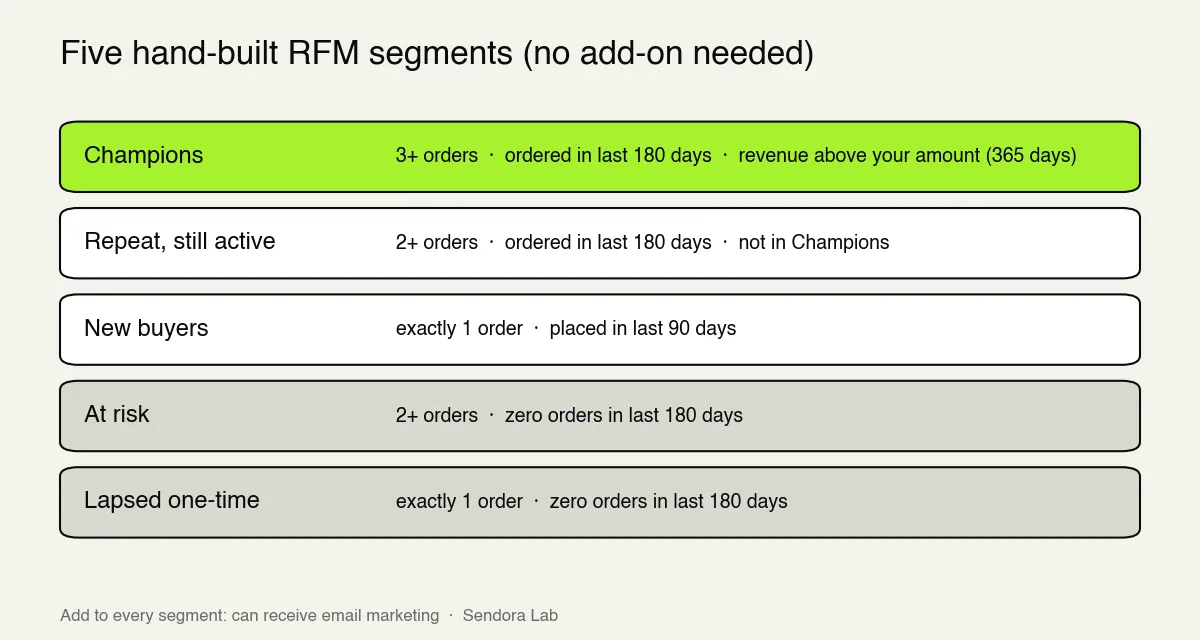
You can build working RFM segments with the normal segment builder. Each factor becomes one condition under “What someone has done (or not done)”.
- Recency: Placed Order zero times in the last 180 days (slipping), or at least once in the last 90 days (recent).
- Frequency: Placed Order is greater than 1 over all time (repeat) or greater than 2 (three or more orders).
- Monetary: Revenue (shown as “Placed Order Value” in some accounts) is greater than an amount you choose over the last 365 days. Klaviyo’s VIP segment guide uses the same two conditions.
- Consent: add “can receive email marketing”, because purchase-based segments include buyers who never subscribed.
Five segments that cover most stores
- Champions: 3+ orders all time AND at least one order in the last 180 days AND revenue above your chosen amount in the last 365 days.
- Repeat, still active: 2+ orders all time AND at least one order in the last 180 days, not in Champions.
- New buyers: exactly one order, placed in the last 90 days.
- At risk: 2+ orders all time AND zero orders in the last 180 days.
- Lapsed one-time buyers: exactly one order AND zero orders in the last 180 days.
Pick the monetary amount from your own data: look at what your top third of customers spend in a year and start there. For deeper treatment of the top tier see our guide to the Klaviyo VIP segment, and for the slipping groups, the Klaviyo win-back segment.
What RFM data looks like on a real store
On a typical small Shopify store, recency is the problem, not frequency. Most buyers have stopped ordering, and the starter segments rarely say how much anyone spent.
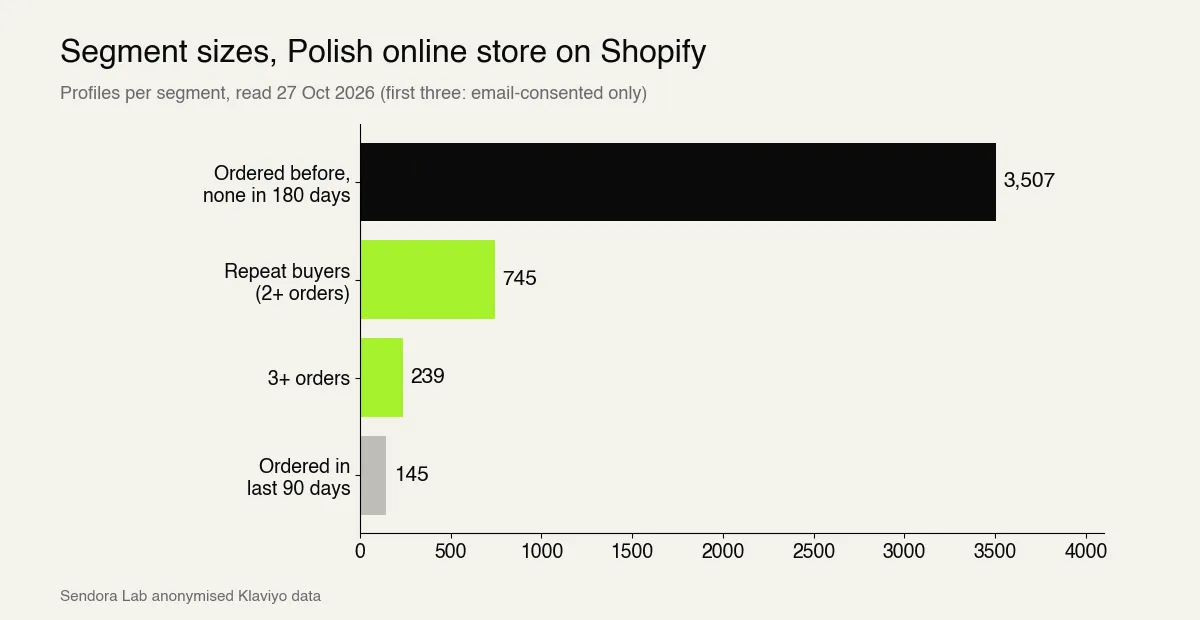
In Sendora Lab’s anonymised Klaviyo data from a Polish online store on Shopify (segment sizes read on 27 October 2026), the account’s segments showed:
- 745 emailable profiles with more than one order ever (repeat buyers);
- 239 emailable profiles with more than two orders ever;
- 3,507 emailable profiles who had ordered before but not in the last 180 days;
- 145 profiles with an order in the last 90 days.
So the lapsed group was far larger than the repeat group. These segments had been in the account since 2021, and none of them had a spend condition: they covered recency and frequency only. Adding the monetary condition is usually the first fix we make, because it separates a lapsed customer worth a personal email from one worth a quiet sunset.
Why short windows hide frequency
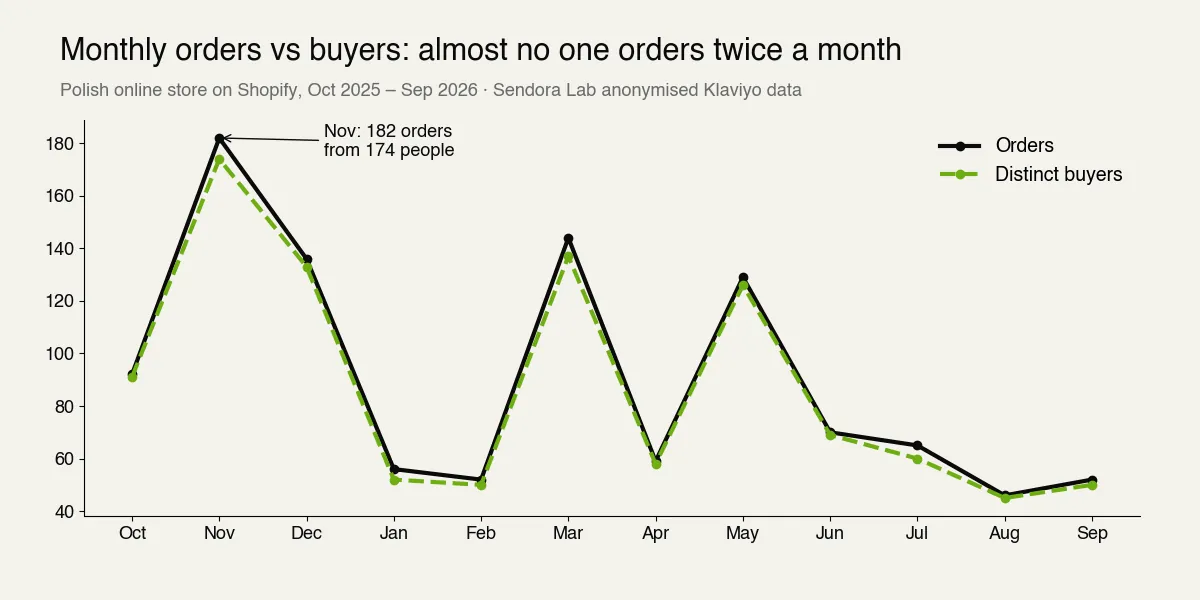
Frequency only shows up over long windows. In the same store’s data for October 2025 to September 2026, there were 1,083 Shopify orders, and in every month the order count was within eight of the number of different buyers. In November 2025, for example, 182 orders came from 174 people.
Inside a single month almost nobody orders twice, so a frequency condition set to “in the last 30 days” will find nearly no one. Use all time or the last 365 days for frequency, and keep the short windows for recency.
How to use RFM segments in campaigns and flows
Use RFM segments to change three things: who gets a campaign, which offer they see and how often you email them.
- Offers: keep discounts away from Champions and Loyal buyers, who buy anyway; save them for At risk.
- Frequency: send more to recent and active buyers, and less to lapsed one-time buyers, so they don’t drag down your engagement. Our engaged segment guide covers the email-activity side of this.
- Flows: trigger a win-back flow when a profile joins At risk, and use a conditional split on spend in the post-purchase flow so high spenders get a thank-you instead of a coupon.
- Content: show best sellers to new buyers and new arrivals or complementary products to repeat buyers. Our purchase behaviour segmentation guide shows how to add product filters.
Review the thresholds every quarter. As the store grows, the spend that puts someone in the top third moves, and fixed numbers drift out of date.
Conclusion
Klaviyo RFM segmentation works with or without the paid report. If you have it, use the Current RFM group property; if not, three conditions (days since last order, order count, revenue) and a consent filter give you the same core groups. Start with recency, because that is where most stores lose customers, and add spend so your best lapsed customers get attention first.
If you want this set up and wired into your flows, see how we run Klaviyo email marketing for Shopify brands. For the basics of how segments differ from lists, read Klaviyo segments vs lists. Drafting these with AI? Check the logic with our Klaviyo AI segment builder guide.
FAQ
Does Klaviyo have RFM segmentation built in?
Yes. The RFM analysis report scores buyers 1 to 3 on each factor and sorts them into six groups, but it needs the Advanced KDP and Personalization subscription and at least 500 customers with an order.
Can I do RFM in Klaviyo on the standard plan?
Yes. Build segments with the “What someone has done” condition: Placed Order for recency and frequency, and Revenue or Placed Order Value for spend. Add a consent condition before you send.
What recency window should I use?
Klaviyo’s report uses 180 and 365 days by default. Shorter windows such as 90 days suit stores whose customers reorder often.
Why does my frequency segment show almost no one?
The window is probably too short. In the store data above, monthly orders and monthly buyers were almost equal, so frequency needs all-time or 365-day windows.
How often do RFM groups update?
The report’s profile properties refresh nightly. Hand-built segments update on their own as new orders arrive.
Want this set up in your Klaviyo account?
A free 30-minute audit, your account open on screen.
Book a free audit