



Shopify email deliverability is whether your marketing emails reach the inbox instead of bouncing or landing in spam. It decides how much of your list ever sees a campaign, before subject lines and email design matter at all. Below are the basics that keep a Shopify store in the inbox, the numbers to watch in Klaviyo, and what real store data shows about where bounces and complaints come from.
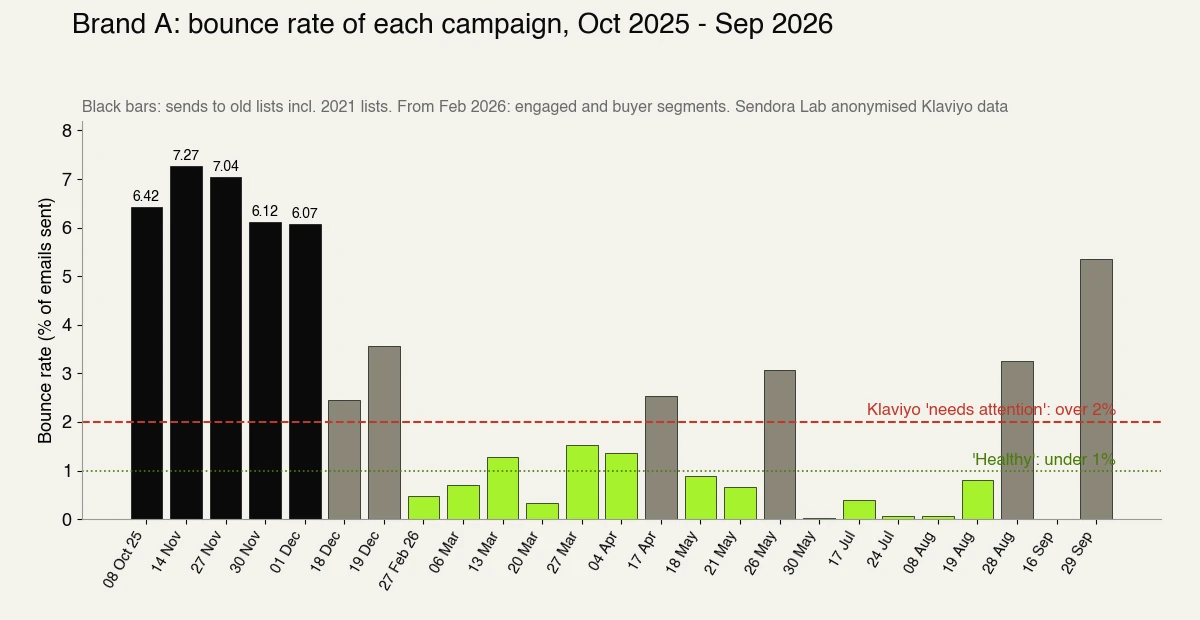
Short answer: authenticate your sending domain, collect addresses with clear consent, send most email to people who recently opened, clicked or bought, keep your volume steady, and make unsubscribing easy. Then watch three numbers on every send: bounce rate, unsubscribe rate and spam complaint rate. In Sendora Lab’s anonymised Klaviyo data, the same store saw 6.07% to 7.27% of campaign emails bounce when it mailed old lists, and 0.34% to 1.52% on its first six sends after switching to engaged segments.
What email deliverability means, and what “delivered” does not
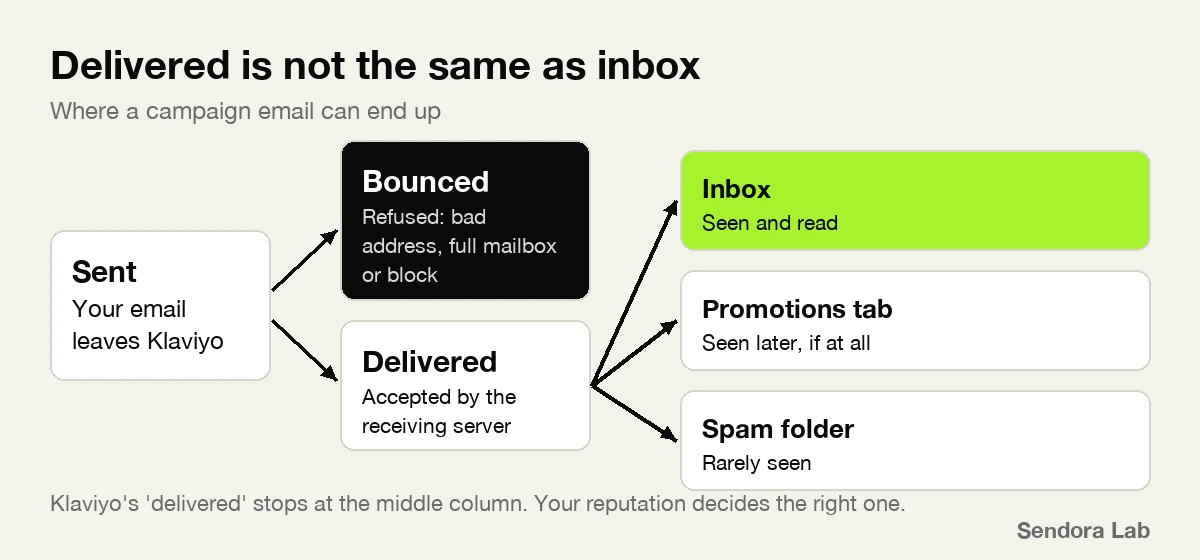
Deliverability is about the inbox, not just arrival. An email can be “delivered” in your report and still sit in a spam folder that nobody opens.
Three terms matter here. A bounce is an email the receiving server refused, either for good (a hard bounce, such as an address that does not exist) or for now (a soft bounce, such as a full mailbox or a temporary block). Delivered in Klaviyo means the receiving server accepted the email; where it then files it is up to Gmail, Outlook, Yahoo or Apple. A spam complaint is a recipient pressing “report spam”, which is the strongest negative signal you can send a mailbox provider.
Mailbox providers decide where to file your email mostly on your sender reputation: how people have reacted to your past emails, how many addresses bounced, how many complaints you caused, and whether your domain is set up correctly. Every send either builds that reputation or spends it.
The five basics every Shopify store needs
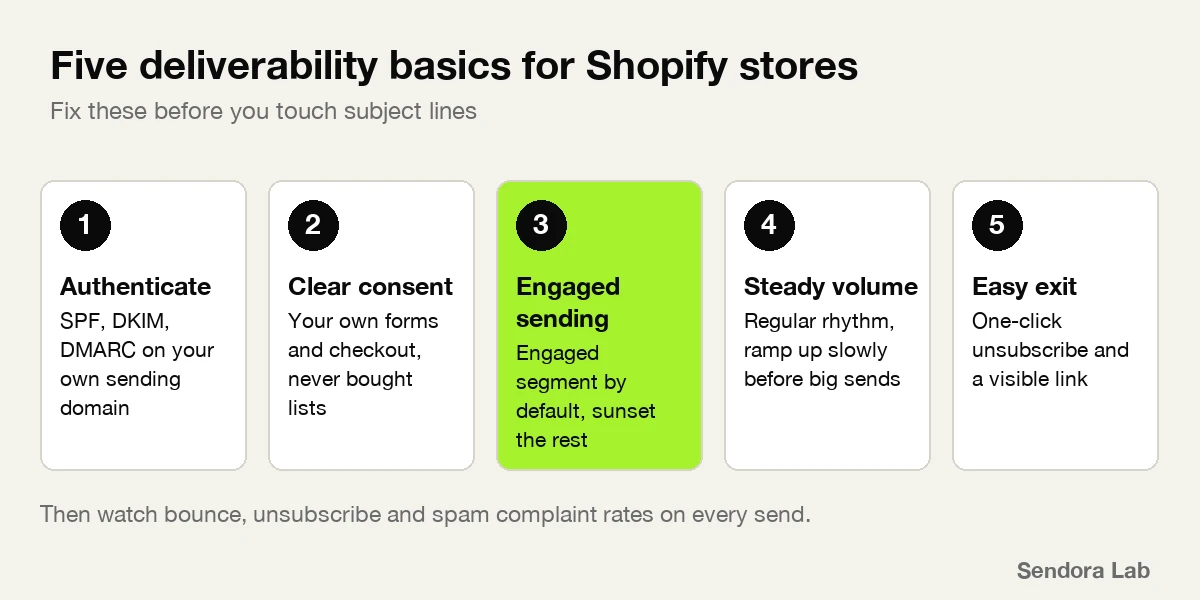
Most deliverability problems in Shopify stores come from five habits. Get these right before you change a single subject line.
- Authenticate your sending domain. SPF, DKIM and DMARC are DNS records that prove an email really comes from your domain. Google’s email sender guidelines require all three from anyone sending more than 5,000 messages a day to Gmail accounts. Our plain-English guide to SPF, DKIM and DMARC covers the setup.
- Collect addresses with clear consent. Grow the list through your own signup forms and checkout, never a bought or borrowed list. People who did not ask for your email are the ones who report it as spam.
- Send to people who engage. Make an engaged segment your default campaign audience, and use a sunset policy to stop mailing people who have ignored you for months.
- Keep your volume steady. Google advises starting “with a low sending volume to engaged users” and raising it slowly. A list that hears nothing for months and then gets a big sale email looks suspicious; our guide to email marketing frequency shows how to set a rhythm.
- Make leaving easy. Google requires one-click unsubscribe and a visible unsubscribe link in marketing email from bulk senders. Someone who cannot find the link reaches for the spam button instead.
The numbers to watch in Klaviyo
Check bounce rate, unsubscribe rate and spam complaint rate after every campaign, and compare each with your last few sends to the same audience. Open and click rates tell you about interest; these three tell you what a send cost your reputation.
Klaviyo’s article on monitoring deliverability performance grades them like this. Klaviyo calculates bounce rate on emails sent, and unsubscribe and spam rates on emails delivered.
| Metric | Healthy | Room for improvement | Needs attention |
|---|---|---|---|
| Bounce rate | under 1.0% | 1% to 2% | over 2% |
| Unsubscribe rate | under 0.3% | 0.3% to 1% | over 1% |
| Spam complaint rate | under 0.01% | 0.01% to 0.05% | over 0.05% |
Google sets its own line for spam: keep the rate reported in Postmaster Tools below 0.10% and never reach 0.30%. In Klaviyo, the deliverability hub under Analytics shows these rates by inbox provider, and a bounce details page shows why emails bounced. Our guide to email campaign metrics explains how to read the rest of a campaign report.
What real store data shows: old lists bounce
Who you send to decides most of your bounce rate. Brand A, a small Polish online store on Shopify, shows this over 25 email campaigns sent between October 2025 and September 2026 (Brand A and Brand B are pseudonyms; figures from Sendora Lab’s anonymised Klaviyo data).
Its first five campaigns, from October to early December 2025, went to a mix of lists that included back-in-stock and buyer lists from 2021. Between 6.07% and 7.27% of each send bounced, more than three times Klaviyo’s “needs attention” line. From February 2026 the store switched to engaged and buyer segments, and its next six campaigns bounced between 0.34% and 1.52%. Four later sends went over 2% again, between 2.53% and 5.36%. Three of them included broader customer segments, and the fourth was a small send of 645 emails.
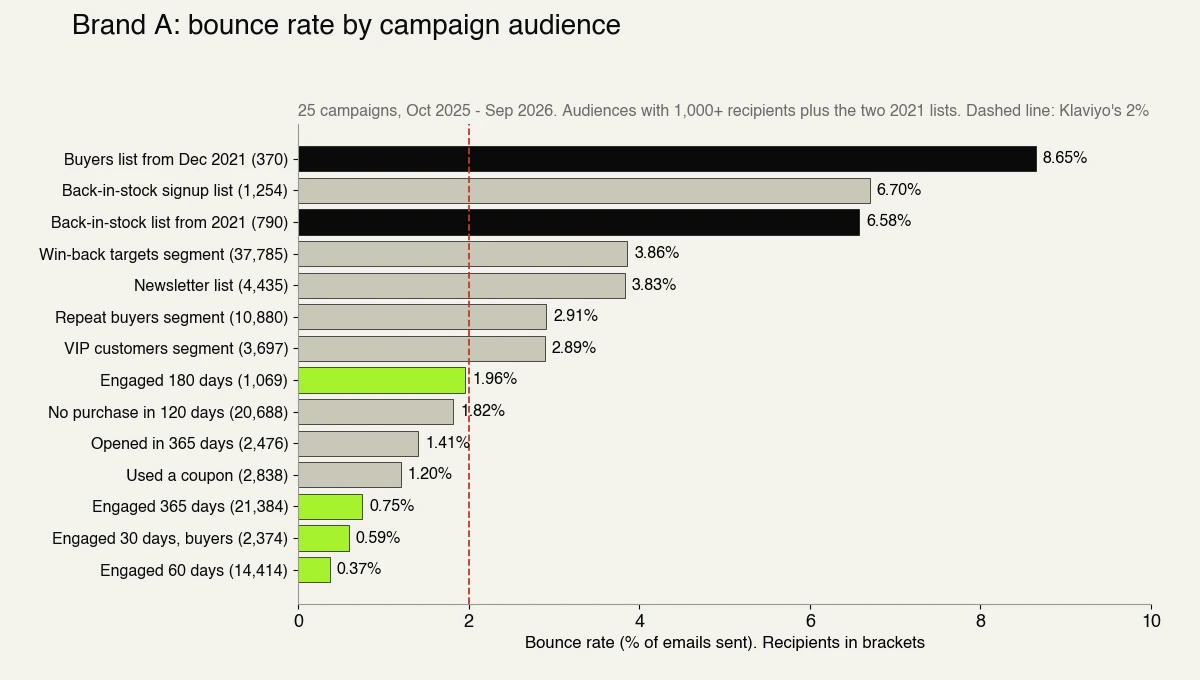
Split by audience over the same year, the pattern is the same. A list of buyers from December 2021 bounced at 8.65% and a 2021 back-in-stock list at 6.58%. The 60-day engaged segment bounced at 0.37% from 14,414 recipients, while broad segments of past buyers and win-back targets sat between 2.89% and 3.86%.
When flows bounce too
The same store’s flows bounced at 4.47% in the welcome series, 4.15% in order confirmations and over 8% in browse and checkout reminders (flows live from December 2025 or February 2026 to September 2026). Fresh signups with typos explain part of a welcome bounce, but an order confirmation goes to an address someone just bought with. When even those bounce, open Klaviyo’s bounce details to see whether you are dealing with bad addresses or with blocks from a mailbox provider, and add a “Bounced Email zero times since starting this flow” filter, as in our welcome series guide.
Broad sends versus engaged sends
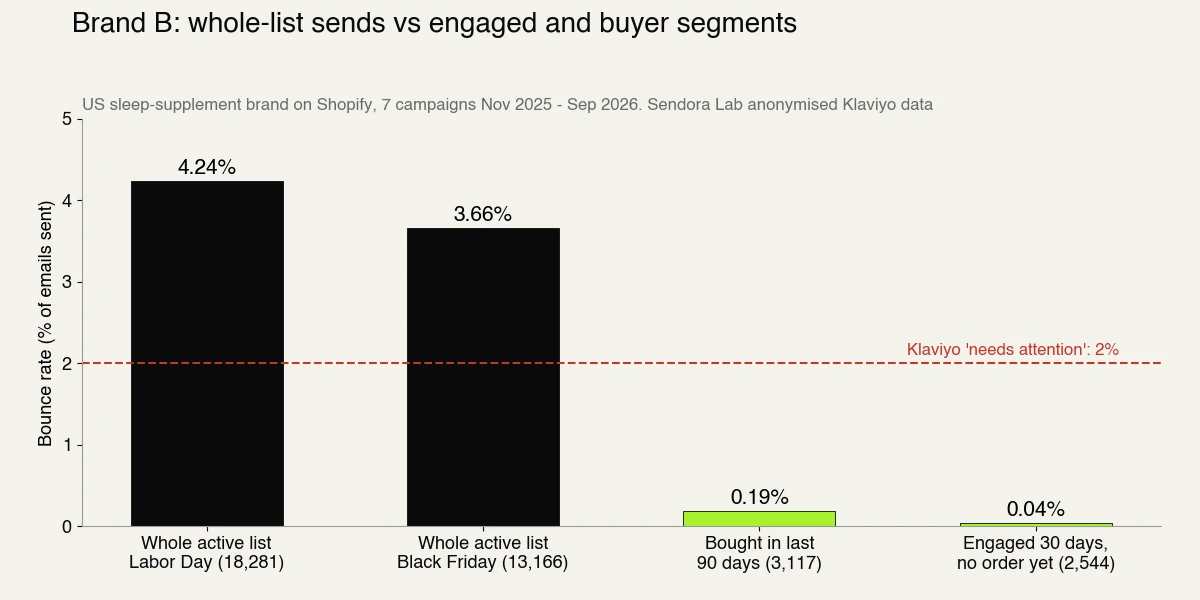
Sending to everyone who can technically receive email costs you on every metric that mailbox providers watch. Brand B, a US sleep-supplement brand on Shopify, sent seven campaigns between November 2025 and September 2026, some to its whole active list and some to engaged or buyer segments.
| Audience | Recipients | Bounce rate | Spam complaints |
|---|---|---|---|
| Whole active list, Labor Day send (Sep 2026) | 18,281 | 4.24% | 15 |
| Whole active list, Black Friday send (Nov 2025) | 13,166 | 3.66% | 6 |
| Bought in the last 90 days (2 sends) | 3,117 | 0.19% | 1 |
| Engaged in 30 days, no order yet (3 sends) | 2,544 | 0.04% | 4 |
The Labor Day send’s complaint rate was 0.09% of delivered emails, above Klaviyo’s 0.05% “needs attention” line and close to Google’s 0.10%. The engaged and buyer segments barely bounced at all.
One caution on small segments: four complaints from 2,544 engaged recipients is a higher rate than six from 13,166, simply because the denominator is small. Judge complaint rates over several sends, or by mailbox provider in the deliverability hub, before you change course on one bad number.
Conclusion
Shopify email deliverability rests on a few habits: an authenticated domain, a list people asked to join, sending to people who engage, a steady volume and an easy way out. Watch bounce, unsubscribe and complaint rates on every send, and treat old lists and whole-list blasts as the first suspects when they rise. If your numbers look like the old-list sends above, our Klaviyo email marketing service includes a deliverability clean-up, or you can book a free audit. The first technical step is a Klaviyo branded sending domain, so your emails pass DMARC under your own name. New domains also need a gradual start, which our Klaviyo domain warming guide walks through. Authentication done? See how BIMI can put your logo in Gmail and Yahoo inboxes.
FAQ
What is a good bounce rate for a Shopify store?
Under 1% per send, according to Klaviyo’s guidance; over 2% needs attention. In our data, a 60-day engaged segment bounced at 0.37%, while lists from 2021 bounced above 6%.
Does “delivered” mean my email reached the inbox?
No. Delivered means the receiving server accepted it. The mailbox provider can still file it in a promotions tab or the spam folder.
What spam complaint rate is too high?
Klaviyo grades anything over 0.05% as needing attention. Google asks bulk senders to stay below 0.10% and never reach 0.30%.
Do I need SPF, DKIM and DMARC?
Yes, if you send more than 5,000 messages a day to Gmail accounts, and it is good practice for every store. Set them up through a branded sending domain in your email platform.
Want this set up in your Klaviyo account?
A free 30-minute audit, your account open on screen.
Book a free audit