



Klaviyo UTM tracking adds labels such as utm_source=klaviyo and utm_medium=email to the links in your emails and texts, so Google Analytics 4 (GA4) knows a visit came from Klaviyo and which send it came from. You switch it on once in the account settings, then check it is on for each flow email and each campaign, because older messages do not update themselves.
Short answer: Go to Settings > Other > UTM tracking in Klaviyo, set your campaign and flow values, and turn on “Automatically add UTM parameters to links”. Then open every live flow email and confirm “Enable UTM Tracking” is ticked. In Sendora Lab’s audits the account setting is rarely the problem; the gaps are the flow emails and campaigns added later.
What Klaviyo UTM tracking does
UTM tracking appends parameters to every tracked link so your analytics tool can tell where a visitor came from. A UTM parameter is a tag in the link, after the question mark, that analytics tools read and store with the visit. Klaviyo adds them for you at send time, so you never edit links by hand.
Without them, GA4 still sees the visit but has to guess its origin. Clicks from many mail apps reach your store with no referrer, so they can show up as direct traffic and your email channel looks smaller than it is.
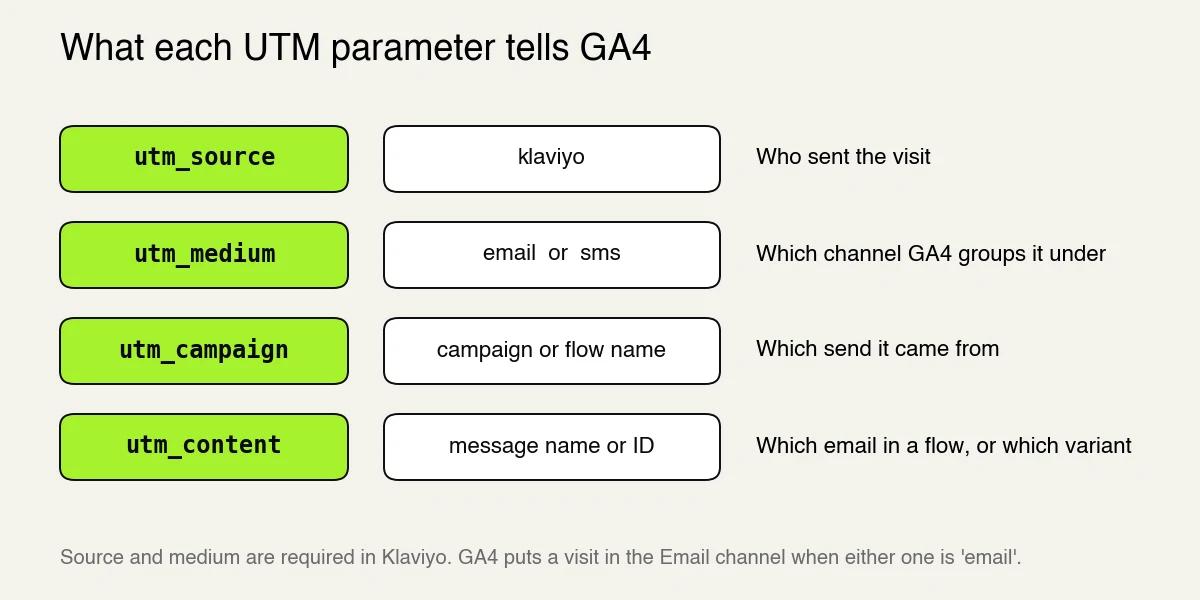
The parameters that matter
utm_source: who sent the visit. Useklaviyo.utm_medium: the channel, such asemailorsms. Klaviyo’s “Message type” value fills this in per channel.utm_campaign: which campaign or flow the click came from.utm_content: which email inside a flow, or which variant.
Klaviyo treats source and medium as required and will not let you remove them. Google’s own guide to campaign URLs says to always use source, medium and campaign, because missing values show up as “(not set)” in reports.
How to set up Klaviyo UTM tracking
There are three switches: the account default, each flow email, and each campaign. Turning on the account default only covers messages you create afterwards, so existing flow emails need checking one by one.
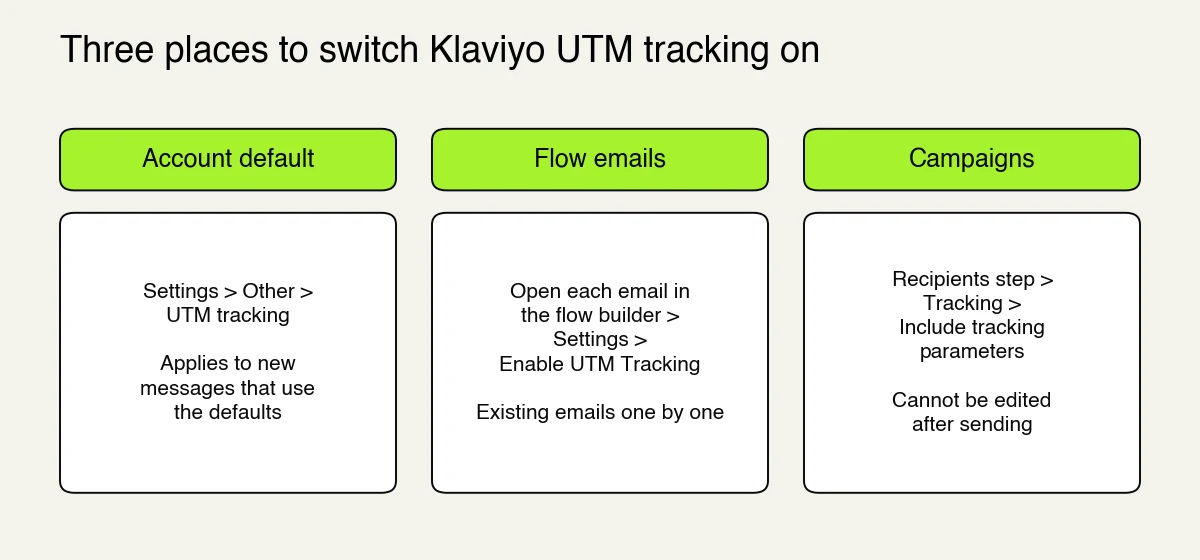
1. Account defaults
Go to Settings > Other > UTM tracking. Set the values for campaigns and for flows, then turn on “Automatically add UTM parameters to links”. According to Klaviyo’s UTM tracking guide, changes to these values apply to future sends of messages that use the account defaults, while messages with their own custom parameters keep their settings.
2. Flow emails
Open each email in the flow builder, go to its settings and tick “Enable UTM Tracking”. A flow is an automated series of messages that Klaviyo sends when something happens, such as a first order or an abandoned checkout. Flows run for months, so an email built before you set the default can send untagged for a long time.
3. Campaigns
In the Recipients step of a campaign, open the Tracking section and turn on “Include tracking parameters”. Check this before you send: UTM parameters cannot be edited after a campaign has gone out, and a scheduled campaign has to be paused first.
Small rules that break tracking
- Every link needs
http://orhttps://, or Klaviyo will not track it. - For texts, keep “Automatically shorten links” switched on.
- For A/B tests, general UTM tracking does not tell variants apart. Turn on “Track links separately in each variation” to add the variation parameter.
Which UTM values to use so GA4 reads them
Use email as the medium for email and sms for texts, and keep the names consistent. GA4 sorts visits into channels using fixed rules, and the medium is what decides it.
Google’s default channel group rules put a visit in the Email channel when the source or medium is “email”, “e-mail”, “e_mail” or “e mail”, and in the SMS channel when the source or medium exactly matches “sms”. The rules are not case-sensitive and cannot be edited. A medium such as newsletter or flow falls outside both, so that traffic ends up in “Unassigned”.
The setup we use at Sendora Lab:
| Parameter | Campaigns | Flows |
|---|---|---|
| utm_source | klaviyo | klaviyo |
| utm_medium | Message type (email or sms) | Message type (email or sms) |
| utm_campaign | Campaign name | Flow name |
| utm_content | Message name or ID | Message name or ID |
Name campaigns and flows the way you want them to read in GA4, because those names become the campaign value. One catch from Klaviyo’s guide: if you use a list or segment as a campaign value, it only records the first audience selected for the message, not each recipient’s list.
What a real Klaviyo UTM audit found
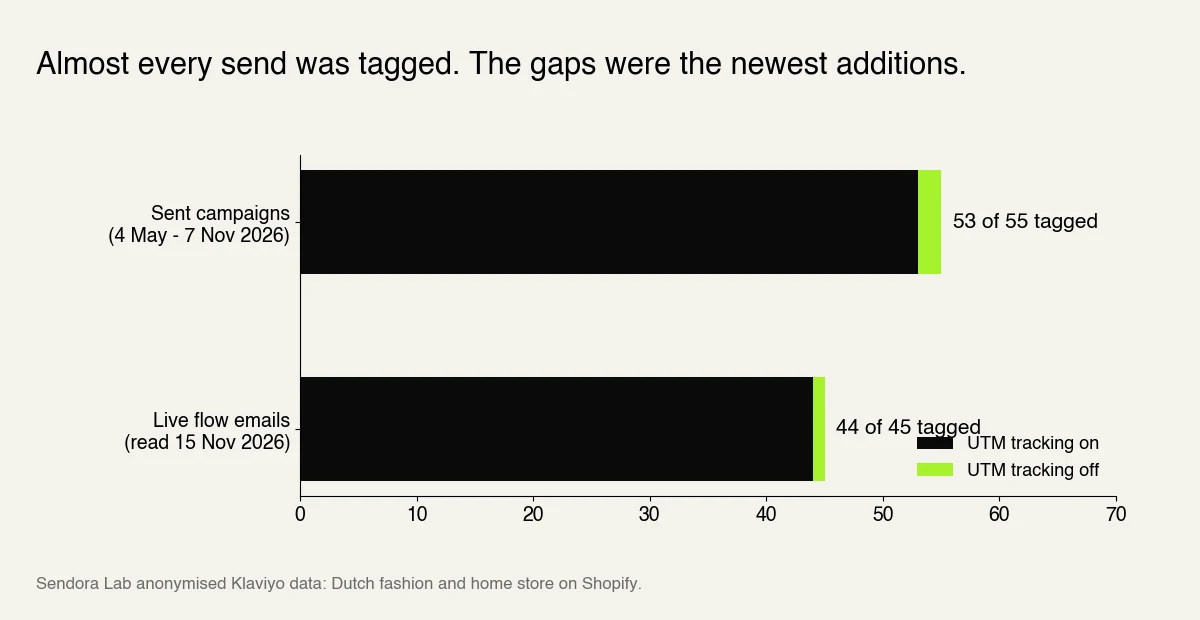
Even a well-run account had gaps, and they were in the newest sends. We checked the tracking setting on every live flow email and every recent campaign in one account through Klaviyo’s API.
In Sendora Lab’s anonymised Klaviyo data from a Dutch fashion and home store on Shopify, 44 of 45 live flow emails had UTM tracking on (read 15 November 2026), and 53 of 55 campaigns sent between 4 May and 7 November 2026 were tagged. Every tagged message used the account defaults rather than custom values.
The one untagged flow email was the first email of a review request flow added in September 2026, months after the rest of the flows. It was also the most-clicked email in that flow: from 19 September to 14 November 2026, 1,444 people clicked it, against 703 for the second email and 317 for the third. Any of those clicks that went to the store reached GA4 without Klaviyo’s labels.
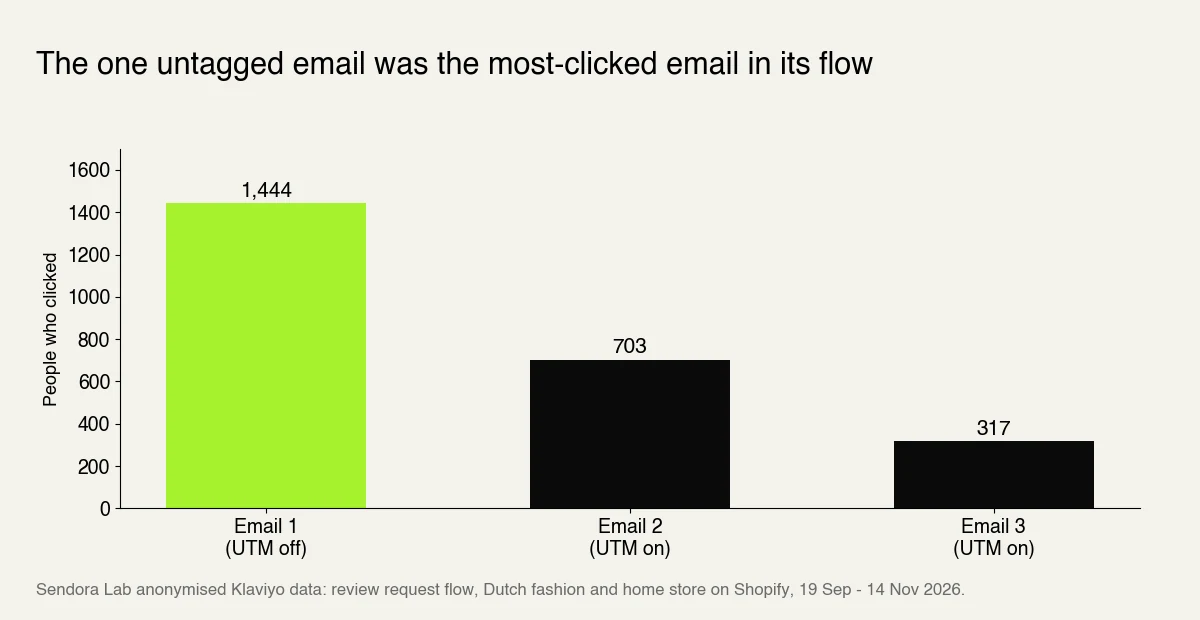
The lesson is simple. The setting fails quietly when someone builds or copies a message later, so check new flows and campaigns, not just the account switch.
Why Klaviyo and GA4 revenue still won’t match
UTM tracking makes GA4 see email traffic, but it will not make GA4 agree with Klaviyo. The two tools count a sale in different ways, so a gap between them is normal.
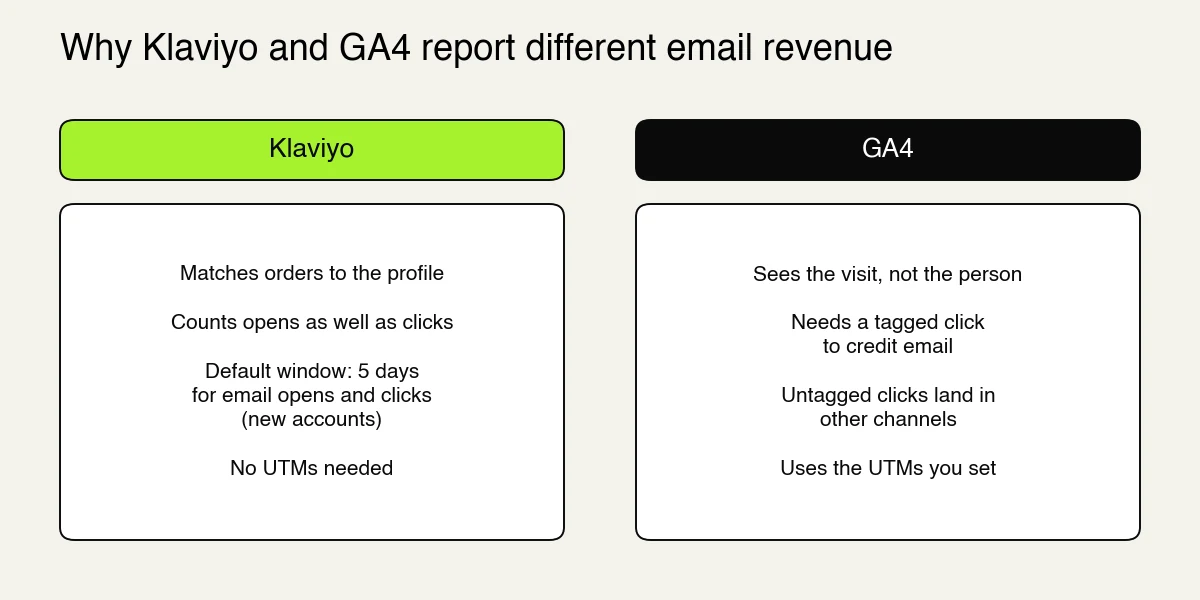
Klaviyo’s attributed revenue is the value of orders it credits to a message. According to Klaviyo’s conversion tracking guide, it links an order to a message when both belong to the same profile, it does not use UTMs for this, and new accounts credit email opens and clicks for 5 days by default. GA4 only gives email credit when the buyer arrives through a tagged link in a session it can see.
So Klaviyo will usually report more email revenue than GA4. We explain how to report the Klaviyo figure honestly in our guide to Klaviyo attributed revenue. Use GA4 to compare email with other channels on the same rules, and Klaviyo to compare one email with another.
A 10-minute monthly UTM check
Once a month, confirm new messages are tagged and that GA4 is receiving the values. It takes about ten minutes and catches the gaps before a quarter of data is lost.
- Open every flow that was created or edited this month and check “Enable UTM Tracking” on each email, including new branches and A/B variants.
- Open last month’s campaigns and confirm “Include tracking parameters” was on.
- In GA4, open the Traffic acquisition report, filter session source to
klaviyo, and check that the medium shows onlyemailandsms. - Look for Klaviyo traffic in “Unassigned”. If you find it, a medium value is wrong.
- Click a link in a test send and read the address bar on your store to see the live parameters.
This fits into a wider account review; our Klaviyo audit checklist covers the rest. If your store runs on Shopify, also confirm the connection itself is healthy with our Klaviyo Shopify integration guide.
Conclusion
Klaviyo UTM tracking takes minutes to switch on and is easy to lose. Set the account defaults with klaviyo as the source and the message type as the medium, tick the setting on every flow email, check each campaign before it sends, and repeat the check whenever a new flow goes live. Then read GA4 and Klaviyo side by side, knowing they measure different things.
Want someone to check your tracking and flows for you? Sendora Lab sets up and audits Klaviyo accounts as part of our email marketing service. For the wider setup, see our Klaviyo Google Analytics integration guide.
FAQ
Is Klaviyo UTM tracking on by default?
Not necessarily. You turn it on in Settings > Other > UTM tracking, and it then applies to new messages that use the defaults. Existing flow emails need “Enable UTM Tracking” checked one by one.
Can I change UTM parameters after a campaign is sent?
No. Klaviyo does not allow edits to UTM parameters on sent messages. To change a scheduled campaign, pause it first.
What utm_medium should I use for Klaviyo?
Use email for email and sms for texts. GA4’s default channel rules use these values to place traffic in the Email and SMS channels.
Why does Klaviyo show more email revenue than GA4?
Klaviyo matches orders to profiles and counts opens as well as clicks within its attribution window, without needing UTMs. GA4 only credits email when a buyer arrives through a tagged link.
Do UTMs work for Klaviyo SMS?
Yes. Klaviyo adds them to text message links too, as long as “Automatically shorten links” stays on and each link starts with http:// or https://.
Want this set up in your Klaviyo account?
A free 30-minute audit, your account open on screen.
Book a free audit