



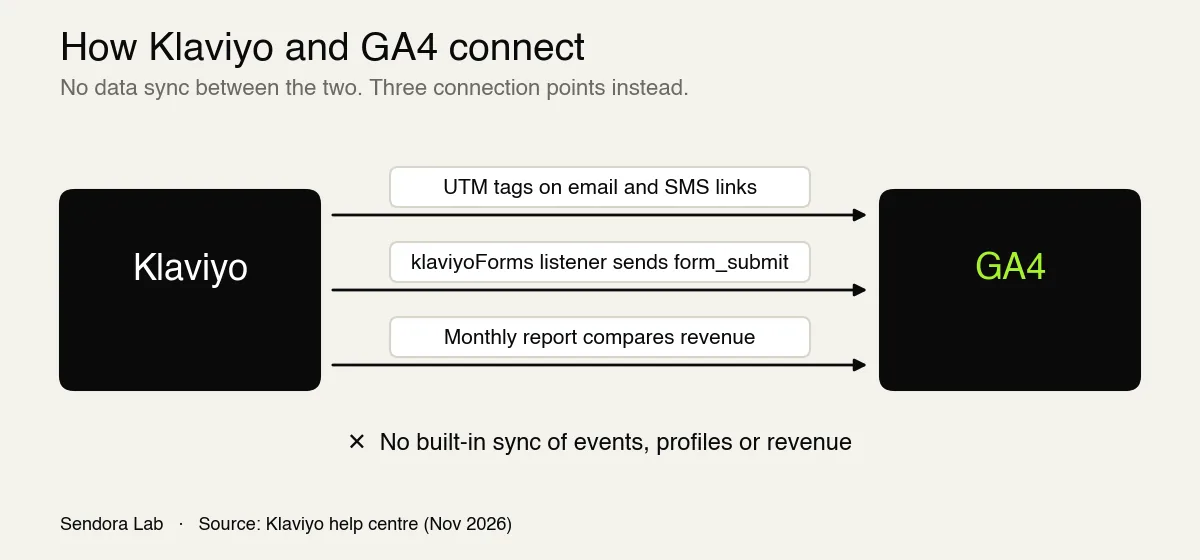
Klaviyo has no built-in Google Analytics integration that syncs data between the two tools. You connect them in three ways: UTM tags on every Klaviyo link, a short script that sends sign-up form events to GA4, and a monthly report that explains why the two revenue numbers differ.
Short answer: There is nothing to switch on inside Klaviyo called “Google Analytics”. Turn on Klaviyo’s automatic UTM tracking so GA4 knows which sessions came from email, add Klaviyo’s form-event listener next to your Google tag so GA4 counts sign-ups, and keep Klaviyo and GA4 revenue side by side instead of forcing them to match. That is the setup Sendora Lab uses on client accounts.
Does Klaviyo have a Google Analytics integration?
Not as a data sync. Klaviyo does not push its events into GA4, and GA4 does not send its data into Klaviyo; what Klaviyo documents is UTM tracking for message links and a code snippet for sign-up forms.
That matters because people often search for a toggle that does not exist. The three connection points below cover what most Shopify stores need. Paid connector tools can copy events between the two platforms, but you rarely need them for email reporting.
Step 1: tag every Klaviyo link with UTMs
UTM parameters are short tags added to the end of a link that tell analytics tools where a visit came from. Without them, GA4 often files email visits as direct traffic.
In Klaviyo, go to your account name (bottom left) > Settings > Other > UTM tracking and turn on “Automatically add UTM parameters to links”. According to Klaviyo’s UTM tracking guide, the setting only applies to new campaigns and flow messages, so older flow emails need checking one by one. The guide also says the default utm_medium value has been “Message type” since 2 June 2025.
We cover the exact values, and a real audit of 100 messages, in our guide to Klaviyo UTM tracking.
Step 2: send Klaviyo sign-up form events to GA4
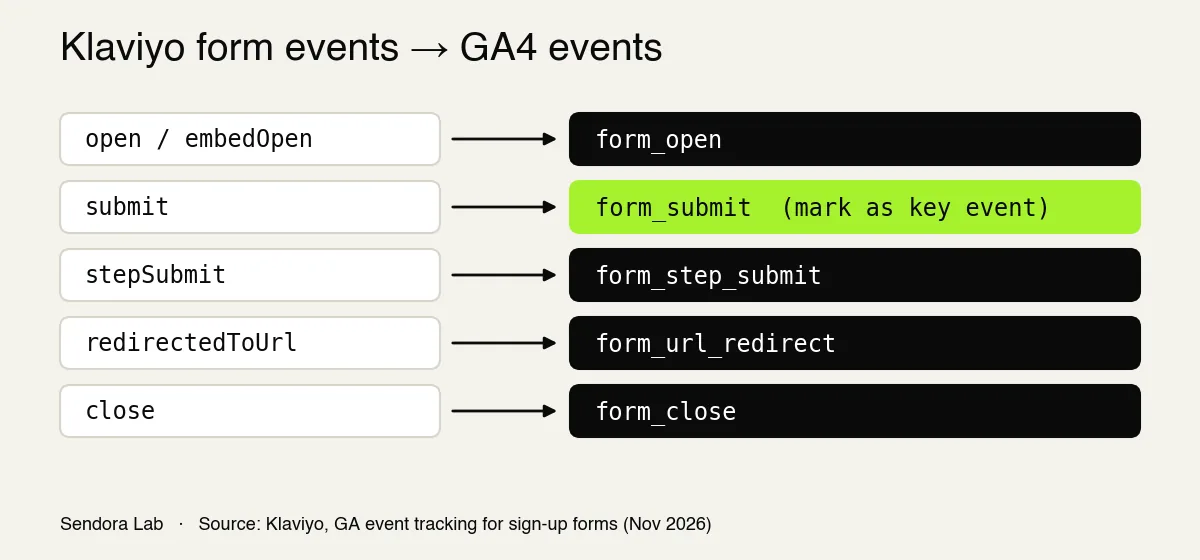
Klaviyo forms fire a browser event called klaviyoForms, and a few lines of JavaScript can pass it to GA4 as a form_submit event. That lets GA4 report sign-ups next to the traffic sources that brought them in.
Klaviyo’s form tracking article lists the event types: open, embedOpen, submit, stepSubmit, redirectedToUrl and close. Your Google tag (gtag) must already be loaded on the page; the snippet does not install GA4. A minimal version that only tracks submissions looks like this:
<script>
window.addEventListener("klaviyoForms", function (e) {
  if (e.detail.type === "submit") {
    gtag("event", "form_submit", { form: "Klaviyo form", form_id: e.detail.formId });
  }
});
</script>
Three things that catch people out
- Multi-step forms count twice. A form that asks for an email and then a phone number can send two submit events in one visit, so GA4 sign-ups can run higher than Klaviyo’s.
- Reports lag. Klaviyo notes that standard GA4 reports can take 24–48 hours. Use GA4 Realtime to test, which only shows events for 30 minutes.
- Mark it as a key event. In GA4, mark
form_submitas a key event so it appears in acquisition reports.
For forms that grow the list without annoying visitors, see our guide to Klaviyo popup forms.
Step 3: understand how each tool gives credit for a sale
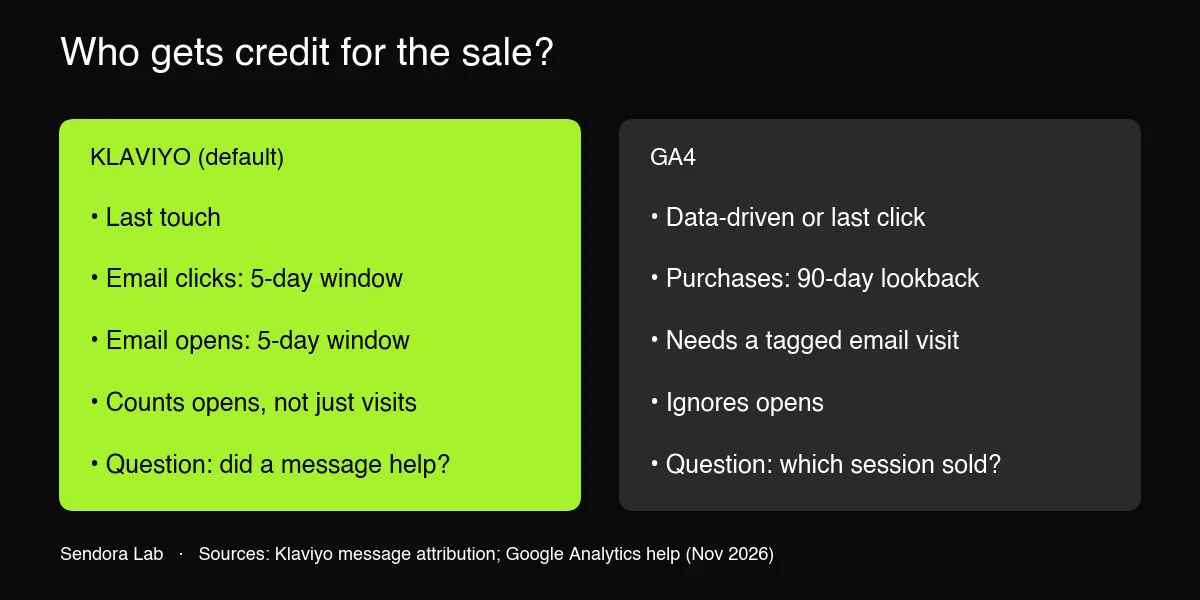
Klaviyo and GA4 answer different questions, so their email revenue will never match. Klaviyo asks “did this person get, open or click a message before buying?”; GA4 asks “which session and source led to the purchase?”
Klaviyo’s message attribution guide says the default model is last touch, with a 5-day window for email clicks and a 5-day window for email opens on new accounts. Attributed revenue, in Klaviyo terms, is the order value credited to a message under those rules. An open counts, so someone who opens an email and later buys through a Google search can be credited to email in Klaviyo and to organic search in GA4.
GA4 offers data-driven attribution, paid and organic last click, and Google paid channels last click, as listed in Google’s attribution overview. Its attribution settings page gives a default lookback window of 90 days for purchases and other non-acquisition key events, with 30 or 60 days as options. GA4 can only credit email when the visit carries UTM tags or a recognisable referrer.
Should you change Klaviyo’s settings to match GA4?
Usually not. You can narrow the gap in Settings > Attribution: exclude Apple Mail Privacy Protection opens and bot clicks, or untick email opens so only clicks earn credit. Klaviyo’s attribution settings guide says you can save changes three times in 30 days, and they can take up to 36 hours to apply to past data.
In our work, we leave the windows alone and remove bot clicks and Apple privacy opens, because those are not real interest. The windows stay the same from month to month, so reports remain comparable.
Klaviyo vs GA4 revenue: what one real month looks like
The fairest way to report email is three numbers side by side, each answering a different question. Here is what Klaviyo showed for one store.
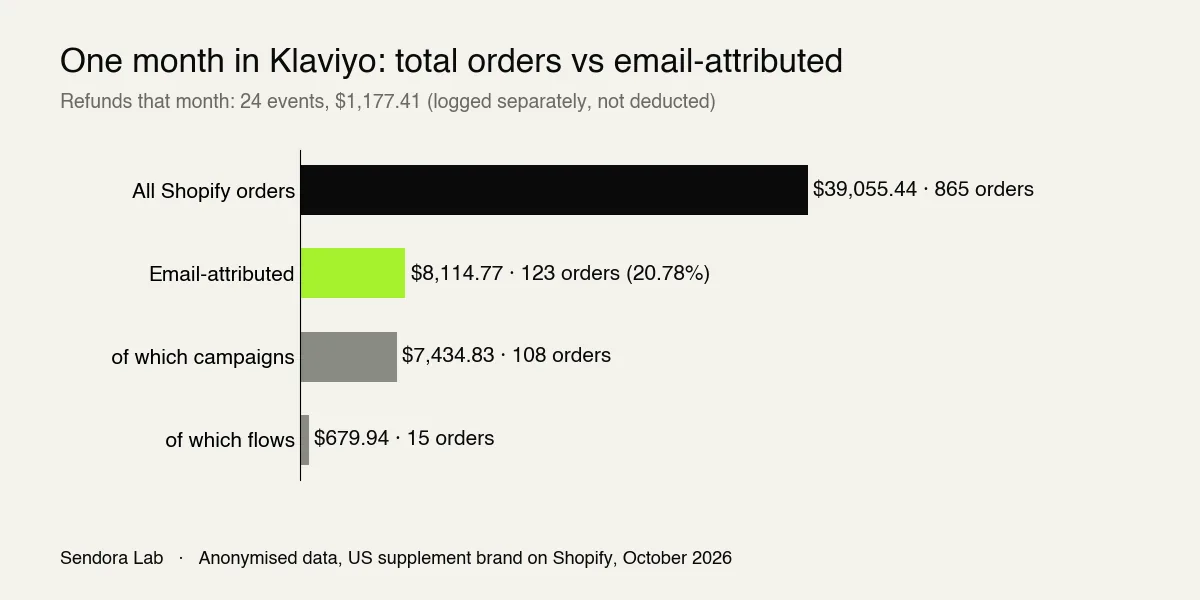
In Sendora Lab’s anonymised Klaviyo data from a US supplement brand on Shopify (October 2026, store time), Klaviyo recorded 865 Shopify orders worth $39,055.44. Of those, 123 orders worth $8,114.77 were attributed to email, or 20.78% of order value. Campaigns earned 108 of those orders ($7,434.83) and flows earned 15 ($679.94). No orders were attributed to SMS that month.
The same account logged 24 refund events worth $1,177.41 in October. Refunds arrive in Klaviyo as a separate event, so they do not reduce the Placed Order totals above. That is one more reason the store’s net sales report and Klaviyo’s attributed revenue differ.
The three-number monthly report
| Number | Where it comes from | What it answers |
|---|---|---|
| Total sales | Shopify | How much the store sold |
| Email-attributed revenue | Klaviyo | Which flows and campaigns influenced orders |
| Email channel revenue | GA4 (needs UTMs) | How many sales started from an email click |
Expect GA4’s email figure to sit below Klaviyo’s, because it ignores opens and only counts visits it can trace back to an email link. If GA4 shows almost no email revenue at all, check your UTM tags first. For how to judge the Klaviyo number itself, read Klaviyo attributed revenue explained and what share of revenue email should drive.
Conclusion
A Klaviyo Google Analytics integration is three pieces of setup, not one switch: UTMs on every link, form events sent to GA4, and an honest report that shows Shopify, Klaviyo and GA4 numbers side by side. Set those up once, check UTMs monthly, and stop trying to make the revenue figures match.
Want this checked on your account? Our Klaviyo email marketing service includes tracking and reporting set-up for Shopify stores.
FAQ
Can I connect Klaviyo to Google Analytics 4 directly?
There is no native data sync. You connect them with UTM parameters on Klaviyo links and a script that sends Klaviyo form events to GA4.
Why is Klaviyo revenue higher than GA4 email revenue?
Klaviyo credits orders placed within 5 days of an email open or click by default. GA4 only credits email when the buying session came from a tagged email link.
How do I track Klaviyo form sign-ups in GA4?
Add a listener for the klaviyoForms browser event that sends a GA4 form_submit event, then mark it as a key event. Your Google tag must load first.
Do Klaviyo UTM settings apply to existing flows?
No. Klaviyo’s automatic UTM setting applies to new campaigns and flow messages, so check older flow emails individually.
Want this set up in your Klaviyo account?
A free 30-minute audit, your account open on screen.
Book a free audit