



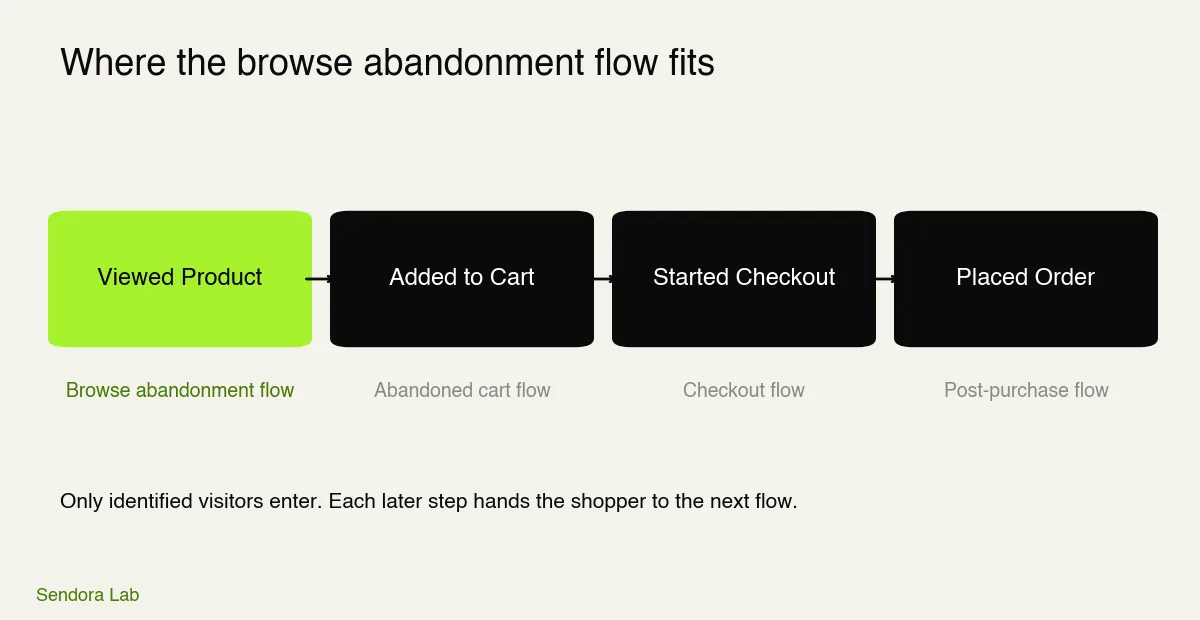
A Klaviyo browse abandonment flow emails known subscribers who looked at a product and left without adding it to their cart. Send the first email soon after the visit, follow up once or twice over the next two days, and stop the moment they add to cart, start checkout or buy. Below is the exact setup, plus a year of real results from two browse flows that ran side by side.
Short answer: trigger the flow on Viewed Product, exclude anyone who added to cart, started checkout or ordered since entering, and send two or three light emails that show the product they viewed. In Sendora Lab’s anonymised data below, the first email earned more per recipient than every later email, and a 10% code in the second email earned no more than a plain reminder. Visitors who leave without opening a product page need an abandoned site flow instead.
What a Klaviyo browse abandonment flow does
It catches interest one step before the cart. In Klaviyo, a flow is a set of messages that sends automatically when a trigger fires; here the trigger is the Viewed Product event, which Klaviyo records when an identified visitor opens a product page.
“Identified” matters. Klaviyo can only send this flow to people it recognises, usually because they are on your list and have clicked an email or filled in a form on that browser. Klaviyo’s browse abandonment guide also notes that on Shopify, visitors in the EU, EEA, UK and Switzerland who have not given cookie consent are not tracked, so they never enter the flow. If your flow is quiet, check why Klaviyo Viewed Product is not tracking before you touch the emails.
Viewing a product shows less intent than starting checkout. Klaviyo calls browse emails a “lighter touchpoint” than cart emails, and that is the right brief: helpful, short, no pressure. Our comparison of abandoned checkout vs abandoned cart covers the two stronger-intent flows.
How to set up the Klaviyo browse abandonment flow
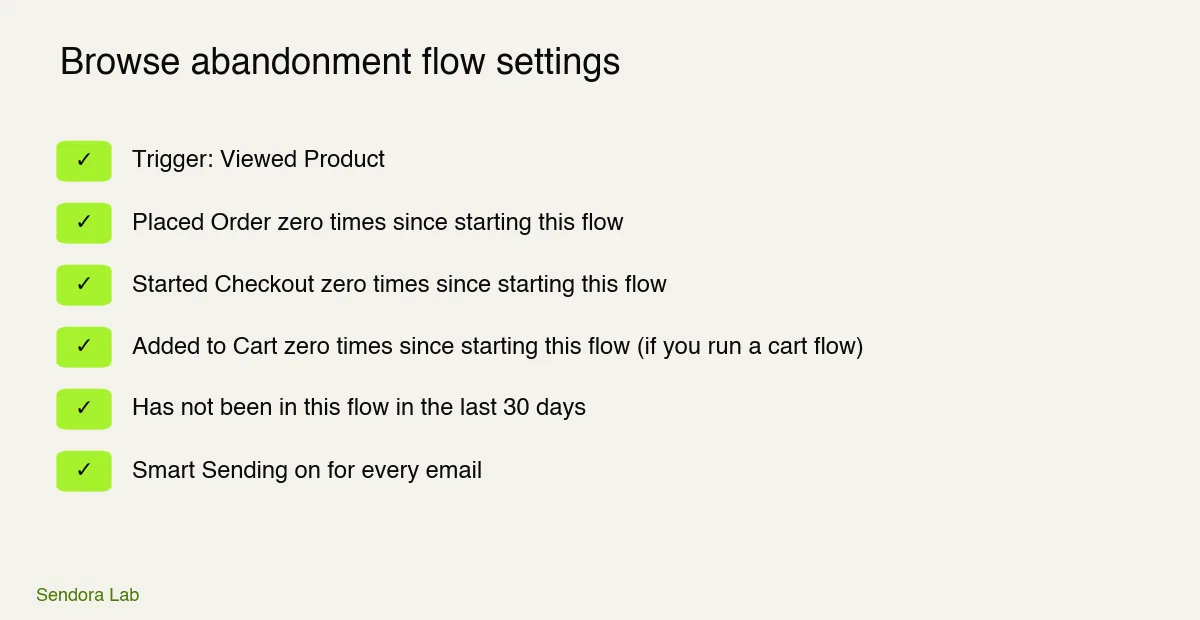
Start from the pre-built Browse Abandonment flow in the flow library, then check the trigger, the filters and Smart Sending. Klaviyo recommends the pre-built version because its dynamic product block is already wired to the event.
Trigger and filters
- Trigger: Viewed Product.
- Placed Order zero times since starting this flow, so buyers drop out and get your post-purchase emails instead.
- Started Checkout zero times since starting this flow, so your checkout flow takes over.
- Added to Cart zero times since starting this flow, but only if you also run an Added to Cart flow. Otherwise people get emails from both.
- Has not been in this flow in the last 30 days, so heavy browsers are not emailed every visit.
A flow filter is a condition Klaviyo checks when someone enters and again before every email, as its flow triggers and filters guide explains, so a shopper who buys between emails is removed straight away. The store in the data below used a 10-day re-entry limit instead of 30 days; with a big catalogue and frequent visitors, 30 days is the safer default.
Smart Sending and the product block
Smart Sending skips an email if the person received another one recently. Klaviyo recommends keeping it on for every browse email, and we agree (more in our Klaviyo Smart Sending guide). For the product, use a static block with the event variables {{ event.Name }}, {{ event.Price }}, {{ event.URL }} and a dynamic image from event.ImageURL. Do not copy your abandoned cart email: its cart block reads a different event.
How many emails to send, and when
Send the first email soon after the visit and keep the sequence to two or three emails over about two days. Klaviyo suggests a first delay of at least one hour for custom builds; the store below waits only 10 to 20 minutes. The first email does most of the work; each later email earns less.
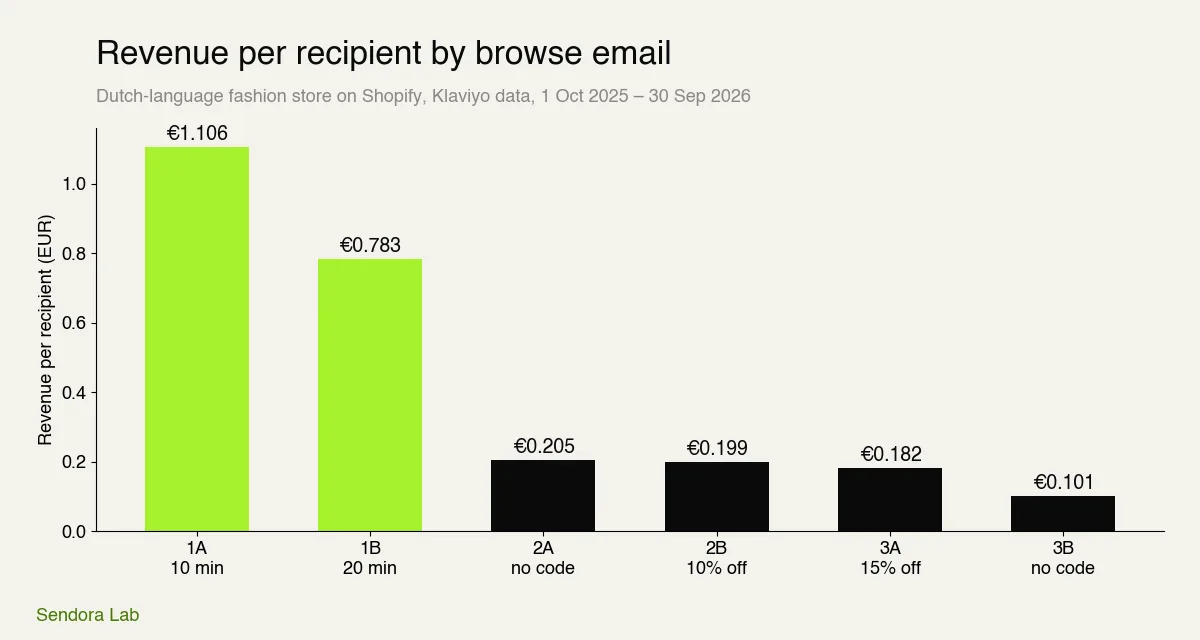
The data comes from a Dutch-language fashion and lifestyle store on Shopify, from 1 October 2025 to 30 September 2026, in EUR. Its main browse flow uses a 50/50 random split: path A sends email 1 after 10 minutes, path B after 20 minutes, with a different design and subject line on each path. Both paths then wait one day per email. Revenue is attributed revenue: orders Klaviyo credits to an email under the account’s attribution settings.
| Path | Sent | Offer | Recipients | Click rate | Orders | Revenue per recipient | |
|---|---|---|---|---|---|---|---|
| 1 | A | 10 min | None | 17,727 | 6.96% | 283 | €1.106 |
| 1 | B | 20 min | None | 16,719 | 6.92% | 198 | €0.783 |
| 2 | A | +1 day | None | 14,575 | 4.38% | 48 | €0.205 |
| 2 | B | +1 day | 10% off | 14,526 | 3.31% | 42 | €0.199 |
| 3 | A | +1 day, 09:30 | 15% off | 13,567 | 3.10% | 30 | €0.182 |
| 3 | B | +1 day, 17:30 | None | 13,574 | 2.91% | 21 | €0.101 |
Both first emails earned at least €0.78 per recipient; no follow-up earned more than €0.21. Path A’s first email also beat path B’s (€1.106 against €0.783), but the two differ in delay and in design, so this test cannot say which change mattered. Klaviyo’s guide to A/B testing flow branches warns that testing more than one variable at a time can skew results. If you want to test timing, keep the emails identical and change only the delay.
Should a browse abandonment email include a discount?
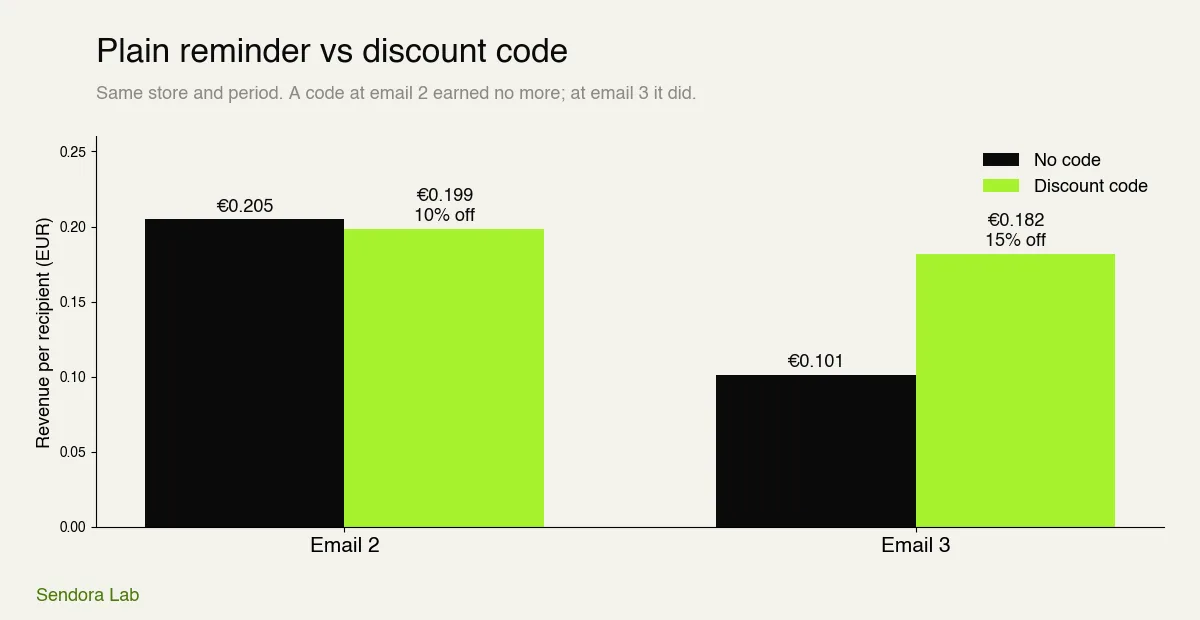
Not early. In this data, a code in the second email earned no more than a plain reminder, and every discounted order costs margin.
On day one, path A’s plain second email earned €0.205 per recipient and path B’s 10% code earned €0.199. Path A did better with a 15% code in its third email (€0.182 against €0.101 for path B’s code-free third email), so a late code can help the last email. Treat that as a reason to test, not a rule: a browser who has not added anything to cart often needs more information, not a lower price. Size guides, reviews, delivery times and similar products usually belong in email two.
Wider tracking pixels: more reach, less per email
A third-party pixel can feed Klaviyo more Viewed Product events than Klaviyo’s own tracking, but those extra people tend to be colder. Run it as a separate flow and exclude anyone already in the main one.
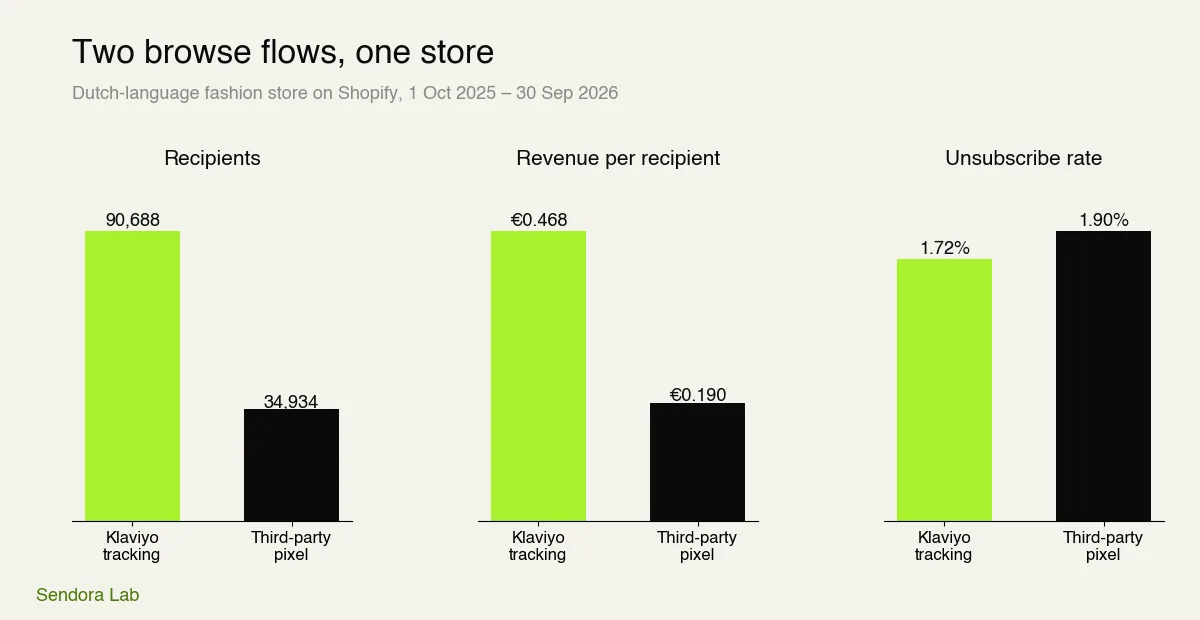
The same store runs a second browse flow, live since October 2025, triggered by a third-party pixel’s Viewed Product event. It uses the same emails and filters, plus “Viewed Product (Klaviyo) zero times since starting this flow”, so nobody gets both flows. Over the same twelve months:
- Klaviyo-tracked flow: 90,688 recipients, 622 attributed orders, €0.468 revenue per recipient, 1.72% unsubscribe rate.
- Pixel-triggered flow: 34,934 recipients, 100 attributed orders, €0.190 revenue per recipient, 1.90% unsubscribe rate.
The pixel flow still brought €6,528.85 in attributed revenue from people who entered through the pixel. Whether that is worth it depends on the unsubscribes it costs you. Watch both flows’ unsubscribe rates monthly and tighten the pixel flow (for example, two views of the same product) if they climb.
Common browse flow mistakes
Most broken browse flows fail on filters or tone, not design. Check these before you rewrite any copy:
- Smart Sending off. The store above runs with it off on every browse email, and its first emails had unsubscribe rates of 1.73% and 2.29%. We cannot prove one caused the other, but Klaviyo’s advice is to keep it on.
- No hand-off to the cart flow. Without the Added to Cart and Started Checkout filters, shoppers get browse and abandoned cart emails for the same visit.
- “We saw you looking” copy. Lead with the product and something useful about it.
- Too many emails. If email three earns little and loses subscribers, cut it.
- Testing two things at once. Change one element per split, or you will not know what worked.
Conclusion
A Klaviyo browse abandonment flow is a quiet earner: one trigger, four filters and two or three helpful emails, with the first one sent fast. Put your effort into that first email, keep Smart Sending on, and test discounts before you assume they help. If you want a second pair of eyes on your flows, Sendora Lab builds and audits Klaviyo flows for Shopify brands, or you can book a free audit. If a viewed item later goes on sale, a Klaviyo price drop flow can follow up automatically.
FAQ
What triggers a Klaviyo browse abandonment flow?
The Viewed Product event. Klaviyo records it when an identified visitor opens a product page, so the flow only reaches people Klaviyo already recognises.
How soon should the first browse abandonment email go out?
Soon after the visit. Klaviyo suggests a first delay of at least one hour for custom builds; the store in our data sent at 10 and 20 minutes, and its first email earned more per recipient than any later one.
Should browse abandonment emails include a discount?
Not by default. In our data, a 10% code in the second email earned €0.199 per recipient against €0.205 for a plain reminder. A 15% code in the third email did better than a code-free third email, so test it late if at all.
How do I stop people getting browse and abandoned cart emails together?
Add the filters “Added to Cart zero times since starting this flow” and “Started Checkout zero times since starting this flow”. Klaviyo checks them before every email.
Want this set up in your Klaviyo account?
A free 30-minute audit, your account open on screen.
Book a free audit