



A Klaviyo replenishment flow reminds customers to reorder a product shortly before it runs out. It suits things people use up, such as supplements, coffee, skincare or pet food, and it only works if the reminder lands at the right moment. Below is how to find that moment in your own order data, how to build the flow, and what a year of real reorder timing looks like.
Short answer: trigger the flow on Placed Order, filter it to the product, exit anyone who reorders, skip subscription renewals, and send two short reminders a few days before the supply runs out. In Sendora Lab’s anonymised data, a supplements brand’s repeat buyers came back after a median of 30 days, while a fashion store’s showed no steady rhythm, which is why you should check your reorder gap before you build anything.
What a Klaviyo replenishment flow is, and when you need one
It is a timed “running low?” reminder tied to a specific product. In Klaviyo, a flow is a series of messages that sends automatically after a trigger; here the trigger is Placed Order, the event recorded when someone buys. Klaviyo’s replenishment flow guide files it under flows that encourage repeat purchases.
It is not a cross-sell or a win-back. A cross-sell suggests something new, and a win-back reaches people who have stopped buying. A replenishment reminder sells the same product again, at the point the customer would need it anyway, so it should feel like a service rather than a promotion.
You only need one if your products run out on a predictable schedule. Before you build it, look at how long your customers actually take to reorder. If there is no clear pattern, a post-purchase flow and a win-back flow will do more for you than a reminder timed to a guess.
How to find your reorder interval
Measure the days between a customer’s first and second order, then check the spread, not just the average. A tight spread means a reminder can land at the right time; a wide one means it will mostly arrive too early or too late.
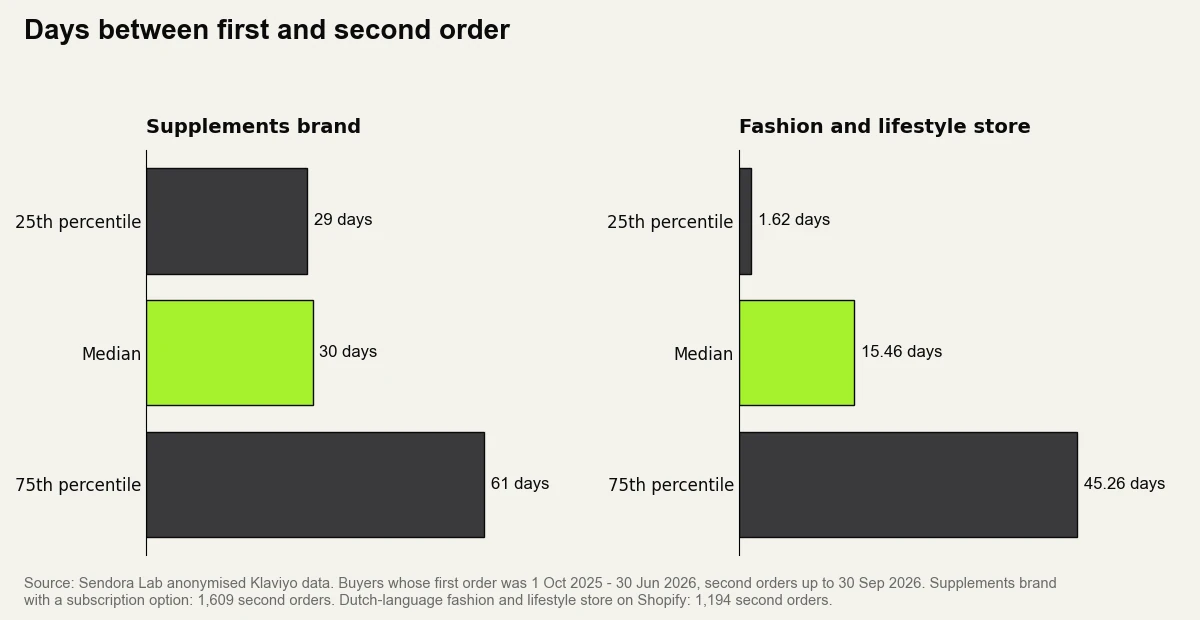
We ran the same query on two stores in Sendora Lab’s anonymised Klaviyo data. In both, we took customers whose first order was between 1 October 2025 and 30 June 2026 and looked for a second order up to 30 September 2026.
| Supplements brand | Fashion and lifestyle store | |
|---|---|---|
| First-time buyers | 4,231 | 31,772 |
| Placed a second order | 1,609 | 1,194 |
| 25th percentile gap | 29 days | 1.62 days |
| Median gap | 30 days | 15.46 days |
| 75th percentile gap | 61 days | 45.26 days |
The supplements brand, which sells a subscription option, has a clear rhythm: a quarter of its second orders came at 29 days or sooner and half at 30 days or sooner. The fashion store, a Dutch-language fashion and lifestyle store on Shopify, does not. A quarter of its repeat buyers came back within two days, and the rest spread out over months. Customers who keep coming back are candidates for your VIP segment. A reminder at any fixed day would miss most of them.
Where to get the number
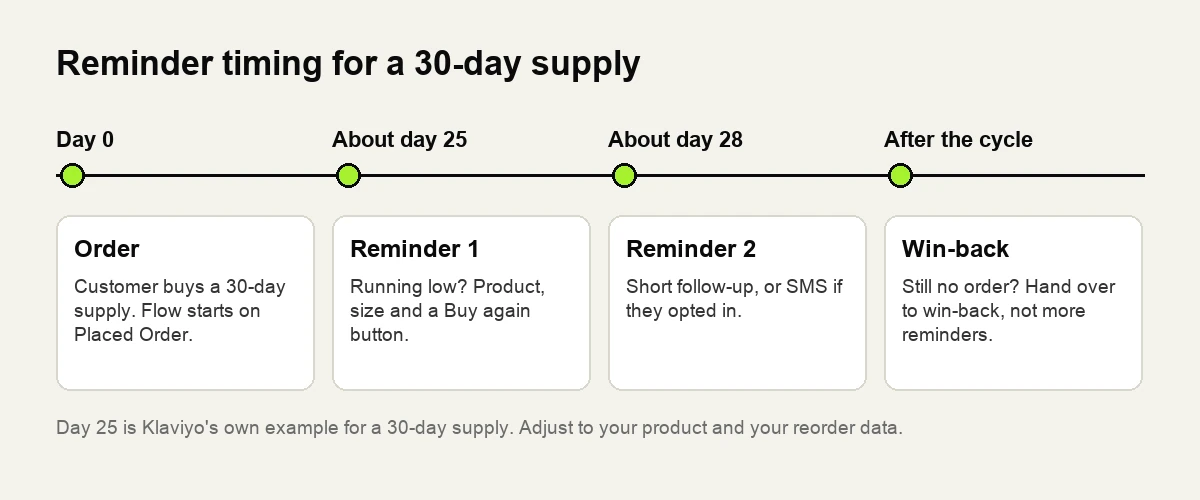
- Your product’s supply. A 30-day pack is the starting point. Klaviyo’s guide uses that example and suggests a first reminder about 25 days after purchase.
- Your order history. Export orders from your store platform and compare first and second order dates per customer, or ask your developer for a simple query like the one behind the table above.
- Klaviyo’s predicted next order date. Klaviyo’s predictive analytics guide says it needs at least 500 customers with orders, 180 days of order history with orders in the last 30 days, and some customers with three or more orders. If you qualify, the expected date of next order is useful for segments, but it is a prediction per customer, not a product’s supply length.
How to set up the Klaviyo replenishment flow
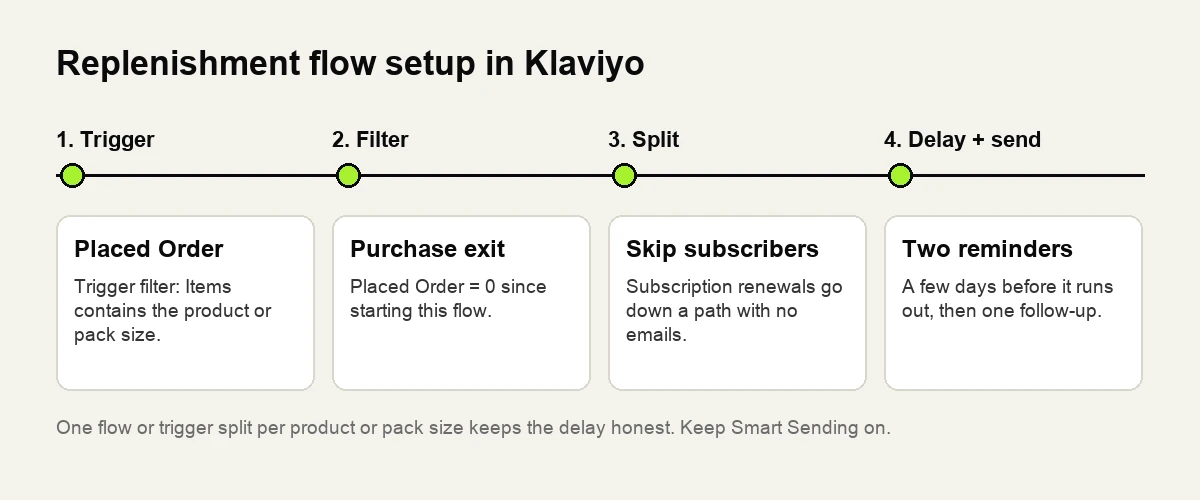
Build one flow, or one trigger split, per product or pack size, so each reminder uses the right delay. These are the settings that matter:
- Trigger: Placed Order, with a trigger filter “Items contains” the product name. Klaviyo’s guide describes the same setup. A trigger filter checks the order that started the flow, so only orders with that product enter.
- Purchase exit: the flow filter “Placed Order zero times since starting this flow”. A flow filter is checked again before each step, as Klaviyo’s guide to flow triggers and filters explains, so anyone who reorders early stops getting reminders.
- Skip subscription renewals: customers on a subscription do not need a reminder. The supplements brand above sends orders tagged as subscription renewals down an empty path with a trigger split in its post-purchase flow; the same split works here.
- Smart Sending on: it skips a reminder if the person got another email recently. Our Klaviyo Smart Sending guide explains why we keep it on for lower-urgency emails like this one.
If you sell several sizes, do not use one delay for all of them. A 60-day pack reminded at day 25 gets a “running low?” email when it is not even half used.
When to send each reminder, and what to put in it
Send the first reminder a few days before the supply runs out, and one short follow-up after that. Klaviyo’s guide suggests two reminders, with its example sending the second three days after the first.
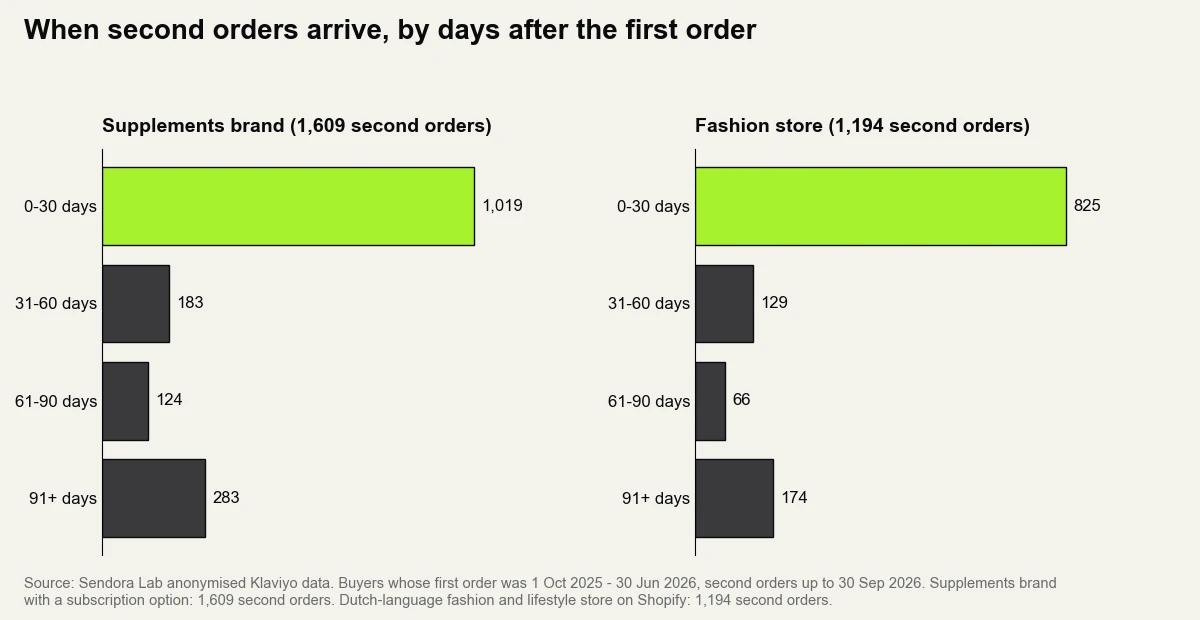
For the supplements brand, 1,019 of the 1,609 second orders arrived within 30 days of the first order, so a reminder after day 30 would have come too late for most repeat buyers. Treat this as a direction rather than a rule: because the brand sells a subscription option, some of those second orders are likely to be renewals rather than reminders answered.
What goes in the email
- The product they bought, with its image and size, using the order’s item data.
- One clear “Buy again” button that goes straight to that product or a prefilled cart.
- A line on the subscription option, if you have one, for people who reorder every time.
- For the follow-up, a shorter note. If the customer has opted in to SMS, a text can do this job; see our SMS vs email guide for where each fits.
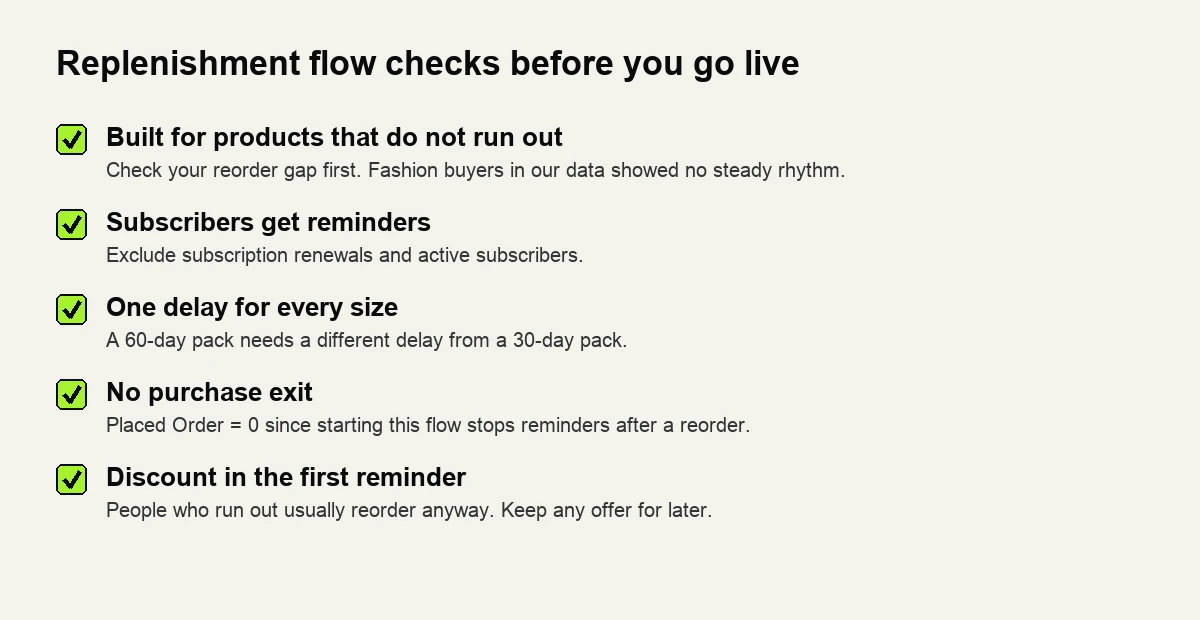
Leave the discount out of the first reminder. Someone who is running out is likely to reorder anyway, and in our post-purchase flow data the email with a 10% code earned less per recipient than the plain emails sent before it. If you test an incentive, put it in a later email and compare it against a version without one.
Common replenishment flow mistakes
Most replenishment flows fail because of timing or audience, not copy. Check these before you go live:
- Building it for products that do not run out. Check your reorder gap first; the fashion store above has no rhythm to remind people of.
- Reminding subscribers. Their next order is already scheduled.
- One delay for every size. Split by product or pack size.
- No purchase exit. Without it, people who already reordered keep hearing that they are running low.
- Endless reminders. After two, hand people over to a win-back flow. Our guide to finding lapsed customers covers who belongs there.
Conclusion
A Klaviyo replenishment flow is simple to build and easy to get wrong. Measure your real reorder gap first, then set a Placed Order trigger filtered to the product, a purchase exit, a subscriber split and two short reminders timed a few days before the product runs out. For stores without a clear reorder rhythm, put the effort into the post-purchase and win-back flows instead; our Klaviyo retention strategy guide shows how they fit together. Sendora Lab builds these Klaviyo flows for Shopify brands; if you want yours checked, book a free audit. Buyers on their first order need a different plan; our second purchase email strategy guide covers it. If customers reorder through a subscription instead, see our Recharge Klaviyo integration guide.
FAQ
What triggers a Klaviyo replenishment flow?
Placed Order, filtered with “Items contains” to the product the reminder is about. Klaviyo’s own replenishment guide uses this setup.
When should the first replenishment email go out?
A few days before the product runs out. Klaviyo’s example for a 30-day supply sends the first reminder about 25 days after purchase, with a second three days later.
Should subscribers get replenishment reminders?
No. Their next order is already scheduled, so split subscription renewals out of the flow and send them nothing.
How do I know if my store needs a replenishment flow?
Check the days between customers’ first and second orders. In our data, a supplements brand had a median of 30 days and a tight spread, while a fashion store’s repeat orders were spread from a day to months, so only the first had a rhythm worth reminding people of.
Want this set up in your Klaviyo account?
A free 30-minute audit, your account open on screen.
Book a free audit