



Multilingual email marketing means sending each subscriber your emails in the language they read, from one set of flows and campaigns you can still manage. In Klaviyo the hard part is rarely the translation. It is knowing which language each person wants, and choosing an account set-up that doesn’t double your work every time you add a market.
Short answer: store each subscriber’s preferred language in one profile property, then pick one of three set-ups: one Klaviyo account with Smart Translations, one account with separate emails per language, or a separate account per market. For most stores with two to four languages and the same offers everywhere, we recommend one account with Smart Translations. In Sendora Lab’s client data, the language field was the weak point: a Dutch-language store had 39,635 profiles with no locale at all.
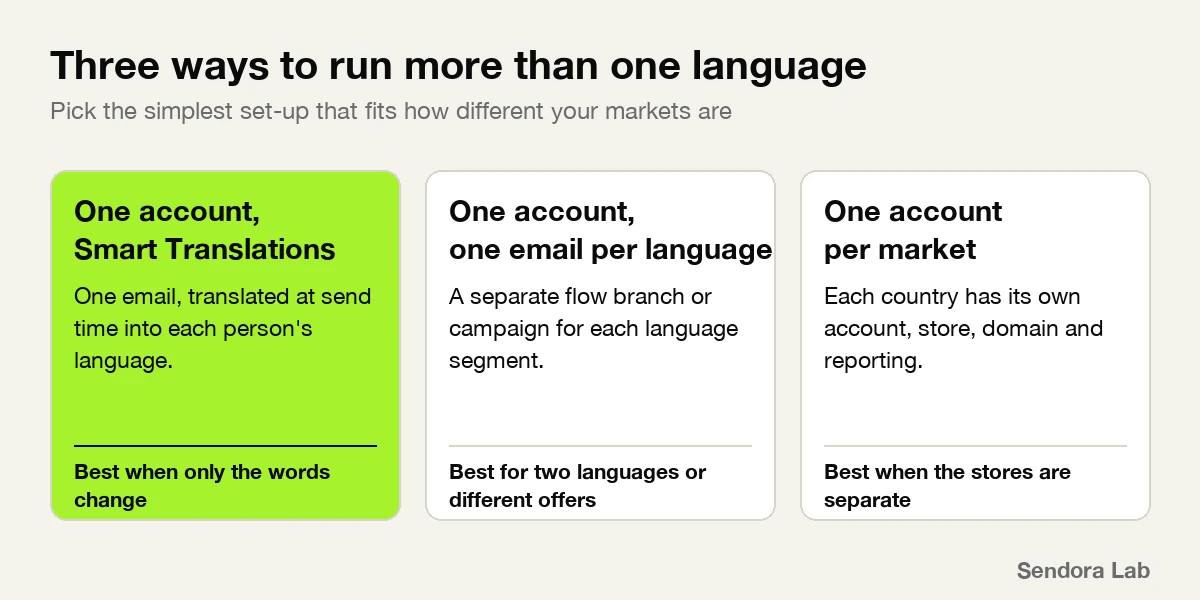
Three ways to run multilingual email in Klaviyo
You can keep every language in one account and translate each email, keep one account and build a separate email per language, or give each market its own account. The right choice depends on how different your markets are, not just how many languages you speak.
Two Klaviyo terms come up throughout. A flow is an automated series of emails that starts when someone does something, such as joining your list or leaving a checkout. A profile property is a field stored on each subscriber, such as their locale, a short code like nl-BE that combines language and country.
| Set-up | Works best when | Main trade-off |
|---|---|---|
| One account, Smart Translations | Same products, prices and offers in every market; only the words change | Needs a paid plan and a reliable language property; every edit to the original needs a translation review |
| One account, one email per language | Two languages, or markets that need different offers or images | Every flow and campaign is built two or more times, and they drift apart |
| One account per market | Separate stores, currencies, sending domains or teams per country | Reporting, templates and fixes are split across accounts |
We see all three in client accounts. A European brand on Shopify runs Germany, Switzerland, Austria, Poland, Spain and Denmark from one Klaviyo account; on 20 October 2026 its largest locales were de-DE (2,863 profiles), de-CH (1,596), pl-PL (907), es-ES (733), de-AT (679) and da-DK (480). Another brand with a Czech and a Swedish storefront uses a separate account for each country. One account per Shopify store also matters for tracking, because the Klaviyo app embed links to one store, as our guide to fixing Viewed Product tracking explains.
Get the language data right before you translate anything
Every set-up depends on one field that says which language a person reads. If that field is empty or wrong, the best translation goes to the wrong people.
Klaviyo’s guide on customising content by language is clear that Klaviyo does not detect language from the language a customer used on your website. It suggests asking for it on a sign-up form, with a required radio button that saves to a property such as Language. Klaviyo also gives every profile an estimated location from the IP address, but a location is a country, not a language.
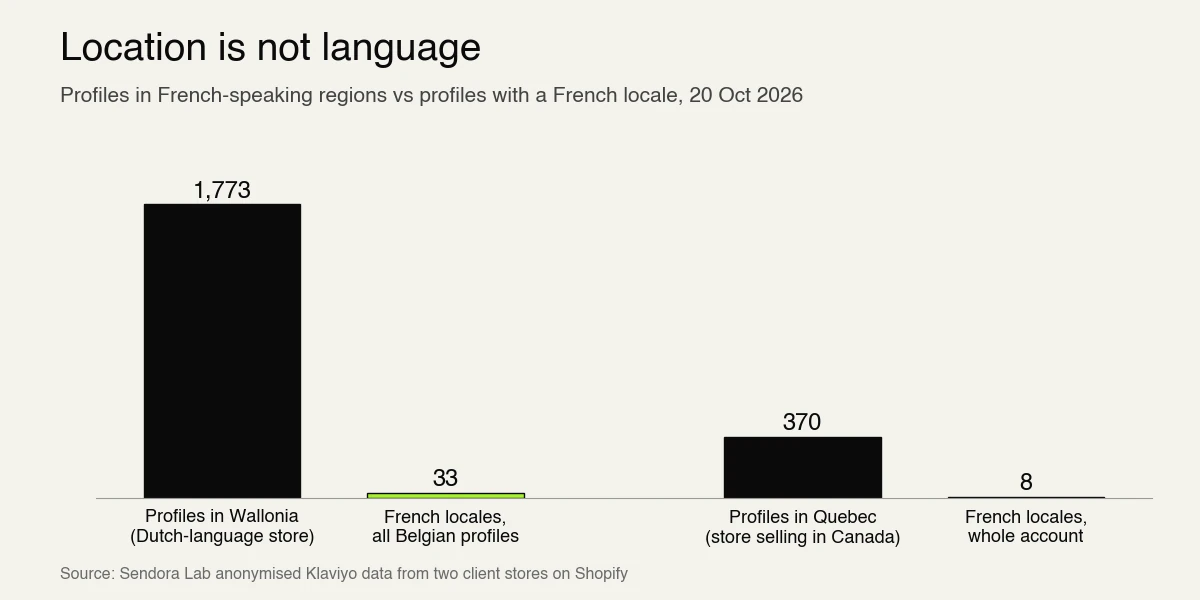
Our client data shows why that matters. In a Dutch-language fashion and lifestyle store on Shopify, at least 1,773 Belgian profiles were located in the French-speaking provinces of Wallonia on 20 October 2026, yet only 33 of the store’s 40,644 Belgian profiles had a French locale. In a footwear store selling in Canada, 370 profiles were in Quebec, and only 8 profiles in the whole account had a French locale. The locale tends to record the language of the store or form someone used, so a store that only offers Dutch or English collects Dutch or English locales.
The same store’s country data was messy too. Among campaign recipients from October 2025 to September 2026, the Netherlands appeared under three labels (“Netherlands”, “The Netherlands” and “NL”), and 5,031 recipients had no country. Across the account, 39,635 profiles had no locale. Before you build anything, do three things:
- Pick one property for preferred language and use BCP-47 codes such as nl-BE or de-CH, which Klaviyo recommends.
- Ask for it where people sign up. A language choice on your sign-up popup fills the gap for new subscribers.
- Decide the fallback for everyone with no value: usually your largest market’s language.
How to set up Klaviyo Smart Translations
Smart Translations translates one email into each subscriber’s language at send time, so you keep one campaign or one flow email instead of several. It needs a paid Klaviyo account.
According to Klaviyo’s guide to enabling Smart Translations, the set-up takes a few minutes:
- Go to Settings, then Translations, and turn on Translate messages.
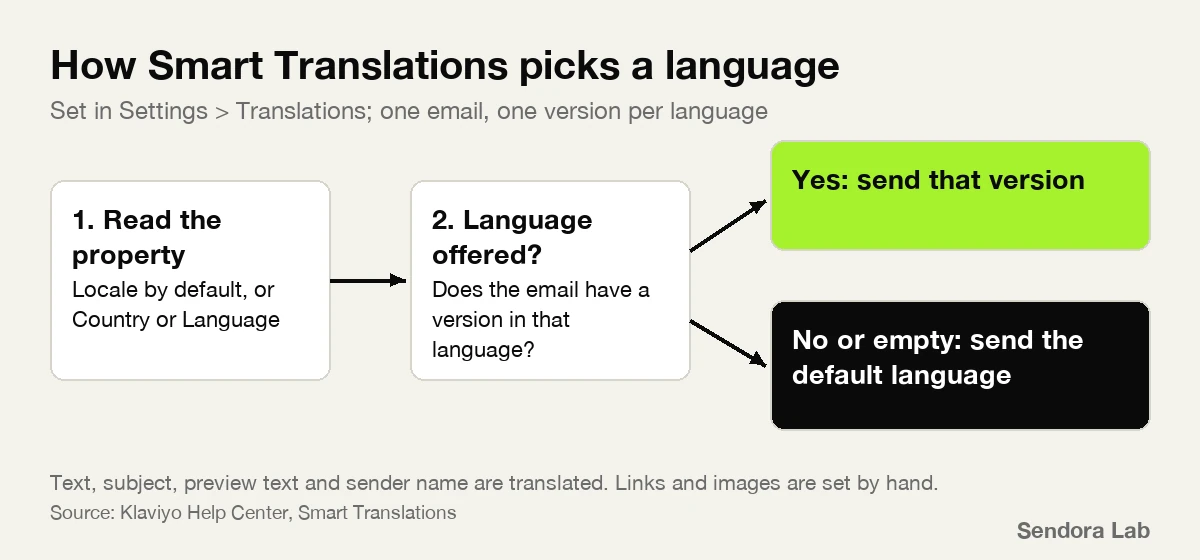
- Choose the property that decides each person’s preferred language. Locale is the default; Country or Language can be used if they hold values.
- Add your languages and set a default language for anyone whose language is unknown or not offered.
- In each email, finish the original first, then click Translate, pick the target languages and review every block.
Klaviyo translates text blocks, labels, alt text, subject lines, preview text and sender names. Links and images you change by hand per language, and product feed content isn’t translated. If you edit the original after translating, Klaviyo flags the blocks that are out of sync and asks you to re-translate, match the source, edit or ignore them. That is why we lock the original copy before translating.
Machine translation is a first draft. Have a native speaker read every flow email once and every campaign subject line, because those are the words that decide whether the email is opened. Keep a short list of words that must not be translated, such as product and collection names.
Multilingual flows: split once, not in every email
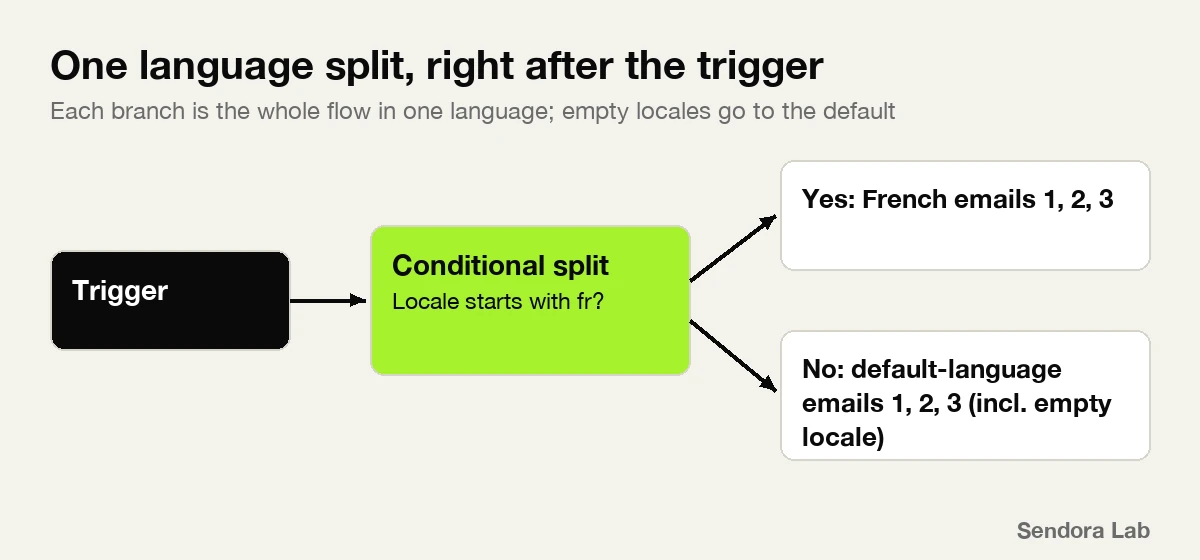
If you don’t use Smart Translations, branch each flow by language near the top, so each branch is a complete copy of the flow in one language. Splitting before every email makes flows hard to read and easy to break.
A conditional split is a step in a Klaviyo flow that sends people down a yes or no path based on a rule, such as “Locale starts with fr”. Put it right after the trigger and send the “no” path to your default language, so people with an empty locale still get an email. Our guides to the Klaviyo welcome series and the abandoned cart flow cover what goes inside each branch.
For campaigns, Smart Translations sends one campaign in several languages. Without it, build one campaign per language segment. A segment is a list that updates itself from rules, such as “Locale starts with de”. Our guide on how to create a Klaviyo campaign covers sending in each recipient’s local time zone, which matters once your list spans several countries.
What to localise beyond the words
Translation changes the words; localisation changes everything a reader in that market would notice is wrong. A German email in Switzerland can still fail on the currency.
- Regional variants. In the German-language store above, de-CH and de-AT profiles together outnumbered de-DE. Swiss German spelling, for example, does not use ß.
- Prices, currency and shipping. Match the checkout the reader will see, including delivery times and free-shipping thresholds.
- Discount codes and offers. A code must work in that market’s store, with the same terms the email promises.
- Legal footer and unsubscribe text. Translate them, along with the sender address details.
- Dates and holidays. Black Friday, Singles’ Day and national holidays differ by country, and so do date formats.
- Sending domain. If each market has its own domain, set up SPF, DKIM and DMARC for each one.
That German-language store sells in Germany, Switzerland and Austria. On 20 October 2026 its locales were de-DE (3,165 profiles), de-CH (2,024), de-AT (1,285) and plain de (405). Only 4 profiles had fr-FR and 2 had it-IT, even though Switzerland has French- and Italian-speaking regions.
Can one language serve two countries?
Often, yes. When two markets share a language, one set of emails can work well, as long as prices and offers fit both.
The Dutch-language store sends the same Dutch campaigns to the Netherlands and Belgium. From 1 October 2025 to 30 September 2026, 8.1% of its Belgian campaign recipients (2,020 of 24,881) clicked at least one campaign. For profiles labelled “Netherlands” the figure was 6.8% (2,928 of 42,773), and for “The Netherlands” 6.9% (1,187 of 17,173). Of the Belgian profiles with a region recorded, most were in Flanders, where Dutch is the main language: at least 9,651, against at least 1,773 in Wallonia and 3,795 in Brussels. For that audience, Dutch emails were no handicap.
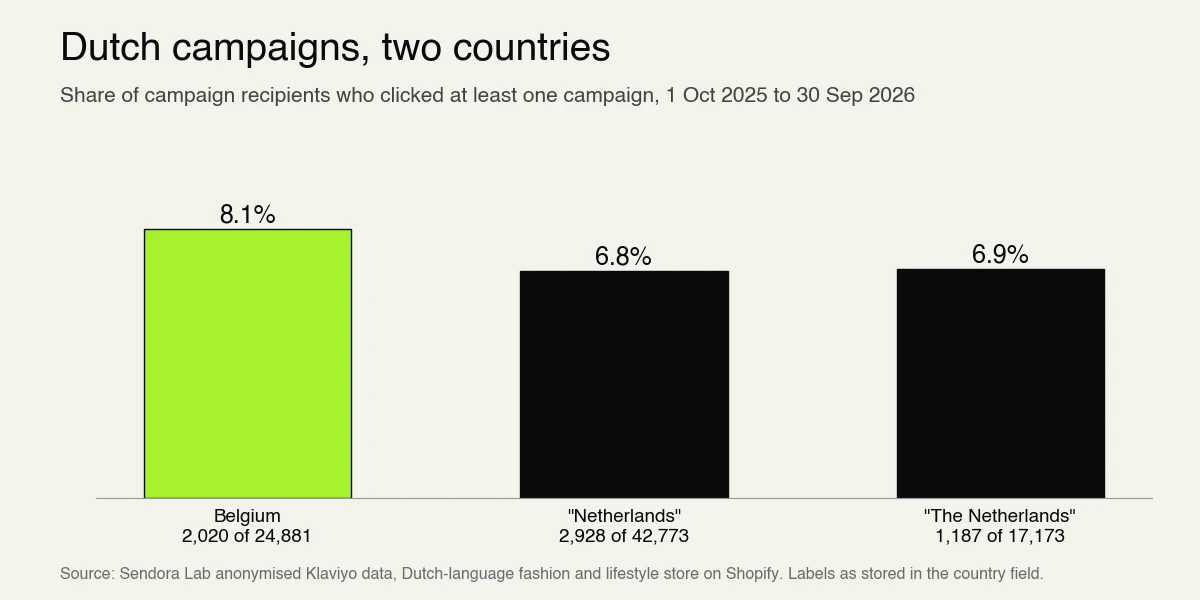
The lesson is to add a language when a real group of readers needs it, not because a country appears in your list. Count how many subscribers would get the new language first. A few dozen profiles rarely justify a full set of flows; a few thousand usually do.
Conclusion
Multilingual email marketing in Klaviyo starts with one reliable language property, then the simplest set-up that fits your markets: Smart Translations in one account when only the words change, separate emails when offers differ, and separate accounts when the stores themselves are separate. Fix the language data before you translate, and have a native speaker check what the machine writes. If you want help setting this up across your markets, see our Klaviyo email marketing service or book a free audit.
FAQ
Can Klaviyo send emails in different languages automatically?
Yes, with Smart Translations on a paid account. It translates email content into 60+ languages and sends each person the version that matches their language property, or your default language if it is unknown.
Does Klaviyo know which language a customer speaks?
Not by itself. Klaviyo says it does not detect language from the language a customer used on your website, so you need to collect it, for example with a sign-up form question, or sync it from your store.
Should I use one Klaviyo account or one per country?
Use one account when the products and offers are the same and only the language changes. Use separate accounts when each country has its own store, currency, sending domain or team.
What happens to subscribers with no language set?
With Smart Translations they receive the default language you choose. In a flow with a conditional split, send the “no” path to your main language so they still get an email.
Want this set up in your Klaviyo account?
A free 30-minute audit, your account open on screen.
Book a free audit