



Klaviyo integrations are the connections that send data from your store and other apps into Klaviyo, and from Klaviyo out to tools like Meta Ads. For a Shopify brand, the Shopify integration does most of the work. Add more only when a new app gives a flow or segment data it needs, and check that each one actually sends events.
Short answer: connect Shopify first, then add apps by job: reviews, loyalty, subscriptions, support or ads, each only when you will use its data in a flow, segment or audience. At Sendora Lab the bigger problem we find in audits is not missing integrations but overlapping ones, where two or three tools send the same event and nobody checks which one is working.
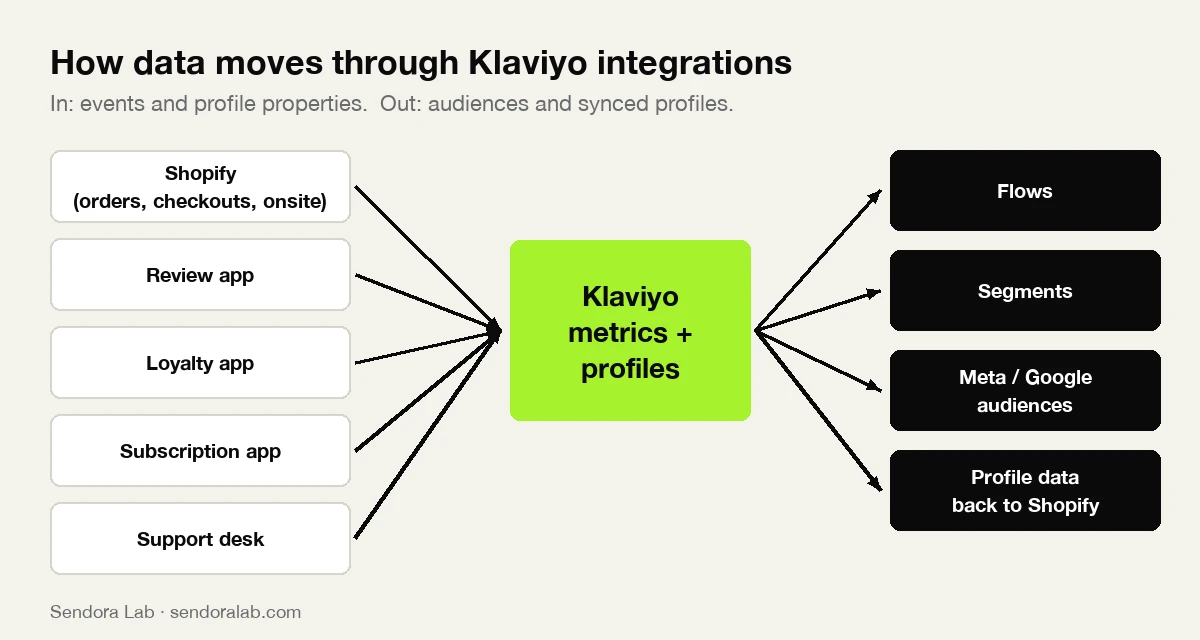
What a Klaviyo integration actually does
An integration either brings data into Klaviyo or sends Klaviyo data somewhere else. Most of the value comes from the first kind, because flows and segments can only use data that has arrived. That depth of store data is also the main difference in Klaviyo vs Mailchimp.
A few terms first. A metric (or event) is something a person did, recorded with a time stamp, such as Checkout Started or Placed Order. A profile property is a fact stored on the person, such as a loyalty tier. A flow is an automated series of messages that starts from a trigger, often a metric. A segment is a group of profiles that updates itself based on rules.
So an integration earns its place when it adds a metric that can start a flow, or a property you can segment on. If it adds neither, it is only adding noise to your metric list.
Native and third-party integrations
You add integrations from the Integrations tab in Klaviyo by clicking Explore apps. Klaviyo’s integrations FAQ says the marketplace holds all Klaviyo-built integrations plus some built by third parties. Other apps connect from their own side, usually with a Klaviyo API key, and their events arrive tagged as coming from that app or from the API.
One limit matters for brands with more than one store: Klaviyo supports only one integration of each type in a single account. Two Shopify stores means two Klaviyo accounts, or one store connected another way.
The Shopify integration comes first
The Shopify integration is the one you cannot skip. It brings in the orders, checkouts and onsite behaviour that every core flow runs on: abandoned checkout, browse abandonment, post-purchase and win-back.
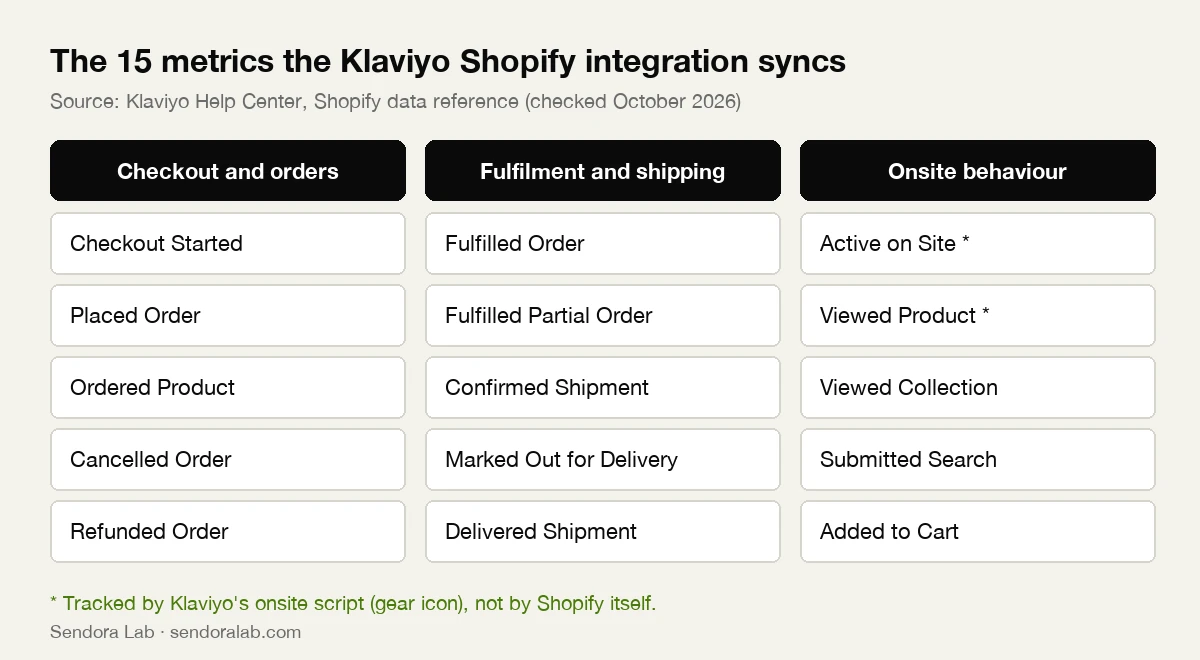
Klaviyo’s Shopify data reference lists 15 metrics. They fall into three groups:
- Checkout and orders: Checkout Started, Placed Order, Ordered Product, Cancelled Order, Refunded Order.
- Fulfilment and shipping: Fulfilled Order, Fulfilled Partial Order, Confirmed Shipment, Marked Out for Delivery, Delivered Shipment.
- Onsite behaviour: Active on Site, Viewed Product, Viewed Collection, Submitted Search, Added to Cart.
Active on Site and Viewed Product come from Klaviyo’s onsite script, not from Shopify itself, so they carry a gear icon instead of the Shopify logo. In the store we look at further down, both are listed as API metrics. That is normal, not a broken integration. If they stop arriving, our guide to Viewed Product not tracking covers the usual causes.
Three setup details that cause problems later
- Disconnect your old email platform first. Klaviyo’s Shopify setup guide says to disconnect the previous ESP from Shopify before connecting Klaviyo, or existing subscribers can receive double opt-in emails.
- Turn on the app embed. Onsite tracking needs the Klaviyo app embed switched on in your Shopify theme. Without it, browse and cart events go missing.
- Use Placed Order, not Ordered Product, for flow logic. Placed Order is tracked once per order and Ordered Product once per item. They arrive seconds apart, so Klaviyo recommends Placed Order to trigger and filter flows.
After you connect, Klaviyo syncs the last 90 days of Shopify data first, then the full history, which can take minutes or several days. Wait for the full sync before you judge segment sizes.
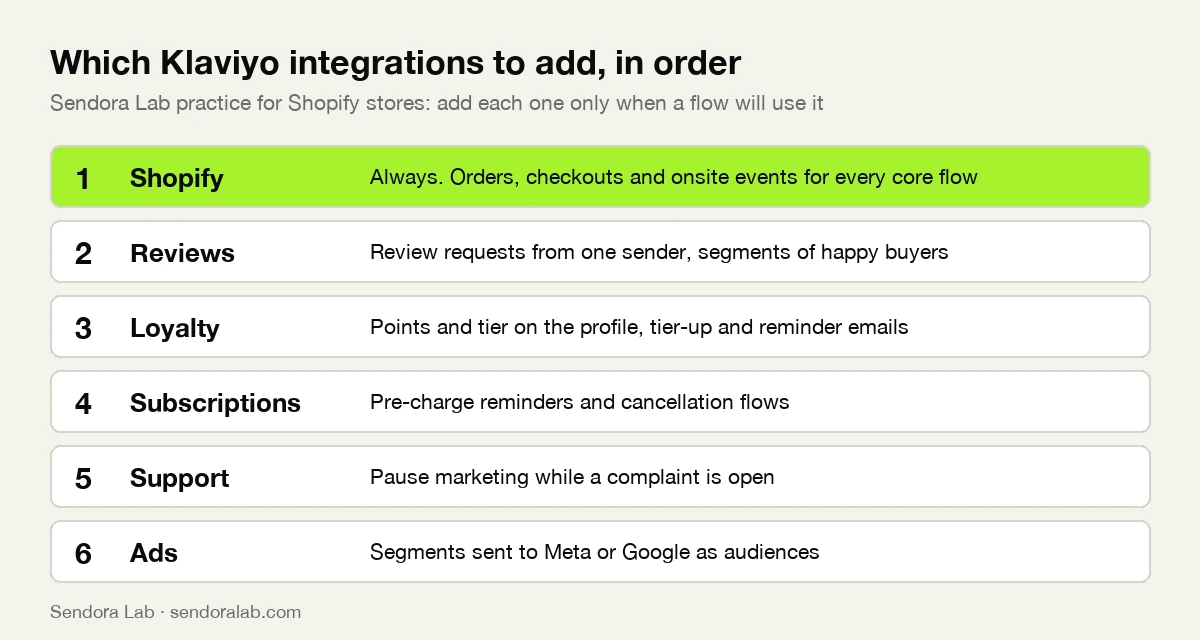
Best Klaviyo integrations for Shopify, by job
The best Klaviyo integrations for a Shopify store are the ones that fill a gap in a flow you already run. Pick by the job the data does, not by how many apps the marketplace lists.
| Job | What it adds to Klaviyo | What it lets you build | Add it when |
|---|---|---|---|
| Reviews | Review submitted events, ratings | Review requests, thank-you emails, segments of happy buyers | Your review app sends its own request emails and you want one sender |
| Loyalty | Points, tier, referral link on the profile | Points reminders, tier-up emails, VIP segments | You run a loyalty programme customers actually use |
| Subscriptions | Subscription created, cancelled, upcoming charge | Pre-charge reminders, cancellation save flows | Subscriptions are a real share of revenue |
| Support | Tickets and their status | Pausing marketing during an open complaint | Support volume is high enough to clash with campaigns |
| Ads | Lists and segments sent out as audiences | Retargeting, lookalikes, excluding buyers from ads | You spend on Meta or Google every month |
Two examples, checked on each tool’s own help pages in October 2026. Smile.io’s Klaviyo overview says it syncs points balance, VIP tier and referral URL to Klaviyo profiles and lets you build flows from loyalty events, on its paid plans. Klaviyo’s Meta Ads guide says lists and segments sync to Meta as custom audiences, that only emails linked to a Meta login are matched, and that Meta can take 24 to 48 hours to update the audience.
That last point is why an ad audience is often smaller than the segment behind it. It is a matching limit, not a sync error.
What to leave out
Skip an integration if nobody will build on its data in the next month. Every connected app adds metrics, and every metric is one more thing someone can pick by mistake when building a flow or segment.
What overlapping integrations look like in a real account
When two tools send the same event, Klaviyo keeps them as separate metrics with similar names. Each one can trigger its own flow, and their numbers rarely match.
In Sendora Lab’s anonymised Klaviyo data from a Dutch-language fashion and lifestyle store on Shopify (October 2025 to September 2026), three sources sent checkout data: the Shopify integration, the pixel of an analytics app, and a checkout-recovery tool connected through the API. Here is what the monthly count of unique profiles showed.
- The native event nearly stopped. Shopify’s Checkout Started reached 10,999 profiles in November 2025, then fell to 86 in January, 48 in February, 77 in March and 45 in April 2026, before coming back in May and June.
- Another source kept running. In the same months the analytics pixel recorded between 408 and 2,536 profiles a month starting checkout, and the checkout-recovery tool recorded 7,920 in February alone.
- A tool left behind. The checkout-recovery tool’s events ran from January to May 2026 and have been almost silent since. Its two flows are still drafts.
- A dead metric. One Added to Cart metric, sent through the API, recorded zero events in the whole 12 months, next to a Shopify one and a pixel one that were active every month.
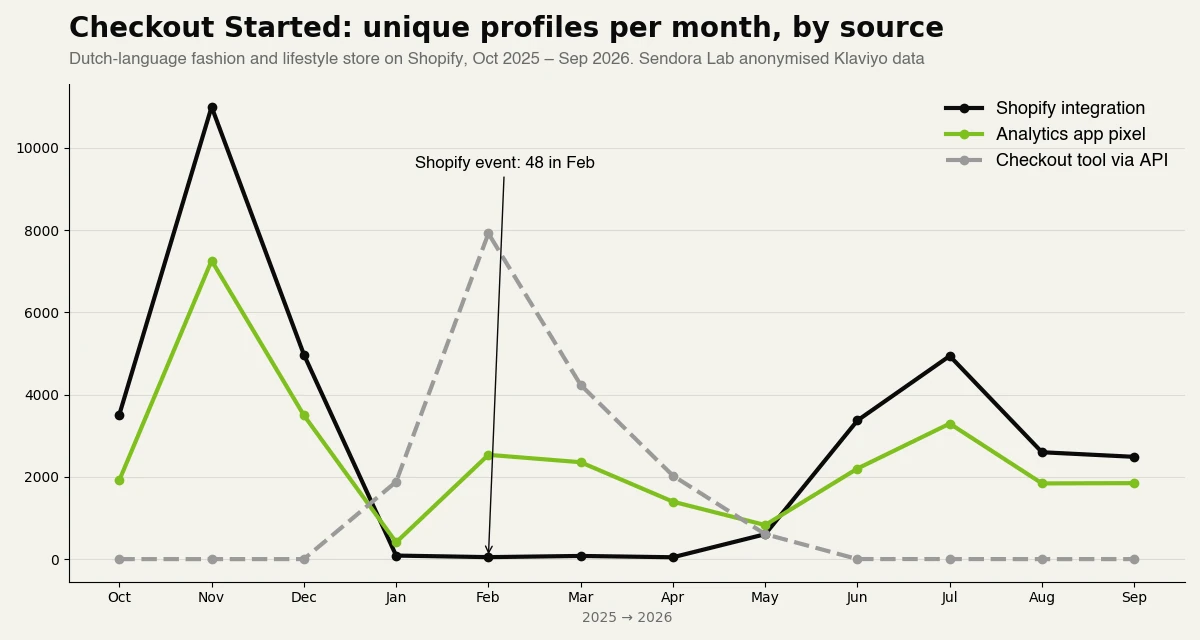
The sources also disagree when all of them work. In November 2025 the pixel recorded 7,123 profiles adding to cart and Shopify’s Added to Cart recorded 3,943. Different tools identify different visitors, so neither count is the whole truth.
A flow on the native event would have reached almost nobody for four months. This store had live abandoned checkout flows on both Shopify’s event and the pixel’s event, which covered the gap, but it also means one shopper can qualify for two flows. That only works with profile filters that check purchases and checkouts from every source, joined the right way. Our guide to Klaviyo trigger filters vs flow filters shows how.
How to audit your Klaviyo integrations
A Klaviyo integration audit takes about 20 minutes: list every source, check each one is sending, and make sure each flow knows which source it trusts.
- Open the Integrations tab. Note every connected app and its status. Anything you no longer use is a candidate to disconnect.
- List metrics by source. Klaviyo tags every metric with the integration that created it. Look for the same action under two or three names, such as Added to Cart from Shopify, the API and a pixel.
- Check volume for the last 12 months. Chart each key metric by month. A metric at zero, or one that suddenly drops, needs an answer before you trust any flow on it.
- Map flows to metrics. For each live flow, write down the metric that triggers it. Two live flows on two versions of the same event need shared exclusions.
- Clean up drafts and old apps. Archive draft flows built on tools you have stopped using, so nobody switches them on by mistake.
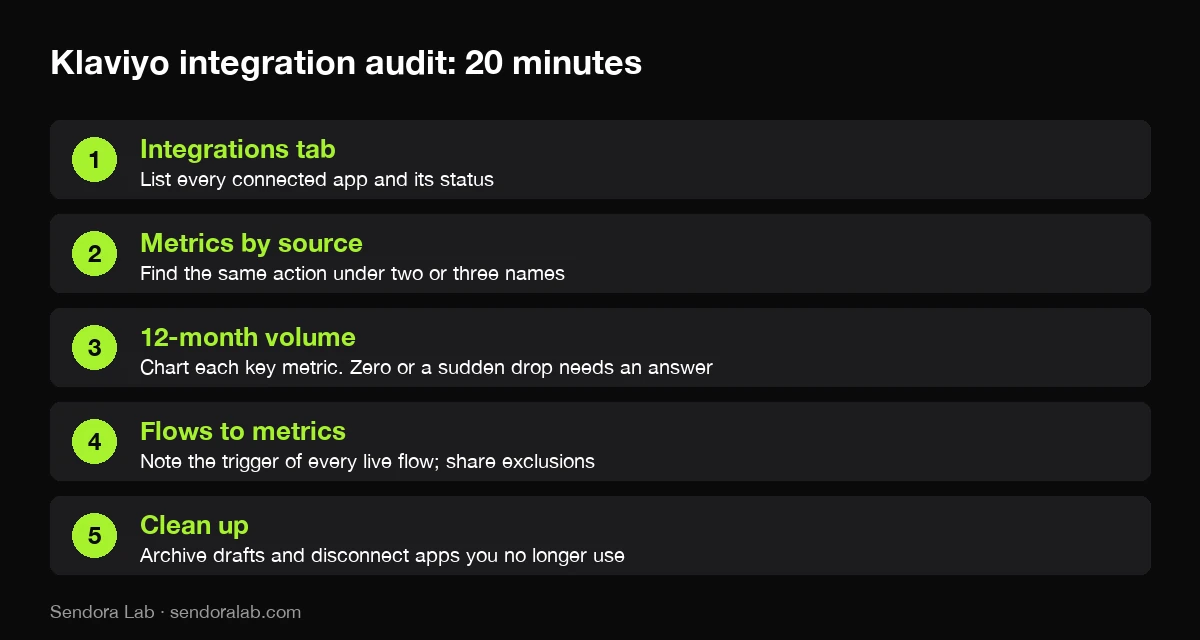
Run this after any new app install and once a quarter. It fits into the wider Klaviyo audit checklist, and it is the first thing to check when an abandoned cart flow suddenly sends less.
Conclusion
Klaviyo integrations are worth exactly as much as the flows and segments that use their data. Connect Shopify properly, add reviews, loyalty, subscriptions, support or ads only when you have a use for them, and check every few months that each source still sends what you think it sends. If you want us to map and clean up the integrations in your account, see our Klaviyo email marketing services or book a free audit. Still choosing a platform? Compare email marketing tools for Shopify. Still setting up the connection itself? Our Klaviyo Shopify integration guide walks through it. For a review app walkthrough, see our Okendo Klaviyo integration guide. Running subscriptions on Recharge? Our Recharge Klaviyo integration guide covers setup and the flows to build. For actions no integration sends, use the Klaviyo custom events API. Running a loyalty program on Smile? See our Smile.io Klaviyo integration guide. If an app asks you to paste a key, read our Klaviyo private API key guide first.
FAQ
Which Klaviyo integration should a Shopify store set up first?
The Shopify integration. It brings in the checkout, order, fulfilment and onsite events that abandoned checkout, browse, post-purchase and win-back flows run on.
Why does Viewed Product show as an API metric instead of Shopify?
Viewed Product and Active on Site come from Klaviyo’s onsite script, not from Shopify’s own data, so Klaviyo marks them with a gear icon rather than the Shopify logo. This is expected.
Can I connect two Shopify stores to one Klaviyo account?
No. Klaviyo supports one integration of each type per account, so a second Shopify store needs its own account or another connection method.
Why is my Meta custom audience smaller than my Klaviyo segment?
Only email addresses linked to a Meta login are matched, and Meta can take 24 to 48 hours to update the audience.
What happens if two apps send the same event to Klaviyo?
Klaviyo keeps them as separate metrics. Each can trigger its own flow and their counts will differ, so pick one source per flow and exclude buyers from every source.
Want this set up in your Klaviyo account?
A free 30-minute audit, your account open on screen.
Book a free audit