



To create a Klaviyo campaign, open the Campaigns tab, click Create, choose Email, pick the segments to include and exclude, build the email from a template, then test, schedule and send. The clicks take ten minutes. The choices inside them, mainly who gets the email and how you judge it afterwards, decide whether the campaign earns anything.
Short answer: a campaign is a one-off email you send to a list or segment on a date you choose. Send it to people who engaged recently, keep one goal and one button per email, only A/B test when each variation reaches thousands of people, and judge the result on orders and revenue per recipient. At Sendora Lab we set up every client campaign this way, and the real numbers below show why each step matters.
Before you open Klaviyo: one goal, one audience
Write down what the campaign is for before you build anything, ideally as a slot on your email campaign calendar. A launch, a restock, a sale ending or a story about how a product is made are all fine, but each needs its own email.
In Klaviyo, a campaign is a one-time send to a list or segment, while a flow is an automated series that sends when someone does something, such as joining your list or leaving a cart. A segment is a group of profiles that Klaviyo keeps up to date from rules you set, for example “clicked an email in the last 30 days”. If you want to understand what happens after you press send, from the inbox to the order, read our guide on how email campaigns work and where flows fit.
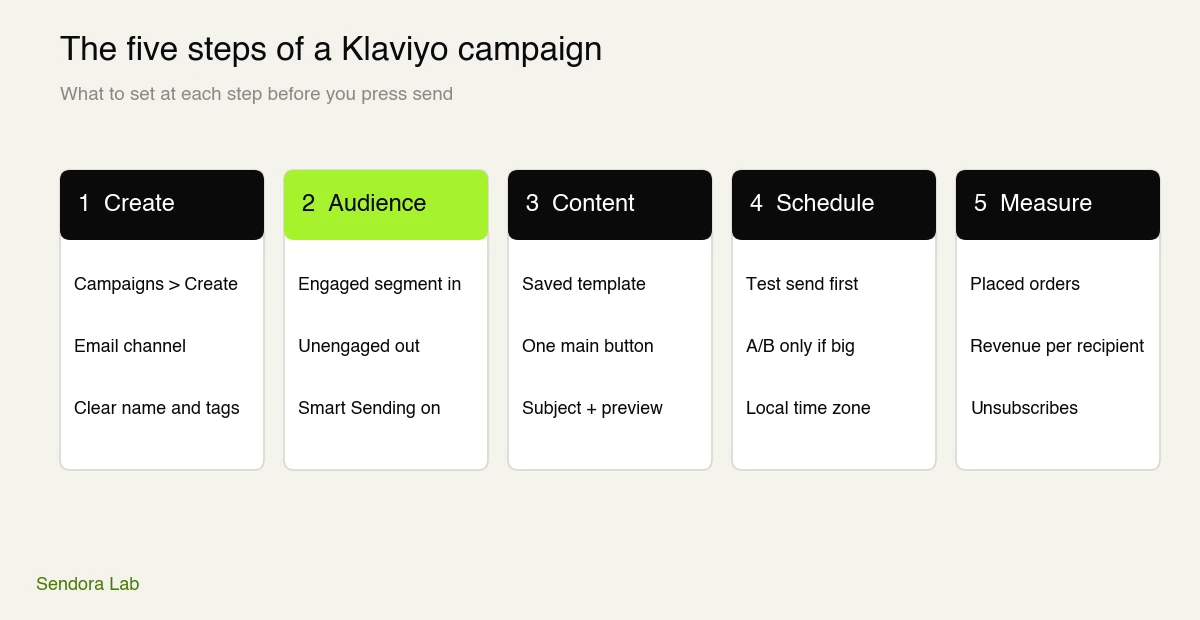
Step 1: How to create a Klaviyo campaign and name it
Go to Campaigns, click Create and choose Email. Klaviyo’s guide to creating an email campaign also offers a Library option with pre-built drafts, which is handy for a first send but rarely matches your brand.
Klaviyo fills the name with the date. Replace it with something you can search for in six months, such as 2026-10 | New arrivals | Engaged 30d, and add tags for the campaign type. Clean names make reporting much faster when you compare campaigns later.
Step 2: Choose who gets it, and who does not
Send to a segment of people who engaged recently, not to everyone on the list. You can include up to 15 lists or segments, exclude others under “Don’t send to”, and Klaviyo shows an estimated recipient count with duplicates, exclusions and suppressed profiles already removed.
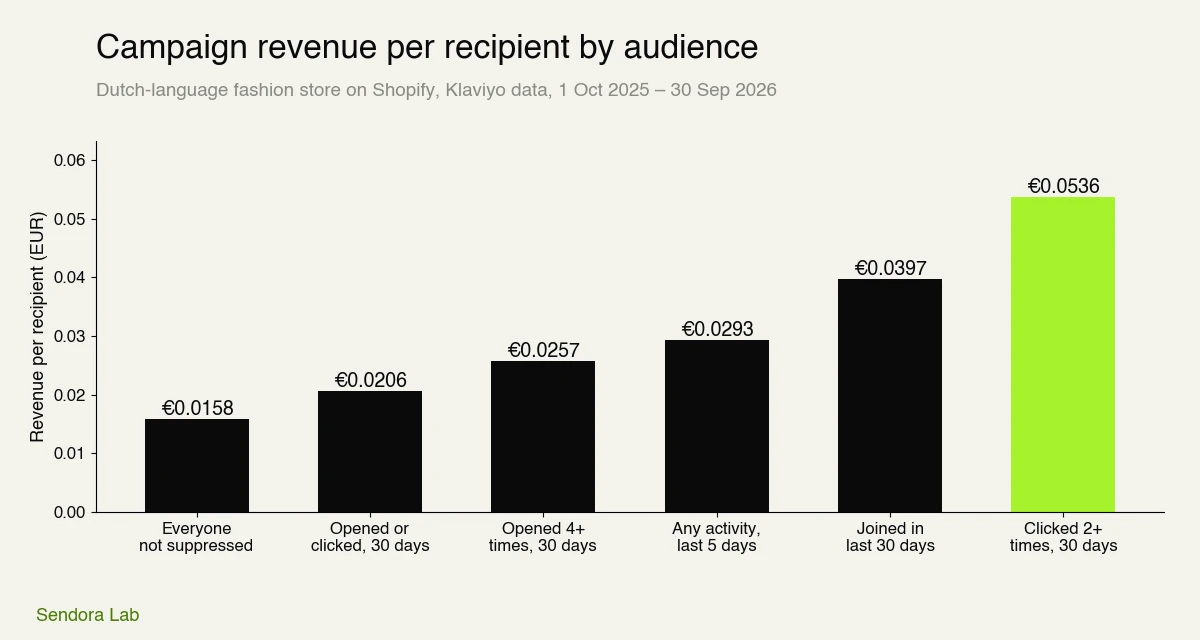
Here is why the audience matters. In Sendora Lab’s anonymised Klaviyo data from a Dutch-language fashion and lifestyle store on Shopify (1 October 2025 to 30 September 2026), the same year of campaigns earned very different amounts per recipient depending on which segment received them. These are six of the twelve audiences the store used:
| Audience (segment rule) | Recipients | Click rate | Orders | Revenue per recipient | Unsubscribe rate |
|---|---|---|---|---|---|
| Everyone not suppressed | 501,325 | 0.79% | 106 | €0.0158 | 1.15% |
| Opened or clicked in the last 30 days | 213,131 | 0.68% | 75 | €0.0206 | 1.31% |
| Opened 4+ times in the last 30 days | 89,218 | 0.87% | 33 | €0.0257 | 1.44% |
| Opened, clicked or was active on the site in the last 5 days | 175,290 | 1.06% | 80 | €0.0293 | 1.47% |
| Joined in the last 30 days | 25,628 | 1.32% | 12 | €0.0397 | 2.67% |
| Clicked 2+ times in the last 30 days | 6,460 | 4.09% | 6 | €0.0536 | 3.52% |
Revenue per recipient is the revenue Klaviyo attributes to a send divided by the number of people who received it. People who clicked twice in the last month earned more than three times as much per recipient as the whole list. Two warnings: the smallest segments recorded only 6 and 12 orders, so treat their figures as a direction rather than a rule, and they also had the highest unsubscribe rates, so the most active people should not get every send. We cover how to build these audiences in our guide to creating an engaged segment in Klaviyo.
Smart Sending and UTM tracking
Two settings sit on this screen. Smart Sending skips anyone who received an email from you very recently; leave it on for promotional sends unless the email is time-critical, and read when to keep Smart Sending on or off for the edge cases. UTM tracking adds tags to your links so Google Analytics and Shopify can see which campaign sent the visit; switch it on in the Tracking tab.
Step 3: Build the content
Start from a saved template, not a blank email. Klaviyo lets you use saved templates, the drag-and-drop library, a Text Only editor for emails that should look personal, or an HTML editor for custom code.
- One goal, one main button. Secondary links are fine if they serve the same goal.
- Put the offer and the button in the first screen on a phone. Most people decide before they scroll.
- Write the subject line last. Once the email exists, say plainly what is inside it. Use the preview text for the detail the subject line could not fit.
- Check the sender name and reply-to address. A sender name people recognise does more work than a clever subject line.
Then send a test to yourself and open it on a phone and a desktop. Check every link, the images with images turned off, and any personalisation such as a first name, so nobody receives an empty greeting.
Step 4: A/B test only when the audience is large
An A/B test sends two versions to small samples and the winner to everyone else. Klaviyo’s A/B testing guide recommends open rate as the winning metric for subject line, preview text and sender tests, click rate for content tests, and placed order rate for content aimed at sales. It also warns that when a large share of your opens come from Apple Mail, open rate needs a bigger sample to mean anything.
The same store ran seven A/B tests between March and September 2026, with 2,176 to 8,853 recipients per variation. No variation recorded more than four orders. In four of the seven tests, the version with the higher open rate recorded fewer orders; in two it recorded more; in one, neither version recorded an order.
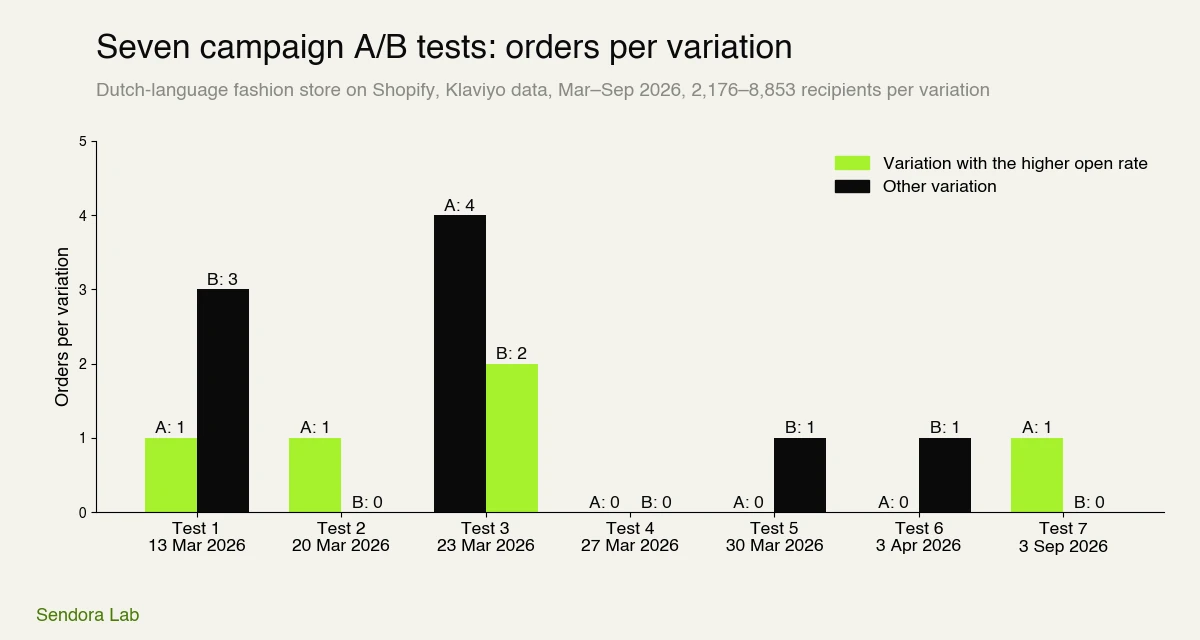
The lesson is not that testing is useless. It is that a few thousand people per version is too few to pick a winner on orders, and opens are a weak stand-in. Test one thing at a time, choose click rate for content tests, and save order-based tests for your biggest sends.
Step 5: Schedule the send
On the review screen, fix any warnings Klaviyo flags, then choose Schedule or send. Klaviyo queues scheduled campaigns and sends them within a few minutes of the time you set, and a campaign with no recipients is cancelled automatically.
You have three timing options worth knowing:
- A fixed time in your own time zone. Simple and predictable.
- The recipient’s local time zone, so a 9:00 send arrives at 9:00 wherever each person lives. Useful when your list spans several countries. If they also read different languages, see multilingual email marketing in Klaviyo.
- Smart Send Time, which tests send times across a 24-hour window and then finds the hour your audience engages most. Klaviyo’s Smart Send Time guide says it needs at least 12,000 recipients, and smaller lists cannot run the test.
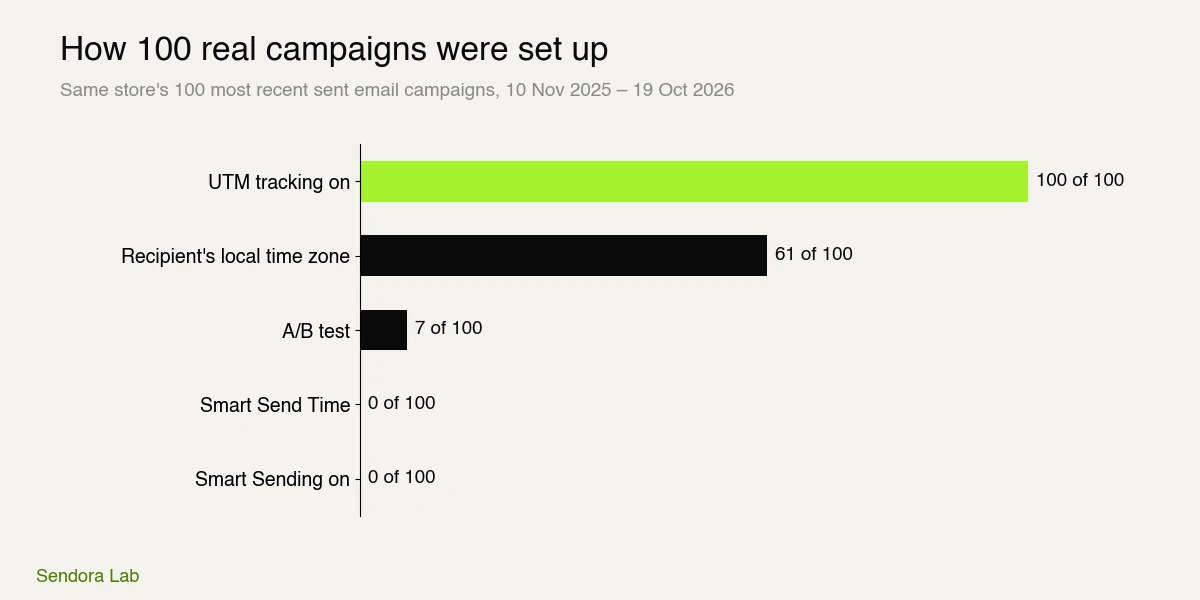
Real accounts rarely use every option. Of the same store’s 100 most recent sent email campaigns (10 November 2025 to 19 October 2026), all 100 had UTM tracking on, 61 were sent in each recipient’s local time zone, 7 were A/B tests, none used Smart Send Time and none had Smart Sending switched on.
After you send: read the right numbers
Judge a campaign on placed orders, revenue per recipient and unsubscribes, not on opens, as our guide to email campaign metrics explains. Apple Mail Privacy Protection loads images automatically, which inflates open rates, so a high open rate can sit next to almost no sales.
Wait for the attribution window to close before you compare campaigns. Klaviyo’s conversion tracking guide explains that it credits an order to the email most recently opened or clicked, and that the default window for accounts created since October 2024 is five days. Compare each campaign with others sent to the same segment, and watch the unsubscribe rate as closely as revenue. Our guide to revenue per recipient explains how to use that number across campaigns and flows, and how often to send email covers the other half of the decision.
Conclusion
Knowing how to create a Klaviyo campaign is mostly knowing what to decide: who it goes to, what single thing it asks for, whether a test can really tell you anything, and which numbers prove it worked. Get the audience right first, because in our data it moved revenue per recipient more than any other setting. If you want your campaigns planned, built and measured for you, Sendora Lab runs Klaviyo email marketing for Shopify brands, or you can book a free audit of your account.
FAQ
How do I create a campaign in Klaviyo?
Go to Campaigns, click Create, choose Email, name it, choose the lists or segments to include and exclude, build the content, add the subject line, then review and choose Schedule or send.
Should I send Klaviyo campaigns to my whole list?
Usually not. In our data from a Dutch-language fashion store, sends to everyone earned €0.0158 per recipient, while people who opened, clicked or were active on the site in the last five days earned €0.0293.
How many people do I need for a Klaviyo A/B test?
Klaviyo recommends a test size based on your list size. In our data, 2,176 to 8,853 recipients per variation produced no more than four orders per version, which is too few to pick a winner on sales.
What is the minimum list size for Smart Send Time?
Klaviyo needs at least 12,000 recipients to run a Smart Send Time test. Once it has found an optimal time, you can apply it to smaller campaigns.
What is the difference between a Klaviyo campaign and a flow?
A campaign is a one-time send to a list or segment on a date you pick. A flow sends automatically when someone takes an action, such as joining your list or abandoning a cart.
Want this set up in your Klaviyo account?
A free 30-minute audit, your account open on screen.
Book a free audit